
Mind map
Data Representation
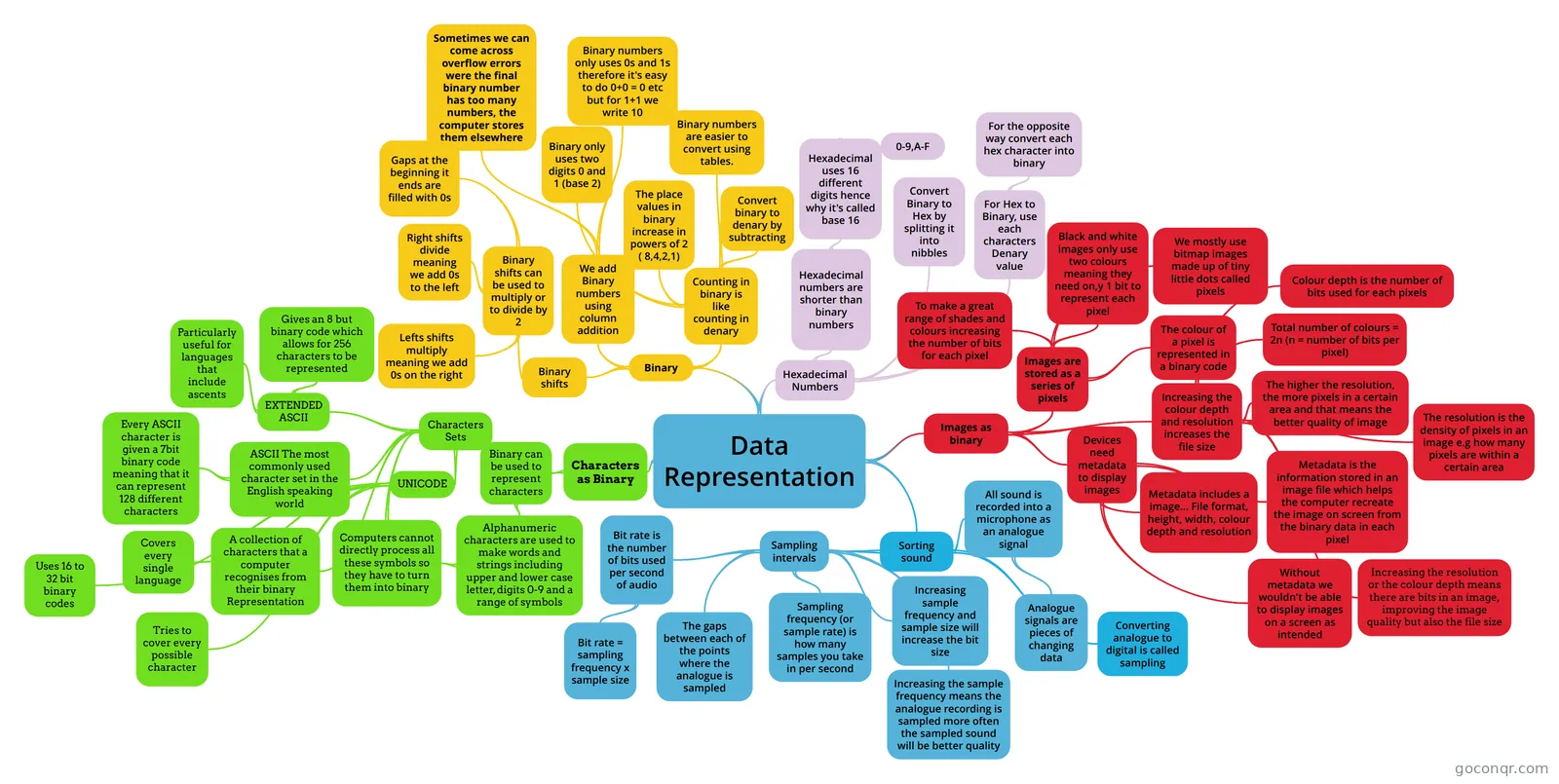
Mind map: Data representation
Map content
Data Representation
- Data Representation
Images as binary
- Images are stored as a series of pixels
- We mostly use bitmap images made up of tiny little dots called pixels
- The colour of a pixel is represented in a binary code
- Black and white images only use two colours meaning they need on,y 1 bit to represent each pixel
- To make a great range of shades and colours increasing the number of bits for each pixel
- Increasing the colour depth and resolution increases the file size
- Colour depth is the number of bits used for each pixels
- Total number of colours = 2n (n = number of bits per pixel)
- The resolution is the density of pixels in an image e.g how many pixels are within a certain area
- The higher the resolution, the more pixels in a certain area and that means the better quality of image
- Increasing the resolution or the colour depth means there are bits in an image, improving the image quality but also the file size
- Devices need metadata to display images
- Metadata is the information stored in an image file which helps the computer recreate the image on screen from the binary data in each pixel
- Metadata includes a image... File format, height, width, colour depth and resolution
- Without metadata we wouldn't be able to display images on a screen as intended
- Images are stored as a series of pixels
Sorting sound
- Converting analogue to digital is called sampling
- All sound is recorded into a microphone as an analogue signal
- Analogue signals are pieces of changing data
- Sampling intervals
- The gaps between each of the points where the analogue is sampled
- Sampling frequency (or sample rate) is how many samples you take in per second
- Bit rate is the number of bits used per second of audio
- Bit rate = sampling frequency x sample size
- Increasing the sample frequency means the analogue recording is sampled more often the sampled sound will be better quality
- Increasing sample frequency and sample size will increase the bit size
Characters as Binary
- Binary can be used to represent characters
- Alphanumeric characters are used to make words and strings including upper and lower case letter, digits 0-9 and a range of symbols
- Computers cannot directly process all these symbols so they have to turn them into binary
- Characters Sets
- A collection of characters that a computer recognises from their binary Representation
- ASCII The most commonly used character set in the English speaking world
- Every ASCII character is given a 7bit binary code meaning that it can represent 128 different characters
- EXTENDED ASCII
- Gives an 8 but binary code which allows for 256 characters to be represented
- Particularly useful for languages that include ascents
- UNICODE
- Tries to cover every possible character
- Uses 16 to 32 bit binary codes
- Covers every single language
- Characters Sets
- Computers cannot directly process all these symbols so they have to turn them into binary
- Alphanumeric characters are used to make words and strings including upper and lower case letter, digits 0-9 and a range of symbols
- Binary can be used to represent characters
Binary
- Counting in binary is like counting in denary
- Binary only uses two digits 0 and 1 (base 2)
- The place values in binary increase in powers of 2 ( 8,4,2,1)
- Binary numbers are easier to convert using tables.
- Convert binary to denary by subtracting
- We add Binary numbers using column addition
- Binary numbers only uses 0s and 1s therefore it's easy to do 0+0 = 0 etc but for 1+1 we write 10
- Sometimes we can come across overflow errors were the final binary number has too many numbers, the computer stores them elsewhere
- Binary shifts
- Binary shifts can be used to multiply or to divide by 2
- Gaps at the beginning it ends are filled with 0s
- Lefts shifts multiply meaning we add 0s on the right
- Right shifts divide meaning we add 0s to the left
- Binary shifts can be used to multiply or to divide by 2
- Counting in binary is like counting in denary
Hexadecimal Numbers
- Hexadecimal numbers are shorter than binary numbers
- Hexadecimal uses 16 different digits hence why it's called base 16
- 0-9,A-F
- Hexadecimal uses 16 different digits hence why it's called base 16
- Convert Binary to Hex by splitting it into nibbles
- For Hex to Binary, use each characters Denary value
- For the opposite way convert each hex character into binary
- Hexadecimal numbers are shorter than binary numbers
Information
- Description
- Mind Map on Untitled, created by Elliott Powell on 13/12/2016.
- Created by
- Bailey Hughes
- Views
- 2
- History
-
- Created by Elliott Powell · Dec 13, 2016
- Copied by Bailey Hughes · Dec 9, 2019
- Rating