
Mind map
Memory and data storage
Map content
Memory and data storage
Many file formats used to store data, be it either text, images or sound. File formats include MIDI (Musical Instrument Digital Interface), MP3, MP4, jpeg, and text and number file formats
- MIDI: Not music, don't contain any sounds. It's a communications protocol that allows electronic musical instruments to interact with each other
- MP3 - Uses audio compression to convert music and other sounds into an MP3 file format. Used in MP3 players, computers or mobile phones. Lossy format
- MP4 - Allows storage of multimedia files, rather than just sound. Music, videos, photos and animation can be stored.
- jpeg - Reduces picture resolution, to reduce file size. Lossy file compression.
- Text and number file formats
- Text stored in ASCII format, numbers can be stored in real, integer, date, time or currency format. Lossless compression generally - important no information/data is lost
Lossy compression: Unnecessary bits of data removed, impossible to get original file back when compressed, reduction in quality
- Lossless compression: all data bits from original file reconstructed when uncompressed. Compresses by recording data, and how many times it's repeated
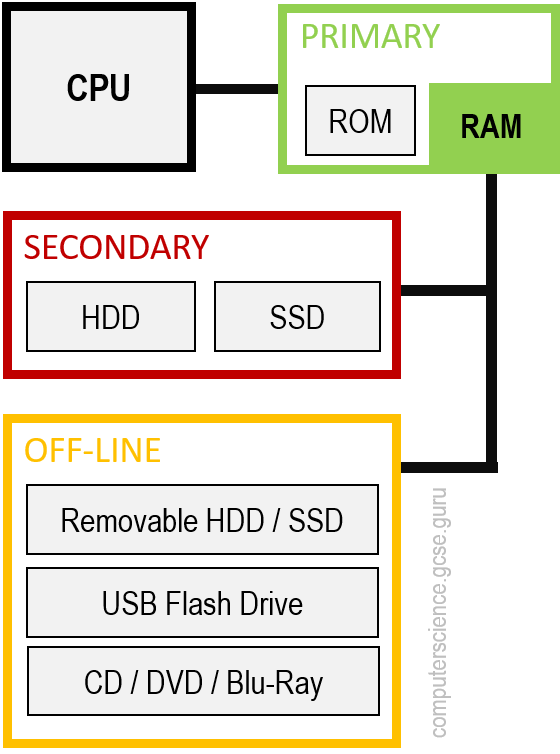
Primary memory (CPU has direct access to memory storage)
- RAM (Random Access Memory)
- Volatile - contents of memory lost when RAM is turned off
- Stores data, files or part of OS currently in use
- Can be written to or read from and the contents of the memory can be changed
- Larger the size of RAM, the faster the computer will operate. Never runs out of memory - continues to operate, but just gets slower and slower
- As RAM becomes full, processor has to continually access the hard disk drive to overwrite old data on RAM with new data. By increasing RAM size, number of times this access operate is carried out is reduced, making computer run faster.
- Much faster to write to or read from than other types of memory
- Buffers use RAM - data only needs to be stored temporarily
- ROM (Read Only Memory)
- Non-volatile - contents of memory remains even when switched off
- Often used to store start-up instructions when computer is first switched on
- Data or contents of a ROM chip can only be read; cannot be changed
- RAM (Random Access Memory)
Secondary storage (Any internal or external device to computer that CPU can't directly access, although user can)
- Hard Disk Drive (HDD)
- Data stored in a digital format on the magnetic surfaces of the disks (platters)
- Has a number of platters that can spin about 7000 times a second. A number of read-write heads can access all of the surfaces in the disk-drive
- Each platter typically has two surfaces which can be used to store data. The read-write heads can move quickly - can move from centre of disk to edge of disk and back 50 times a second.
- Data is stored on surface in sectors and tracks - a sector on a given track will contain a fixed number of bytes
- Each platter typically has two surfaces which can be used to store data. The read-write heads can move quickly - can move from centre of disk to edge of disk and back 50 times a second.
- Has a number of platters that can spin about 7000 times a second. A number of read-write heads can access all of the surfaces in the disk-drive
- Very slow data access compared to, for example, RAM. Many applications require the read-write heads to constantly seek for correct blocks of data, meaning a large number of head movements, which is when latency becomes very significant.
- Latency: time it takes for a specific block of data on a at a track to rotate around to the read-write head
- Data stored in a digital format on the magnetic surfaces of the disks (platters)
- Solid-state Drives (SSD)
- Latency not really an issue
- No moving parts and all data is retrieved at same rate. Don't rely on magnetic properties - most common type of SSD stores data by controlling the movement of electrons within NAND chips. The data is stored as 0s and 1s in millions of tiny transistors within the chip, effectively producing a non-volatile rewritable memory
- A number of SSDs sometimes use EEPROM (Electronically Erasable Programmable Read-Only Memory) technology. Main difference is use of NOR chips instead of NAND chips, making them faster but more expensive than NAND technology. EEPROM also allows data to be read or erased in single bytes at a time, use of NAND only allows blocks of data to be erased or read. Because of cost implications, most SSDs use NAND technology
- No moving parts and all data is retrieved at same rate. Don't rely on magnetic properties - most common type of SSD stores data by controlling the movement of electrons within NAND chips. The data is stored as 0s and 1s in millions of tiny transistors within the chip, effectively producing a non-volatile rewritable memory
- Advantages over HDD
- More reliable, considerably higher, don't have to 'get up to speed' before working properly, have a lower power consumption, run much cooler than HDDs, no moving parts so very thin and data access is considerably faster
- Latency not really an issue
- Hard Disk Drive (HDD)
Off-line storage (any storage device not permanently connected to computer)
- CD (Compact Disc)/DVD (Digital Versatile Disc) disks
- Optical storage devices - laser light is used to read data and to write data in surface of disk. Both CDs and DVDs use a thin layer of metal alloy or light-sensitive organic dye to store data. Both systems use a single, spiral track which runs from centre of disc to edge
- Data is stored in 'pits' and 'bumps' on spiral track. A red laser used to read and write data. CDs and DVDs can be designated R (write once only) or RW (can be written to or read from many times).
- DVD technology is slightly different to CDs - has dual layering, which considerably increases storage capacity (has two individual recording layers). Two layers of a standard DVD are joined together with a transparent (polycarbonate) spacer, and a very thin reflector is also sandwiched between the layers. Reading and writing of the second layer is done by a red laser focusing at a fraction of a millimetre difference compared to first layer.
- Single layer DVDs still have a larger storage capacity than CDs, because the 'pit' size and track width are smaller, so more data can be stored on DVD surface. DVDs use lasers with a wavelength of 650 nanometers, CDs use lasers with wavelengths of 780 nanometers. The shorter the wavelength, the greater the storage capacity of the medium
- DVD technology is slightly different to CDs - has dual layering, which considerably increases storage capacity (has two individual recording layers). Two layers of a standard DVD are joined together with a transparent (polycarbonate) spacer, and a very thin reflector is also sandwiched between the layers. Reading and writing of the second layer is done by a red laser focusing at a fraction of a millimetre difference compared to first layer.
- Data is stored in 'pits' and 'bumps' on spiral track. A red laser used to read and write data. CDs and DVDs can be designated R (write once only) or RW (can be written to or read from many times).
- DVD-RAM
- Instead of a single spiral track, uses a number of concentric tracks, which allows simultaneous read and write operations to take place. Upton 100,000 read and write operations can occur, and have longevity over 30 years
- Optical storage devices - laser light is used to read data and to write data in surface of disk. Both CDs and DVDs use a thin layer of metal alloy or light-sensitive organic dye to store data. Both systems use a single, spiral track which runs from centre of disc to edge
- Blu-ray disks
- Optical storage media. Use a blue laser instead of a red laser to carry out read and write operations. Wavelength of blue laser is 405 nanometers. Using blue laser light means that the 'pits' and 'bumps' can be much smaller, so Blu-ray can store up to five times more data than DVDs. Blu-ray also uses a single 1.1mm thick polycarbonate disc, instead of two 0.6mm thick disks in DVDs. Blu-ray only has one layer, so disks don't suffer from birefringence (two sandwiched layers can cause this - light refracted into two separate beams causing radome errors). They also automatically come with a secure encryption system, helping to prevent piracy and copyright infringement
- Optical media is used as back-up systems (for photos, music and multimedia files). CDs and DVDs can also be used to transfer files between computers. Most common use of DVD and Blu-ray is movies or games, although memory capacity of CDs isn't enough to store most films
- USB flash memories
- Use solid state technology. Usually connect to a computer via a USB port. Very small, lightweight devices that make them suitable for transferring files between computers. Can also be used as small back-up devices for music or photo files. Complex or expensive software, such as an Expert System, often uses memory sticks as a dongle. The dongle contains additional files needed to run the software, and without this dongle, the software can't work properly. It therefore prevents illegal/unauthorised use of the software, and also prevents copying of the software. Digital cameras use XD (eXtreme Digital) or SD (Secure Digital) cards. The technology is the same as memory sticks. Many printers and computers also have card slots, allowing the device to read the memory card directly.
- Each memory card is made up of NAND chips, and as with all solid state memories, no moving parts. If the memory card/stick is removed from the device before being made safe, data on it could be corrupted
- Use solid state technology. Usually connect to a computer via a USB port. Very small, lightweight devices that make them suitable for transferring files between computers. Can also be used as small back-up devices for music or photo files. Complex or expensive software, such as an Expert System, often uses memory sticks as a dongle. The dongle contains additional files needed to run the software, and without this dongle, the software can't work properly. It therefore prevents illegal/unauthorised use of the software, and also prevents copying of the software. Digital cameras use XD (eXtreme Digital) or SD (Secure Digital) cards. The technology is the same as memory sticks. Many printers and computers also have card slots, allowing the device to read the memory card directly.
- Removable HDDs
- Essentially HDD, but can be connected to computer using a USB port, so can be used as a back-up device or as a way of transferring files
- CD (Compact Disc)/DVD (Digital Versatile Disc) disks
Estimating size of a file
- Text file: count number of characters - each character has a value of about 1 byte
- Image file: Multiply image resolution by bit depth (depends on number of colours in image )
- Image resolution - width x height of image. Number of pixels (picture elements) in an image.
- Audio file: multiply bit rate by duration
- Each pixel is 8 bits/1 byte
- Bit depth= pixel size x number of colours, e.g typical RGB image has a bit depth of 24 (8 x 3)
- Image resolution - width x height of image. Number of pixels (picture elements) in an image.
- Image file: Multiply image resolution by bit depth (depends on number of colours in image )
- Text file: count number of characters - each character has a value of about 1 byte
Images and files in the map
Information
- Description
- Computer Science Mind Map on Memory and data storage, created by Sophie J Evans on 02/02/2020.
- Created by
- Sophie J Evans
- Views
- 4
- Rating