
Memory and Storage
173 resources created by 169 users
This GoConqr page gathers over 1,600 community-made resources on Memory and Storage: quizzes, mind maps, flashcards and notes to revise and practise with.
Top Memory and Storage resources
-
6 questionsRAID and Nested RAIDs Which RAID configuration has two or more drives, with one being the duplicate of another?
-
Mind map Unit 1.2 Memory Unit 1.2 Mind map
-
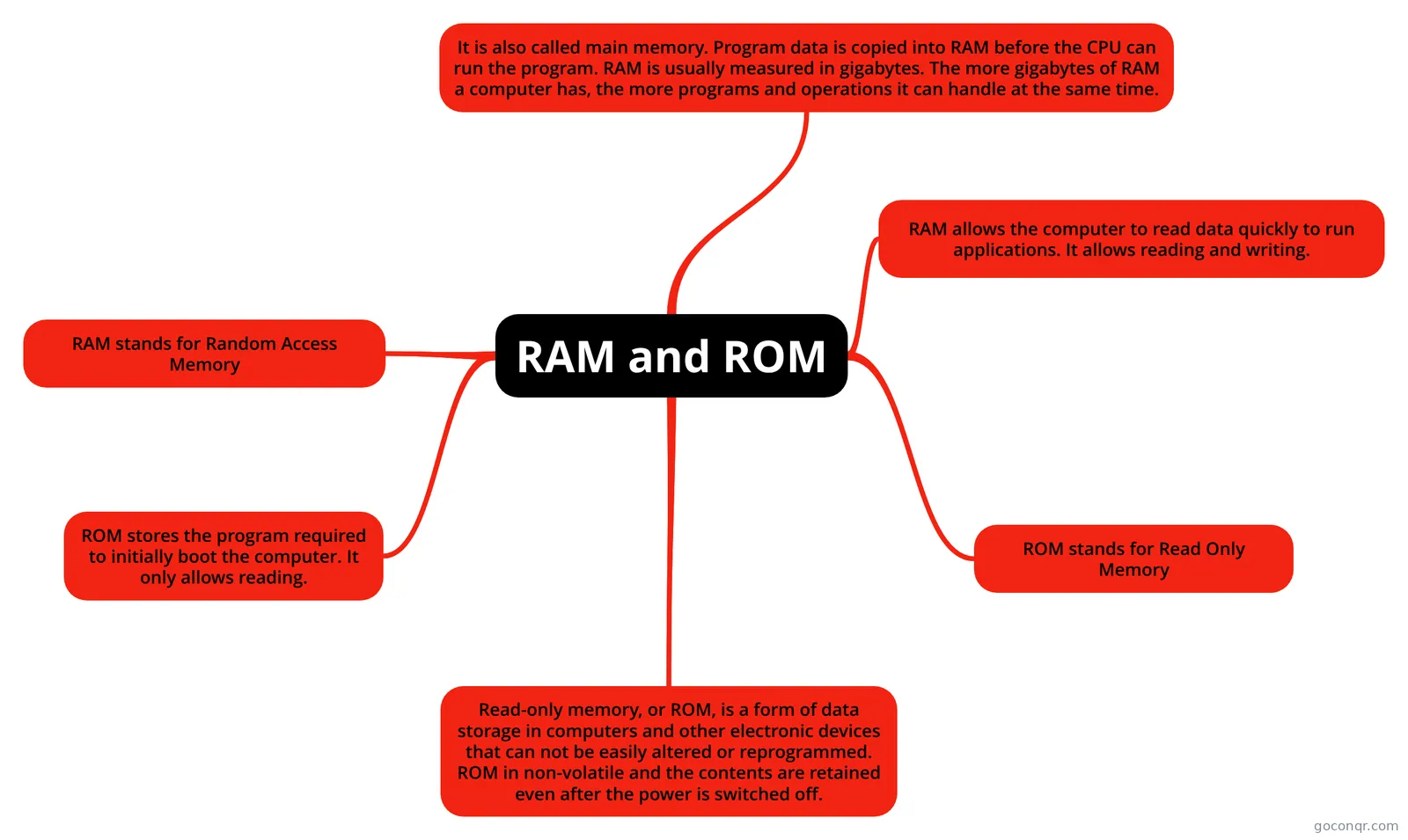 Mind map RAM and ROM RAM & ROM
-
10 questionsStorage Devices What is a Storage Device?
-
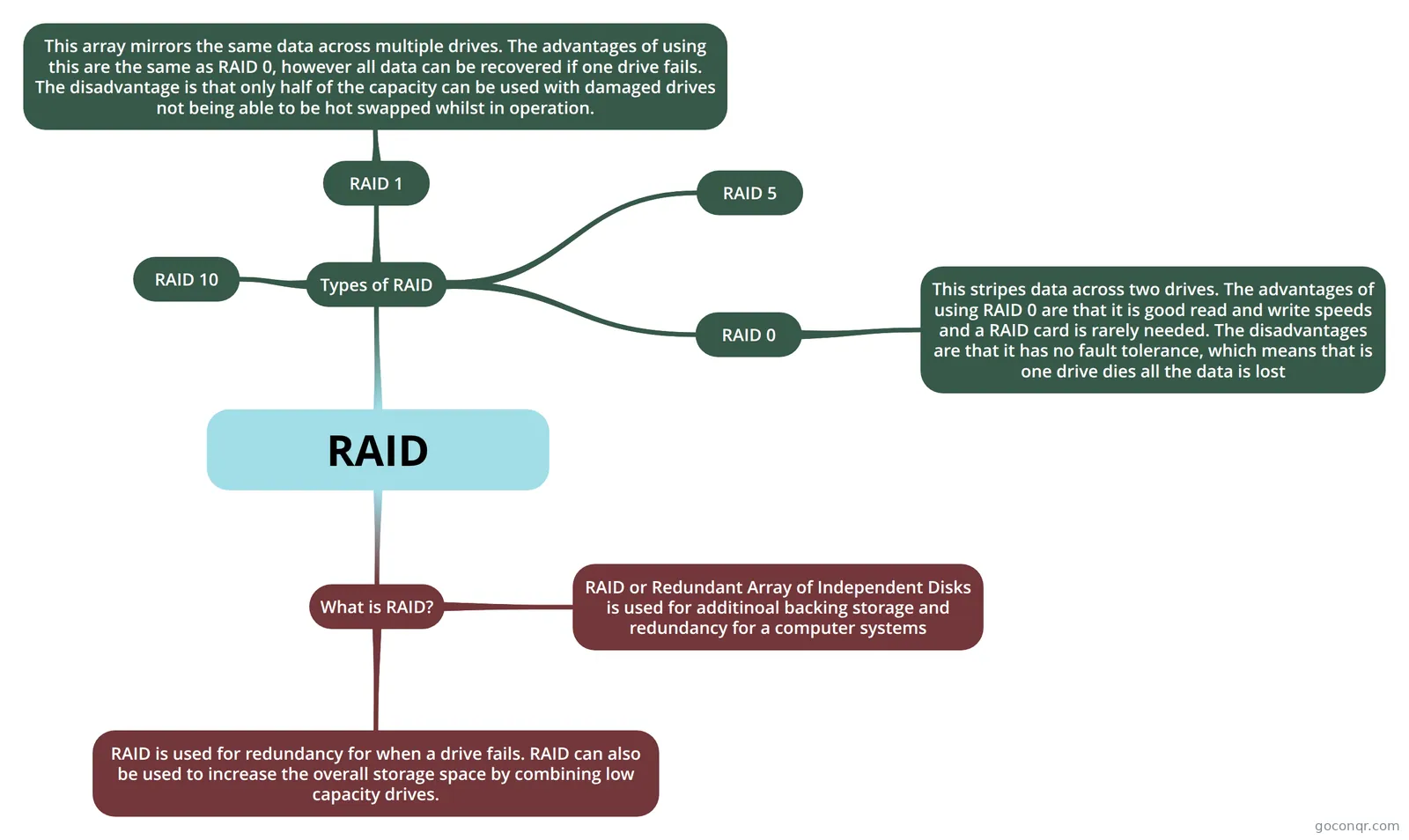 Mind map RAID
-
Mind map RAM and ROM Mindmap ram and rom
-
Mind map RAM and ROM RAM and ROM Poster
-
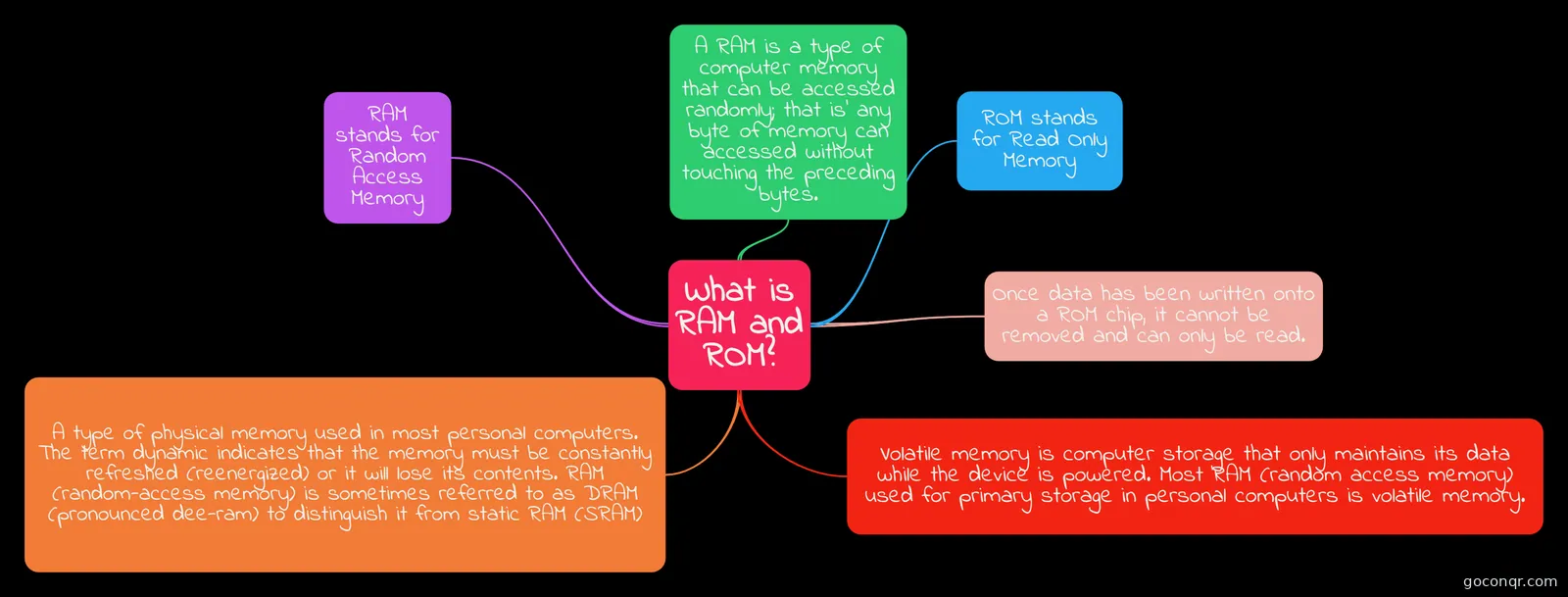 Mind map What is RAM and ROM? RAM/Rom mindmap
Quizzes
See all 13 quizzes-
6 questionsRAID and Nested RAIDs Which RAID configuration has two or more drives, with one being the duplicate of another?
-
10 questionsStorage Devices What is a Storage Device?
-
15 questions1.2 Memory & Storage Quiz True or False: RAM is volatile, meaning when the computer is turned off whatever is running is saved.
-
17 questions2.3 Secondary Storage Secondary storage can be either internal or external. True or false?
-
13 questionsStorage Devices RAM (Random Access Memory) can hold Terabytes of data.
-
11 questionsKapitel 2 Fill in the missing words
-
12 questionsWhat does the future hold for Memory? What key factors will change in the future for memory?
-
8 questionsRAID What is RAID
Mind maps
See all 101 mind maps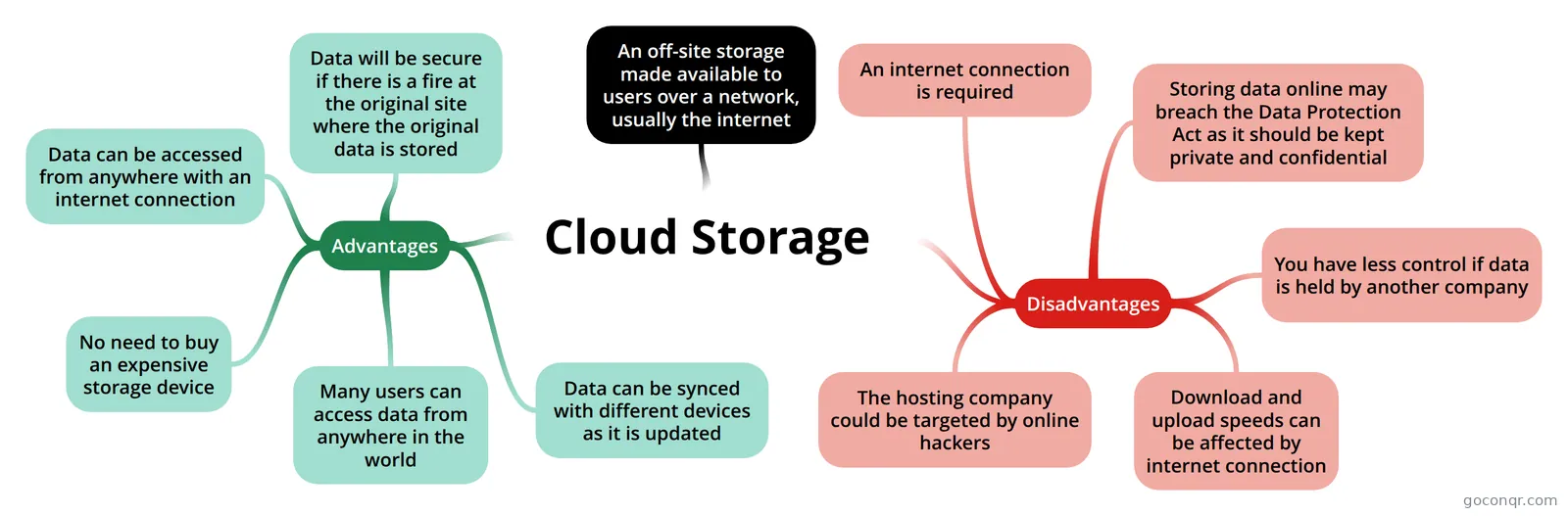
Flashcards
See all 54 flashcards-
10 cardsSecondary Storage What is the smallest unit of data?
-
55 cards1.2.4 Data storage Bit(b)=Single binary digit (1 or 0) Nibble = Byte(B) = Kilobyte = Megabyte = Gigabyte= Terabyte = Petabyte =
-
15 cardsYear 9 Computer Science Revision list Year 9 Computer Science Revision. For Computer science test.
-
14 cardsC226 P04 What is a RAM?
-
16 cardsSLR 3 Give some examples of input devices
-
8 cardsDifferent types of storage What is Internal Storage?
-
4 cardsTypes of Storage Devices Cloud Storage. What Is Cloud Storage ?
-
10 cardsComputer Hardware ROM (Read only memory) is a flash memory chip that contains a small amount of non volatile memory.
Notes
-
Storage and Magnetic Devices Storage and Magnetic DevicesStorage DevicesA storage device may hold information, process information, or both. A device that only holds information is a recording medium. Devices that process information (data storag...
-
Optical Storage Devices and Flash Memory Optical storage is the storage of data on an optically readable medium. Data is recorded by making marks in a pattern that can be read back with the aid of light, usually a beam of laser light precisely focused on a s...
-
Optical Storage & Flash Memory Optical storage Optical storage is the storage of data on an optically readable medium. Data is recorded by making marks in a pattern that can be read back with the aid of light, usually a beam of laser light precisel...
-
computer science 13/11/2018 1.3 storage all CD looking items go into the optical media category 2 examples of magnetic storage and what they are •Floppy disk this is a thin disk sealed in a square plastic carrier •Magnetic tape this is mai...
Slides
More Computing and ICT (programming, computer science, digital skills, educational technology) topics
About Memory and Storage
GoConqr OriginalWhat this unit covers
This page sits in the Computer Systems strand of Computing and ICT. It splits into two linked ideas: memory, which the computer uses while it works, and storage, which keeps data for later. The listed resources were made by GoConqr users, so you will see different styles and levels of detail.
Memory: RAM, ROM and virtual memory
Most of the mind maps here are about RAM and ROM. They explain that RAM is Random Access Memory, often called main memory, where program data is copied before the CPU can run it. It is volatile, so it is wiped when the computer shuts down. ROM is Read Only Memory and is non-volatile, so it keeps its information through power off. The mind map called Unit 1.2 Memory adds flash memory, virtual memory, solid state media and registers. RAM, ROM, Virtual Memory is another clear place to see the contrasts side by side.
Storage: devices, media and RAID
The STORAGE DEVICE mind map sorts storage into optical, magnetic and solid state, and separates direct access devices from serial and sequential ones. Examples include DVD, hard disc and tape drive. Many flashcard decks cover secondary storage, and there are notes on storage and magnetic devices. For RAID, the RAID mind map explains Redundant Array of Independent Disks and lists RAID 0, 1, 5 and 10. The quiz RAID and Nested RAIDs checks whether you know that RAID 1 is mirroring.
A sensible order
- Start with the mind map Unit 1.2 Memory for the big picture.
- Open one or two RAM and ROM mind maps and note the volatile and non-volatile difference.
- Move to the STORAGE DEVICE mind map, then a secondary storage flashcard deck.
- Finish with RAID and take a quiz such as Storage Devices.
Using maps and quizzes together
Read a map first, then take a quiz without looking. Wherever you slip up, go back to the matching map and read that branch again. Flashcards are handy for short definitions. Exam mentions on the page include GCSE Computer Science, GCSE ICT, GCSE Computing and IGCSE ICT, so pick resources that match your course. Choose a map to begin with, and when you are ready, try a quiz.
Frequently asked questions
Which resource should I open first?
Start with the mind map Unit 1.2 Memory. It brings together ROM, RAM, flash memory, virtual memory, solid state media and registers in one place. After that, move to one of the RAM and ROM maps, then a storage devices map, and test yourself with a quiz.
What do the RAM and ROM mind maps cover?
They explain that RAM is Random Access Memory, or main memory, where program data is copied before the CPU runs it, and that it is wiped when the computer is switched off. They also explain that ROM is Read Only Memory and keeps its data without power.
Is there anything on RAID?
Yes. There is a RAID mind map covering Redundant Array of Independent Disks and the types RAID 0, 1, 5 and 10. You can also try the quiz RAID and Nested RAIDs, plus further RAID quizzes, a flashcard deck and notes.
Which exams do these resources suit?
The listed resources mention GCSE Computer Science, GCSE ICT, GCSE Computing and IGCSE ICT. Most of the material is aimed at school level, so it suits school students revising these courses and teachers looking for ready-made material.
Are the resources free, and who made them?
Every resource on this page is free to open, study and take, with no account needed. They were made by GoConqr users, not by GoConqr. A free account also saves your quiz scores and lets you make your own quizzes, mind maps, flashcards and notes.
What if I can't find the topic I need?
Try nearby titles first. Cloud storage, back up, hard drive technology and data storage and recovery each have their own resources. If your topic is still missing, you could build your own mind map or flashcards from the notes that are listed.