
Mind map
Chapter 1: What is interaction design (3720)
Map content
Chapter 1: What is interaction design (3720)
Much of the same UX issues still exist today
1.2 Good and Poor Design
- develop interactive products that are usable
- an interactive product designed with the users in mind.
- it is important to consider where it is going to be used and who is going to use it
- invest the time and effort to follow a user centered design process.
1.2.1 What to Design
- who is going to be using them, how they are going to be used, and where they are going to be used
- understand the kind of activities people are doing when interacting with the product
- Who,How,Where,What
- Internet of Things (IoT) now means that many products and sensors can be connected to each other via the Internet, which enables them to talk to each other.
- understanding of the users based approach
- Considering what people are good and bad at
- • Considering what might help people with the way they currently do things
- • Thinking through what might provide quality user experiences
- • Listening to what people want and getting them involved in the design
- • Using user-centered techniques during the design process
1.3 What Is Interaction Design?
- Designing interactive products to support the way people communicate and interact in their everyday and working lives
- creating user experiences that enhance and augment the way people work, communicate, and interact
- 1.3.1 The Components of Interaction Design
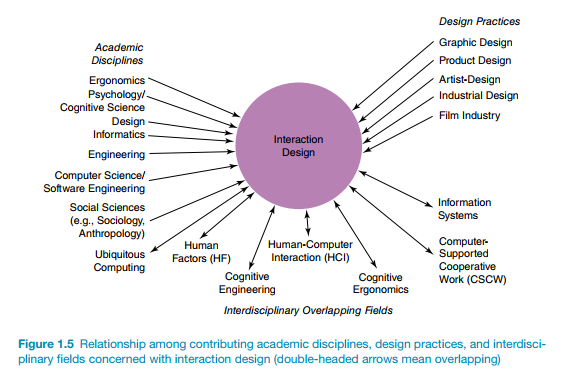
- main difference between interaction design (ID) and human-computer interaction (HCI) as one of scope.
- Historically, HCI had a narrow focus on the design and usability of computing systems, while ID was seen as being broader, concerned with the theory, research, and practice of designing user experiences for all manner of technologies, systems, and products
- Difference between Interaction Design and the other approaches
- methods, philosophies, and lenses they use to study, analyze, and design products.
- the scope and problems they address.
- main difference between interaction design (ID) and human-computer interaction (HCI) as one of scope.
1.3.2 Who Is Involved in Interaction Design?
- Designers need to know many different things about users, technologies, and the interactions among them to create effective user experiences
- people with different backgrounds and training
- in practice is that confusion, misunderstanding, and communication breakdowns can surface in a team
1.3.3 Interaction Design Consultancies
- Plentyfull
1.4 The User Experience
- refers to how a product behaves and is used by people in the real world
- “all aspects of the enduser’s interaction with the company, its services, and its products.”
- one cannot design a user experience, only design for a user experience.
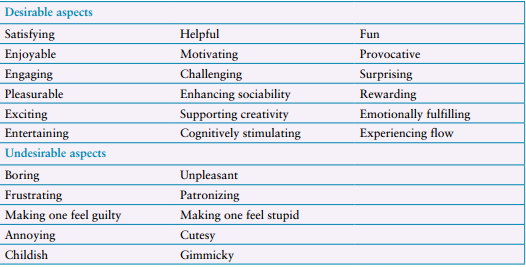
- Of central importance are the usability, functionality, aesthetics, content, look and feel, and emotional appeal.
- Marc Hassenzahl’s (2010) model of the user experience is the most wellknown, where he conceptualizes it in terms of pragmatic and hedonic aspects.
- By pragmatic, it is meant how simple, practical, and obvious it is for the user to achieve their goals
- By hedonic, it is meant how evocative and stimulating the interaction is to them.
- Technology as Experience framework accounts for the user experience largely in terms of how it is felt by the user.
1.5 Understanding Users
- Help designers understand how to design interactive products that provide good user experiences or match a user’s needs
- Learning more about people and what they do can also reveal incorrect assumptions that designers may have about particular user groups and what they need.
- Being aware of cultural differences is also an important concern for interaction design, particularly for products intended for a diverse range of user groups from different countries
1.6 Accessibility and Inclusiveness
- Accessibility refers to the extent to which an interactive product is accessible by as many people as possible
- Allow for disabled users to interact
- Accessibility can be achieved in two ways
- through the inclusive design of technology
- through the design of assistive technology.
- • Sensory impairment (such as loss of vision or hearing)
- • Physical impairment
- Cognitive (for instance, learning impairment or loss of memory)
- Impairment can also be categorized as follows:
- • Permanent (for example, long-term wheelchair user)
- • Temporary (such as after an accident or illness)
- • Situational (for instance, a noisy environment means a person can’t hear)
- Accessibility refers to the extent to which an interactive product is accessible by as many people as possible
1.7 Usability and User Experience Goals
- usability is often fundamental to the quality of the user experience and, conversely, aspects of the user experience, such as how it feels and looks, are inextricably linked with how usable the product is
- 1.7.1 Usability Goals
- usability is broken down into the following six goals:
- • Effective to use (effectiveness)
- is a general goal, and it refers to how good a product is at doing what it is supposed to do.
- • Efficient to use (efficiency)
- Efficiency refers to the way a product supports users in carrying out their tasks ( productivity)
- • Safe to use (safety)
- protecting the user from dangerous conditions and undesirable situations.
- (1) preventing the user from making serious errors by reducing the risk of wrong keys/buttons being mistakenly activated
- (2) providing users with various means of recovery should they make errors
- protecting the user from dangerous conditions and undesirable situations.
- • Having good utility (utility)
- refers to the extent to which the product provides the right kind of functionality
- • Easy to learn (learnability)
- how easy a system is to learn to use
- • Easy to remember how to use (memorability)
- refers to how easy a product is to remember how to use, once learned.
- • Effective to use (effectiveness)
- usability is broken down into the following six goals:
- 1.7.2 User Experience Goals
- 1.7.3 Design Principles
- derived from a mix of theory-based knowledge, experience, and common sense
- Visibility
- The more visible functions are, the more likely it is that users will be able to know what to do next.
- Feedback
- sending back information about what action has been done and what has been accomplished
- Constraints
- restricting the kinds of user interaction that can take place at a given moment.
- Consistency
- designing interfaces to have similar operations and use similar elements for achieving similar tasks
- easier to learn and use.
- Affordance
- attribute of an object that allows people to know how to use it.
- “to give a clue”
- two kinds of affordance: perceived and real
- Physical objects are said to have real affordances
- user interfaces that are screen-based are virtual
- Applying Design Principles in Practice
- applying more than one of the design principles in interaction design is that trade-offs can arise among them
Images and files in the map
Information
- Description
- Computer Science Mind Map on Chapter 1: What is interaction design (3720), created by Gideon Van on 11/02/2020.
- Created by
- Gideon Van
- Views
- 0
- Rating