
Mind map
Chapter 1: Introduction (3721)
Map content
Chapter 1: Introduction (3721)
operating system is a program that manages the computer hardware.
provides a basis for application programs and acts as an intermediary between the computer user and the computer hardware.
Mainframe operating systems are designed primarily to optimize utilization of hardware.
Personal computer (PC) operating systems support complex games, business applications etc
operating systems are designed to be convenient, others to be efficient, and others some combination of the two.
1.1 What Operating Systems Do
- 4 Major Components
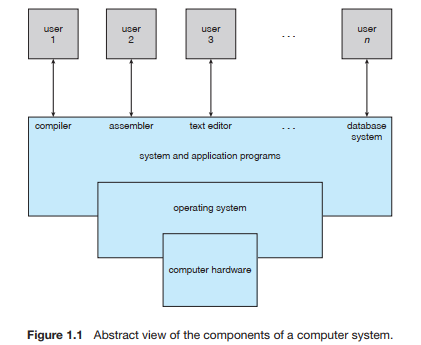
- Hardware—the central processing unit (CPU), the memory, and the input/output (I/O) devices—provides the basic computing resources for the system
- Application programs—such as word processors, spreadsheets, compilers, and Web browsers -> uses the resources
- can also view a computer system as consisting of hardware, software, and data
- operating system provides the means for proper use of these resources- > Only a facilitator really
- 1.1.1 User View
- PC
- OS for ease of use
- When a single user is using a system for work/play
- Not much attention paid to resource utilisation
- mainframe or a minicomputer.
- OS designed to maximize resource utilization
- assure that all available CPU time, memory, and I/O are used efficiently and that no individual user takes more than her fair share.
- workstations connected to networks
- OS designed to compromise between individual usability and resource utilization.
- compromise between individual usability and resource utilization.
- handheld computers
- power, speed, and interface limitations, they perform relatively few remote operations.
- OS are designed mostly for individual usability, but performance per unit of battery life is important as well
- PC
- 1.1.2 System View
- operating system is the program most intimately involved with the hardware. -> a resource allocator.
- An operating system is a control program
- A control program manages the execution of user programs to prevent errors and improper use of the computer.
- 1.1.3 Defining Operating Systems
- The fundamental goal of computer systems is to execute user programs and to make solving user problems easier.
- the operating system is the one program running at all times on the computer—usually called the kernel.
- Along with the kernel, there are two other types of programs:
- systems programs, which are associated with the operating system but are not part of the kernel
- systems programs, which are associated with the operating system but are not part of the kernel
1.2 Computer-System Organization
- 1.2.1 Computer-System Operation
- one or more CPUs and a number of device controllers connected through a common bus that provides access to shared memory
- a memory controller is provided whose function is to synchronize access to the memory.
- The initial program is simple
- bootstrap program
- Typically, it is stored in read-only memory (ROM) or electrically erasable programmable read-only memory (EEPROM), known by the general term firmware,within the computer hardware.
- initializes all aspects of the system, from CPU registers to device controllers to memory contents
- The bootstrap program must locate and load into memory the operatingsystem kernel
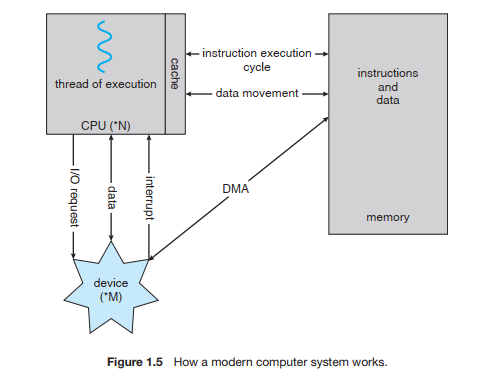
- occurrence of an event is usually signaled by an interrupt from either the hardware or the software.
- Hardware can interrupt the CPU by way of system bus. Software interrupts with a system call
- The interrupt must transfer control to the appropriate interrupt service routine.
- invoke a generic routine to examine the interrupt information; the routine, in turn, would call the interrupt-specific handler
- a table of pointers to interrupt specific routines can be used instead to provide the necessary speed.
- The interrupt routine is called indirectly through the table, with no intermediate routine needed.
- Generally, the table of pointers is stored in low memory (the first hundred or so locations). These locations hold the addresses of the interrupt service routines for the various devices. This array, or interrupt vector, of addresses is then indexed by a unique device number, given with the interrupt request, to provide the address of the interrupt service routine
- After the interrupt is serviced, the saved return address is loaded into the program counter, and the interrupted computation resumes as though the interrupt had not occurred.
- 1.2.2 Storage Structure
- The CPU can load instructions only from memory, so any programs to run must be stored there
- rewriteable memory, called main memory (also called random-access memory or RAM).
- Main memory commonly is implemented in a semiconductor technology called dynamic random-access memory (DRAM).
- All forms of memory provide an array of words. Each word has its own address
- Interaction is achieved through a sequence of load or store instructions to specific memory addresses.
- The CPU automatically loads instructions from main memory for execution.
- A typical instruction–execution cycle, as executed on a system with a von Neumann architecture, first fetches an instruction from memory and stores that instruction in the instruction register. The instruction is then decoded and may cause operands to be fetched from memory and stored in some internal register. After the instruction on the operands has been executed, the result may be stored back in memory
- Notice that the memory unit sees only a stream of memory addresses; it does not know how they are generated or what they are for (instructions or data)
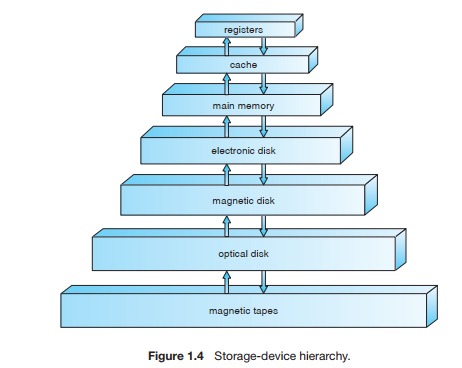
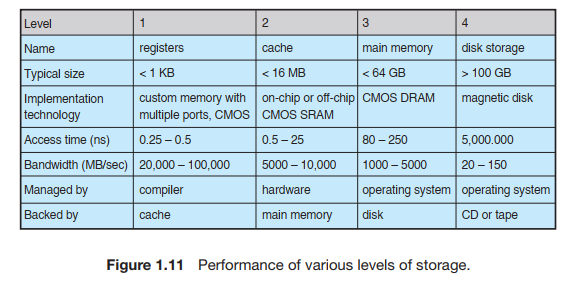
- Main memory is volatile and small and hence all data and programs cant reside here
- The most common secondary-storage device is a magnetic disk, which provides storage for both programs and data.
- differences among the various storage systems lie in speed, cost, size, and volatility.
- The CPU can load instructions only from memory, so any programs to run must be stored there
- 1.2.3 I/O Structure
- A general-purpose computer system consists of CPUs and multiple device controllers that are connected through a common bus.
- Each device controller is responsible for a device type
- seven or more devices can be attached to the small computer-systems interface (SCSI) controller.
- controller maintains some local buffer storage and a set of special-purpose registers
- direct memory access (DMA) is used. After setting up buffers, pointers, and counters for the I/O device, the device controller transfers an entire block of data directly to or from its own buffer storage to memory, with no intervention by the CPU.
- operating systems have a device driver for each device controller. This device driver understands the device controller and presents a uniform interface to the device to the rest of the operating system.
- To start an I/O operation, the device driver loads the appropriate registers within the device controller. The device controller, in turn, examines the contents of these registers to determine what action to take (such as “read a character from the keyboard”). The controller starts the transfer of data from the device to its local buffer. Once the transfer of data is complete, the device controller informs the device driver via an interrupt that it has finished its operation. The device driver then returns control to the operating system,
- 1.2.1 Computer-System Operation
1.3 Computer-System Architecture
- 1.3.1 Single-Processor Systems
- If there is only one general-purpose CPU, then the system is a single-processor system.
- Almost all systems have other special-purpose processors as well. -> These don't deal with user requests
- may come in the form of device-specific processors,
- 1.3.2 Multiprocessor Systems
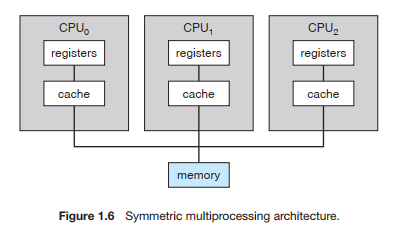
- Such systems have two or more processors in close communication, sharing the computer bus and sometimes the clock, memory, and peripheral devices.
- Multiprocessor systems have three main advantages:
- Increased throughput
- The speed-up ratio with N processors is not N, however; rather, it is less than N.
- Economy of scale
- Multiprocessor systems can cost less than equivalent multiple single-processor systems, because they can share peripherals, mass storage, and power supplies
- Increased reliability.
- the failure of one processor will not halt the system, only slow it down
- called graceful degradation.
- the failure of one processor will not halt the system, only slow it down
- Increased throughput
- The multiple-processor systems in use today are of two types.
- asymmetric multiprocessing, in which each processor is assigned a specific task. A master processor controls the system; the other processors either look to the master for instruction or have predefined tasks
- a master–slave relationship.
- symmetric multiprocessing (SMP), in which each processor performs all tasks within the operating system.
- asymmetric multiprocessing, in which each processor is assigned a specific task. A master processor controls the system; the other processors either look to the master for instruction or have predefined tasks
- multiprocessing can cause a system to change its memory-access model from uniform memory access (UMA) to non-uniform memory access (NUMA).
- UMA is defined as the situation in which access to any RAM from any CPU takes the same amount of time
- NUMA, some parts of memory may take longer to access than other parts, creating a performance penalty.
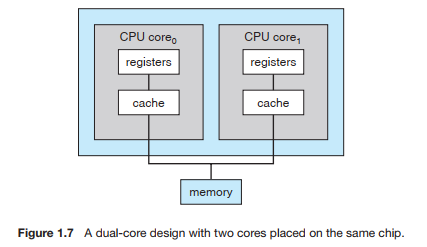
- trend in CPU design is to include multiple computing cores on a single chip.
- these are multiprocessor chips. They can be more efficient than multiple chips with single cores because on-chip communication is faster than between-chip communication.
- uses significantly less power than multiple single-core chips
- blade servers are a recent development in which multiple processor boards, I/O boards, and networking boards are placed in the same chassis.
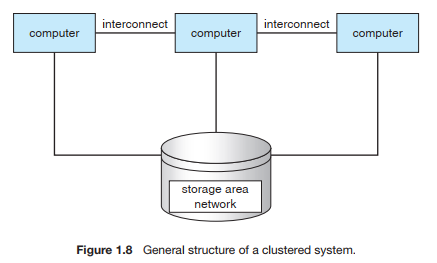
- 1.3.3 Clustered Systems
- type of multiple-CPU system
- they are composed of two or more individual systems
- clustered computers share storage and are closely linked via a local-area network (LAN)
- Clustering is usually used to provide high-availability service
- A layer of cluster software runs on the cluster nodes.
- In asymmetric clustering, one machine is in hot-standby mode while the other is running the applications.
- In symmetric mode, two or more hosts are running applications and are monitoring each other.
- applications must be written specifically to take advantage of the cluster by using a technique known as parallelization,
- greater computational power than single-processor or even SMP systems because they are capable of running an application concurrently on all computers in the cluster
- 1.3.1 Single-Processor Systems
1.4 Operating-System Structure
- One of the most important aspects of operating systems is the ability to multiprogram.
- Multiprogramming increases CPUutilization by organizing jobs (code and data) so that the CPU always has one to execute.
- Time sharing (or multitasking) is a logical extension of multiprogramming.
- the CPU executes multiple jobs by switching among them, but the switches occur so frequently that the users can interact with each program while it is running.
- A program loaded into memory and executing is called a process.
1.5 Operating-System Operations
- modern operating systems are interrupt driven
- A trap (or an exception) is a software-generated interrupt caused either by an error or by a specific request from a user program that an operating-system service be performed
- need to make sure that an error in a user program could cause problems only for the one program running.
- 1.5.1 Dual-Mode Operation
- most computer systems is to provide hardware support that allows us to differentiate among various modes of execution.
- we need two separate modes of operation: user mode and kernel mode (also called supervisor mode, system mode, or privileged mode)
- the mode bit, is added to the hardware of the computer to indicate the current mode: kernel (0) or user (1).
- able to distinguish between a task that is executed on behalf of the operating system and one that is executed on behalf of the user
- whenever the operating system gains control of the computer, it is in kernel mode.
- provides us with the means for protecting the operating system from errant users—and errant users from one another
- designating some of the machine instructions that may cause harm as privileged instructions.
- executed only in kernel mode
- designating some of the machine instructions that may cause harm as privileged instructions.
- Once hardware protection is in place, it detects errors that violate modes.
- the hardware traps to the operating system. The trap transfers control through the interrupt vector to the operating system
- 1.5.2 Timer
- operating system maintains control over the CPU
- cannot allow a user program to get stuck in an infinite loop or to fail to call system services and never return control to the operating system
- A timer can be set to interrupt the computer after a specified period.
- A simple technique is to initialize a counter with the amount of time that a program is allowed to run. A program with a 7-minute time limit, for example, would have its counter initialized to 420. Every second, the timer interrupts and the counter is decremented by 1. As long as the counter is positive, control is returned to the user program. When the counter becomes negative, the operating system terminates the program for exceeding the assigned time limit.
1.6 Process Management
- A program in execution, as mentioned, is a process
- it is possible to provide system calls that allow processes to create subprocesses to execute concurrently.
- a program by itself is not a process; a program is a passive entity, like the contents of a file stored on disk, whereas a process is an active entity.
- A single-threaded process has one program counter specifying the next instruction to execute.
- The execution of such a process must be sequential.
- A multithreaded process has multiple program counters, each pointing to the next instruction to execute for a given thread.
- The operating system is responsible for the following activities in connection with process management:
- • Scheduling processes and threads on the CPUs • Creating and deleting both user and system processes • Suspending and resuming processes • Providing mechanisms for process synchronization • Providing mechanisms for process communication
1.7 Memory Management
- central processor reads instructions from main memory during the instruction-fetch cycle and both reads and writes data from main memory during the data-fetch cycle
- For a program to be executed, it must be mapped to absolute addresses and loaded into memory
- it accesses program instructions and data from memory by generating these absolute addresses. Eventually, the program terminates, its memory space is declared available, and the next program can be loaded and executed.
- To improve both the utilization of the CPU and the speed of the computer’s response to its users
- several programs in memory
- creating a need for memory management.
- The operating system is responsible for the following activities in connection with memory management:
- • Keeping track of which parts of memory are currently being used and by whom • Deciding which processes (or parts thereof) and data to move into and out of memory • Allocating and deallocating memory space as needed
- Each algorithm requires its own hardware support.
1.8 Storage Management
- operating system abstracts from the physical properties of its storage devices to define a logical storage unit, the file
- maps files onto physical media and accesses these files via the storage devices.
- 1.8.1 File-System Management
- Magnetic disk, optical disk, and magnetic tape are the most common.
- Each medium is controlled by a device which has its own unique characteristics.
- properties include access speed, capacity, data-transfer rate, and access method
- The operating system is responsible for the following activities in connection with file management:
- • Creating and deleting files • Creating and deleting directories to organize files • Supporting primitives for manipulating files and directories • Mapping files onto secondary storage • Backing up files on stable (nonvolatile) storage media
- 1.8.2 Mass-Storage Management
- Secondary storage to back up main memory.
- The operating system is responsible for the following activities in connection with disk management:
- • Free-space management • Storage allocation • Disk scheduling
- Tertiary storage -> CD, DVD
- WORM (write-once, read-many-times) and RW (read–write) formats
- 1.8.3 Caching
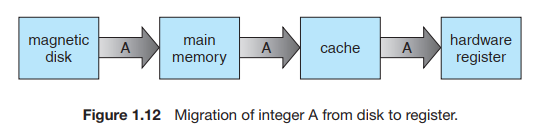
- a particular piece of information, we first check whether it is in the cache. If it is, we use the information directly from the cache; if it is not, we use the information from the source, putting a copy in the cache under the assumption that we will need it again soon.
- internal programmable registers, such as index registers, provide a high-speed cache for main memory
- Main memory can be viewed as a fast cache for secondary storage
- Important to ensure data consistency between storage mediums
- cache coherency, and it is usually a hardware problem (handled below the operating-system level).
- 1.8.4 I/O Systems
- devices are hidden from the bulk of the operating system itself by the I/O subsystem. The I/O subsystem consists of several components:
- • A memory-management component that includes buffering, caching, and spooling • A general device-driver interface • Drivers for specific hardware devices
- devices are hidden from the bulk of the operating system itself by the I/O subsystem. The I/O subsystem consists of several components:
- operating system abstracts from the physical properties of its storage devices to define a logical storage unit, the file
1.9 Protection and Security
- memory-addressing hardware ensures that a process can execute only within its own address space. The timer ensures that no process can gain control of the CPU without eventually relinquishing control. Device-control registers are not accessible to users, so the integrity of the various peripheral devices is protected.
- Protection, then, is any mechanism for controlling the access of processes or users to the resources defined by a computer system.
- Protection can improve reliability by detecting latent errors at the interfaces between component subsystems.
- Contains interface errors from spilling over into other system
- the job of security to defend a system from external and internal attacks.
- viruses and worms, denial-ofservice attacks
- When a user logs into the system, the authentication stage determines the appropriate user ID for the user. That user ID is associated with all of the user’s processes and threads.
- Group functionality can be implemented as a system-wide list of group names and group identifiers.
- Operating systems provide various methods to allow privilege escalation.
- Can run as another user until the priviledge is terminated
1.10 Distributed Systems
- A distributed system is a collection of physically separate, possibly heterogeneous, computer systems that are networked
- Access to a shared resource increases computation speed, functionality, data availability, and reliability
- A network, in the simplest terms, is a communication path between two or more systems.
- To an operating system, a network protocol simply needs an interface device—a network adapter, for example— with a device driver to manage it, as well as software to handle data
1.11 Special-Purpose Systems
- functions are more limited and whose objective is to deal with limited computation domains.
- 1.11.1 Real-Time Embedded Systems
- Embedded computers are the most prevalent form of computers in existence
- Embedded systems almost always run real-time operating systems
- A real-time system has well-defined, fixed time constraints.
- 1.11.2 Multimedia Systems
- Multimedia data consist of audio and video files as well as conventional files such as text, word, programs, spreadsheets
- include audio files such as MP3, DVD movies, video conferencing, and short video clips
- 1.11.3 Handheld Systems
- operating system and applications must manage memory efficiently.
- Issues: Physical memory, Speed of the processor, I/O
- Web clipping, where only a small subset of a Web page is delivered and displayed on the handheld device.
1.12 Computing Environments
- 1.12.1 Traditional Computing
- Consider the “typical office environment.”
- Web technologies are stretching the boundaries of traditional computing.
- Companies establish portals, which provide Web accessibility to their internal servers.
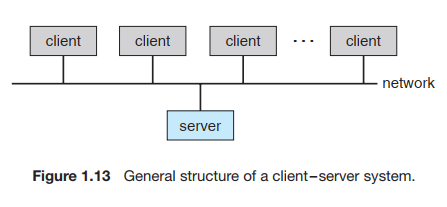
- 1.12.2 Client–Server Computing
- many of today’s systems act as server systems to satisfy requests generated by client systems.
- broadly categorized as compute servers and file servers:
- compute-server system provides an interface to which a client can send a request to perform an action (for example, read data); in response, the server executes the action and sends back results to the client
- file-server system provides a file-system interface where clients can create, update, read, and delete files.
- 1.12.3 Peer-to-Peer Computing
- clients and servers are not distinguished from one another; instead, all nodes within the system are considered peers, and each may act as either a client or a server
- In a client-server system, the server is a bottleneck; but in a peer-to-peer system, services can be provided by several nodes distributed throughout the network.
- When a node joins a network, it registers its service with a centralized lookup service on the network. Any node desiring a specific service first contacts this centralized lookup service to determine which node provides the service. The remainder of the communication takes place between the client and the service provider.
- A peer acting as a client must first discover what node provides a desired service by broadcasting a request for the service to all other nodes in the network. The node (or nodes) providing that service responds to the peer making the request. To support this approach, a discovery protocol must be provided that allows peers to discover services provided by other peers in the network.
- 1.12.4 Web-Based Computing
- The Web has become ubiquitous, leading to more access by a wider variety of devices
- Web-based computing has given rise to new categories of devices, such as load balancers, which distribute network connections among a pool of similar servers.
- 1.12.1 Traditional Computing
1.13 Open-Source Operating Systems
- Open-source operating systems are those made available in source-code format rather than as compiled binary code.
- community of interested (and usually unpaid) programmers who contribute to the code by helping to debug it, analyze it, provide support
- closed source -> Microsoft
- 1.13.1 History
- Software was open sourced for a long period, then companies started licensing and only releasing the compiled binaries to the public
- eg. GNU General Public License (GPL)
- 1.13.2 Linux
- open-source operating system, consider GNU/Linux
- Open-source operating systems are those made available in source-code format rather than as compiled binary code.
Images and files in the map
Information
- Description
- Computer Science Mind Map on Chapter 1: Introduction (3721), created by Gideon Van on 25/02/2020.
- Created by
- Gideon Van
- Views
- 0
- Rating