
Mind map
AQA Alevel UNIT 4.9 Networking
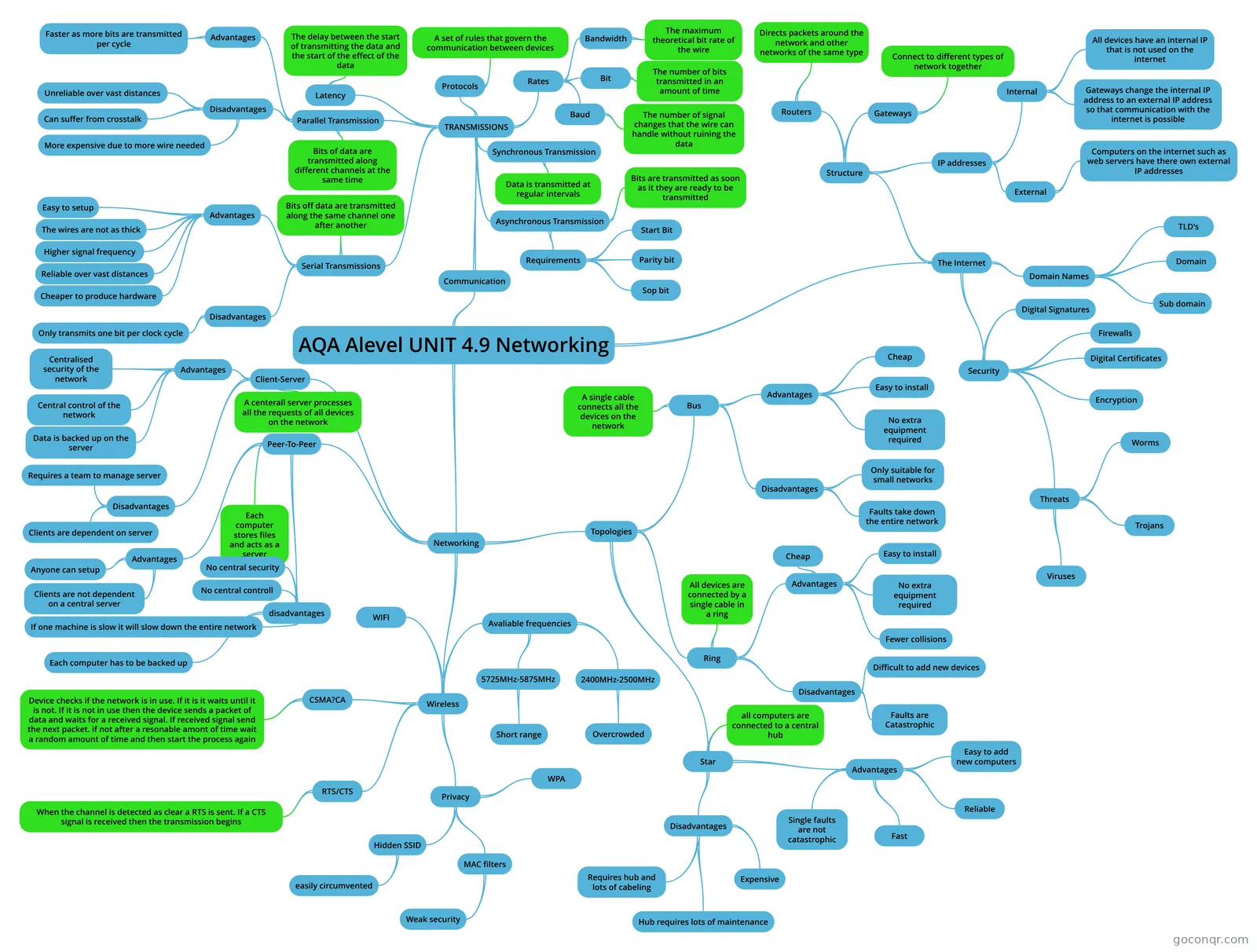
Mind map: AQA A level unit 4.9 networking
Map content
AQA Alevel UNIT 4.9 Networking
Communication
- TRANSMISSIONS
- Parallel Transmission
- Advantages
- Faster as more bits are transmitted per cycle
- Disadvantages
- Unreliable over vast distances
- More expensive due to more wire needed
- Can suffer from crosstalk
- Crosstalk is where interference from other wires corrupts the data being transmitted over the wires due to the close proximity of the wires and the strength of the signals.
- Bits of data are transmitted along different channels at the same time
- Advantages
- Serial Transmissions
- Advantages
- Cheaper to produce hardware
- Easy to setup
- Reliable over vast distances
- Higher signal frequency
- Therefore higher net data transfer rate
- The wires are not as thick
- Disadvantages
- Only transmits one bit per clock cycle
- Bits off data are transmitted along the same channel one after another
- Advantages
- Synchronous Transmission
- Data is transmitted at regular intervals
- This is normally controlled by the computers clock
- Data is transmitted at regular intervals
- Asynchronous Transmission
- Bits are transmitted as soon as it they are ready to be transmitted
- Requirements
- Start Bit
- Parity bit
- Sop bit
- Latency
- The delay between the start of transmitting the data and the start of the effect of the data
- Protocols
- A set of rules that govern the communication between devices
- Rates
- Bit
- The number of bits transmitted in an amount of time
- Normally the time period is one second
- The number of bits transmitted in an amount of time
- Baud
- The number of signal changes that the wire can handle without ruining the data
- Bandwidth
- The maximum theoretical bit rate of the wire
- Bit
- Parallel Transmission
- TRANSMISSIONS
Networking
- Topologies
- Bus
- A single cable connects all the devices on the network
- Advantages
- Cheap
- Easy to install
- No extra equipment required
- Disadvantages
- Only suitable for small networks
- Faults take down the entire network
- Ring
- All devices are connected by a single cable in a ring
- Information travels in one direction around the ring
- Advantages
- Cheap
- Easy to install
- No extra equipment required
- Fewer collisions
- Disadvantages
- Faults are Catastrophic
- Difficult to add new devices
- All devices are connected by a single cable in a ring
- Star
- Most modern networks are wired this way, however they behave like a bus network. This is because the star network can use a physical switch and bus protocols to communicate directly with other devices on the network. The device does not need to communicate with the switch.
- all computers are connected to a central hub
- Advantages
- Reliable
- Fast
- Easy to add new computers
- Single faults are not catastrophic
- Disadvantages
- Expensive
- Requires hub and lots of cabeling
- Hub requires lots of maintenance
- Bus
- Client-Server
- A centerall server processes all the requests of all devices on the network
- Advantages
- Centralised security of the network
- Central control of the network
- Data is backed up on the server
- Disadvantages
- Requires a team to manage server
- Clients are dependent on server
- Peer-To-Peer
- Each computer stores files and acts as a server
- Advantages
- Anyone can setup
- Clients are not dependent on a central server
- disadvantages
- No central security
- No central controll
- If one machine is slow it will slow down the entire network
- Each computer has to be backed up
- Wireless
- Requires a wireless access point so that devices can connect to the network. Devices require a wireless adaptor to allow them to connect to the wireless access point
- Requires a wireless access point for the devices to connect to. Devices require a wireless adaptor to connect to the WAP
- WIFI
- In terms off physical setup wireless networks act as star networks. However in terms of collisions wireless networks are more comparable to bus networks.
- Avaliable frequencies
- 2400MHz-2500MHz
- This is known as the 2.4GHz band Contains 3 non overlapping channels
- Overcrowded
- Most wireless devices around the home run on the 2.4GHz band
- 5725MHz-5875MHz
- Also known as the 5GHz band Contains 23 non overlapping channels
- Short range
- 2400MHz-2500MHz
- CSMA?CA
- Carrier sense multiple access/collision avoidance
- Device checks if the network is in use. If it is it waits until it is not. If it is not in use then the device sends a packet of data and waits for a received signal. If received signal send the next packet. if not after a resonable amont of time wait a random amount of time and then start the process again
- RTS/CTS
- Request to send/Clear to send
- When the channel is detected as clear a RTS is sent. If a CTS signal is received then the transmission begins
- Privacy
- Hidden SSID
- The Service set identifier is attached to each packet of data. The WAP only cares about the data if it has the same SSID as itself.
- easily circumvented
- The SSID can easily be obtained due to all packets being sent to and from the WAP contain the SSID of the network.
- MAC filters
- The MAC address is the physical id of the wireless receiver. WAP can be changed to accept only a select list of MAC addresses
- Weak security
- The software that adds it too the packets can be altered to send custom MAC addresses
- WPA
- Wireless protected access is an encryption standard used by wireless networks. Each packet is encrypted using a key of at least 6 alphanumerical characters. WPA is the only reliable security measure for wireless networks
- Hidden SSID
- Topologies
The Internet
- Structure
- Routers
- Directs packets around the network and other networks of the same type
- Gateways
- Used to translate internal IP addresses to external IP addresses
- Connect to different types of network together
- Strips away the header and trailer information and rebuild it in the format the new Network is expecting it in
- IP addresses
- Internal
- All devices have an internal IP that is not used on the internet
- Gateways change the internal IP address to an external IP address so that communication with the internet is possible
- External
- Computers on the internet such as web servers have there own external IP addresses
- Internal
- Routers
- Domain Names
- A memorable identifier that is linked to an IP address
- TLD's
- Top levels domains (TLD"s) Is the highest level of the DNS. Some of the most common TLDS are: .com .net .gov .org .uk .us
- Domain
- In the example my.example.com The domain of this Domain Name is example.
- Sub domain
- In the Example my.example.com the subDomain is my.
- Security
- Digital Signatures
- Digital signatures provide a secure way to check wether the dafa has been tampered with and to provide authentication of the sender.
- Firewalls
- Stops any data coming through. Exceptions in the firewall are then made for data you want to recieve.
- Digital Certificates
- Provides an extra layer of security and authorisation of the data provider by having a third parties signature verifying the contents of the certificate. It also allows for secure transmission between the user and the server.
- Encryption
- Encryption is where data is encoded so that it can only be decoded and read by specific people. This is achieved using various methods such as using complex mathematical functions.
- Threats
- Worms
- Worms are a type of malicious software that replicates itself into other systems once it is ion your computer. Another thing most worms tend to do is send emails with the worm attached to all the contacts in the computers contact books
- Trojans
- This is software that purposes as something else but has an ulterior motive that is unaware to the user until it is too late.
- Viruses
- Exploits weaknesses in the computer system to replicate itself and infect more systems in order to gain control of the system.
- Worms
- Digital Signatures
- Structure
Information
- Description
- A level Computing (Networking) Mind Map on AQA Alevel UNIT 4.9 Networking, created by Aidan Stewart on 16/03/2020.
- Created by
- Aidan Stewart
- Views
- 4
- History
-
- Created by Natasja Deacon · Mar 15, 2020
- Copied by Aidan Stewart · Mar 16, 2020
- Rating