
Mind map
Chapter 10: File System (3721)
Map content
Chapter 10: File System (3721)
two distinct parts: a collection of files, each storing related data, and a directory structure, which organizes and provides information about all the files in the system
10.1 File Concept
- Files are mapped by the operating system onto physical devices
- Data files may be numeric, alphabetic, alphanumeric, or binary.
- A text file is a sequence of characters organized into lines
- A source file is a sequence of functions, each of which is further organized as declarations followed by executable statements.
- An executable file is a series of code sections that the loader can bring into memory and execute.
- 10.1.1 File Attributes
- Name -> Human made
- Identifier -> Non human readable tag
- Type
- Location
- Size
- Protection
- Time,Date,User Identification
- The information about all files is kept in the directory structure, which also resides on secondary storage.
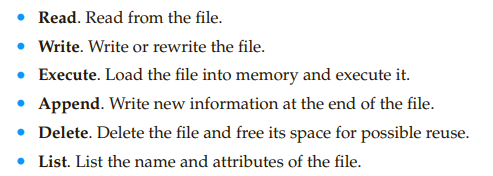
- 10.1.2 File Operations
- • Creating a file.
- space in the file system must be found for the file.
- • Writing a file.
- system must keep a write pointer to the location in the file where the next write is to take place.
- system call specifying both the name of the file and the information to be written to the file.
- • Reading a file.
- we use a system call that specifies the name of the file and where (in memory) the next block of the file should be put.
- read pointer to the location in the file where the next read is to take place.
- Both the read and write operations use this same pointer, saving space and reducing system complexity
- the current operation location can be kept as a per-process current-fileposition pointer
- • Repositioning within a file
- the current-file-position pointer is repositioned to a given value
- • Deleting a file.
- we release all file space
- we search the directory for the named file, in most cases relating to file operations
- To avoid this constant searching
- The operating system keeps a table, called the open-file table, containing information about all open files
- the file is specified via an index into this table, so no searching is required
- When the file is done being used the process closes the file and the file is removed from the table
- The open() system call typically returns a pointer to the entry in the open-file table. This is then used for all I/O operations going forward
- The open() system call searches the directory and adds the file to the table
- To avoid this constant searching
- • Truncating a file
- erase the contents of a file but keep its attributes.
- the operating system uses two levels of internal tables: (Processes can open the same file)
- The per-process table tracks all files that a process has open
- the current file pointer for each file is found here. Access rights to the file and accounting information can also be included.
- Each entry in the per-process table in turn points to a system-wide open-file table.
- The system-wide table contains process-independent information, such as the location of the file on disk, access dates, and file size.
- the open-file table also has an open count associated with each file to indicate how many processes have the file open.
- When the count is zero the entry is removed from the open-file table
- several pieces of information are associated with an open file.
- • File pointer.
- the last read– write location as a current-file-position pointer
- This pointer is unique to each process operating on the file
- • File-open count.
- As files are closed, the operating system must reuse its open-file table entries, or it could run out of space
- • Disk location of the file
- The information needed to locate the file on disk is kept in memory
- This ties back to the demand paging and memory side of things
- • Access rights.
- This information is stored on the per-process table
- Some operating systems provide facilities for locking an open file (or sections of a file)
- Useful to ensure that shared files are used in the correct state
- Ashared lock is akin to a reader lock in that several processes can acquire the lock concurrently.An exclusive lock behaves like a writer lock; only one process at a time can acquire such a lock.
- The use of file locks requires the same precautions as ordinary process synchronization.
- Must be careful not to cause deadlocks or unnecessary access restrictions to files
- • File pointer.
- The per-process table tracks all files that a process has open
- • Creating a file.
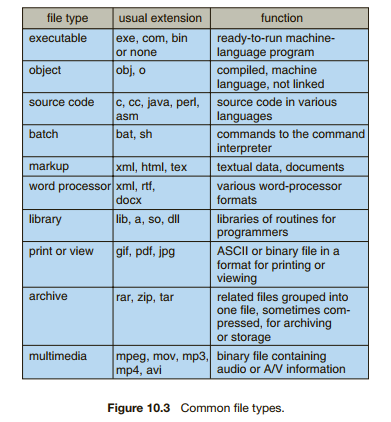
- 10.1.3 File Types
- The system uses the extension to indicate the type of the file and the type of operations that can be done on that file.
- The .com and .exe files are two forms of binary executable files, whereas the .sh file is a shell script containing, in ASCII format, commands to the operating system
- 10.1.4 File Structure
- For example, the operating system requires that an executable file have a specific structure so that it can determine where in memory to load the file and what the location of the first instruction is.
- disadvantages of having the operating system support multiple file structures:
- the resulting size of the operating system is cumbersome. If the operating system defines five different file structures, it needs to contain the code to support these file structures
- Files must then also fall into these supported structures, or the OS will not interpret it correctly
- Therefore applications are required to include support for their file structures
- all operating systems must support at least one structure—that of an executable file—so that the system is able to load and run programs.
- 10.1.5 Internal File Structure
- Because disk space is always allocated in blocks, some portion of the last block of each file is generally wasted. If each block were 512 bytes, for example, then a file of 1,949 bytes would be allocated four blocks (2,048 bytes); the last 99 bytes would be wasted.
- This leads to internal fragmentation
10.2 Access Methods
- Files store information. When it is used, this information must be accessed and read into computer memory
- 10.2.1 Sequential Access
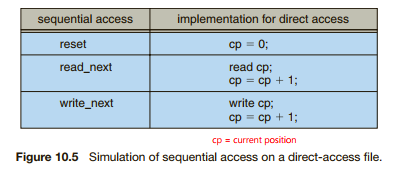
- Information in the file is processed in order, one record after the other.
- A read operation—read next()—reads the next portion of the file and automatically advances a file pointer, which tracks the I/O location.
- write operation—write next()—appends to the end of the file and advances to the end of the newly written material (the new end of file)
- 10.2.2 Direct Access
- Here, a file is made up of fixed-length logical records that allow programs to read and write records rapidly in no particular order
- Thus, we may read block 14, then read block 53, and then write block 7. There are no restrictions on the order of reading or writing for a direct-access file.
- Direct-access files are of great use for immediate access to large amounts of information. Databases are often of this type.
- The block number provided by the user to the operating system is normally a relative block number.
- A relative block number is an index relative to the beginning of the file.
- the first relative block of the file is 0, the next is 1, and so on, even though the absolute disk address may be 14703 for the first block and 3192 for the second.
- relative block numbers allows the operating system to decide where the file should be placed (called the allocation problem)
- prevent the user from accessing portions of the file system that may not be part of her file
- 10.2.3 Other Access Methods
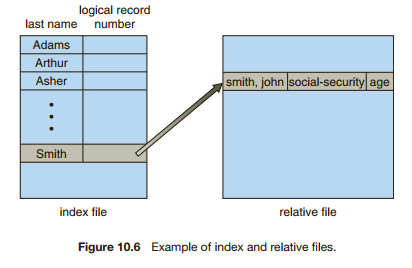
- The index, like an index in the back of a book, contains pointers to the various blocks.
- For example, a retail-price file might list the universal product codes (UPCs) for items, with the associated prices. Each record consists of a 10-digit UPC and a 6-digit price, for a 16-byte record. If our disk has 1,024 bytes per block, we can store 64 records per block. A file of 120,000 records would occupy about 2,000 blocks (2 million bytes). By keeping the file sorted by UPC, we can define an index consisting of the first UPC in each block. This index would have 2,000 entries of 10 digits each, or 20,000 bytes, and thus could be kept in memory. To find the price of a particular item, we can make a binary search of the index. From this search, we learn exactly which block contains the desired record and access that block
10.3 Directory and Disk Structure
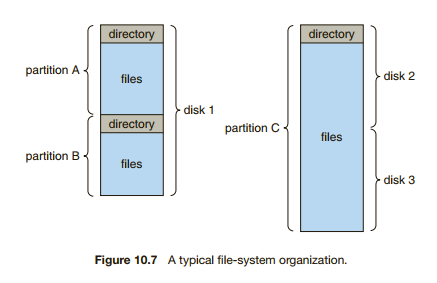
- Files are stored on random-access storage devices, including hard disks, optical disks, and solid-state (memory-based) disks.
- Sometimes, disks are subdivided (partitioned) and also collected into RAID sets.
- 10.3.1 Storage Structure
- Book -> Solaris specific
- a general-purpose computer system has multiple storage devices, and those devices can be sliced up into volumes that hold file systems
- 10.3.2 Directory Overview
- When considering a particular directory structure, we need to keep in mind the operations that are to be performed on a directory:
- • Search for a file.
- • Create a file.
- • Delete a file.
- • List a directory.
- • Rename a file.
- • Traverse the file system.
- can be viewed as a symbol table that translates file names into their directory entries
- When considering a particular directory structure, we need to keep in mind the operations that are to be performed on a directory:
- 10.3.3 Single-Level Directory
- All files are contained in the same directory
- significant limitations when the number of files increases or when the system has more than one user. Each file must then be unique across all users
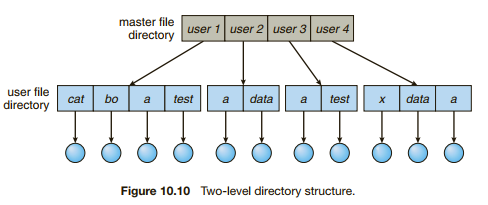
- 10.3.4 Two-Level Directory
- The standard solution is to create a separate directory for each user.
- each user has his ownuser file directory (UFD). The UFDs have similar structures, but each lists only the files of a single user.
- When a user job starts or a user logs in, the system’s master file directory (MFD) is searched. The MFD is indexed by user name or account number, and each entry points to the UFD for that user
- This structure effectively isolates one user from another. -> Can be bad if the users want to collaborate
- A two-level directory can be thought of as a tree, or an inverted tree, of height 2. The root of the tree is the MFD. Its direct descendants are the UFDs. The descendants of the UFDs are the files themselves
- A special instance occurs with the system files, which are shared by all users
- A special user directory is defined to contain the system files (for example, user 0). Whenever a file name is given to be loaded, the operating system first searches the local UFD. If the file is found, it is used. If it is not found, the system automatically searches the special user directory that contains the system files
- The standard solution is to create a separate directory for each user.
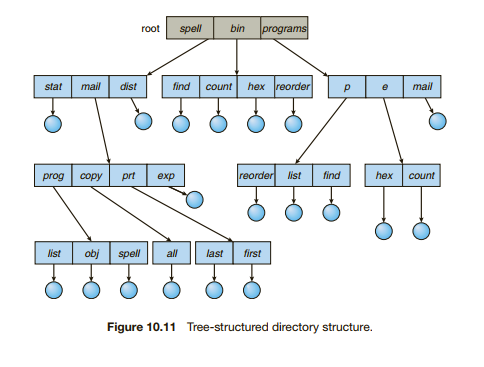
- 10.3.5 Tree-Structured Directories
- the natural generalization is to extend the directory structure to a tree of arbitrary height
- In normal use, each process has a current directory. The current directory should contain most of the files that are of current interest to the process.
- Path names can be of two types: absolute and relative. An absolute path name begins at the root and follows a path down to the specified file, giving the directory names on the path. A relative path name defines a path from the current directory
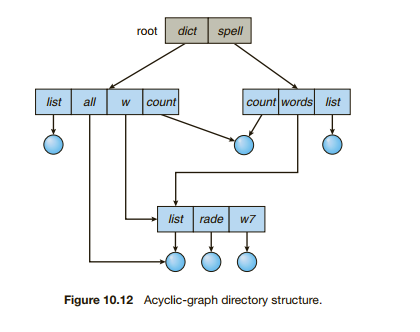
- 10.3.6 Acyclic-Graph Directories
- A shared directory or file exists in the file system in two (or more) places at once.
- A tree structure prohibits the sharing of files or directories. An acyclic graph—that is, a graph with no cycles—allows directories to share subdirectories and files
- With a shared file, only one actual file exists, so any changes made by one person are immediately visible to the other.
- When people are working as a team, all the files they want to share can be put into one directory. The UFD of each team member will contain this directory of shared files as a subdirectory.
- 10.3.7 General Graph Directory
- Book
0.4 File-System Mounting
- a file system must be mounted before it can be available to processes on the system
- The operating system is given the name of the device and the mount point—the location within the file structure where the file system is to be attached
- Next, the operating system verifies that the device contains a valid file system.
- . Finally, the operating system notes in its directory structure that a file system is mounted at the specified mount point.
- Windows operating systems automatically discover all devices and mount all located file systems at boot time. The user can then click on the volume and have access to the file system
10.5 File Sharing
- file sharing is very desirable for users who want to collaborate and to reduce the effort required to achieve a computing goal.
- 10.5.1 Multiple Users
- To implement sharing and protection, the system must maintain more file and directory attributes
- Systems use the concepts of file (or directory) owner (or user) and group.
- Owner grants access and changes attributes -> Most control
- Group defines a subset of users who has access to file
- The owner and group IDs of a given file (or directory) are stored with the other file attributes.
- 10.5.2 Remote File Systems
- The first implemented method involves manually transferring files between machines via programs like ftp
- The second major method uses a distributed file system (DFS) in which remote directories are visible from a local machine.
- the third method, the World Wide Web
- 10.5.2.1 The Client–Server Model
- Remote file systems allow a computer to mount one or more file systems from one or more remote machines.
- Server contains the file and the client accesses the files
- 10.5.2.2 Distributed Information Systems
- The domain name system (DNS) provides host-name-to-network-address translations for the entire Internet
- Microsoft uses active directory as a distributed naming structure to provide a single name space for users. Once established, the distributed naming facility is used by all clients and servers to authenticate users.
- lightweight directory-access protocol (LDAP) as a secure distributed naming mechanism. (AD falls in this group)
- one distributed LDAP directory could be used by an organization to store all user and resource information for all the organization’s computers.
- 10.5.2.3 Failure Modes
- Local file systems can fail for a variety of reasons, including failure of the disk containing the file system, corruption of the directory structure or other diskmanagement information (collectively called metadata), disk-controller failure, cable failure, and host-adapter failure.
- Remote file systems have even more failure modes
- 10.5.3 Consistency Semantics
- These semantics specify how multiple users of a system are to access a shared file simultaneously.
- Consistency semantics are directly related to the process synchronization algorithms of Chapter 6.
- 10.5.3.1 UNIX Semantics
- Changes to a shared file is immediately visible to other users who have the file open
- One mode of sharing allows users to share the pointer of current location into the file.
- 10.5.3.2 Session Semantics
- The Andrew file system (Open AFS)
- Writes to an open file by a user are not visible immediately when shared with other users and file is open
- Once a file is closed, the changes made to it are visible only in sessions starting later.
- 10.5.3.3 Immutable-Shared-Files Semantics
- Once a file is declared as shared by its creator, it cannot be modified.
- in a distributed system is simple, because the sharing is disciplined (read-only)
10.6 Protection
- we want to keep information safe from physical damage (the issue of reliability) and improper access (the issue of protection).
- 10.6.1 Types of Access
- The need to protect files is a direct result of the ability to access files.
- Protection mechanisms provide controlled access by limiting the types of file access that can be made.
- 10.6.2 Access Control
- access dependent on the identity of the user.
- associate with each file and directory an access-control list (ACL) specifying user names and the types of access allowed for each user. (This list can get big then)
- To condense the length of the access-control list, many systems recognize three classifications of users in connection with each file:
- • Owner. The user who created the file is the owner.
- • Group. A set of users who are sharing the file and need similar access is a group, or work group
- • Universe. All other users in the system constitute the universe.
- 10.6.3 Other Protection Approaches
- Another approach to the protection problem is to associate a password with each file
Images and files in the map
Information
- Description
- Computer Science Mind Map on Chapter 10: File System (3721), created by Gideon Van on 24/04/2020.
- Created by
- Gideon Van
- Views
- 0
- Rating