
Mind map
Chapter 11: Implementing File-Systems (3721)
Map content
Chapter 11: Implementing File-Systems (3721)
11.1 File-System Structure
- Disks provide most of the secondary storage
- Two characteristics make them convenient for this purpose:
- 1. A disk can be rewritten in place; it is possible to read a block from the disk, modify the block, and write it back into the same place.
- 2. A disk can access directly any block of information it contains. Thus, it is simple to access any file either sequentially or randomly, and switching from one file to another requires only moving the read–write heads and waiting for the disk to rotate
- To improve I/O efficiency, I/O transfers between memory and disk are performed in units of blocks.
- Each block has one or more sectors
- sector size varies from 32 bytes to 4,096 bytes; the usual size is 512 bytes.
- A file system poses two quite different design problems.
- how the file system should look to the user.
- defining a file and its attributes
- Operations allowed on a file
- the directory structure for organizing files.
- creating algorithms and data structures to map the logical file system onto the physical secondary-storage devices
- how the file system should look to the user.
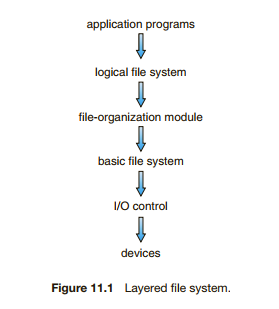
- The file system itself is generally composed of many different levels
- The I/O control level consists of device drivers and interrupt handlers to transfer information between the main memory and the disk system
- device driver can be thought of as a translator.
- Takes high level commands and translates these into low level hardware specific instructions for hardware controller
- interfaces the I/O device to the rest of the system.
- The device driver usually writes specific bit patterns to special locations in the I/O controller’s memory
- tell the controller which device location to act on and what actions to take
- device driver can be thought of as a translator.
- The basic file system needs only to issue generic commands to the appropriate device driver to read and write physical blocks on the disk.
- Each physical block is identified by its numeric disk address (for example, drive 1, cylinder 73, track 2, sector 10)
- manages the memory buffers and caches that hold various file-system, directory, and data blocks.
- A block in the buffer is allocated before the transfer of a disk block can occur. When the buffer is full, the buffer manager must find more buffer memory or free up buffer space to allow a requested I/O to complete.
- The file-organization module knows about files and their logical blocks, as well as physical blocks.
- By knowing the type of file allocation used and the location of the file, the file-organization module can translate logical block addresses to physical block addresses for the basic file system to transfer
- The file-organization module also includes the free-space manager
- tracks unallocated blocks and provides these blocks to the file-organization module when requested
- Finally, the logical file system manages metadata information.
- Metadata includes all of the file-system structure except the actual data
- It maintains file structure via file-control blocks
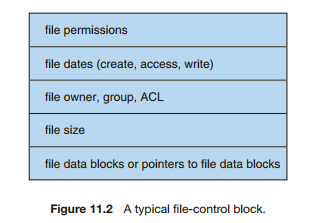
- A filecontrol block (FCB) (an inode in UNIX file systems)contains information about the file, including ownership, permissions, and location of the file contents.
- also responsible for protection
- Unfortunately, layering can introduce more operating-system overhead, which may result in decreased performance.
- The I/O control level consists of device drivers and interrupt handlers to transfer information between the main memory and the disk system
11.2 File-System Implementation
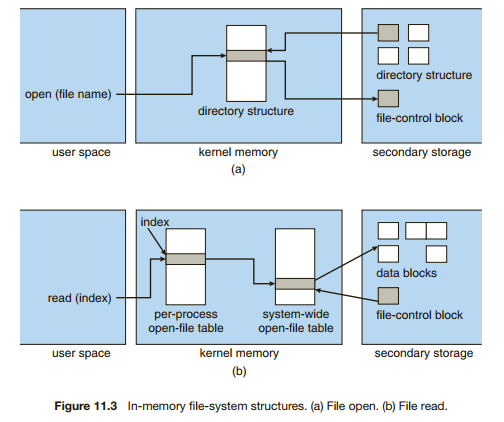
- operating systems implement open() and close() systems calls for processes to request access to file contents.
- 11.2.1 Overview
- Several on-disk and in-memory structures are used to implement a file system.
- On disk, the file system may contain information about how to boot an operating system stored there, the total number of blocks, the number and location of free blocks, the directory structure, and individual files.
- • A boot control block (per volume) can contain information needed by the system to boot an operating system from that volume
- It is typically the first block of a volume.
- • A volume control block (per volume) contains volume (or partition) details, such as the number of blocks in the partition, the size of the blocks, a free-block count and free-block pointers, and a free-FCB count and FCB pointers.
- • A directory structure (per file system) is used to organize the files.
- • Aper-file FCB contains many details about the file. It has a unique identifier number to allow association with a directory entry.
- • A boot control block (per volume) can contain information needed by the system to boot an operating system from that volume
- The in-memory information is used for both file-system management and performance improvement via caching.
- The data are loaded at mount time, updated during file-system operations, and discarded at dismount
- • An in-memory mount table contains information about each mounted volume.
- • An in-memory directory-structure cache holds the directory information of recently accessed directories.
- • The system-wide open-file table contains a copy of the FCB of each open file, as well as other information.
- • The per-process open-file table contains a pointer to the appropriate entry in the system-wide open-file table
- • Buffers hold file-system blocks when they are being read from disk or written to disk.
- On disk, the file system may contain information about how to boot an operating system stored there, the total number of blocks, the number and location of free blocks, the directory structure, and individual files.
- To create a new file, an application program calls the logical file system. The logical file system knows the format of the directory structures. To create a new file, it allocates a new FCB. (Alternatively, if the file-system implementation creates all FCBs at file-system creation time, an FCB is allocated from the set of free FCBs.) The system then reads the appropriate directory into memory, updates it with the new file name and FCB and writes it back to the disk
- The logical file system can call the file-organization module to map the directory I/O into disk-block numbers, which are passed on to the basic file system and I/O control system.
- Now that a file has been created, it can be used for I/O
- The open() call passes a file name to the logical file system. The open() system call first searches the system-wide open-file table to see if the file is already in use by another process. If it is, a per-process open-file table entry is created pointing to the existing system-wide open-file table. This algorithm can save substantial overhead. If the file is not already open, the directory structure is searched for the given file name. Parts of the directory structure are usually cached in memory to speed directory operations. Once the file is found, the FCB is copied into a system-wide open-file table in memory. This table not only stores the FCB but also tracks the number of processes that have the file open.
- Next, an entry is made in the per-process open-file table, with a pointer to the entry in the system-wide open-file table and some other fields.
- The open() call returns a pointer to the appropriate entry in the per-process table
- When a process closes the file, the per-process table entry is removed, and the system-wide entry’s open count is decremented.
- 11.2.3 Virtual File Systems
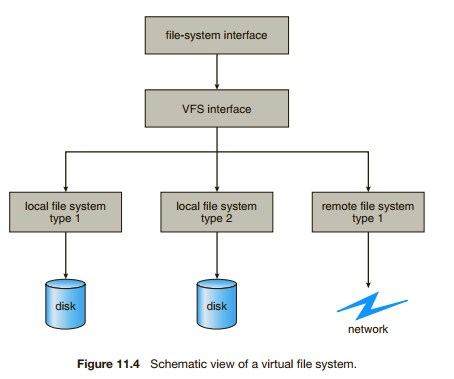
- The first layer is the file-system interface, based on the open(), read(), write(), and close() calls and on file descriptors.
- The second layer is called the virtual file system (VFS) layer. The VFS layer serves two important functions:
- 1. It separates file-system-generic operations from their implementation by defining a clean VFS interface. Several implementations for the VFS interface may coexist on the same machine, allowing transparent access to different types of file systems mounted locally.
- 2. It provides a mechanism for uniquely representing a file throughout a network.
- the VFS distinguishes local files from remote ones, and local files are further distinguished according to their file-system types.
- Several on-disk and in-memory structures are used to implement a file system.
- 11.2.2 Partitions and Mounting
- Each partition can be either “raw,” containing no file system, or “cooked,” containing a file system.
- Raw disk is used where no file system is appropriate.
- Eg. For swap space
- Boot information can be stored in a separate partition
- The file system is not loaded at boot time
- This boot loader in turn knows enough about the filesystem structure to be able to find and load the kernel and start it executing
- The root partition, which contains the operating-system kernel and sometimes other system files, is mounted at boot time.
- As part of a successful mount operation, the operating system verifies that the device contains a valid file system.
- by asking the device driver to read the device directory and verifying that the directory has the expected format.
- Finally, the operating system notes in its in-memory mount table that a file system is mounted
11.3 Directory Implementation
- The selection of directory-allocation and directory-management algorithms significantly affects the efficiency, performance, and reliability of the file system.
- 11.3.1 Linear List
- linear list of file names with pointers to the data blocks.
- The real disadvantage of a linear list of directory entries is that finding a file requires a linear search. The entire list must be searched every time for a file, or to add or to delete
- many operating systems implement a software cache to store the most recently used directory information
- Amore sophisticated tree data structure, such as a balanced tree, might help here. An advantage of the sorted list is that a sorted directory listing can be produced without a separate sort step.
- 11.3.2 Hash Table
- Here, a linear list stores the directory entries
- The hash table takes a value computed from the file name and returns a pointer to the file name in the linear list
- greatly decrease the directory search time.
- difficulties with a hash table are its generally fixed size and the dependence of the hash function on that size.
- For example, assume that we make a linear-probing hash table that holds 64 entries. The hash function converts file names into integers from 0 to 63 (for instance, by using the remainder of a division by 64). If we later try to create a 65th file, we must enlarge the directory hash table—say, to 128 entries. As a result, we need a new hash function that must map file names to the range 0 to 127, and we must reorganize the existing directory entries to reflect their new hash-function values.
- Alternatively, we can use a chained-overflow hash table. Each hash entry can be a linked list instead of an individual value
11.4 Allocation Methods
- how to allocate space to these files so that disk space is utilized effectively and files can be accessed quickly.
- Three major methods of allocating disk space are in wide use:
- contiguous, linked, and indexed.
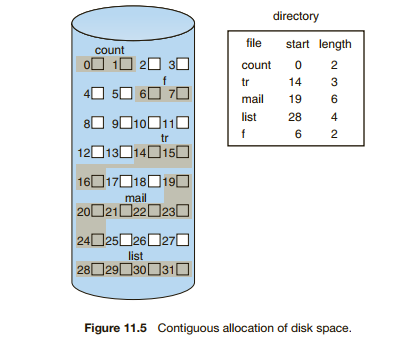
- 11.4.1 Contiguous Allocation
- each file occupy a set of contiguous blocks on the disk
- Disk addresses define a linear ordering on the disk
- When head movement is needed (from the last sector of one cylinder to the first sector of the next cylinder), the head need only move from one track to the next. Thus, the number of disk seeks required for accessing contiguously allocated files is minimal
- If the file is n blocks long and starts at location b, then it occupies blocks b, b + 1, b + 2, ..., b + n − 1
- sequential and direct access can be supported by contiguous allocation.
- One difficulty is finding space for a new file.
- a particular application of the general dynamic storage-allocation problem discussed in Section 8.3
- First fit, best fit and worst fit
- All these algorithms suffer from the problem of external fragmentation
- External fragmentation exists whenever free space is broken into chunks
- when the largest contiguous chunk is insufficient for a request
- One strategy for preventing loss of significant amounts of disk space to external fragmentation is to copy an entire file system onto another disk. The original disk is then freed completely, creating one large contiguous free space. We then copy the files back onto the original disk by allocating contiguous space from this one large hole. This scheme effectively compacts all free space into one contiguous space, solving the fragmentation problem.
- Defragmenting a drive
- First fit, best fit and worst fit
- a particular application of the general dynamic storage-allocation problem discussed in Section 8.3
- How to cater for files that grow after being created and allocated a block?
- some operating systems use a modified contiguous-allocation scheme
- a contiguous chunk of space is allocated initially. Then, if that amount proves not to be large enough, another chunk of contiguous space, known as an extent, is added
- The location of a file’s blocks is then recorded as a location and a block count, plus a link to the first block of the next extent.
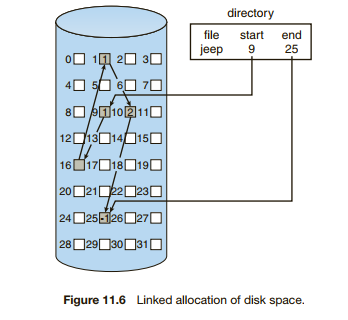
- 11.4.2 Linked Allocation
- Linked allocation solves all problems of contiguous allocation. With linked allocation, each file is a linked list of disk blocks
- The directory contains a pointer to the first and last blocks of the file
- There is no external fragmentation with linked allocation
- it is never necessary to compact disk space.
- The major problem is that it can be used effectively only for sequential-access files. To find the ith block of a file, we must start at the beginning of that file and follow the pointers until we get to the ith block. (No support for direct access)
- Another disadvantage is the space required for the pointers
- If a pointer requires 4 bytes out of a 512-byte block, then 0.78 percent of the disk is being used for pointers, rather than for information.
- The usual solution to this problem is to collect blocks into multiples, called clusters, and to allocate clusters rather than blocks
- Pointers then use a much smaller percentage of the file’s disk space
- The cost of this approach is an increase in internal fragmentation, because more space is wasted when a cluster is partially full than when a block is partially full
- Yet another problem of linked allocation is reliability
- If a pointer gets lost or damaged, the part of the file is missing
- One partial solution is to use doubly linked lists, and another is to store the file name and relative block number in each block
- More overhead for each file
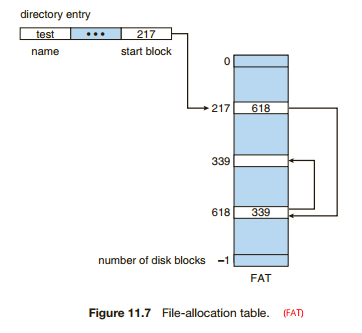
- variation on linked allocation is the use of a file-allocation table (FAT)
- A section of disk at the beginning of each volume is set aside to contain the table. The table has one entry for each disk block and is indexed by block number
- The FAT is used in much the same way as a linked list. The directory entry contains the block number of the first block of the file. The table entry indexed by that block number contains the block number of the next block in the file
- The FAT allocation scheme can result in a significant number of disk head seeks, unless the FAT is cached.
- random-access time is improved, because the disk head can find the location of any block by reading the information in the FAT.
- 11.4.3 Indexed Allocation
- Indexed allocation solves this problem (Direct access) by bringing all the pointers together into one location: the index block.
- Each file has its own index block, which is an array of pointers to disk-block addresses.
- The ith entry in the index block points to the ith block of the file
- The directory contains the address of the index block
- Use the ith index block pointer to the ith block. (similar to the paging scheme described in Section 8.5)
- The index block is initially NULL, and as the blocks are allocated to the file the free-space manager issues a block. The ith index block entry is then updated with the address
- Indexed allocation supports direct access, without suffering from external fragmentation
- The pointer overhead of the index block is generally greater than the pointer overhead of linked allocation.
- This point raises the question of how large the index block should be.
- • Linked scheme. An index block is normally one disk block. Thus, it can be read and written directly by itself.
- for large files, we can link together several index blocks
- an index block might contain a small header giving the name of the file and a set of the first 100 disk-block addresses. The next address (the last word in the index block) is null (for a small file) or is a pointer to another index block (for a large file).
- • Multilevel index.A variant of linked representation uses a first-level index block to point to a set of second-level index blocks, which in turn point to the file blocks.
- With 4,096-byte blocks, we could store 1,024 four-byte pointers in an index block. Two levels of indexes allow 1,048,576 data blocks and a file size of up to 4 GB.
- You have each of the 1024 pointers pointing to its own 1024 pointers, which then point to the data (hence 1024^2 => 1048576)
- 1048576 * 4096 per block = 4GB
- With 4,096-byte blocks, we could store 1,024 four-byte pointers in an index block. Two levels of indexes allow 1,048,576 data blocks and a file size of up to 4 GB.
- • Combined scheme.
- Book ->Used by UNIX
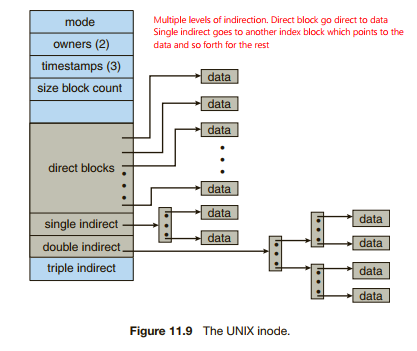
- • Combined scheme. Another alternative, used in UNIX-based file systems, is to keep the first, say, 15 pointers of the index block in the file’s inode. The first 12 of these pointers point to direct blocks; that is, they contain addresses of blocks that contain data of the file. Thus, the data for small files (of no more than 12 blocks) do not need a separate index block. If the block size is 4 KB, then up to 48 KB of data can be accessed directly. The next three pointers point to indirect blocks. The first points to a single indirect block, which is an index block containing not data but the addresses of blocks that do contain data. The second points to a double indirect block, which contains the address of a block that contains the addresses of blocks that contain pointers to the actual data blocks. The last pointer contains the address of a triple indirect block. (A UNIX inode is shown in Figure 11.9.) Under this method, the number of blocks that can be allocated to a file exceeds t
- • Linked scheme. An index block is normally one disk block. Thus, it can be read and written directly by itself.
- This point raises the question of how large the index block should be.
- Indexed allocation solves this problem (Direct access) by bringing all the pointers together into one location: the index block.
- 11.4.4 Performance
- storage efficiency and data-block access times
- For any type of access, contiguous allocation requires only one access to get a disk block.
- We can store the address of the first block in memory and calculate +i to get to desired block
- Bad for when the file requires additional blocks later on
- For linked allocation, we can also keep the address of the next block in memory and read it directly
- Good for sequential and slow for direct
- Some OS's can allow a file to be created using sequential access only or direct only
- Indexed allocation is more complex. If the index block is already in memory, then the access can be made directly.
- Otherwise the index block must be read, or the multi level blocks must be read till the desired data block can be found
11.5 Free-Space Management
- To keep track of free disk space, the system maintains a free-space list. The free-space list records all free disk blocks—those not allocated to some file or directory.
- 11.5.1 Bit Vector
- Frequently, the free-space list is implemented as a bit map or bit vector
- Each block is represented by 1 bit. If the block is free, the bit is 1; if the block is allocated, the bit is 0.
- Unfortunately, bit vectors are inefficient unless the entire vector is kept in main memory (and is written to disk occasionally for recovery needs)
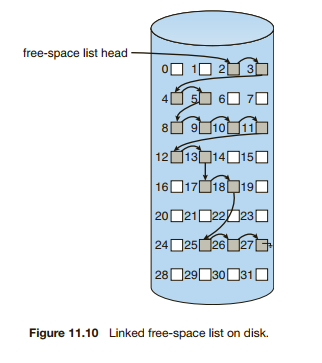
- 11.5.2 Linked List
- link together all the free disk blocks, keeping a pointer to the first free block in a special location on the disk and caching it in memory.
- This scheme is not efficient; to traverse the list, we must read each block, which requires substantial I/O time.
- Usually, the operating system simply needs a free block so that it can allocate that block to a file, so the first block in the free list is used.
- 11.5.3 Grouping
- stores the addresses of n free blocks in the first free block. The first n−1 of these blocks are actually free. The last block contains the addresses of another n free blocks, and so on.
- 11.5.4 Counting
- several contiguous blocks may be allocated or freed simultaneously when allocated contiguously.
- Each entry in the free-space list then consists of a disk address (the first free block) and a count. (contiguous free blocks after)
- These entries can be stored in a balanced tree, rather than a linked list, for efficient lookup, insertion, and deletion.
- 11.5.5 Space Maps
- Book -> Solaris
11.6 Efficiency and Performance
- 11.6.1 Efficiency
- The efficient use of disk space depends heavily on the disk-allocation and directory algorithms in use.
- 11.6.2 Performance
- disk controllers include local memory to form an on-board cache
- The disk controller then transfers any sector requests to the operating system.
- 11.6.1 Efficiency
11.7 Recovery
- Files and directories are kept both in main memory and on disk, and care must be taken to ensure that a system failure does not result in loss of data or in data inconsistency.
- A system crash can cause inconsistencies among on-disk file-system data structures, such as directory structures, free-block pointers, and free FCB pointers.
- 11.7.1 Consistency Checking
- For detection, a scan of all the metadata on each file system can confirm or deny the consistency of the system (At boot time)
- The consistency checker—a systems program such as fsck in UNIX— compares the data in the directory structure with the data blocks on disk and tries to fix any inconsistencies it finds.
- 11.7.2 Log-Structured File Systems
- algorithms and technologies originally used in one area are equally useful in other areas. Such is the case with the database log-based recovery algorithms.
- These logging algorithms have been applied successfully to the problem of consistency checking.
- 11.7.3 Other Solutions
- 11.7.4 Backup and Restore
- system programs can be used to back up data from disk to another storage device
- the loss of an individual file, or of an entire disk, may then be a matter of restoring the data from backup.
- A typical backup schedule may then be as follows:
- Day 1. Copy to a backup medium all files from the disk. This is called a full backup.
- • Day 2. Copy to another medium all files changed since day 1. This is an incremental backup.
- • Day N. Copy to another medium all files changed since day N− 1. Then go back to day 1.
- the larger the value of N, the greater the number of media that must be read for a complete restore.
11.8 NFS
- They are typically integrated with the overall directory structure and interface of the client system. NFS is a good example of a widely used, well implemented client–server network file system.
- Book
Images and files in the map
Information
- Description
- Computer Science Mind Map on Chapter 11: Implementing File-Systems (3721), created by Gideon Van on 25/04/2020.
- Created by
- Gideon Van
- Views
- 1
- Rating