
Mind map
QMS
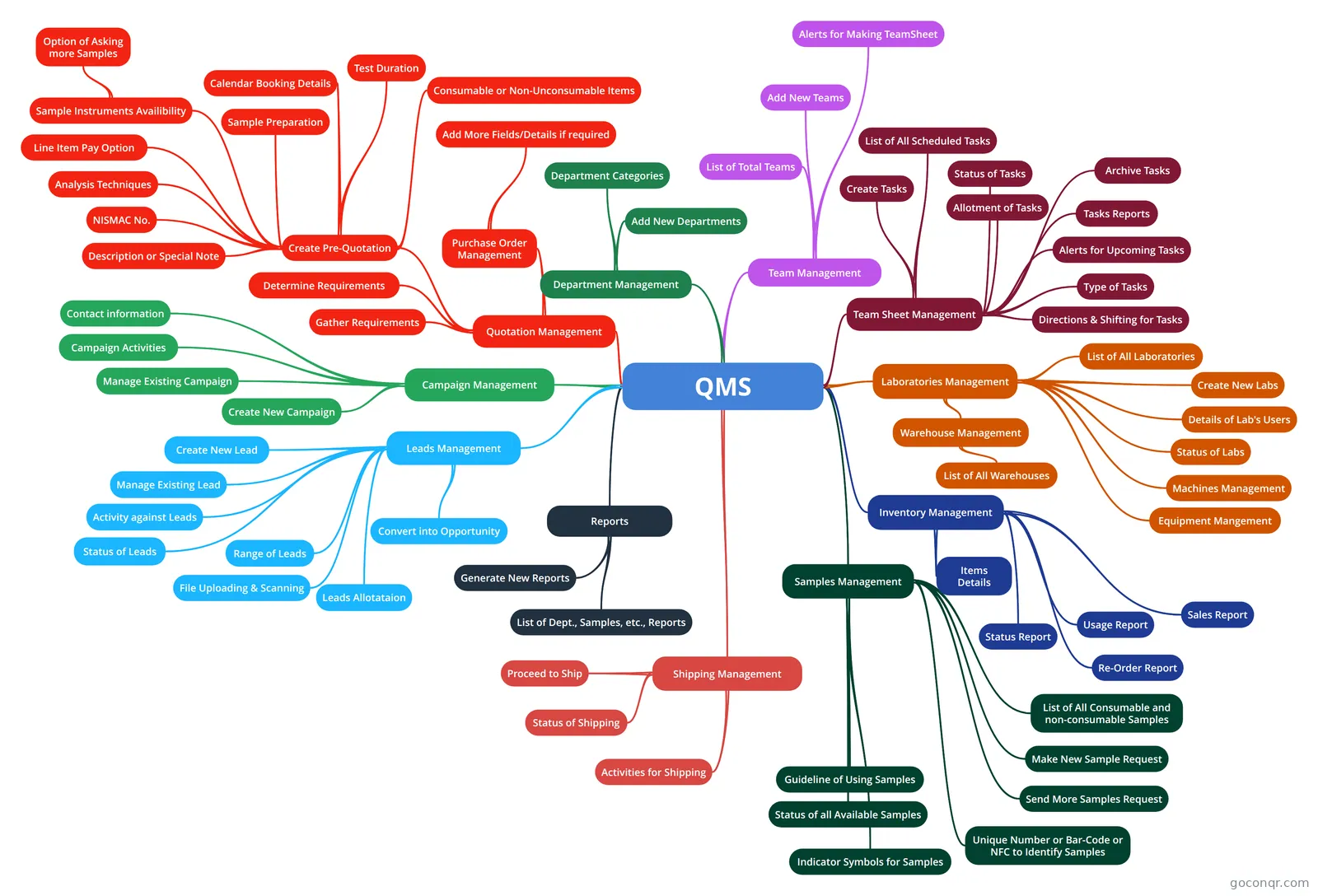
Mind map: QMS quality management system
Map content
QMS
Leads Management
- Create New Lead
- Manage Existing Lead
- Activity against Leads
- Status of Leads
- Range of Leads
- File Uploading & Scanning
- Leads Allotataion
- Convert into Opportunity
Campaign Management
- Create New Campaign
- Manage Existing Campaign
- Campaign Activities
- Contact information
Quotation Management
- Gather Requirements
- Determine Requirements
- Create Pre-Quotation
- Description or Special Note
- NISMAC No.
- Analysis Techniques
- Line Item Pay Option
- Sample Instruments Availibility
- Option of Asking more Samples
- Calendar Booking Details
- Consumable or Non-Unconsumable Items
- Test Duration
- Sample Preparation
- Purchase Order Management
- Add More Fields/Details if required
Department Management
- Department Categories
- Add New Departments
Team Management
- List of Total Teams
- Add New Teams
- Alerts for Making TeamSheet
Team Sheet Management
- List of All Scheduled Tasks
- Status of Tasks
- Allotment of Tasks
- Tasks Reports
- Alerts for Upcoming Tasks
- Create Tasks
- Type of Tasks
- Directions & Shifting for Tasks
- Archive Tasks
Laboratories Management
- Warehouse Management
- List of All Warehouses
- List of All Laboratories
- Create New Labs
- Details of Lab's Users
- Status of Labs
- Machines Management
- Equipment Mangement
- Warehouse Management
Inventory Management
- Sales Report
- Usage Report
- Re-Order Report
- Status Report
- Items Details
Shipping Management
- Proceed to Ship
- Status of Shipping
- Activities for Shipping
Reports
- Generate New Reports
- List of Dept., Samples, etc., Reports
Samples Management
- List of All Consumable and non-consumable Samples
- Make New Sample Request
- Status of all Available Samples
- Send More Samples Request
- Guideline of Using Samples
- Unique Number or Bar-Code or NFC to Identify Samples
- Indicator Symbols for Samples