
Mind map
Computer Organisation and Architecture
Map content
Computer Organisation and Architecture
Internal Hardware Components of a Computer
- Processor
- It performs arithmetical, logical, input/output (I/O) and other basic instructions that are passed from an operating system (OS), it is the main brains of a computer
- Speed is given in megahertz/gigahertz
- Can deal with 64 (computer) 32 (laptop) bits of information
- It performs arithmetical, logical, input/output (I/O) and other basic instructions that are passed from an operating system (OS), it is the main brains of a computer
- Main Memory
- Memory that is directly accessible to the processor. It is very fast in order not to slow the system down (BOTTLENECKING
- Read Only Memory (ROM)
- Permanent area of storage for special programs and data, the contents cannot be altered due to the fact that the ROM chip cannot be moved
- ROM IS NON VOLATILE
- Permanent area of storage for special programs and data, the contents cannot be altered due to the fact that the ROM chip cannot be moved
- Random Access Memory (RAM)
- It constitutes the working area of the computer, it's used for storage of programs and data currently in use.
- RAM IS VOLATILE
- Once the computer is turned off all the data that was stored there is lost.
- RAM is directly written and read by the processor
- It constitutes the working area of the computer, it's used for storage of programs and data currently in use.
- Cache Memory
- Holds frequently accessed code and data. It is extremely fast and is accessed by the processor therefore doesn't access main momory
- Cache memory is very small because it doesn't access main memory
- Holds frequently accessed code and data. It is extremely fast and is accessed by the processor therefore doesn't access main momory
- Read Only Memory (ROM)
- Memory that is directly accessible to the processor. It is very fast in order not to slow the system down (BOTTLENECKING
- Busses
- A bus is many microscopic parallel wires that transmit data between internal components. They connect the processor to the various input and output controllers. They can either be uni- directional or bi - directional.
- Address Bus
- Used to specify a physical address in memory so the data bus can access it.
- UNI - DIRECTIONAL
- The number of addressable memory addresses is equivalent to 2n where n is the bus size
- Used to specify a physical address in memory so the data bus can access it.
- Data Bus
- It transfers data between the processor, main memory and I/O controller
- BI - DIRECTIONAL
- It is likely to have the largest word size
- It transfers data between the processor, main memory and I/O controller
- Control Bus
- Carries signals that regualtes data flow around a system. All the signals on the bus follow a strict timinf sequence
- Address Bus
- A bus is many microscopic parallel wires that transmit data between internal components. They connect the processor to the various input and output controllers. They can either be uni- directional or bi - directional.
- I/O Controllers
- Provides the interface between the ports and the motherboarde
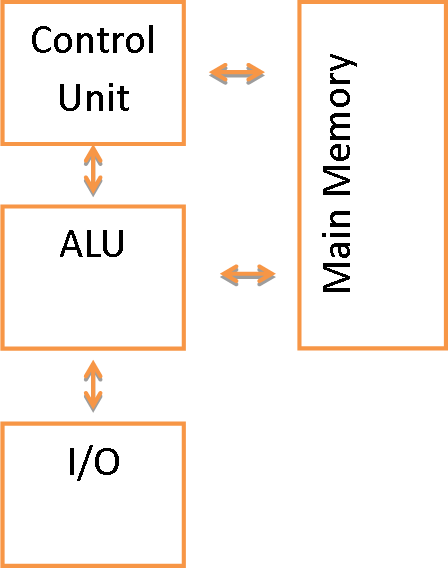
- Von Neumann Arcitechture
- Memory is used to store both programs and data together. The processor uses the fetch - decode - execute method and so can only work on one instruction at a time
- This tends to be used in general - purpose computing systems
- Memory is used to store both programs and data together. The processor uses the fetch - decode - execute method and so can only work on one instruction at a time
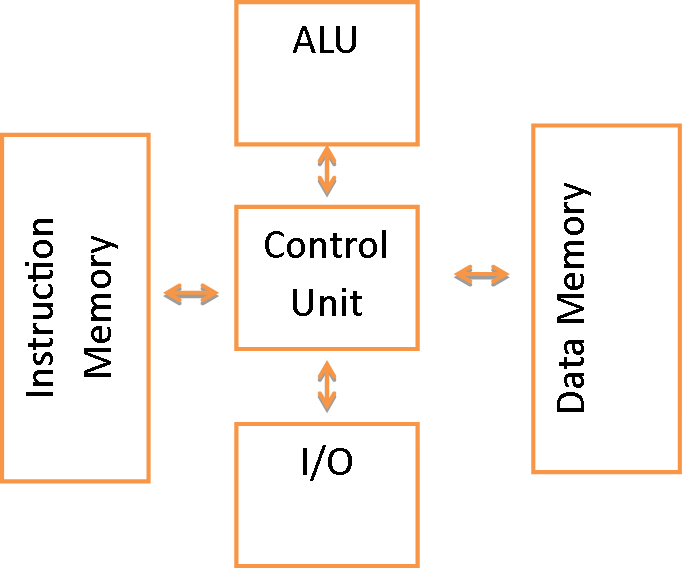
- Harvard Architecture
- This uses separate memory for data and programs/instructions and utilised the control unit at the centre of the structure
- Embedded systems such as those found in digital signal proc3essing systems use this
- This uses separate memory for data and programs/instructions and utilised the control unit at the centre of the structure
- Addressable memory
- Addressable memory is memory that is accessible from a computer program to store data
- When the processor needs to access a section of memory it conveys what address is being indexed using the address bus and uses the control bus to state whether it is reading or writing to that memory location
- The data bus is then used to transmit data to or from the address location
- When the processor needs to access a section of memory it conveys what address is being indexed using the address bus and uses the control bus to state whether it is reading or writing to that memory location
- Addressable memory is memory that is accessible from a computer program to store data
- Processor
Meanings of the Stored Program Concept
- The concept proposed that:
- In order to execute a program it must be contained in main memory
- Instructions are read in machine code and are fetched, decoded if needed, subsequently from main memory and executed in the processor
- The processor then performs the arithmetic, or logical, operations of the fetched instructions
- Instructions are collected in a periodic manor (serially) and then the processor will perform the arithmetic operations.
- The results could then be used to determine changes to the stored instructions
- The concept allows digital computers to become more adaptable and more flexible because of the nature of the concept
- A computer can be adapted and built upon to perform any task with little consideration as to how the hardware will interact
- Without the stored program model there would there would be rigorous restrictions on what hardware could be used with other hardware which would make building cheap and affordable computers which possess moderate computation capabilitys
- A computer can be adapted and built upon to perform any task with little consideration as to how the hardware will interact
- The concept proposed that:
The Processor and its Components
- Arithmetic Logic Unit
- ALU carries out arithmetic operations such as addition etc. It can make logical comparisons between items of data. The result of the ALU is held in a register called the accumulator
- Control unit
- This governs the operations of all hardware, including input and output devices and the CPU. It does this by fetching, interpreting and executing each instruction in turn, in an automatically controlled cycle
- Clock
- This provides regular pulse of high voltage followed by low voltage. Each high to low transition is know as a cycle. The clock regulates all of the actions that take place.
- General - purpose registers
- These are used for performing general arithmetic functions. They have no pre-defined role by the chip designer and can be manipulated by a computer programmer to perform any role of a register
- Program Counter
- aka the Accumulator. This holds the address of the next instruction to be executed. The PC is incremented to point to the next instruction. Depending on the length of the Current Instruction 1,2 or 3 has to be added to its contents unless its a jump, then the destination address is used.
- Memory Buffer Registers (MBR)
- Values that are about to be added or subtracted can be copied, via the MBR, into the PC. The results can be placed in one PC and from there copied into a main memory location All communications between the CPU and the memory take place through the MBR.
- Current Instruction Register
- This contains the information specifying the instruction that is being performed.
- Memory Address Register
- In order to fetch an instruction from memory the CPU places the address of the instruction in the memory address register and then carries out a memory read; the instruction is then copied into the MBR and from there into the CIR.
- Status Register
- This contains bits that are set or cleared based on the result of an instruction. These flags determine the operation of the processor depending on the result of the previous action. It also handles interrupts to signal to the control unit.
- Arithmetic Logic Unit
Fetch-Execute Cycle
- Fetch Phase
- 1. The contents of the PC are copied into the MAR. The MAR now contains the location address of the next instruction and a memory read is initiated to copy the instruction word from memory into the MBR
- 2. The PC is incremented and now contains the address of the next instruction
- 3. The instruction word is then copied from the MBR into the CIR. The instruction consists of two parts: The operation code (opcode) and the operand. The opcode is the instruction and the operand is the data to perform the operation on.
- Execute Phase
- 1. The opcode instruction in the CIR is decoded to a simple operation (such as add, store, compare) which affects the path the data will then follow
- 2. The instruction in the CIR is executed; if the result needs to be committed to memory the address is held in the MAR.
- 3. Unless the instruction is a STOP instruction, then the cycle is repeated
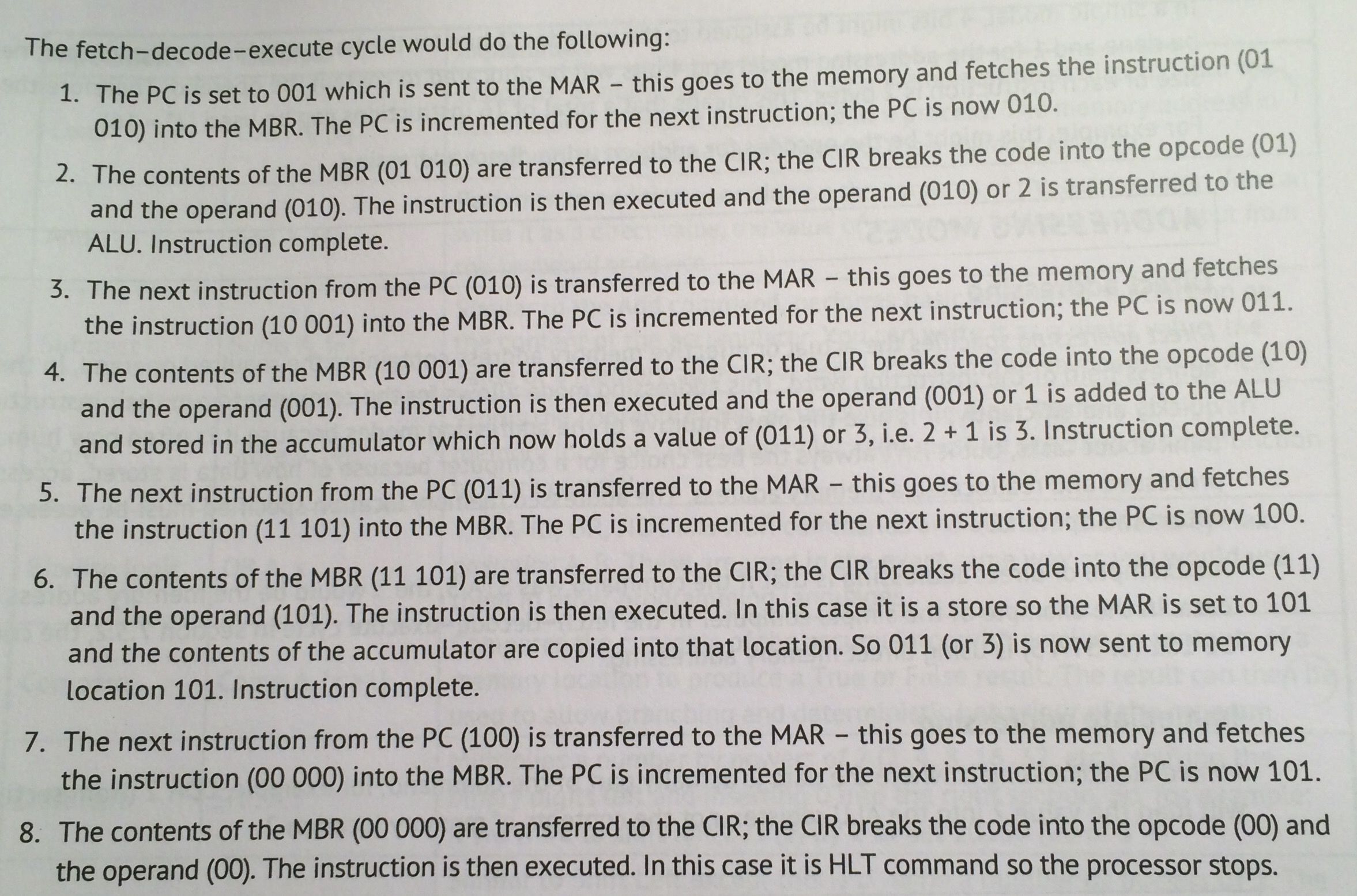
- The fetch - decode- execute cycle would do the following:
- Fetch Phase
Processor Instruction Set
- These are a set of instructions that a processor can apply to a flow of data during run - time of an application
- All processors have different instruction sets as they haven't been standardised
- There are two approaches used in instruction sets: REDUCED INSTRUCTION SET COMPUTER and COMPLEX INSTRUCTION SET COMPUTER
- RISC
- This provides a fairly small and basic instruction set where in every operation cycle only one value id fetched stored to/from memory
- This runs faster because of its memory access speeds and simplicity
- CISC
- This is varied and one instruction can do an entire sequence of operations across multiple clock cycles
- CISC developers have managed to implement PISC principles into the CISC architecture therefore making it more common place
- RISC
- The instruction set is composed of instructions given length of bits and consists of two parts
- OPCODE
- This is the part of the machine language instructions that tells the processor what operation is to be formed
- OPERAND
- This is the data that is stored in the opcodes address
- OPCODE
- These are a set of instructions that a processor can apply to a flow of data during run - time of an application
Addressing modes
- Direct Addressing
- This specifies the actual or effective memory address containing the required operand, in the address field of the instruction word.
- This mode allows for the computer to run their instructions quickly and efficiently.
- This is how humans think about tasks, but isn't always the best choice for a computer because of how data is STORED, ACCESSED, PROCESSED and REALLOCATED a memory address
- The address memory location specified must be accessed to obtain the operand.
- This is how humans think about tasks, but isn't always the best choice for a computer because of how data is STORED, ACCESSED, PROCESSED and REALLOCATED a memory address
- E.G. if the command was STA 5, the 5 would be the memory address and the command (STA) is using direct memory addressing
- Immediate Addressing
- This is where the data is actually part of the COMMAND; e.g. LDA 2 will load the value 2 into the ALU register, not the contents of memory location 2.
- Direct Addressing
Machine code/Assembly Language Opperations
- Load
- Loads the contents of a variable, or memory address directly into the accumulator so it can be used in a process
- Add
- Performs an addition operation on the contents of the accumulator. It can be written as a direct value, the value of a memory address, or user input
- Subtract
- Performs subtraction on the contents of the accumulator. It can be written as a direct value, the value of a memory address, or user input
- Store
- Stores the contents of the accumulator into main memory at a given memory location
- Branching
- Conditional
- Goes to a particular line in the program based on a result of a comparison. Most common branches are based on the results from the ALU and the contents of the PC. They also tend to be based on the value being Zero, positive or not zero
- Unconditional
- Goes to a particular line in the program. It is a compulsory branch and is often used with a conditional branch to TERMINATE at a particular condition
- Conditional
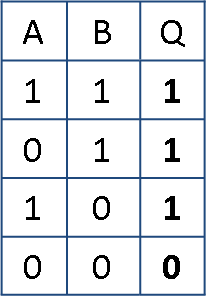
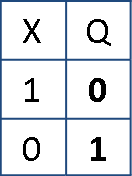
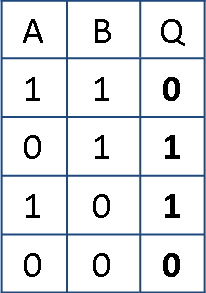
- Bitwise Logic
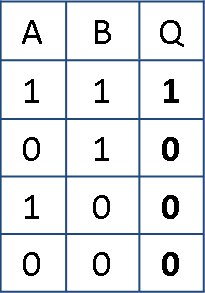
- AND
- OR
- NOT
- XOR
- Logical Shift left
- Multiplies a number by powers of 2, shifting the binary digits to the left and inserting 0 in the right section
- Logical Shift Right
- Divides a number by powers of 2. The leftmost column is filled with zeros. Least significant bits are lost
- Halt
- Tells the computer to halt all processes within the program tree. IT will end the program safely and properly to prevent any errors
- Compare
- Compares the contents of the accumulator with a value or contents of a memory location to produce a TRUE or FALSE result
- Load
Factors Affecting Processor Peformance
- Multiple Cores
- Increase in cores allows for greater throughput of data. It allows the processor to divide the labour of performing a task between the cores
- THREADING is where the processor can split the instructions into a number of simpler instructions
- Cache Memory
- Enables the CPU to access repeatedly used data directly from its own board, rather than repeatedly requesting it from system memory
- Word Length
- A word is a group of bits that can be addressed, transferred and manipulated as a single unit by the CPU.
- A Large word size means that a computer can work faster than a computer with a smaller word size, but is less efficient when the data doesn't need to use the full word length
- Clock Speed
- The faster a computer's clock speed (ticks), the more instructions can be carried out per second
- Bus Width
- The amount of data that the CPU unit can transmit at a time to wherever the data is needed (Memory or input/output devices) the larger the bus width the more efficient the processor Performance
- Multiple Cores
Images and files in the map

Information
- Description
- AS - Level Computing (7. Computer Organisation and Architecture ) Mind Map on Computer Organisation and Architecture, created by Georgie Williams on 10/06/2016.
- Created by
- Georgie Williams
- Views
- 4
- Rating