
Quiz
Magento 2 Front-end Developer Certification Practice Exam
This quiz has question types that open in the usual player.
Questions in this quiz (120)
1In which folders can themes be located? (select all that apply)
- Aapp/design/adminhtml/<Vendor>/<Theme>
- Bapp/design/frontend/<Vendor>/<Theme>
- Cvendor/<path/defined/in/composer.json>
- Dapp/code/<Vendor>/<Theme>
- Eapp/design/frontend/base/<Theme>
2A composer-based theme will necessarily be found in the vendor/ directory
- ATrue
- BFalse
3What is the difference if a theme is installed in one or the other of the possible directories (app/design/ or vendor/)?
- AComposer-based themes are loaded from an external source and cannot be modified directly, whereas local themes are part of the project’s source code and can be modified directly
- BThemes for the Adminhtml area must be loaded through Composer whereas themes for the Frontend area must be located in app/design/.
- COnly official themes provided by Magento (Blank and Luma) can be loaded through Composer. Themes from other vendors must be installed in app/design/.
4Which folders can exist within a theme?
The [blank_start]etc[blank_end]/ folder usually contains only the view.xml file.
The [blank_start]i18n[blank_end]/ folder contains theme translations in csv files.
The [blank_start]media[blank_end]/ folder contains preview.jpg, a screenshot of the theme.
The [blank_start]web/css[blank_end]/ folder contains the stylesheets for the theme.
The [blank_start]web/css/source[blank_end]/ folder contains the .less files.
The [blank_start]web/css/sources/lib[blank_end]/ folder contains overrides for the UI Library files found in lib/web/css/source/lib.
The [blank_start]web/fonts[blank_end]/ folder contains fonts for the theme.
The [blank_start]web/images[blank_end]/ folder contains images for the theme.
The [blank_start]web/js[blank_end]/ folder contains javascript files for the theme.
The <Vendor_Module>/[blank_start]web/css/source[blank_end]/ folder contains overrides of .less files for specific modules.
The <Vendor_Module>/[blank_start]layout/override/base[blank_end]/ folder contains layouts that override the default module layouts.
The <Vendor_Module>/[blank_start]layout/override[blank_end]/<parent_theme>/ folder contains layouts that override the parent theme layouts for the module.
The <Vendor_Module>/[blank_start]templates[blank_end]/ folder contains theme templates which override the default module templates or parent theme templates for this module. Custom templates are also stored in this directory.- Aetc
- Bi18n
- Cmedia
- Dweb/css
- Eweb/css/source
- Fweb/css/source/lib
- Gweb/fonts
- Hweb/images
- Iweb/js
- Jweb/css/source
- Klayout/override/base
- Llayout/override
- Mtemplates
5Which folders are optional and which are required in a theme? Select all folders that are required.
- A<Vendor_Module>/
- Betc/
- Ci18n/
- Dmedia/
- Eweb/
6Which files are required to be present in a theme? Select all that apply.
- Aregistration.php
- Btheme.xml
- Cetc/view.xml
- Dcomposer.json
- Ei18n/en_US.csv
- Fmedia/preview.jpg
7Which design areas exist?
- Afrontend
- Badminhtml
- Cbase
- Dcode
- Ebackend
8What is the difference between them, and what do design areas have in common? Select all that apply.
- AA theme is created either for the frontend OR adminhtml area. The area is defined in the registration.php file
- BA module can contain files for both frontend AND adminhtml and can also share files between the two areas by putting them in the view/base/ directory
- CPlacing a file in the view/frontend/ or view/adminhtml/ folder will override a file of the same name placed in the view/base folder
- DA local theme can overrides files from both frontend AND adminhtml
- EA module is created either for the frontend OR adminhtml area. The area is defined in the registration.php file
9Design areas are used for separating the admin panel functionality from the storefront
- ATrue
- BFalse
10What do you need to do in order to apply an Admin theme?
- ACreate a new module and specify the theme in the arguments supplied for the Magento\Theme\Model\View\Design class in the module's etc/adminhtml/di.xml.
- BSimply reload the admin panel after adding the new theme. The latest theme will be applied automatically.
- CEdit the core_config_data table manually and add the theme id as a value for the design/adminhtml/theme/theme_id path.
- DIn the admin panel, go to Content > Design > Configuration and set the theme for the Admin scope. Clear all caches for the changes to take effect.
11What are the differences between a parent theme and a child theme? Select all that apply.
- AThe child theme inherits view configuration, templates, layouts and static files from its parent(s)
- BThe child theme is the currently selected theme whereas the parent is only indirectly active (its static files, layouts and templates will be used if not overridden by the child theme)
- CAny theme can be chosen for display (whether or not it specifies a parent theme in theme.xml)
- DA parent theme is only used as a backbone for other themes to extend but it cannot be activated directly
- EA child theme can only be used for temporary design changes using the Design Schedule feature but it cannot be activated as the website's main theme
- FOnly the default Blank and Luma themes can be used as parent themes. All other themes must be descendants of one of the base themes
12The parent theme is declared in the child theme’s [blank_start]theme.xml[blank_end] file, in the [blank_start]<parent>[blank_end] node
- Atheme.xml
- Bcomposer.json
- Cregistration.php
- Dparent
- Eparent_theme
13Describe the fallback mechanism between parent and child themes.
Templates and static files are [blank_start]overridden[blank_end] in the child theme
Configuration files are [blank_start]extended[blank_end] in the child theme
Layout files are [blank_start]extended[blank_end] by default but can be [blank_start]overridden[blank_end] if placed in the layout/[blank_start]override[blank_end] folder- Aoverridden
- Bextended
- Cextended
- Doverridden
- Eextended
- Foverridden
- Goverridden
- Hextended
- Ioverride
- Jextend
14How do the configuration settings found in the Admin UI under Content > Design > Configuration affect theme rendering? Select all that apply.
- AThe configuration settings are not theme configuration but rather store design configuration
- BThe configuration settings are stored in core_config_data but not found in Stores > Configuration
- CThe configuration settings follow the Website > Store > Store View hierarchy
- DEach endpoint can be configured separately and inherits from its parents
- EThe values are retrieved like any other store configuration value
- FThe configuration settings are used to specify theme settings such as the parent theme and the theme's preview image
- GThe configuration settings can be defined for each theme separately
15What happens if a theme is added or removed?
Themes are automatically added in the theme table in the database when accessing the Design configuration page [blank_start]True[blank_end]
If a theme is removed, the default theme will automatically be used [blank_start]True[blank_end]
If a theme is removed, the theme will automatically be removed from the theme table [blank_start]True[blank_end]
A composer theme can always be uninstalled by running the php bin/magento theme:uninstall command [blank_start]False[blank_end]- ATrue
- BFalse
- CTrue
- DFalse
- ETrue
- FFalse
- GTrue
- HFalse
16Where would you go to add a scheduled design change?
- AIn the Admin panel, under Content > Design > Schedule
- BIn the Admin panel, under Content > Design > Configuration. Select the appropriate scope and navigate to the Design Schedule section
- C<start_date> and <end_date> nodes can be added in the theme's theme.xml file
17What is the effect if both Contend > Design > Configuration and Contend > Design > Schedule are used at the same time? Select all that apply.
- AThe theme selected in Design Schedule overrides the theme selected in Design Configuration
- BDesign Configuration will be the default option if there are no scheduled design changes
- CDesign Schedule applies the theme between the dates specified
- DAt the end of the scheduled design change, the temporary theme will be removed and Magento will revert to the Luma theme if no other theme is specified through the Design Schedule
- EThe theme must be specified in either Design Configuration OR Design Schedule. The Design Mode can be changed in Stores > Configuration > General > Design.
18What attributes are required on a <container> layout element in Magento 2.1.x?
- Aname
- BhtmlTag
- ChtmlClass
- Dlabel
- Ebefore
- Fafter
- Gas
- Houtput
- IhtmlId
19How would you remove a block or container from a layout?
- AUsing <referenceBlock name="[element_name]" remove="true" /> or <referenceContainer name="[element_name]" remove="true" />
- BUsing <reference name="[element_name]"><action method="remove" /></reference>
- CUsing <referenceBlock name="[element_name]"> or <referenceContainer name="[element_name]"> and setting an argument with the name "remove" and the value "true"
- DUsing <remove name="[element_name]" />
20What attributes are required on a <block> layout element in Magento 2.1.x?
- Aclass
- Bname
- Cbefore
- Dafter
- Eas
- Ftemplate
- Gcacheable
21What attributes are required on a <move> layout instruction?
- Aelement
- Bdestination
- Cas
- Dbefore
- Eafter
22How would you include a layout handle?
<[blank_start]update[blank_end] [blank_start]handle[blank_end]="name_of_the_handle_to_include" />- Aupdate
- Bhandle
23How can the page layout be specified?
The page layout is specified in a layout XML file, in the root <[blank_start]page[blank_end]/> node using the [blank_start]layout[blank_end] argument.- Apage
- Blayout
24What is the purpose of page layouts? Select all that apply.
- ACreate a structured and common set of instructions to render pages
- BThe page layouts can be selected throughout the admin panel to provide a specific layout by page
- CGive layout instructions for a specific page using the module_controller_action structure
25What is the main difference between the Page Layout and Page Configuration layout types?
- APage Layouts only contain containers, unlike Page Configuration layouts, which can contain both blocks and containers
- BA Page Configuration layout is necessarily associated with a specific controller action, unlike a Page Layout, which can be used for multiple pages
26How can the available layout handles for a given page be determined? Select all that apply.
- ALook at the body class. One of the classes contains the path. Exchange the dashes for underscores to get the layout handle
- BThe method $block->getLayout()->getUpdate()->getHandles() can be used to get the list of handles while debugging
- CLook at the url of the page in the browser's address bar. Exchange the slashes for underscores to get the layout handle
27In order to add a layout change that will be available on every page, a module should use the [blank_start]default[blank_end].xml layout handle.
- Adefault
28Select all layout handles that can be used to customize a product page's layout.
- Adefault
- Bcatalog_product_view
- Ccatalog_product_view_type_[type]
- Dcatalog_product_view_id_[id]
- Ecatalog_product_view_sku_[sku]
- Fcatalog_product_view_name_[name]
- Gcatalog_product_view_category_[category]
29Are the following layout elements available on Page Layouts, Page Configurations or both?
html [blank_start]Page Configuration[blank_end]
head [blank_start]Page Configuration[blank_end]
body [blank_start]Page Configuration[blank_end]
title [blank_start]Page Configuration[blank_end]
meta [blank_start]Page Configuration[blank_end]
link [blank_start]Page Configuration[blank_end]
css [blank_start]Page Configuration[blank_end]
script [blank_start]Page Configuration[blank_end]
container [blank_start]Both[blank_end]
referenceContainer [blank_start]Both[blank_end]
block [blank_start]Page Configuration[blank_end]
referenceBlock [blank_start]Page Configuration[blank_end]
update [blank_start]Both[blank_end]
move [blank_start]Both[blank_end]- APage Configuration
- BPage Layout
- CPage Configuration
- DPage Layout
- EPage Configuration
- FPage Layout
- GPage Configuration
- HPage Layout
- IPage Configuration
- JPage Layout
- KPage Configuration
- LPage Layout
- MPage Configuration
- NPage Layout
- OPage Configuration
- PPage Layout
- QPage Configuration
- RPage Layout
- SBoth
- TPage Configuration
- UPage Layout
- VBoth
- WPage Configuration
- XPage Layout
- YBoth
- ZPage Configuration
- AAPage Layout
- ABBoth
- ACPage Configuration
- ADPage Layout
- AEBoth
- AFPage Configuration
- AGPage Layout
- AHBoth
- AIBoth
- AJBoth
- AKBoth
- ALBoth
- AMBoth
- ANBoth
- AOBoth
- APBoth
30What is the default block class?
- A\Magento\Framework\View\Element\Template
- B\Magento\Cms\Block\Block
- C\Magento\Framework\View\Element\AbstractBlock
31What are the differences between blocks and containers? Fill in the blanks.
A [blank_start]container[blank_end] is a structure without content that holds other layout elements such as blocks and containers
A [blank_start]block[blank_end] is a unit of page output that renders some distinctive content (anything visually tangible for the end-user).
A [blank_start]block[blank_end] is associated with a PHP class that makes certain variables and method available to the template
A [blank_start]container[blank_end] can wrap its content in an HTML tag
A [blank_start]block[blank_end] is associated with a template
A [blank_start]container[blank_end] renders its children automatically
A [blank_start]block[blank_end] can contain other blocks, but the template is responsible for rendering them
A [blank_start]container[blank_end] will not render any output if there are no children assigned to it- Acontainer
- Bblock
- Ccontainer
- Dblock
- Econtainer
- Fblock
- Gcontainer
- Hblock
- Icontainer
- Jblock
- Kcontainer
- Lblock
- Mcontainer
- Nblock
- Ocontainer
- Pblock
32If you need to override a module layout, where would you put the layout file?
- Atheme_dir/Vendor_Module/layout/override/base/name_of_layout.xml
- Btheme_dir/Vendor_Module/layout/override/frontend/name_of_layout.xml
- Ctheme_dir/Vendor_Module/layout/overrides/base/name_of_layout.xml
- Dtheme_dir/Vendor_Module/layout/overrides/frontend/name_of_layout.xml
33During layout merging, what is the order in which XML files are merged?
Module files
Sorted according to their module priority (array index of module's position in app/ etc/config.php). If their priorities are equal, they are sorted according to their alphabetical priority)
- Module [blank_start]base[blank_end] files loaded
- Module [blank_start]area[blank_end] files loaded
Theme files
- [blank_start]Layout[blank_end] files loaded
- [blank_start]Override[blank_end] files loaded
- [blank_start]Theme override[blank_end] files replaced- Abase
- Barea
- CLayout
- DOverride
- ETheme override
34What are additive changes and what are overriding changes during layout merging?
Adding a new block or setting a new argument is considered and [blank_start]additive[blank_end] change. Changing the value of an existing argument is considered and [blank_start]overriding[blank_end] change.- Aadditive
- Boverriding
35In which element are image properties configured in etc/view.xml?
<[blank_start]images[blank_end] module=“Magento_Catalog”>- Aimages
36What are the available image types in etc/view.xml? Select all that apply
- Aimage
- Bsmall_image
- Cswatch_image
- Dswatch_thumb
- Ethumbnail
- Flarge_image
- Gswatch_thumbnail
- Hbase_image
37In what order are image properties defined in etc/view.xml?
[blank_start]width[blank_end]
[blank_start]height[blank_end]
[blank_start]constrain[blank_end]
[blank_start]aspect_ratio[blank_end]
[blank_start]frame[blank_end]
[blank_start]transparency[blank_end]
[blank_start]background[blank_end]- Awidth
- Bheight
- Cconstrain
- Daspect_ratio
- Eframe
- Ftransparency
- Gbackground
38How do you access a value from etc/view.xml in a template?
$block->[blank_start]getVar[blank_end]($name, $module = null)- AgetVar
39How would you set arguments on a block?
<block name="my_block" template="Vendor_Module::path/to/template.phtml">
<[blank_start]arguments[blank_end]>
<[blank_start]argument[blank_end] [blank_start]name[blank_end]="my_argument" [blank_start]xsi:type[blank_end]="sring" [blank_start]translate[blank_end]="true">My value</argument>
<[blank_start]argument[blank_end] [blank_start]name[blank_end]="other_argument" xsi:type="array">
<[blank_start]item[blank_end] [blank_start]name[blank_end]="item1" xsi:type="number">1</item>
...
</argument>
</arguments>
</block>- Aarguments
- Bargument
- Cname
- Dxsi:type
- Etranslate
- Fargument
- Gitem
- Hname
- Iname
40What is the correct way to use a loop in a .phtml template according to the Magento coding standards?
- A<?php foreach ($items as $item): ?>
...
<?php endforeach; ?> - B<?php foreach ($items as $item) { ?>
...
<?php } ?> - C<?php for ($i = 0; $i < count($items); $i++) { ?>
...
<?php } ?> - D<?php for ($i = 0; $i < count($items); $i++): ?>
...
<?php endfor; ?>
- A<?php foreach ($items as $item): ?>
41Name the common methods available on the $block variable:
[blank_start]getRootDirectory[blank_end]() - Instantiates filesystem directory
[blank_start]getMediaDirectory[blank_end]() - Get media directory
[blank_start]getUrl[blank_end]($route = '', $params = []) - Generate url by route and parameters
[blank_start]getBaseUrl[blank_end]() - Get base url of the application
[blank_start]getChildBlock[blank_end]($alias) - Retrieve child block by name
[blank_start]getChildHtml[blank_end]($alias = '', $useCache = true) - Retrieve child block HTML
[blank_start]getChildChildHtml[blank_end]($alias, $childChildAlias = '', $useCache = true) - Render output of child child element
[blank_start]getChildData[blank_end]($alias, $key = '') - Get a value from child block by specified key
[blank_start]getBlockHtml[blank_end]($name) - Retrieve block html
[blank_start]formatDate[blank_end]($date = null, $format = \IntlDateFormatter::SHORT, $showTime = false, $timezone = null) - Retrieve formatting date
[blank_start]formatTime[blank_end]($time = null, $format = \IntlDateFormatter::SHORT, $showDate = false) - Retrieve formatting time
[blank_start]getModuleName[blank_end]() - Retrieve module name of block
[blank_start]escapeHtml[blank_end]($data, $allowedTags = null) - Escape HTML entities
[blank_start]escapeJs[blank_end]($string) - Escape string for the JavaScript context
[blank_start]escapeHtmlAttr[blank_end]($string, $escapingSingleQuote = true) - Escape a string for the HTML attribute context
[blank_start]escapeCss[blank_end]($string) - Escape string for the CSS context
[blank_start]stripTags[blank_end]($data, $allowableTags = null, $allowHtmlEntries = false) - Wrapper for standard [blank_start]strip_tags[blank_end]() function with extra functionality for html entities
[blank_start]escapeUrl[blank_end]($string) - Escape URL
[blank_start]getVar[blank_end]($name, $module = null) - Get variable value from view configuration- AgetRootDirectory
- BgetMediaDirectory
- CgetUrl
- DgetBaseUrl
- EgetChildBlock
- FgetChildHtml
- GgetChildChildHtml
- HgetChildData
- IgetBlockHtml
- JformatDate
- KformatTime
- LgetModuleName
- MescapeHtml
- NescapeJs
- OescapeHtmlAttr
- PescapeCss
- QstripTags
- Rstrip_tags
- SescapeUrl
- TgetVar
42How can a group of child blocks be rendered in a template?
- AUsing the getGroupChildNames() method and then rendering each block by name in a loop
- BUsing the getGroupChildHtml() method
- CUsing the getData('group_items') method in a foreach loop
43Given the following code in layout XML, how would you render that value using a magic getter in a template?
<block name="my_block" template="Vendor_Module::path/to/template.phtml">
<arguments>
<argument name="name_of_argument" xsi:type="string">Value of argument</argument>
</arguments>
</block>
<?= $block->[blank_start]getNameOfArgument[blank_end](); ?>- AgetNameOfArgument
44What command would you use to deploy static view files for the Magento/luma theme in the fr_FR locale using the compact strategy?
bin/magento [blank_start]setup:static-content:deploy[blank_end] [blank_start]fr_FR[blank_end] --[blank_start]theme[blank_end] [blank_start]Magento/luma[blank_end] -[blank_start]s[blank_end] [blank_start]compact[blank_end]- Afr_FR
- Btheme
- Cs
- Dcompact
- EMagento/luma
- Fsetup:static-content:deploy
45Explain the differences between the various static files deployment strategies.
When the [blank_start]Standard[blank_end] strategy is used, all static view files for all packages are deployed.
The [blank_start]Quick[blank_end] strategy minimizes the time required for deployment when files for more than one locale are deployed.
The [blank_start]Compact[blank_end] strategy avoids file duplication by storing similar files in base subdirectories.- AStandard
- BQuick
- CCompact
46What command would you use to create symlinks to LESS files for the Magento/luma theme in the fr_FR locale?
bin/magento [blank_start]dev:source-theme:deploy[blank_end] --[blank_start]locale[blank_end] fr_FR --[blank_start]theme[blank_end] Magento/luma- Adev:source-theme:deploy
- Blocale
- Ctheme
47What are the differences between development and production mode in regards to frontend development? Select all that apply.
- AProduction mode will not generate any missing static files
- BDevelopment and default will attempt to symlink any necessary assets into the corresponding folder in pub/static
- CIn developer mode, errors are rendered in the browser, while in production and default they are not shown and only written to a report file.
- DProduction mode will always load merged and minified CSS and JS files
- EDeveloper mode will compile LESS files on demand in the browser
- FAll caches need to be enabled at all times in Production mode
48Which LESS compilation options are available in Magento? How are they different?
1. [blank_start]Server-side[blank_end]: less files are compiled with a PHP less library. In developer mode, PHP will generate the CSS files on the fly provided there is not one already. Running static content deploy will also compile the stylesheets
2. [blank_start]Client-side[blank_end]: less files are compiled every page load on the client-side. This results in exceptionally slow response times and horrible flash-of-unstyled-text- AServer-side
- BClient-side
49[blank_start]before="-"[blank_end] - Displays before all other elements in its parent node
[blank_start]before="[element_name]"[blank_end] - Displays before the named element
[blank_start]before=""[blank_end] - The element is considered non-positioned if the value of after is also empty
[blank_start]after="-"[blank_end] - Displays after all other elements in its parent node
[blank_start]after="[element_name]"[blank_end] - Displays after the named element
[blank_start]after=""[blank_end] - The element is considered non-positioned if the value of before is also empty
If both before and after are present, [blank_start]after[blank_end] takes precedence
If both before and after are absent or empty, the element is considered as [blank_start]non-positioned[blank_end]
If several elements have before or after set to dash (-), all elements display at the top or bottom, but the order is [blank_start]undefined[blank_end]
If the before or after attribute refer to an element that is not located in the parent node, the element displays at a [blank_start]random[blank_end] location- Abefore="-"
- Bbefore="[element_name]"
- Cbefore=""
- Dafter="-"
- Eafter="[element_name]"
- Fafter=""
- Gafter
- Hbefore
- Inon-positioned
- Jundefined
- Krandom
50How would you initialize a JS component using a data-attribute?
<div [blank_start]data-mage-init[blank_end]='{"[Vendor_Module/js/path/to/file|alias]": {"[optionKey]": "[optionValue]"}}'>- Adata-mage-init
51How would you initialize a JS component using the Magento script tag?
<script type=“[blank_start]script/x-magento-init[blank_end]">
{
“[.element-selector]”: {
“[Vendor_Module/js/path/to/file|alias]”: {
“[optionKey]”: “[optionValue]"
}
}
}
</script>- Ascript/x-magento-init
52How would you make sure that your JS component is loaded before the page is loaded? Select all that apply.
- AInclude it in the head tag of the page using the <script> element in layout XML
- BAdd this line in requirejs-config.js:
deps: ["Vendor_Module/js/path/to/file"] - CInsert a <script> tag at the beginning of the first template to be rendered
53In RequireJS, what is the difference between the define and require methods?
[blank_start]require[blank_end] executes immediately.
[blank_start]define[blank_end] wraps a module that can be requested and used by other modules. It is only executed when called.- Arequire
- Bdefine
54How can JavaScript on a page be configured using block arguments in layout XML?
<arguments>
<argument name="[blank_start]jsLayout[blank_end]" xsi:type="array">
<item name="[blank_start]components[blank_end]" xsi:type="array">
...
</item>
</argument>
</agrument>- AjsLayout
- Bcomponents
55Which core Magento jQuery UI Widgets exist? Select all that apply.
- AAccordion
- BCollapsible
- CDropdownDialog
- DModal
- ENavigation
- FPrompt
- GTabs
- HSlider
- ITable
- JForm
56Given the following code, how would you call the following jQuery UI widget?
// Vendor_Module/js/name-of-widget.js
define([jquery], function ($) {
$.widget('vendor.myWidget', {
...
});
return $.vendor.myWidget;
});- Arequire(['jquery', 'Vendor_Module/js/name-of-widget'], function ($, nameOfWidget) {
$('.element-selector').myWidget({...});
}); - Brequire(['jquery', 'Vendor_Module/js/name-of-widget'], function ($, nameOfWidget) {
nameOfWidget(...);
}); - Crequire(['jquery', 'Vendor_Module/js/name-of-widget'], function ($, nameOfWidget) {
$('.element-selector').nameOfWidget({...});
}); - Drequire(['jquery', 'Vendor_Module/js/name-of-widget'], function ($, nameOfWidget) {
myWidget(...);
});
- Arequire(['jquery', 'Vendor_Module/js/name-of-widget'], function ($, nameOfWidget) {
57How can you call jQuery UI Widget methods?
- A$(‘.element-selector’).nameOfWidget(’nameOfMethod’);
- B$(‘.element-selector’).nameOfWidget.nameOfMethod();
- C$(‘.element-selector’).call(’nameOfMethod’);
- DnameOfWidget.nameOfMethod($('.element-selector'));
58How do you add a mixin to customize a jQuery UI widget?
var config = {
“[blank_start]config[blank_end]”: {
“[blank_start]mixin[blank_end]”: {
“mage/tabs”: {
'Vendor_Module/js/tabs-mixin’: [blank_start]true[blank_end]
}
}
}
};- Aconfig
- Bmixin
- Ctrue
59How do you load a file with require.js?
The dependencies of a file are specified in the [blank_start]first[blank_end] argument of the define or require method.
Paths start from the [blank_start]web[blank_end] directory.
The file extension must be [blank_start]omitted in[blank_end] the path.
The modules can be called by names defined in [blank_start]requirejs-config.js[blank_end]- Afirst
- Bsecond
- Cweb
- Dweb/js
- Eomitted from
- Fincluded in
- Grequirejs-config.js
- Hvar/di.xml
- Ietc/view.xml
60Which arguments are received by the function that is returned by a JS mixin?
- Atarget - The original object that was returned by the component extended by the mixin
- BadditionalData - Additional data passed in the requirejs-config.js file
- Cdata - Data passed to the original object being extended by the mixin
61What options are available to configure JavaScript minification and bundling?
[blank_start]Merge[blank_end] JavaScript files
- Concatenate source JS files from an area together into one file.
- Reduces number of JS requests
- A massive JS file is downloaded
[blank_start]Bundle[blank_end] JavaScript files
- Groups JS files into bundles
- Downloads several files
- Negatively impacts performance
[blank_start]Minify[blank_end] JavaScript files
- Reduces the JS files' size by stripping whitespace and shortening variable names- AMerge
- BBundle
- CMinify
62Where is JS bundling and minification configured?
- AIn the Admin panel, in Store > Configuration > Advanced > Developer
- BIn etc/config.php
- CIn etc/env.php
63Where is the core UI component module located?
- AMagento_Ui/js/core/app
- BMagento_Framework/js/ui-component
- CMagento_UI/js/ui-component
- DMagento_Framework/js/core/app
64How are UI components used in the adminhtml and frontend design areas?
[blank_start]Frontend[blank_end]
- Configured through layout XML
- The jsLayout argument is used to specify information
[blank_start]Adminhtml[blank_end]
- Configured through dedicated XML file (view/.../ui_component/[ui_component_name.xml])
- Included in layout XML with the uiComponent tag- AFrontend
- BAdminhtml
65What are the basic UI components (declared in page layout files)?
- AListing
- BForm
- CTable
- DGrid
66UI Components are a combination of:
- [blank_start]XML[blank_end] declaration that specifies the component’s configuration settings and inner structure based on the hierarchy of child UI components
- [blank_start]JS class[blank_end] inherited from one of the Magento JS framework UI components base classes (UIElement, UIClass, UICollection)
- [blank_start]Related template(s)[blank_end] using [blank_start]KnockoutJS[blank_end] bindings- AXML
- BJS class
- CRelated template(s)
- DKnockoutJS
67What is the server-side workflow for the initialization of UI components?
[blank_start]1[blank_end]. Searches the .xml files with the declared name among all modules. Merges all files into a single configuration object
[blank_start]2[blank_end]. Determines which UI components are used in this particular layout
[blank_start]3[blank_end]. Translates the resulting config into JSON and adds it to the response body
<script type="text/x-magento-init">{"*": {"Magento_Ui/js/core/app":{<JSON_configuration>}}}</script>
[blank_start]4[blank_end]. Merges the resulting config with the configuration from the UI module definition.xml (the UI module definition.xml has the lowest priority)- A1
- B2
- C3
- D4
- E1
- F2
- G3
- H4
- I1
- J2
- K3
- L4
- M1
- N2
- O3
- P4
68What is the client-side workflow for the initialization of UI components?
[blank_start]5[blank_end]. bootstrap.js binds the component as a Model behind the View (template) using Knockout bindings. The UI components are now displayed on the page and are fully interactive
[blank_start]2[blank_end]. app.js calls layout.js and passes the UI component’s config into the layout
[blank_start]4[blank_end]. The component’s HTML templates are rendered by the knockout.js template engine. bootstrap.js passes our own template engine to knockout
[blank_start]3[blank_end]. layout.js creates instances of components. Each UI component’s configuration must have an explicitly declared component property.
[blank_start]1[blank_end]. RequireJS requires Magento_Ui/js/core/app and pass JSON configuration as parameter- A1
- B2
- C3
- D4
- E5
- F1
- G2
- H3
- I4
- J5
- K1
- L2
- M3
- N4
- O5
- P1
- Q2
- R3
- S4
- T5
- U1
- V2
- W3
- X4
- Y5
69Layout configuration file and UI component declaration
- Basic UI components are declared in the [blank_start]page-container[blank_end] node in layout XML
<referenceContainer name=“[blank_start]page-container[blank_end]">
<[blank_start]uiComponent[blank_end] name=“[instance_name]">
</referenceContainer>
- Nested components are declared in the basic components’ instances config files (stored in view/[area]/[blank_start]ui_component[blank_end]/[instance_name].xml), not in page layouts- Apage-container
- BuiComponent
- Cpage-container
- Dui_component
70Basic UI component config file
* The namespace of the name is global. If the file names in different modules are the same, they are [blank_start]merged[blank_end] into a single configuration
* Rules to follow:
* top node must have the name of one of the [blank_start]basic UI components[blank_end]
* top node must contain a link to the [blank_start]XSD schema[blank_end]
* Top node can have an [blank_start]<argument name=“data">[blank_end] node. Contains the config for that basic UI component. The child nodes of the <argument/> node will be the argument properties that will be passed in to the component ([blank_start]<item>[blank_end] nodes).
* Top node can have nested nodes. Every nested node is regarded as a separate UI component. Nested nodes also contain the <argument/> node.- Amerged
- Bbasic UI components
- CXSD schema
- D<argument name=“data">
- E<item>
71Define the custom KnockoutJS bindings added in Magento.
[blank_start]afterRender[blank_end] - Notifies its subscriber when an associated element is inserted in the DOM
[blank_start]autoselect[blank_end] - Automatically highlights the text in an input element when it gets focus
[blank_start]bindHtml[blank_end]- Renders the provided string, as a collection of HTML elements, inside of the associated node. Instantiates all bindings defined for the rendered elements in the scope of the current view model
[blank_start]collapsible[blank_end] - Provides methods and properties required for implementing collapsible panels. May include the following properties: as, closeOnOuter, onTarget, openClass
[blank_start]date picker[blank_end] - An adapter for the mage/calendar.js widget
[blank_start]fadeVisible[blank_end] - Performs the gradual change of the element’s visibility
[blank_start]i18n[blank_end] - Used to translate a string according to the currently enabled locale. Creates the necessary elements for the TranslateInline jQuery widget if it’s enabled on the page
[blank_start]keyboard[blank_end] - Allows setting up listeners for the keypressevent of a specific key
[blank_start]mageInit[blank_end]- Adapter for the [data-mage-init]attribute used to initialize jQuery widgets on the associated element
[blank_start]optgroup[blank_end] - Decorator for the standard Knockout’s options binding which adds the support of nested options, and renders them as the <optgroup> element
[blank_start]outerClick[blank_end] - Allows to subscribe for the click event that happens outside of the boundaries of the associated element
[blank_start]range[blank_end] - Adapter for the jQuery UI Slider widget. Implements necessary handlers to work with mobile devices
[blank_start]resizable[blank_end] - Adapter for the jQuery UI Resizable widget.
[blank_start]scope[blank_end]- Binding that allows evaluating descendant nodes in the scope of an object found in the UiRegistry by provided string
[blank_start]staticChecked[blank_end]- Implements the behavior similar to the standard checked binding. Doesn’t change the array of the already selected elements if the value of the associated DOM element changes.
[blank_start]template[blank_end]- Customization of the existing KO template binding. Used to render a template inside of the associated element. Supports synchronous loading of templates by the provided path instead of searching for them on the page.
[blank_start]tooltip[blank_end] - Custom binding for displaying a tooltip. May include the following options: action, center, closeButton, closeOnScroll, delay, position, track, trigger- AafterRender
- Bautoselect
- CbindHtml
- Dcollapsible
- Edatepicker
- FfadeVisible
- Gi18n
- Hkeyboard
- ImageInit
- Joptgroup
- KouterClick
- Lrange
- Mresizable
- Nscope
- OstaticChecked
- Ptemplate
- Qtooltip
72Which of the following are valid Magento KnockoutJS bindings?
- A<!-- ko if: isVisible-->
<div class="someClass">
<!-- ko i18n: 'Some translatable message!'--><!-- /ko -->
<span data-bind="html: content"></span>
</div>
<!-- /ko --> - B<if args="isVisible">
<div class="someClass">
<translate args="'Some translatable message!'"/>
<span html="content"></span>
</div>
</if> - C<div class="someClass" if="isVisible">
<span translate="'Some translatable message!'"></span>
<span html="content"></span>
</div> - D<div class="someClass" data-bind="if: isVisible">
<span data-bind="translate: 'Some translatable message!'"></span>
<span html="content"></span>
</div> - E<div class="someClass" if="isVisible">
<translate args="'Some translatable message!'"/>
<html args="content"></html>
</div>
- A<!-- ko if: isVisible-->
73Identify the base UI component classes:
[blank_start]uiClass library[blank_end]
- An abstract class from which all components are extended. Rarely used as a direct parent for UI components’ classes
- Commonly used methods:
- extend()- Implements inheritance of UI components
- initConfig()- Processes the UI component’s configurations.
- initialize()- Called during instantiation
- _super()- Calls the parent UI component method with the same name as the _super() caller
- Commonly used properties
- defaults - Declares the list of properties of a UI component’s instance. Declares communications between components if needed (imports/exports/links)
[blank_start]uiElement class[blank_end]
- Direct successor of uiClass library
- Can be used as a direct parent
- Commonly used methods:
- initLinks()- Implements component communications
- initObservable()- Allows declaration of observable variables
- observe(isTracked, listOfProperties) method is a wrapper for ko.observable() and ko.observableArray()
- isTracked- defines access usage
- listOfProperties - {String} - treated as a space-separated list of properties's names
- listOfProperties - {Array} - List of properties's names
- listOfProperties - {Object} - List of properties's names
- track(listOfProperties) - Equal to observe(true, listOfProperties)
- initModules()- Initializes external UI components’s instances and links them to local variables. Works with the modules section of the config, in which each key is the variable’s name and each value is the instance’s name.
- getTemplate()- Returns a file path to the UI component’s template
- hasTemplate() - Verifies that the template property was specified in the config
[blank_start]uiCollection class[blank_end]
- Should be used as a base class by any components that contain a collection of child UI components
- Inherits from uiElement
- Commonly used methods:
- initElement() - Add custom functionality to a child Ui component or to the current UI component at the moment when the child UI component initializes. Gets the child component instance as a parameter
- destroy() - Removes the following for the child component and itself:
- link to the component in uiRegistry
- link to the component is parent component
- event listeners
- getChild(childIndex) - Returns an element from the collection of child UI components
- Commonly used properties:
- elems - Observable property that contains the collection of child components
- childDefaults - Can be used to set the children defaults
- template:
- vendor/magento/module-ui/view/base/web/templates/collection.html
- Performs only one task: renders child templates if they exist
[blank_start]uiLayout service object[blank_end]
- JS function object used for initializing and configuring UI components
- run(nodes, parent, cached, merge) method is the class entry point represented by uiLayout
- nodes configuration object.
- name - The name of the property is the shortened name of the component.
- parent - If the parent component is not yet initialized, uiLayout waits for it to appear in the uiRegistry.
- template
- config
- children
- isTemplate - if true, uiLayout stores the config in a private templates variable instead of initializing the component
- nodeTemplate - use store config to create dynamic component instances during runtime by specifying the full name of the configuration
- provider- AuiClass library
- BuiElement class
- CuiCollection class
- DuiLayout service object
74Define the various ways to link properties of UI components:
[blank_start]exports[blank_end]
- Used to copy a local value to some external entity
- Object with key (name of the internal property or method that is tracked for changes) and value (name of the property or method that receives the value)
[blank_start]imports[blank_end]
- Used to track changes of an external entity property
- Object with key (name of the internal property or method that receives the value) and value (name of the property or method that is tracked for changes)
[blank_start]links[blank_end]
- Used for cross tracking property changes: both are tracked and changing one results in changing the other
- Object with key (name of the internal property or method that sends an receives notifications) and value (name of the property or method that sends and receives the value)
[blank_start]listens[blank_end]
- Used to track the changes of a component’s property
- Object with key (name of the observable property or method that is tracked for changes) and value (name of the internal property or method which listens tot he changes)- Aexports
- Bimports
- Clinks
- Dlistens
75How do you specify the KO template for a UI component?
- For most UI components, set the [blank_start]template[blank_end] option
- The template is specified as the module name, a slash, followed by the file path within the module’s view/<area>/web/[blank_start]template[blank_end] directory but without the .[blank_start]html[blank_end] suffix. E.g.: vendor/magento/module-customer/view/frontend/web/template/authentication-popup.html is specified as [blank_start]Magento_Customer/authentication-popup[blank_end]- Atemplate
- Btemplate
- Chtml
- DMagento_Customer/authentication-popup
76Tracks are specified in the UI component’s JS files in the [blank_start]tracks[blank_end] property. These convert the specified properties on the UI components into a KO observable
- Atracks
- Bimports
- Cexports
- Dlinks
- Elistens
77How do you bind a KO view model to a section of the DOM with the scope binding?
The [blank_start]scope[blank_end] binding connects a UI component that is registered in the [blank_start]uiRegistry[blank_end] with an element that has already been configured. This changes that element's KO binding scope to use the class that represents the specified UI component.- Ascope
- BuiRegistry
78How do you render a ko template of a UiComponent?
Specify the template in the defaults.[blank_start]template[blank_end] property
The name of the template is the name of the module + slash + path to file inside view/<area>/web/[blank_start]template[blank_end] directory- Atemplate
- Btemplate
79Define the various types of Knockout observables:
ko.[blank_start]observable[blank_end]() - Creates a basic observable with a value. Works with any data type except arrays. If the observable contains an array or an object, a regular KO observable does not trigger updates when values within the array change.
ko.[blank_start]observableArray[blank_end]([]) - Should be used when working with arrays
ko.[blank_start]computed[blank_end](callback) - Observable functions
Use the observable’s [blank_start]subscribe[blank_end]() method to listen to changes. The real value of the observable comes out when you bind that to an element in the template.- Aobservable
- BobservableArray
- Ccomputed
- Dsubscribe
80Which of the following is a Knockout virtual element?
- A<!-- ko something: something --><!-- /ko -->
- B<div data-bind="something: something">
- C<div something="something">
- D<something args="something">
81Demonstrate an understanding of ES5 string literal templates like ${$.provider}. What does $. Inside of ${ } resolve to?
Inside the ${}, using $ resolves to [blank_start]this[blank_end]. As such, $.provider resolves to [blank_start]this[blank_end].provider- Athis
- Bthis
82Which of the main css files included in the default_head_blocks.xl file in a Magento theme? Select all that apply.
- Astyles-m.css
- Bstyles-l.css
- Cprint.css
- Dstyles-s.css
- Escreen.css
- Fmain.css
83CSS files can be added in layout using the link or css nodes
- ATrue
- BFalse
84A convention is that all files that are included in a LESS file by @import constructs start with an [blank_start]underscore[blank_end] ([blank_start]_[blank_end]).
- Aunderscore
- B_
85What is the correct way to define a mixin in LESS?
- A.my-mixin(@arguments) {
...
} - B@my-mixin($arguments) {
...
} - C=my-mixin(@arguments) {
...
} - D@mixin my-mixin($arguments) {
...
}
- A.my-mixin(@arguments) {
86What does the special variable @arguments do in a LESS mixin?
- ATakes the arguments that were passed into the mixin an renders them in that order
- BDefines additional arguments to be used in the mixin
- CContains default arguments that are passed to all mixins by the framework
87What is the most practical way to write this selector in LESS using selector concatenation?
.block__element--modifier
.[blank_start]block[blank_end] {
[blank_start]&__element[blank_end] {
[blank_start]&--modifier[blank_end] {
...
}
}
}- Ablock
- B&__element
- C&--modifier
88Demonstrate the process from magento-less files via php preprocessing into real LESS files with extracted @import directives. Where can the intermediate files be found?
Magento’s LESS classes are found in the [blank_start]\Magento\Framework\Css[blank_end] namespace
When loading the page, Magento looks for any CSS insertions into the head tag in layout XML. Any CSS file references are changed to [blank_start]less[blank_end] and the search is made for a LESS file with that name. From there mage parses the @[blank_start]imports[blank_end] and //@[blank_start]magento_import[blank_end] instructions and assembles file paths based on the fallback directories
Magento’s Luma and blank themes load in 2 CSS files: [blank_start]styles-l.css and styles-m.css[blank_end]. These are the entry points into the LESS file structure. These are also the output files. All LESS files that have been imported by another LESS file are included into one of these 2 files.
The intermediate files are found in the [blank_start]var/view_preprocessed[blank_end] directory. From there, they are symlinked into the [blank_start]pub/static[blank_end] directory.- A\Magento\Framework\Css
- Bless
- Cimports
- Dmagento_import
- Evar/view_preprocessed
- Fpub/static
- Gstyles-l.css and styles-m.css
- Hstyles.css and print.css
89What command do you need to run when you create a new LESS file?
bin/magento [blank_start]dev:source-theme:deploy[blank_end]- Adev:source-theme:deploy
90What is the custom LESS directive added by Magento in order to implement a fallback system in the import mechanism?
- A//@magento_import
- B@magento_import
- C//@mage_import
- D@mage_imports
91Define the primary LESS files found in most modules:
[blank_start]_module.less[blank_end] is the main entry point of a module stylesheet. For a module, it can have partials of its own, if desired, and should placed them in a /module directory next to this file. For a theme, this would override the core modules primary stylesheet. As a result, this would be done in cases where a significant portion of the styles are being updated.
[blank_start]_extend.less[blank_end] should mostly or entirely be empty in modules. For themes, if most of the core modules stylesheets are good and the goal is only to update a few things, the easiest way to do that is to create an _extend.less file. This file is loaded after _module.less and consequently will apply the same selectors.
[blank_start]_extends.less[blank_end] contains a massive list of abstract selectors that can be extended from and mixins.- A_module.less
- B_extend.less
- C_extends.less
92Where are the CSS merging and minification options found?
- AIn the Admin panel, in Stores > Configuration > Advanced > Developer > CSS Settings
- BIn app/config.php
- CIn app/env.php
- DIn dev/tools/grunt/configs/themes.js
93Where are the Magento UI library LESS files found?
- Alib/web/css/source/lib
- BMagento_Ui/web/css/source/
- CMagento_Framework/web/css/source
94How are the Magento UI Library mixins imported in a LESS file?
- A@import '../../css/source/lib/[name_of_module]';
- B@import 'lib/[name_of_module]'
- C//@magento_import 'lib/[name_of_module]'
95Where should overrides of existing LESS variables be added?
- A<theme_dir>/web/css/source/_theme.less
- B<theme_dir>/web/css/source/_variables.less
- C<theme_dir>/web/css/source/lib/_variables.less
96How would you create an override for the core Magento UI library dropdowns in your theme?
- A<theme_dir>/web/css/source/lib/_dropdowns.less
- B<theme_dir>/web/css/source/_dropdowns.less
- C<theme_dir>/Magento_Ui/web/css/source/lib/_dropdowns.less
- D<theme_dir>/lib/web/css/source/_dropdowns.less
97What is the purpose of each of the different file types in a theme?
[blank_start]composer.json[blank_end] - Describe the theme’s dependencies and some meta information. The autoload.files node informs Composer about the registration.php file.
[blank_start]registration.php[blank_end] - Registers the module as a theme with Magento.
[blank_start]theme.xml[blank_end] - Describes the theme to Magento. Contains the following nodes:
* [blank_start]title[blank_end] (required)
* [blank_start]parent[blank_end] (optional)
* media/preview_image (optional)
[blank_start]etc/view.xml[blank_end] - This file contains images configuration for all storefront product images and thumbnails.- Acomposer.json
- Bregistration.php
- Ctitle
- Dparent
- Eetc/view.xml
- Ftheme.xml
98What can be changed in the Design tab or a product page?
- ATheme
- BLayout
- CDisplay product options in
- DLayout update XML
- EDesign Schedule
- FContent
99What happens when a category is an "anchor"?
- AThe products from the child categories are displayed
- BA link to the category is added in the main navigation
- CThe category appears in the category filter in the layered navigation
100How would you configure a category to inherit design settings from its parent category?
- A"Use parent category settings" option in design tab
- BA category automatically inherits design settings from its parent
- CUse the catalog_category_view_id_[id]_children.xml layout handle
101How would you display a Cms block as a landing page for a category?
- ASetting Display Mode to Static Block only on the category
- BCreate a Cms page with the same url key as the category and it will automatically be used instead of the category
- CUsing the Layout update XML field to remove the category.products.list block and replace it with a static block
102What Cms template directive would you use to output a variable in a Cms block or email template?
- A{{var [nameOfVariable]}}
- B{{getVar [nameOfVariable]}}
- C{{var name="[nameOfVariable]"}}
103What Cms template directive would you use to output a URL?
- A{{store url="[path]"}}
- B{{url [path]}}
- C{{url path="[path]"}}
104What Cms template directive would you use to output the url of a static view file?
- A{{view url="[path]"}}
- B{{static url="[path]"}}
- C{{view src="[path]"}}
- D{{static path="[path]"}}
105What happens if you use a {{block id="my_id"}} template directive like this?
- AThe Cms block with the identifier "my_id" is outputted
- BAn empty block with the class \Magento\Framework\View\Element\Template and a name of "my_id" is created
- CThere is an error because the block id must be numeric
106How do you create a new widget in your custom module that can be used in Cms content?
- AConfigure the widget in etc/widgets.xml
- BSimply create a new class that implements \Magento\Widget\Block\BlockInterface and it will be registered as a widget automatically
- CConfigure the widget in view/frontend/layout/widget.xml
107What does the template node do in the widgets.xml configuration file?
- AFilters which templates will be available for the widget in a specific container
- BDefines new templates for the module
- CAssign one template to a container so that template is automatically used if the widget is inside the specified container
108Where would you customize customer addresses templates?
- AStores > Configuration > Customers > Customer Configuration > Address templates
- BStores > Configuration > General > General > Locale Options > Address templates
- CThe templates are predefined for each locale and can be overridden in a customer_addresses.xml file in a custom module
- DModify the Magento_Customer::address.phtml template
109What command would you use to locate all translatable strings within a particular path?
bin/magento [blank_start]i18n:collect-phrases[blank_end] path/to/module- Ai18n:collect-phrases
110What command would you use to create a language pack from a csv file?
bin/magento [blank_start]i18n:pack[blank_end] /absolute/path/to/file.csv [language_code]- Ai18n:pack
111In what order are translations applied?
[blank_start]4[blank_end]. Database translations
[blank_start]2[blank_end]. Theme translations
[blank_start]1[blank_end]. Module translations
[blank_start]3[blank_end]. Translation packages- A1
- B2
- C3
- D4
- E1
- F2
- G3
- H4
- I1
- J2
- K3
- L4
- M1
- N2
- O3
- P4
112How would you translate the phrase "2 items" in a .phtml template? "2" is the variable $numItems;
<?= __('[blank_start]%1 items[blank_end]', [blank_start]$numItems[blank_end]); ?>- A%1 items
- B$numItems
113How would you translate the phrase "2 items" in an email template? "2" is the variable numItems
{{trans "[blank_start]%items items[blank_end]" items=[blank_start]numItems[blank_end]}}- A%items items
- BnumItems
114How would you translate the phrase "Shopping Cart" in a UI Component?
<span data-bind="[blank_start]i18n[blank_end]: 'Shopping Cart''></span>
<[blank_start]translate[blank_end] args="'Shopping Cart'"></[blank_start]translate[blank_end]>
<span [blank_start]translate[blank_end]="'Shopping Cart'">- Ai18n
- Btranslate
- Ctranslate
- Dtranslate
115How would you translate the phrase "2 items" in a JS file? "2" is the variable numItems
$.mage.[blank_start]__[blank_end]('[blank_start]%1 items[blank_end]').replace('%1', numItems);
$[blank_start]t[blank_end]('[blank_start]%1 items[blank_end]').replace('%1', numItems);- A__
- B%1 items
- Ct
- D%1 items
116What command would you use to know which caches are enabled or disabled?
bin/magento [blank_start]cache:status[blank_end]- Acache:status
117What command would you use to switch to production mode?
bin/magento [blank_start]deploy:mode:set[blank_end] [blank_start]production[blank_end]- Adeploy:mode:set
- Bproduction
118Identify the containers (red) and the blocks (blue) in this page
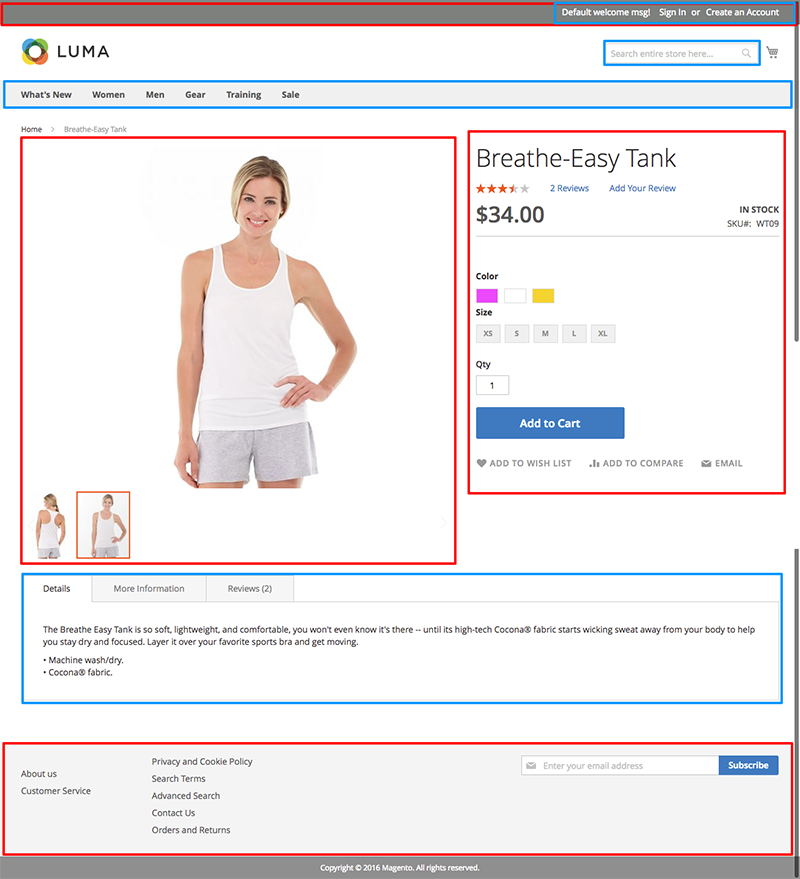
- Aheader.panel
- Bheader.links
- Cproduct.info.media
- Dproduct.info.main
- Ecatalog.topnav
- Ftop.search
- Gproduct.info.details
- Hfooter
119Identify the containers that can be used to add additional information to the checkout shipping step
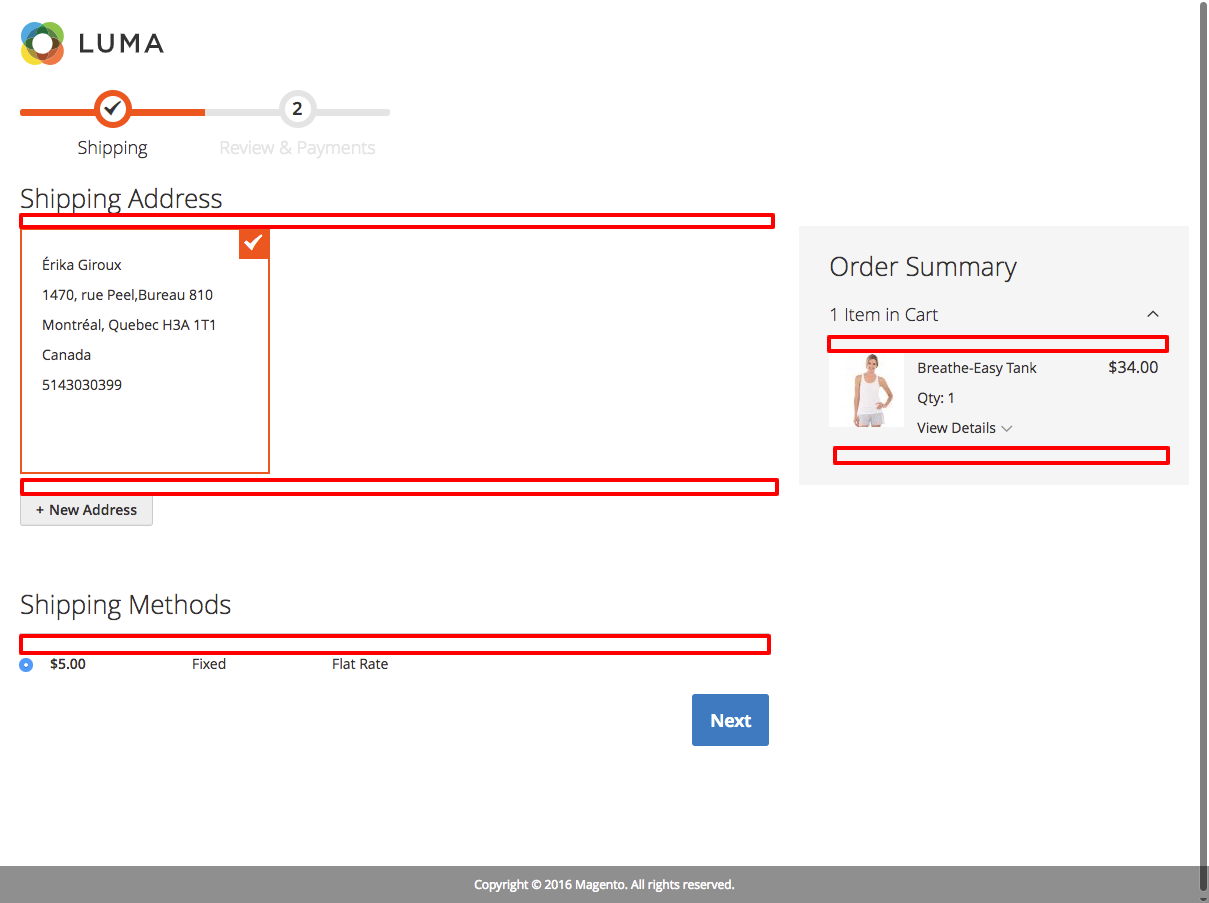
- Abefore-form
- Baddress-list-additional-addresses
- Cbefore-shipping-method-form
- DitemsBefore
- EitemsAfter
120Identify the containers that can be used to add additional information to the checkout billing step
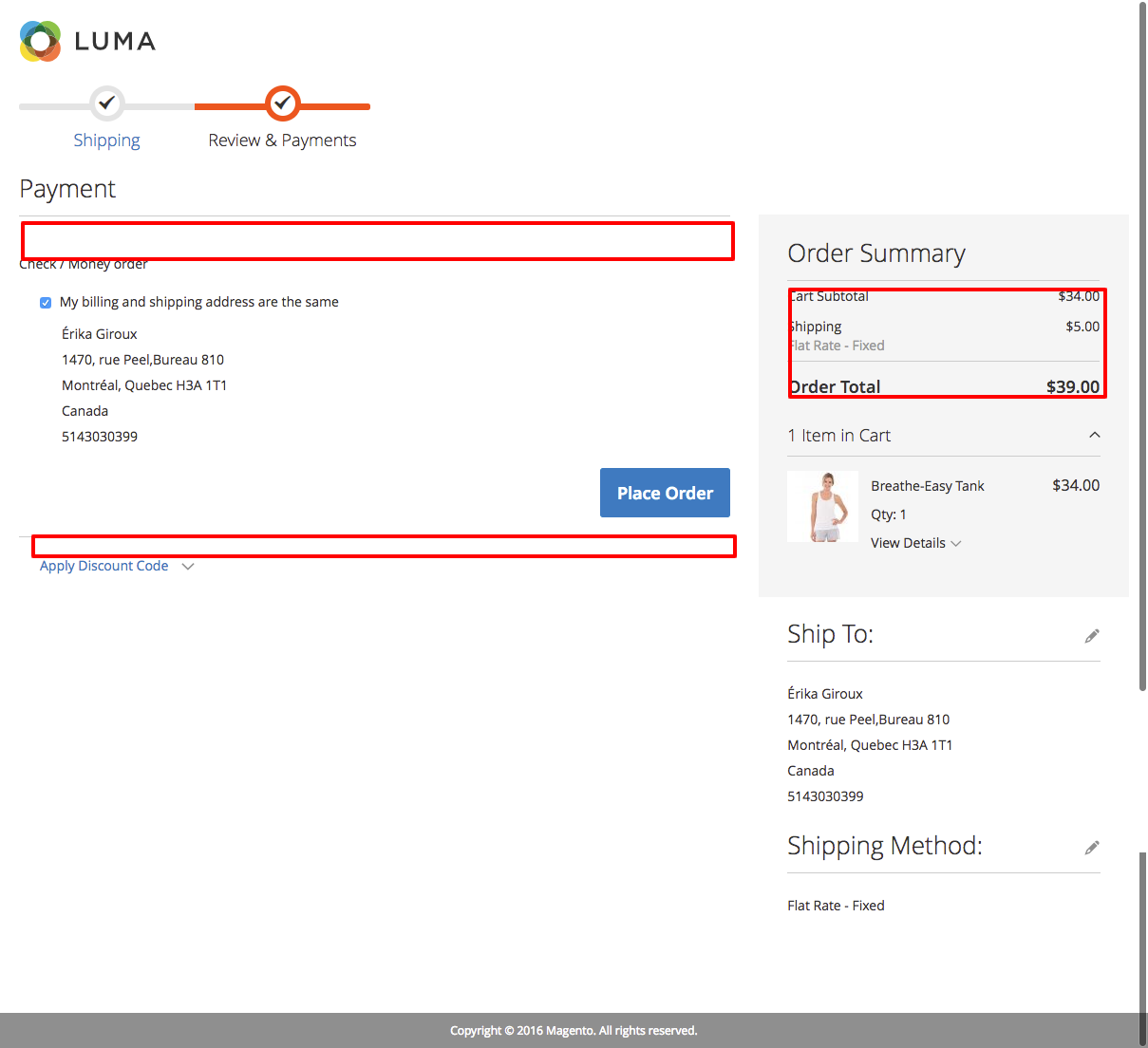
- AbeforeMethods
- BafterMethods
- Ctotals
Information
- Description
- This quiz was made using my own study notes and the study guide from https://swiftotter.com/technical/certifications/magento-2-frontend-developer-study-guide. It is by no means official and is not necessarily similar to the real Magento certification exam.
- Author
- Érika Giroux
- Language
- English
- Views
- 21,208
- History
- Created on 23 Oct 2018 · updated on 16 Nov 2018
- Tags
- Rating
- 5.0 out of 5 · 3 ratings Rate this quiz