
Flashcards
Flash Cards
Flashcards do conjunto (127)
- 1Disadvantages of Online Software- Requires Internet
- There is a Possibility of Getting Hacked
- The Software can Crash - 2Advantages of Online Software- Updated and Backed up Automatically
- Can be Used on Different Devices and Operators
- The files are saved on the servers so it would still be safe
- Users can access files where they got internet. - 3Disadvantages of standalone software- Its impossible to use it on another device
- you have to update and backup the system manually
- - 4Advantages of Standalone Software- As it is installed onto the the hard drive, it can be used when there is no internet access.
- It runs faster than online software with a poor internet connection - 5Disadvantages of Collaborative Working- People working together may cause some confusion and arguments
- One person could lose connection and mess up the project
- People may be working from different time zones - 6Advantages of Collaborative Working- People wont need to go to work together which save money, time and the environment
- People can together on the same document instead of having diffrent versions of the same file - 7The importance of version control and how it can be used-This is important so that a user knows which is the most up-to-date document
This is especially important for collaborative working.
Version control can manage by:
- locking the file and making it "read only" while one user is viewing or editing it
-The software allocation version numbers and dates of editing. - 8Levels of access- Different users can have different level of access. This could be set with a user and password. For example, at school or college you will have different access to your teachers on your school network and this is set when you log on
- 9File permissionsRead only- Can look at a document but make no changes.
Read/Write- Can look at a document and make changes.
Full control- Can do anything to a document, including deleting it. - 10Online Communities- an online community or network of friends is a group that only exists online
- Some need members to be online at the same time ( online gaming ) - 11Virtual WorldVirtual world is basically a world where you can have as many life's as you want
- 12NetiquetteNetiquette is a set of rules that are online.
For example if you break a rule in a game you will get banned - 13BlogA web log or online journal or video blog (vlog). A good blog usually gets updated weekly, some get updated daily.
- 14MicroblogA micro blog is when you update your status with just a couple words. You can do that on websites such as Twitter and Facebook.
- 15ChatroomThis is where many users are online at the same time communicating "live".
- 16WikiAudio or video files that are usually published in installments.
- 17ChatThis is where you communicate either online or real life (depends on the situation)
- 18ProfileA profile is the online presence of a user in a particular system, for example on a game system or social media website.
- 19AvatarAn Avatar is something that represents you on social media. An avatar could be a photo of yourself or a person of someone else (catfish)
- 20VoIPVoIP (Voice over internet protocol) is a method of real-time communication over the internet: Skype , Discord and, House Party.
- 21Advantages (VoIP)-This uses internet only so no additional costs.
-Able to connect from anywhere but you still need internet. - 22Disadvantages (VoIP)-This only relies on internet connection so this can be blown at any time.
-Some people may not have good equipment - 23EquipmentFor online calling you need:
-Microphone
-Headset
-Speakers
-Webcam - 24HTTP-Hypertext transfer protocol
-It handles your request to load a page from a web server
-HTTP is a set of rule that's handles what we do on the web
-It also handles the response to download a web page and all its files to your computers. - 25HTTPS-The S in HTTPS stand for secure
-protects privacy from hackers
- Data in the web page is scrambled before sending across the internet - 26FTP-File transfer protocol
-An old protocol that was invented even before the web was born
-It's still used to upload and download files from a server
-it's often used by web developers to transfer that their web server - 27Online communication- Moving data in the of text,photos,video audio
- 28Real time info-services that provides up to date info
-They are updated for people - 29Commerce-commerce means business so these services involve money in some way
- 30Government-These involve "official" public services
-Taxes - 31f
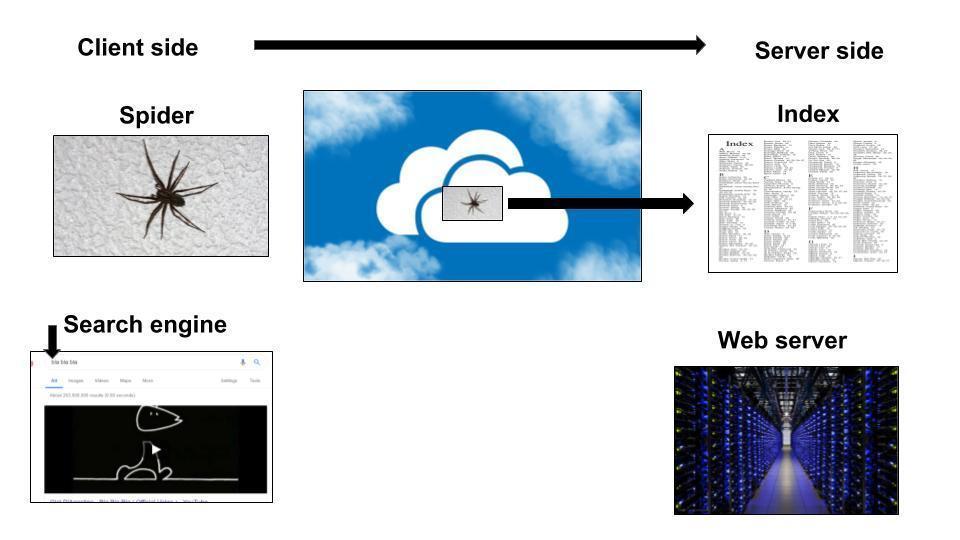
- 32Client sideA user on a device typing key words into a search engine.
- 33Search engineSearch engine allows you to search stuff from Chrome, Yahoo and Bing and probably many more.
- 34Server SideOccurring on the server side of a client-server system. For example, on the World Wide Web, CGI scripts are server-side applications because they run on the Web server. In contrast, JavaScript scripts are client-side because they are executed by your browser (the client).
- 35Spider/Web crawlerA web crawler (also known as a web spider or web robot) is a program or automated script which browses the World Wide Web in a methodical, automated manner. This process is called Web crawling or spidering. Many legitimate sites, in particular search engines, use spidering as a means of providing up-to-date data.
- 36Indexa list where all the web pages can be found
- 37Databasea structured set of data held in a computer, especially one that is accessible in various ways.
- 38Sponsored link resultsDefinition of: sponsored link. sponsored link. A paid advertisement in the form of a hypertext link that shows up on search results pages. The ads are typically for products and services that are generally or very specifically related to the keywords in the search query.
- 39Advertsan advertisement that is usually on top of the page
- 40PopularityMost of the adds are usually at the top of the page or the side and the non-sponsored web sites are usually bellow they sponsored sites.
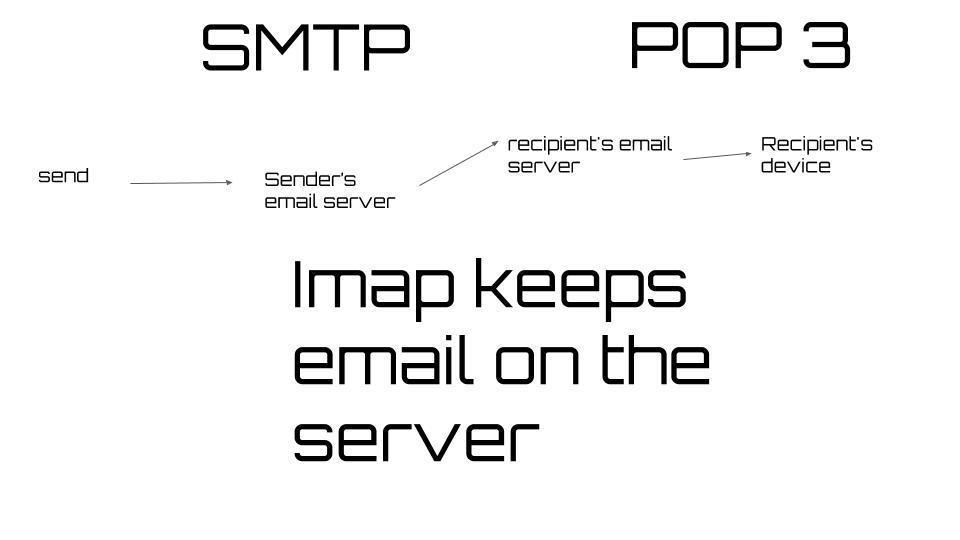
- 41Store and forwardEmails are stored on servers & then forwarded to the receiver - so its called "store and forward"
- 42Address booka book for recording the names, addresses, and telephone numbers of friends, acquaintances, etc.
- 43CC (carbon copy)when you send a copy to another person
- 44BCC (Blind Carbon Copy)when you send a copy to another person but the person you're sending the copy to cant see you're address
- 45Benefits of using an Email-You can attach multiple files such as images or documents
-Emails usually arrive in a matter of a second
-It is faster than sending a mail because that process takes 1-4 days - 46Drawbacks of using email-Some people might spam you (might be a massive problem)
-Attachments can contain some terrible viruses
-fake emails designed to trick people - 47q
- 48Web mailan email system in which a user can access their emails via a browser on any computer or device that is connected to the Internet.
- 49Email clientsEmail client is a desktop application that enables configuring one or more email addresses to receive, read, compose and send emails from that email address(s) through the desktop interface. It provides a central interface for receiving, composing and sending emails of configured email address(s).
- 50SMTPShort for Simple Mail Transfer Protocol, a protocol for sending e-mail messages between servers
This is associated with pushing emails from a server - 51IMAPIn computing, the Internet Message Access Protocol is an Internet standard protocol used by email clients to retrieve email messages from a mail server over a TCP/IP connection.
(PULL) - 52POP 3In computing, the Post Office Protocol is an application-layer Internet standard protocol used by e-mail clients to retrieve e-mail from a mail server.
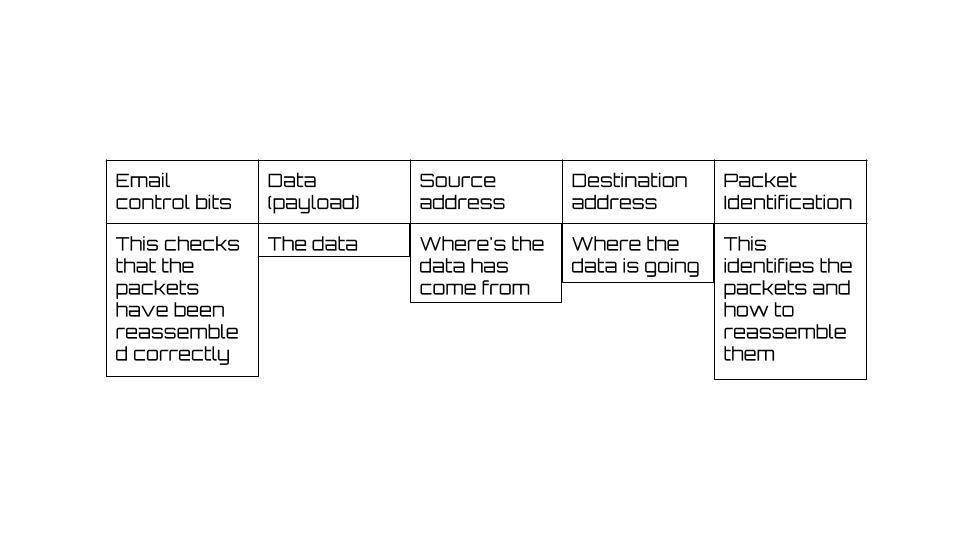
This is associated with pulling people away from the server - 53Data exchange (packet of data)
- 54Codecs
- 55Description of packet switchingPacket-switched describes the type of network in which relatively small units of data called packets are routed through a network based on the destination address contained within each packet. Breaking communication down into packets allows the same data path to be shared among many users in the network.
- 56Advantages of packet switchingThere are two important benefits from packet switching. The first and most important benefit is that since packets are short, the communication links between the nodes are only allocated to transferring a single message for a short period of time while transmitting each packet.
- 57Disadvantages of packet switchingIn Packet Switching Packets arriving in wrong order. Takes Transmission delay. Requires Large amount RAM (Random Access Memory) to handle large amount of data communication in packets.
if one or more packets get lost or corrupted during transmission, the whole file will not be received correctly - 58Simplex with examplesignals One direction at a time
- 59Full duplex with examplesignals both directions at the same time
- 60Half duplex with examplesignals go in both directions but not simultaneous
- 61Serial transmission descriptionBits of data and transferred one at a time over a wire
- 62Benefit and limitation of aboveBenefit : Good over large distances
Limitation : Complex because data has to be broken into individual bits - 63Parallel transmission descriptionbits of data are transferred simultaneously-
A whole byte can be transferred at the same time - 64Benefit and limitation of aboveFaster because more bits are transferred per second.
- 65Unshielded twisted pair (UTP) / Shielded twisted pair (STP)Description - Contains pairs of copper wires.
Use - Used for LANS.
Benefits - *Cheaper than the other methods, Reliable
Drawbacks - *Slow, Low capacity, used over short distances, Susceptible to interference.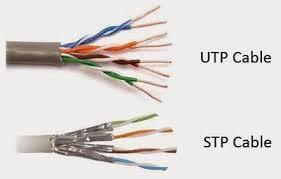
- 66Coaxial cableCoaxial cable is a solid copper wire with thick shielding. It is used to connect TV with aerial.

- 67Advantages of Coaxial cableIts very reliable.
- 68Disadvantages of Coaxial cableIt is slow and it has low capacity. It is used over short distances. Thick and physical inflexible. Susceptible to noise.
- 69Fibre opticFibre optic is strands of glass carry data as light. Used for backbone of network.
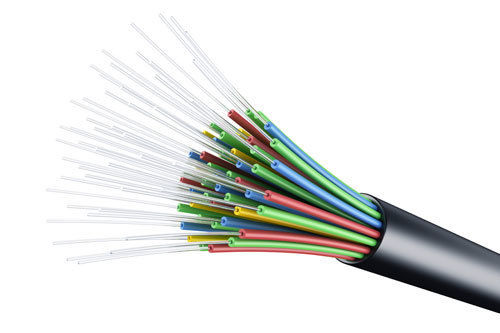
- 70Advantages of Fibre opticFast. Used over long distances and little interference.
- 71Disadvantages of Fibre opticUsed for backbone of network. Its complex to install and its expensive.
- 72Infared devicesUses infrared light to transmit data. That's very high frequency light

- 73Advantages of Infared devicesIts very reliable
- 74Disadvantages of Infared devicesShort range. Devices must be in light of sight and can suffer from interference.
- 75BluetoothUses waves with short wavelengths to transmit data.
- 76Advantages of BluetoothGood for medium distances.
- 77disadvantages of BluetoothCan suffer from interference from other devices eg a microwave oven that's near to a computer device.
- 78satelliteUses satellite in space to relay data between points on earth eg GPS.
- 79Advantages of satelliteGood for VERY long distances.
- 80disadvantages of satellitethey are VERY expensive.
- 81Network Interface Card and Network Access PointDevices using wireless networking need a NIC. Network interface card. its the hardware for receiving wireless signals. Network Access point.
- 82Hypertext markup language (HTML)HTML is made out of tags, mostly in pairs. Pairs of tags are called HTML elements. the open tag is written between
Most tags also have a close tag which includes a forward slash text - 83Basic HTML tagshttp://www.thuto.org/ubh/web/html/tags1.htm
- 84—Description: Client side processing uses the clients computer to process web page in data exchange
Advantages : speed-faster because the data is on the client and does not need to move across the internet. it cannot be intercepted.
Disadvantages : different browsers process scripts in different ways therefore the web page owner cannot be sure how their web page will appear on screen.
Computer speed- the web page owner is reliant on the processors speed of the clients computer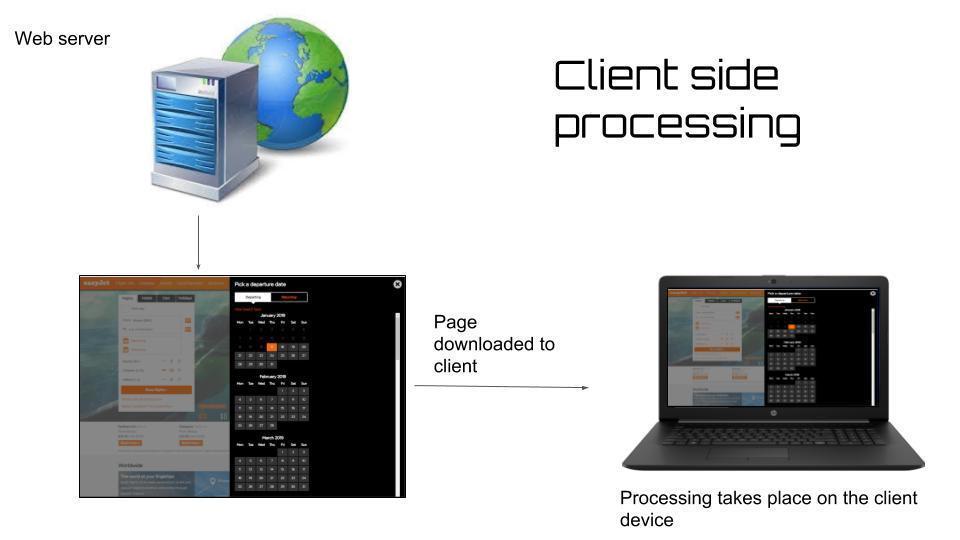
- 85—Description: Server side processing uses the web server to process web page data
Advantages : Servers are powerful computers - a web server is likely to be way more powerful than a client computer, so it can process data faster.
Disadvantages : Security - When the data is send back from the client , it has to travel across the internet where there is no more risk security threats.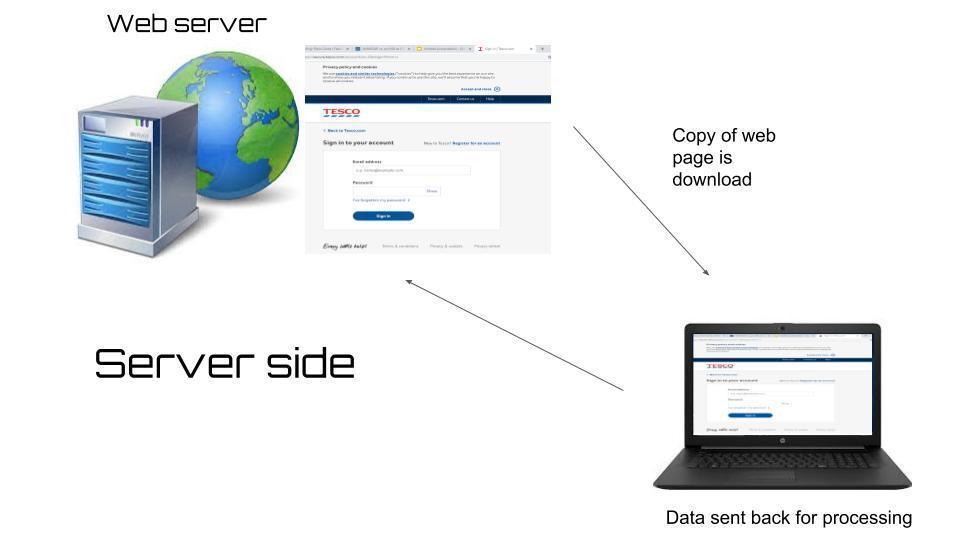
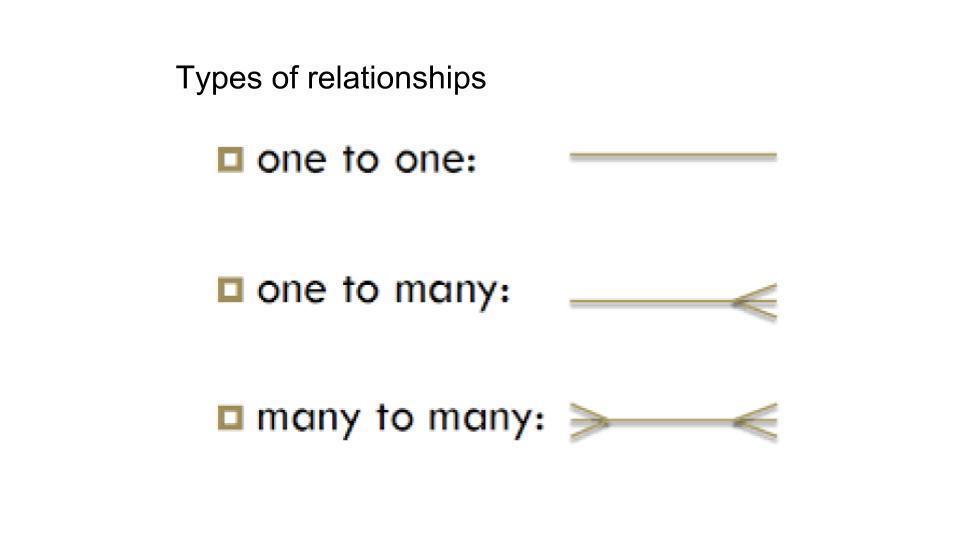
- 86—-one to one relations ships are rarely used
-the most common relation ship is one to many
-
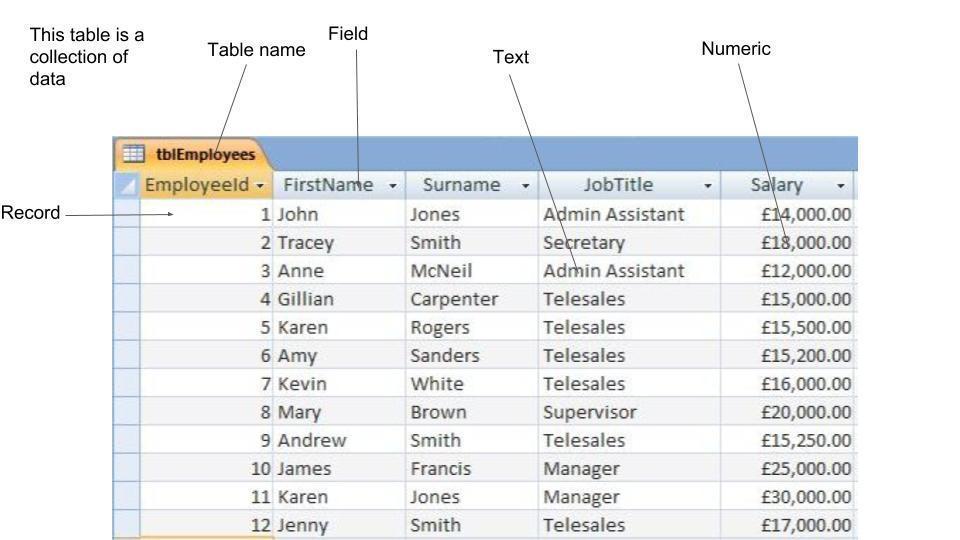
- 87Database-Mostly every single website is based on a database
-its a collection of data - 88Table-A set of data is stored in a table
-it can contain information about learners at am school - 89Field- The columns in a table store categories called field
- e.g. name/address/gender/date of birth - 90Record- A row in a table that stores data about a single item
-e.g. information about 1 learner/footballer/client - 91Primary key- its a unique piece of data which identifies one record
- e.g. a student id number - 92Foreign key- This is the primary key but in a different table and it creates a relationship
- 93Data types and uses : text- character (letters, numbers and symbols)
-e.g. TV04 7DG - 94Data types and uses : Numeric- numerical value
-e.g. 1.4 - 95Data types and uses : date/time- dates and times
-e.g. 01/2014 - 96Data types and uses : Boolean- yes/no also known as true/false
- 97—g
- 98DMBS ( Database Management System)- A DMBS is a software that allows you to create & use your own database
- it creates tables and fields and allows you to search and sort data
- it handles security to prevent unauthorized access - 99SQL- SQL is a language used by DMBS to actually create & search a database
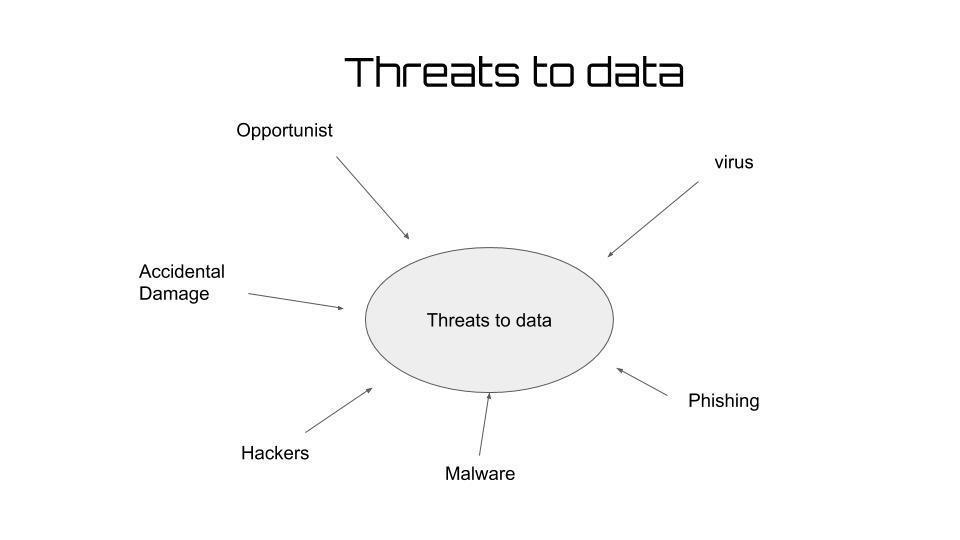
- It has a data definition Language (DDL) to set up the tables - 100—Threats to data
- 101—How to protect data
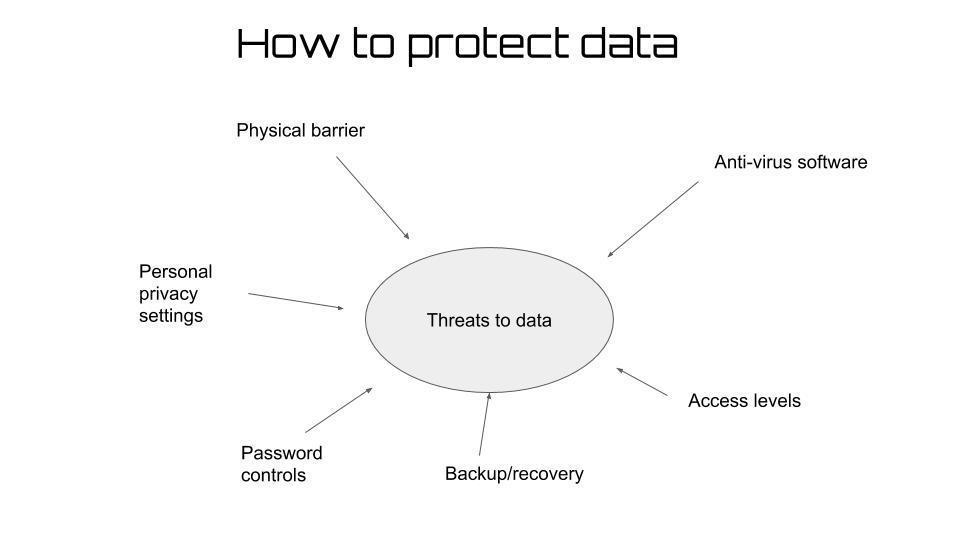
- 102OpportunistA companies network security can be breached why people who take a random opportunity such as an unattended PC
- 103VirusViruses are malicious programs designed to replicate and spread across a computer or a network to damage or corrupt files & data
- 104MalwareMalware is an name for several other types malicious software, such as Trojans, worms, adware, spyware and other nasty software that aims to cause damage to files or to steal data
- 105PhishingMeans when hackers use fake emails or fake websites to trick people into clicking links and then entering their personal data, such as bank passwords
- 106Accidental damagethis could include flood, or fire or hurricane or damage from untrained users
- 107HackersMeans people who purposefully try to gain unauthorized access to a computer or a network. But bear in mind that a high proportion of hackers are people who actually work for an organisation.
- 108Data Protection act 1998Provides 8 principals that govern the way about individuals is stored and used.
- 109Computer Missue Act 1990Introduced to protect from hackers and malicious use of viruses.
- 110Copyright, Designs and patents Act 1988Protects creators of original works.
- 111Freedom of Information Act 2000Provides individual the right to see information stored about them. Data can also be accessed about public bodies.
- 112Technology used for monitoring : movement-CCTV
-GPS Devices
-Airport passenger lists - 113Technology used for monitoring : Communication-Monitoring email
-Monitoring web sites visited
-Logging key words sites visited - 114WirelessWith Wireless you can all connect to different internet's
- 115EncryptingEncrypting can keep you're data secure
- 116Compressing files benefitsTo achieve faster file downloads
To reduce storage space required - 117Packet switchingPacket switching is used to send data over the internet
- 118HTTP over FTPImproved security/safety/privacy.
as encrypted files can be downloaded.
It saves time/quicker/faster.
because a single
connection can be used for multiple downloads. - 119search enginesThe server searches using the keyword which is matched against the index/ list of websites/ search engine databases
- 120To complete the same search as a client-side process would require the browser to download the entire search engine program and index (1) which places extra demand on the client’s computer/browser (1)f
- 121Pay Per ClickVague use of keywords means that although people click to find out what it is advertising there are no sales (from click as the website may not be what they are looking for)
Competition for keywords which could mean that the company is at the bottom of the search page rankings (leading to viewers not bothering to look at it) - 122FirewallsIt monitors all data arriving from the internet so that it can stop/block anything it considers harmful such as viruses, spam, etc.
- 123internet protocolsTCP
HTTP - 124VERSION 9 Discuss the factors the company should consider before choosing a broadband connection.There are numbers of factors that should be considered.
-One of the factors is the broadband speed companies have to know the speed before buying the broadband connection
-Types of broadband available (e.g. cable / fibre optic)/service providers in the area (named providers). Wheelie Wheels will have to research this on the internet or by phoning different service providers
- reliability. Broadband reliability can vary between providers - 125VERSION 5 Discuss the use of VoIP as a communication method method for Tom and his staffThe first advantage of using VoIP as a communication is that it saves a lot of money and a lot of time.
The second advantage is that its free but only if you have all the equipment.
The first disadvantage is that the equipment will have to cost you money and of you want good equipment it can easily cost you over £200. Its not just the equipment its also the internet connection and the monitors/computer/laptop.
The second disadvantage is that the timezone could be different. This is bad because if you're communication someone from America the time difference will be 9+ hours. - 126Packet SwitchingFirst benefit of using packet switch is Faster delivery time because data is split into smaller packets. The second benefit Data packets are not delayed as packets can be redirected to avoid broken parts of a network
- 127advantage of using an online software to work collaborativelyThe first advantage of using an online software to work collaboratively is All users have the same function available because they will be using the same software version. The second advantage is that there is no need to use email because the file is stored in a central location
Informações
- Descrição
- FlashCards sobre Flash Cards, criado por Vitalijs Lukins em 27-11-2018.
- Criado por
- Vitalijs Lukins
- Visualizações
- 1
- Avaliação