Flashcards
Topic 1 : Digital devices
Flashcards do conjunto (28)
- 1Digital Devices1. Mobile Phones
2. Media players
3. Tablets
4. Digital Cameras
5. Video Cameras
6.Games consoles - 2Uses of Digital Devices1. Communication (SMS,MMS,email,VoIP)
2. Gaming
3. Taking photos
4. Film streaming
5. GPS
6. Working from home - 3Audience for Digital DevicesTeenagers - social media (internet needed).
business's - emails (qwerty keyboard).
older people - larger screen and an easy-to-use interface. - 4Factors to consider... _______________________ ...when buying any new Digital Device!. Cost
2. User Interface (easy to use?)
3. Security
4. Connectivity
5. Storage capacity
6.convenience
7. Speed of internet connection - 5Common Features: Processor- Controls all functions in the the device
- Higher processor = Faster Operating
- size of the processor is measured in MB or GB - 6Common Features: Memory... _______________________...Internal Memory- internal memory is measured in bytes.
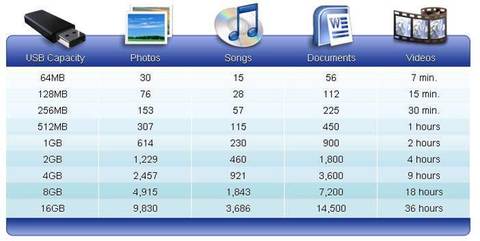
- HDD's contain moving parts so do not often feature in portable devices because they can get damaged. - 7Common Features: Memory... _______________________...Flash Memory- Flash memory = Added memory
TYPES OF FLASH MEMORY
- Secure Digital card (SD Card)
-micro SD card (phones)
SDCX Card (extended capacity card stores up to 2TB)
- USB Drive
- SDHC (High capacity card – up to 32GB) - 8BYTES1000 bytes = ! KILOBYTE (1 KB)
1000 Kilobytes = 1 MEGABYTE (1 MB)
1000 megabytes = 1 GIGABYTE (1 GB)
1000 gigabyte = 1 TERABYTE (1 TB) - 9More Memory = More Storage!!
- 10PeripheralsAdditional Devices that can be added to your personal digital device.
Peripherals can be grouped into three:
- Input devices
- Output devices
- Storage devices - 11Input Devicesallow the user to input data
- Mouse
- Keyboard
- Controller
- Webcam
- Touch Screen - 12Output Devicesallows users to see/hear information
- Docking station
- Headphones
- Printer
- Headset
- Screen - 13Mobile PhonesModern phones do much more than just allowing users to make and receive calls.
They’re now multifunctional devices because they have additional features like:
- Internet browsing
- Entertainment (games, music, videos)
- Camera/Video camera - 14Mobile phone Security-Set a pin /biometric/ password lock
-Restrict Bluetooth usage to stop blue-jacking
-record the unique IMEI number - 15how to responsibly mobile phones- Don’t send inappropriate messages
- Don’t overuse (you could get repetitive strain injury – RSI)
- Don’t take someone’s photo without permission
- Recycle old phones
- Don’t use whilst walking – there’s a risk of accident - 16PC'sFour types:
- Desktop Computers
- Laptops
- Net books
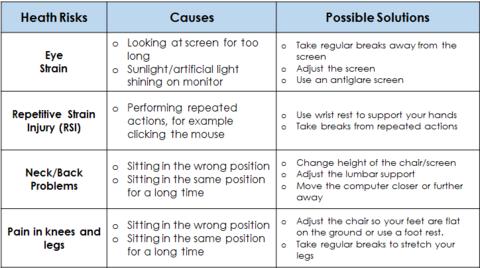
- Tablets - 17PC Risks!!
- 18Cameras and CamcordersMore modern cameras/camcorders allow users to:
- Download files to a computer using USB or Bluetooth
- View files on a TV using USB or HDMI ports
And more.... - 19digital zoom and optical zoomDigital zoom just enlarges part of the image which can become blurred but optical zoom moves the lens closer.
- 20Media playersMedia players are music/video players like iPod's.
- 21Key features of a media player- They are small, light and easy to carry
- They use solid state memory so they don’t skip when playing songs
- They have a long battery life
- They hold a lot of media on inbuilt memory
- They can lock to prevent accidental activation - 22Media Playerscommon file types that are supported:
- MP3 and WMA for Audio (sound)
- JPEG, GIF and PNG for images
- MPEG-4 and MWV for video - 23Digital Rights management ( DRM )This means that some files downloaded to media players cannot be copied or transferred to others. This is to protect the copyright holder of the material to prevent illegal copying.
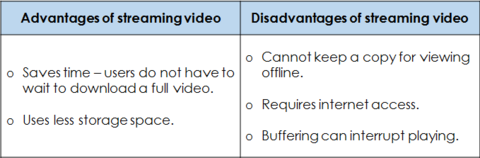
- 24Downloading vs Streaming
- 25Games ConsolesA video games console is a computer than enables games to be played on television or through a digital projector.
These are multifunctional devices. They also allow users to browse the internet, watch videos, listen to music etc. - 26games console peripherals- Controllers (some are wireless)
- Headsets (some are wireless)
- Storage drives
- Webcams
- Speakers
- Microphones
- Motion Sensors (like Kinetic) - 27Games consoles Risks
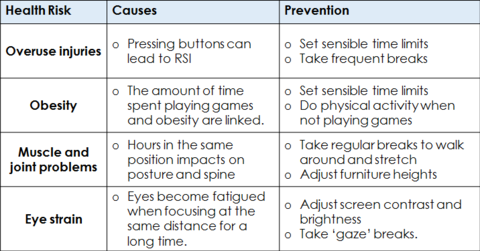
- 28Convergence