
Mock revision
Slides in this set (9)
-
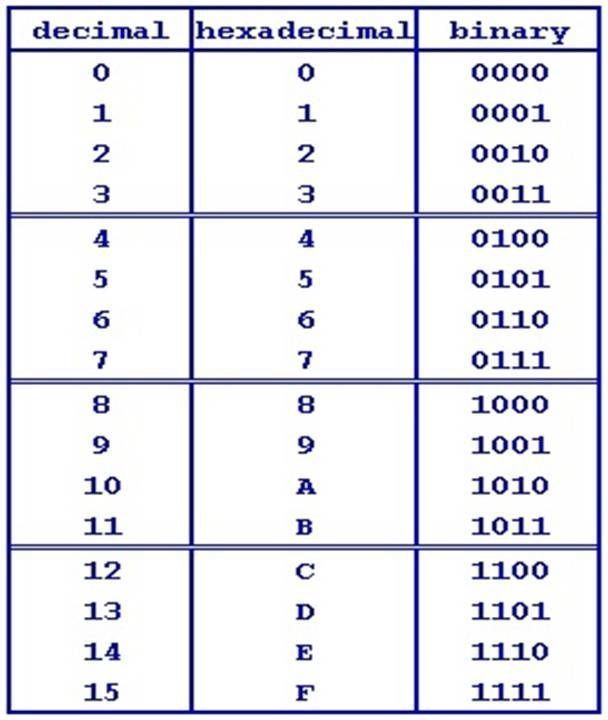
- Binary is a number system used by computers and is shown as 1 (on) and 0 (off). Binary is used because it is easy for computers to use and is easy to store.
-
- Hexidecimal is used by humans to translate binary into something that is easier to see and understand.
-
- Decimal is the counting system humans use and is 0, 10 we use this rather than binary because its easier to use and see for humans
-
- Left shift timeses a binary number by 2 and right shifiting divides a binary number by 2 this is how it works.(picture to left)

-
- Binary Adding is simple and is just like decimal adding however when add 1 and 1 it does not make 2, it carries to the next row.Heres how it works.Overflow is when you round the 1 over a row but it is the last row and

-
- ASCII: the standard alaphbet and misc is known as ASCII. and is stored in a compuer as binary. so A=0100 0001 and so on.Extended ASCII is a bigger version of ASCII and stores more things. Unicode is the biggest and can srore over 65,000 characters and even stores emojis.
-
- Digital images and grapics are stored as binary just like text, for each colour there is a binary number/hexidecimal figure. Index is like the ASCII of colours.each pixel in a picture is stored as a bit (8 bits)
-
- Sound is colleted in waves. We need a way of convereting these waves into binary numbers.To do this we take samples in each wave, the more samples the better the quality of the sound.So to convert these samples into numbers we have to put the waveform up against a graph wich shows amplitude and time. Once you pin point each sample you then convert it into a binary number.
-
- Metadata is really smple, it is just the information of an image e.g. when it was taken, where it was taken and what format the image is. You can find most info for a picture by going onto properties.
Information
- Description
- GCSE Computing Slide Set on Mock revision, created by seb beckwith on 31/10/2019.
- Created by
- seb beckwith
- Views
- 2
- Tags
- Rating