
Notizen
Ohne Titel
Inhalt der Notizen (7)
Seite 1
Master Detail Relationship:- This is parent-child relationship;
Detail record must have Master record reference;
The detail record inherits the sharing and security settings of its master record.
Parent record is required in order to save a child record. Eg Account record is needed to save contact record
Standard object record cannot be a child.
you cant create sharing rule on detail side of the object. Child objects don't have a share-record of their own and will be shared along with the master record.
Only 2 master detail relationship per object.
You cannot have a child record without a parent.
You can't create new Master detail relationship when records are already present.
Cascade delete.
You can create a roll-up summary field to display a value in a master record based on the values of fields in a detail record.
Maximum 25 rollup summary fields
After you have created a roll-up summary field on an object, you cannot convert the object's master-detail relationship into a lookup relationship.
Create roll-up summary fields on any custom object that is on the master side of a master-detail relationship or any standard object on the master side of a master-detail relationship
example:-
Opportunities using the values of opportunity products related to the opportunity
Accounts using the values of related opportunities
Campaigns using campaign member status or the values of campaign member custom fields
Number, currency, and percent fields are available when you select SUM as the roll-up type.
Number, currency, percent, date, and date/time fields are available when you select MIN or MAX as the roll-up type.
Salesforce does not recalculate the value of campaign roll-up summary fields when leads or contacts are deleted.
When a child record is deleted currently the rollup summary field on Parent shows old incorrect value.
The only workaround suggested by salesforce for this issue is to perform Force a mass recalculation of this field on edit page.
Select the Force a mass recalculation of this field option on the edit page of the roll-up summary field to manually recalculate the value.
Seite 2
If your organization uses multiple currencies, the currency of the master record determines the currency of the roll-up summary field. For example, if the master and detail records are in different currencies, the detail record value is converted into the currency of the master record.
Changing a conversion rate, changing price book entries, triggers roll-up summary fields to recalculate.
Changes to the value of a roll-up summary field can trigger assignment rules and workflow to run
Difference between Automatic calculation (Recommended) and Force a mass recalculation of this field?
Page Layout
Page layouts control the layout and organization of buttons, fields, s-controls, Visualforce, custom links, and related lists on object record pages. They also help determine which fields are visible, read only, and required. Use page layouts to customize the content of record pages for your users.”
If a user does not have access to a particular record at all, full access via FLS ,Field Level Security does nothing to change that – the user still will not be able to see any of the fields on the record. FLS, whether associated with a profile or a permission set, conveys the maximum access to a field that a user might have; the user might ultimately have less access based on other settings, but she will not have more access to the field than configured via FLS.
Seite 3
LookUp Relationship
Loosely coupled.
Roll-up summary field not available.
Parent record is not required in order to save a child record.
Lookup fields are not required on the page layout of the detail record.
Standard object record can be on the detail side of a custom object in a lookup relationship.
In case of Lookup: Child objects can have their own sharing access level and ownership
You can have a child record without a parent.
You can have a maximum of 40 lookups on an object.
No cascade delete.
Roll-Up type: (COUNT, SUM, MIN, MAX) COUNT returns the number of all Child records on the selected object. SUM returns the sum of a specified Number or Currency field across Child records. MIN and MAX return the least/first or greatest/last value, respectively, from a specific Number, Currency, or Date field among Child records.
Junction Objects:
Say you have a situation where it is required you have many of one record related to many of another.
For example, a session can have multiple speakers but also speakers can present at multiple sessions. A perfect place to add that junction object of ‘Session Speaker’ inbetween speaker and sessions, to handle this relationship!
Lookup and Master-Detail relationships build the respective foundation for zero-to-many and one-to-many associations between Parent and Child records.
Junction Objects:
Say you have a situation where it is required you have many of one record related to many of another.
For Example:- a session can have multiple speakers but also speakers can present at multiple sessions. A perfect place to add that junction object of ‘Session Speaker’ inbetween speaker and sessions to handle this relationship!
Seite 4
indirect lookup relationships: allow a relationship to be formed between a Salesforce object and an external object. If your Salesforce org was the family, then the objects would be related but not in the same family. A great example of such is relating payment records to an account from an ERP system – the ERP system is external to Salesforce but the records are important. The way they relate is via an external ID to match the payments to the account.
External lookup relationships: allow a relationship to be formed between two external objects. Your two friends from outside of your group are now in a relationship. Maybe that ERP system links the payment records to a bank account.
External lookup relationships: allow a relationship to be formed between two external objects. Your two friends from outside of your group are now in a relationship. Maybe that ERP system links the payment records to a bank account.
Seite 5
Standard Picklist datatype can only be controlling , never dependent field.
Custom Picklist datatype can be either Controlling or dependent field.
Standard or custom Picklist(multiselect) can only be dependent field but not controlling field .
Standard and Custom Checkbox datatype can only be Controlling Field.
The maximum number of values allowed in a controlling field is 300.
Field-level security settings for a controlling field and dependent picklist are completely independent.
The import wizards do not consider field dependencies. Any value can be imported into a dependent picklist regardless of the value imported for a controlling field.
If a dependent picklist is required and no values are available for it based on the controlling field value, users can save the record without entering a value. The record is saved with no value for that field.
If the controlling field picklist is deleted, the dependency rules for the picklist will go away and the dependent picklist will display all available values.
custom Picklist field datatype can be changed to Checkbox datatype and Picklist(multi select)without data loss.
Changing text to picklist and picklist to any other datatype causes data loss
Changing Custom Field types
If you convert an auto-number field into a text field, the data in that field remains unchanged. Also, you can safely convert a text custom field into an auto-number field without losing your data.
Formula fields are special read-only fields that cannot be converted to any other data type. Likewise, you cannot convert any other field type into a formula field.
You can change a master-detail into a lookup relationship or a lookup into a master-detail relationship.
After you have created a roll-up summary field on an object, you cannot convert the object's master-detail relationship into a lookup relationship.
If there are any existing records on an object that have a null value set for the lookup field, the lookup relationship can’t be converted to a master detail relationship.
If you are converting a master-detail relationship to a lookup for a custom object , the organization-wide default for the object is automatically updated to Public Read/Write. Similarly, converting a lookup to a master-detail-relationship changes the organization-wide default to Controlled by Parent.
You can convert a long text area field to an Email, Phone, Text, Text Area, or URL type field, the data in your records is truncated to the first 255 characters of the field.
You can only convert rich text area fields into long text area fields. Any images are deleted the next time the long text area field is saved
Seite 6
External Lookup Relationship
If you have established an external data source and created an external object, you “unlock” a new field type: an external lookup relationship. This allows you to create a relationship between an object and a table in an external system, represented as an external object in Salesforce. The child object can be either an object in Salesforce (resulting in a Salesforce object looking up to an external object) or an external object (resulting in an external object looking up to an external object).
Seite 7
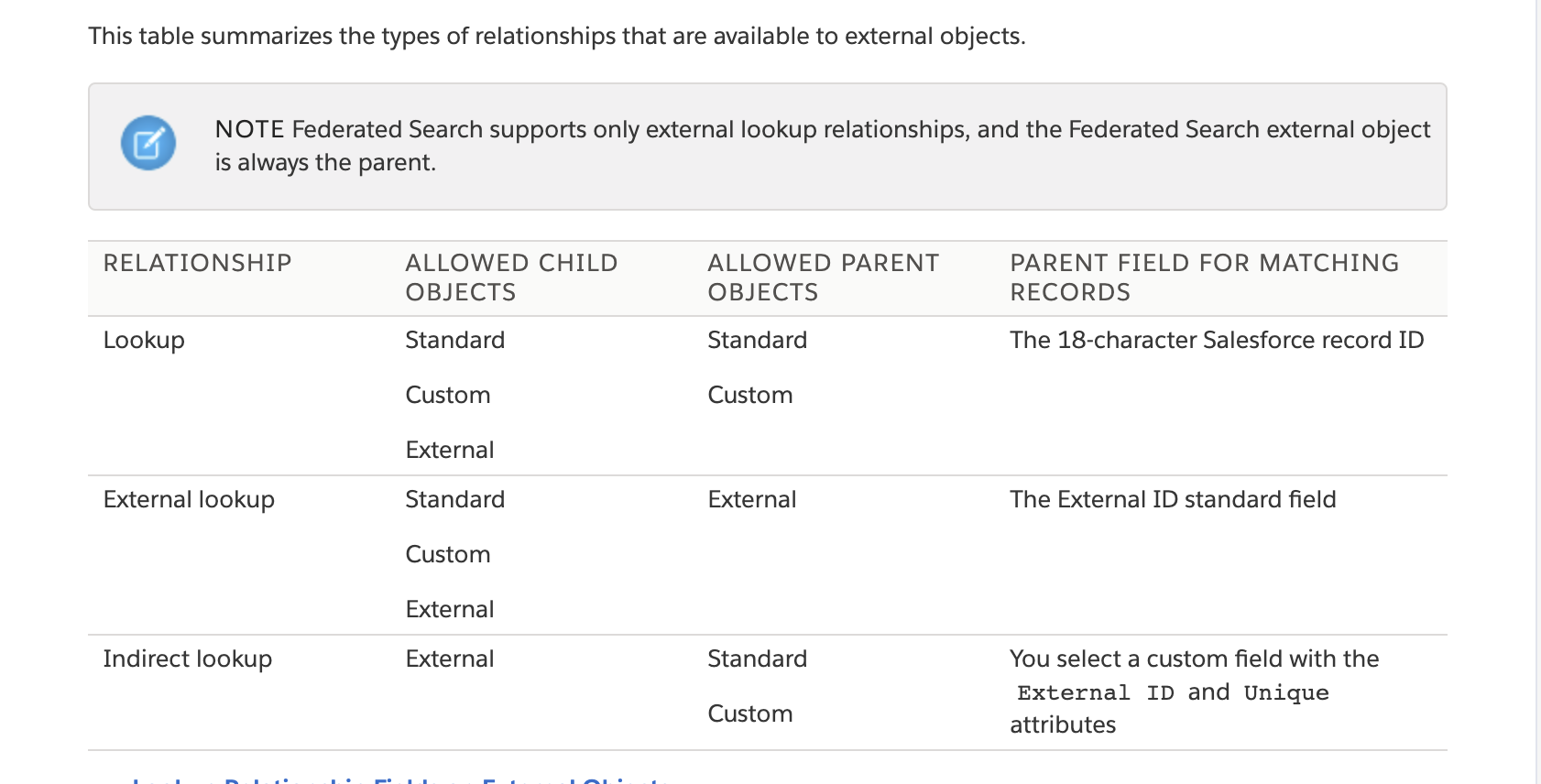
A lookup relationship field links a child standard, custom, or external object to a parent standard or custom object. A user who’s editing a child record can click the field’s lookup icon to select a specific parent record, and a user who’s viewing a parent record can view a related list of child records.
EXAMPLE
Account record (parent standard object) displays a related list of external SAP sales orders (child external object).
Account record (parent standard object) displays a related list of support cases (child standard object).
Use an external lookup relationship when the parent is an external object.
An external lookup relationship links a child standard, custom, or external object to a parent external object.
The values of the standard External ID field on the parent external object are matched against the values of the external lookup relationship field.
Use an indirect lookup relationship when the external data doesn’t include Salesforce record IDs.
An indirect lookup relationship links a child external object to a parent standard or custom object. When you create an indirect lookup relationship field on an external object, you specify the parent object field and the child object field to match against each other.
Specifically, you select a custom unique, external ID field on the parent object to match against the child’s indirect lookup relationship field, whose values are determined by the specified External Column Name.
Informationen
- Beschreibung
- Salesforce Engineering Notiz am Ohne Titel, erstellt von Lavanya Bg am 11/02/2021.
- Erstellt von
- Lavanya Bg
- Aufrufe
- 4
- Bewertung