
Notes
Chapter 10 - Computer Systems
Content of the notes (7)
Page 1
The central processing unit (CPU)
Inside a processor there are billions of transistors
Carry out instructions given to it
Runs to the timings of a clock signal
The speed of the signal/clock speed is measured in hertz
Unit______________________Pulses per second
1 hertz___________________1
1 kilohertz_______________1,000
1 megahertz_____________1,000,000
1 gigahertz______________1,000,000,000
Processors work by continually fetching instructions from memory, decoding them and executing them. This is known as the fetch-decode-execute cycle
Inside the processor
Registers
Memory locations within the processor itself
Work at extremely fast speeds (so that it can be used by the processor without causing a bottleneck)
Program Counter (PC)
Keeps track of the memory location of the machine code being executed
Gets incremented to point to the next instruction
Changed by instructions that alter the flow of control
-Branch if zero (BRZ)
-Branch always (BRA)
-Branch if positive (BRP)
Memory data register (MDR)
Stores the data that has been fetched from or stored in memory.
Memory Address register (MAR)
Stores the address of the data or instructions that are to be fetched from or sent to.
Current instruction register (CIR)
Stores the most recently fetched instruction, waiting to be decoded and executed.
Accumulator (ACC)
Stores the result of calculations made by the ALU.
General purpose registers
Used temporarily to store data being used rather than sending data to and from comparatively much slower memory.
Buses
Are the communication channels through which data can be sent around the computer
USB(Universal serial bus) - Used to transfer data between the computer and external devices
When looking at the fetch-decode-execute cycle, there are three buses inside the computer that must be considered:
The data bus - carries data between the processor and memory
The control bus - sends control signals from the control unit
The address bus - carries the address of the memory location being read from or written to
Arithmetic logic unit (ALU)
Carries out calculations and logical decisions. The results of its calculations are stored in the accumulator.
Control unit (CU)
Sends out signals to co-ordinate how the processors works.
Controls how data moves around parts of the CPU and how it moves between the CPU & memory.
Instructions are decoded in the control unit.
Page 2
Input, output, storage and memory
Input devices allow data to be entered to the the computer. Examples include:
Keyboards
Mice
Microphones
Scanners
Joysticks
Output devices allow information to be retrieved from a computer and displayed
printers
speakers
monitors
actuators
There are 3 categories of storage devices:
Magnetic
Advantages
Disadvantages
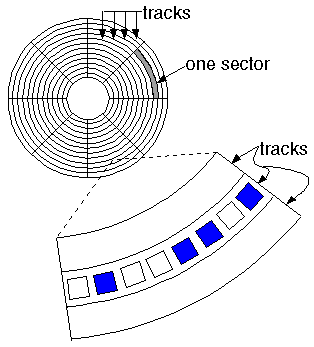
Uses a magnetisable material. Patterns of magnetisation are used to represent binary sequences.
Examples: Hard disk drives, magnetic tape
Magnetic tape
tape used in recording sound, pictures, or computer data.
The oxide particles themselves do not move during recording. Rather their magnetic domains are reoriented by the magnetic field from the tape head.Tape heads for stereo cassette tapes must record on two tracks simultaneously.
Magnetic tape is a medium for magnetic recording, made of a thin, magnetizable coating on a long, narrow strip of plastic film.
Advanatges
the cheapest form of storage per megabyte of storage
Disadvanatges
Serial access so can be quite slow to access data
Magnetic disk
Flash
A kind of memory that retains data in the absence of a power supply.
Has no moving parts.
Uses a special type of ROM that can be overwritten. Used in USB memory sticks and camera memory cards
Advantages
Consumes less power than other types of media.
Well suited to portable devices
Disadvantage
More expensive than magnetic or optical
Optical
A computer memory that uses optical techniques which generally involve an addressable laser beam, a storage medium which responds to the beam for writing and sometimes for erasing, and a detector which reacts to the altered character of the medium when it uses the beam to read out stored data.
Works by using a laser and look at its reflection, determining where there are pits on a surface representing 1s and 0s.
A DVD can contain more data than a CD because the pits are closer together.
Advantages
Cheap to distribute
Fairly resiliant
Disadvantages
Cant hold as much data as other forms of storage, e.g. magnetic
Page 3
RAM & ROM
RAM
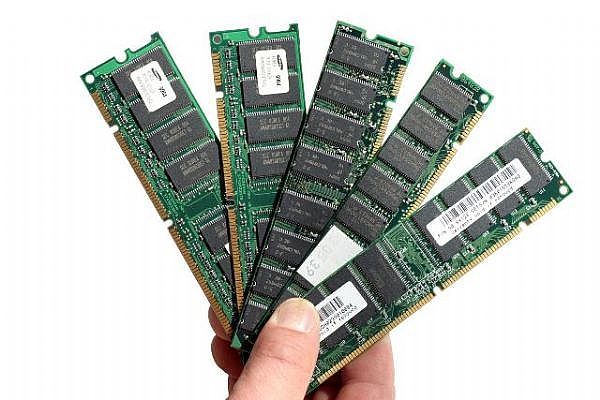
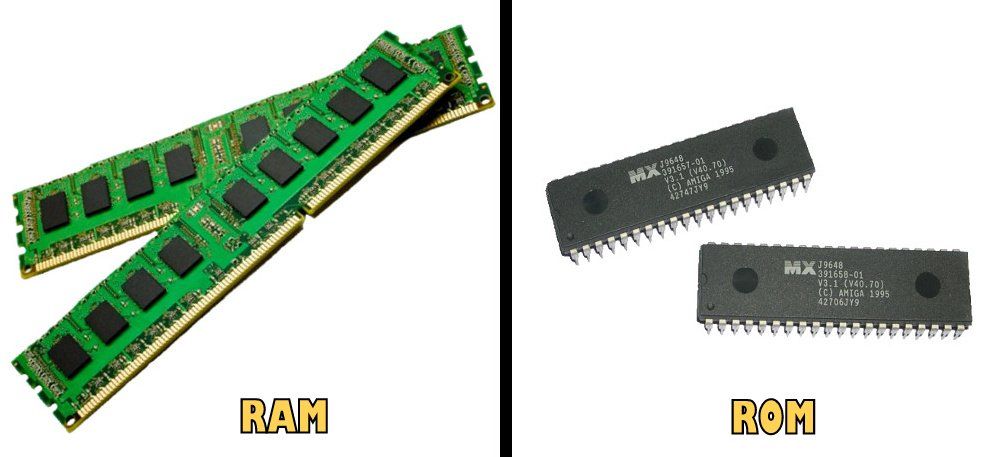
Volatile - When the power to the computer is lost, RAM loses its contents
When the programs and data being run are temporarily used
Much quicker access to RAM than any other storage device
ROM
Can be read from but not written to
Used for storing the program to boot up a computer
Non-volatile - keeps its memory when the computers power is lost
Page 4
Harvard architecture
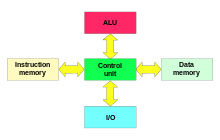
Data and instructions are stored in separate memory units with separate buses
The next instruction can bead read from the instruction memory while data is being read or written to memory
Used by RISC processors
Page 5
Von Neumann architecture
Instructions and data are stored in memory together
Page 6
Parallel processing
(SIMD) Single instruction multiple data - The same operation is carried on multiple pieces of data, at one time.
(MIMD) Multiple instructions multiple data - Different instructions are carried out concurrently on different pieces of data
Takes place on a much larger scale on supercomputers
Supercomputers are massive parallel machines. Top supercomputers contain tens of thousands of multiple processors. They are really expensive to buy and run.
Distributed computing is an alternative approach to parallel computing.
Each computer across a network takes on a part of a problem
Not all problems can be carried out faster using multiple codes. E.g. the fibonacci sequence. Each term depends on the previous so it cant be carried out faster with multiple cores
(RISC) - Reduced instruction set computing
The number of instructions is streamlined
Tend to have fewer addressing modes and more general purpose registers than non RISC processors
All RISC systems should execute all their instructions in roughly the same cycle
RISC systems can use pipelining
Compiler has to do more work
Every operation takes place in just one clock cycle
Longer code requiring more RAM to execute
Further away from high level languages
Simple hardware
(CISC) - Complex instruction set computing
Less work for the compiler to carry out
More complex hardware
Some instructions take multiple clock cycles to complete
Closer to high level language
Smaller code requiring less RAM to execute
Page 7
1st day back
test on chapter 9 & 10
Information
- Description
- AS - Level Computing Science Note on Chapter 10 - Computer Systems, created by Karl Taylor on 24/01/2017.
- Created by
- Karl Taylor
- Views
- 2
- Rating