
Notes
INTRODUCING COMPUTERS
Content of the notes (7)
Page 1
General purpose machines are most computers with a CPU, such as smartphones and PCs. They are described as general purpose machine because they can be used for many different things. Software enables a computer to be a games machine, web browser, word processor and perform a wide range of functions
SPECIAL PURPOSE MACHINES are devices such as Sega mega Drive (released 1990) becuase they were designed to just do one thing- play games.
COMPUTER SYSTEMS
modern computers function on the same general model of INPUT>PROCESS>OUTPUT
INPUT- type in the message and press send
PROCESS- the phones hardware and network process the message
OUTPUT- the message goes to the receiver
PRINTER's INPUT:
printer recieves document from a computer
PRINTER's PROCESS:
The printer stores the documents in its memory
PRINTER's OUTPUT:
Document is printed out onto paper
Microwaves INPUT:
user presses buttons to select the power level and time
Microwaves PROCESS:
microve switches to the mode selected by the user and heats up for the duration selected by the person.
Microwave OUTPUT:
microwave beeps and the user removes heated food
Page 2
TYPES OF COMPUTERS
PCs, smartphones and Game consoles are everyday computerst there are many other types of computer systems
EMBEDDED COMPUTERS
Used in CAR ENGINES, SPACECRAFT, MP3 players.
They're dedicated systems that are designed for a fixed purpose. This is different to PCs and smarthphones which use software for range of purposes.
WEARABLE TECHNOLOGY
Where technogloy interacts with our bodies such as Smartwatches.
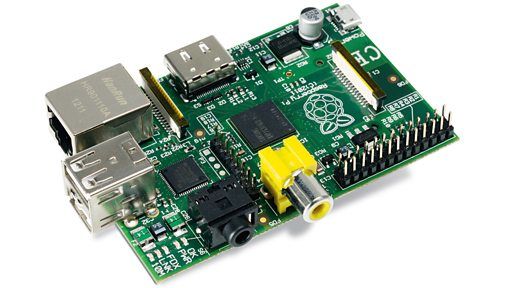
RASPBERRY PI
Credit card sized computer.
Contains 256MB or 512MB RAM and a 1 GHz CPU
It can run a full Linux ( AN OPERATING SYSTEM, free and open source anyone can improve it)
Rasberry is popular with 'makers'- people who want to experiment/create their own projects, such as programs and gadgets.
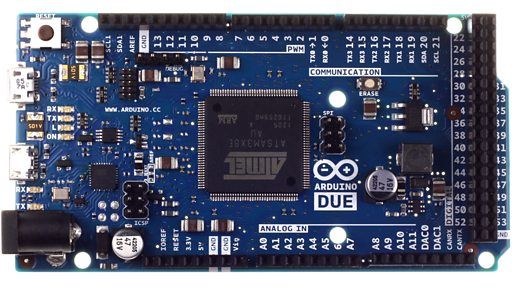
THE ARDUINO
Arduino is a microcontroller.
Basic computer with less power than the Rasberry Pi.
Useful for small scale projects such as creating wearable technology
does not have an operating system.
to be programmed, program data has to be transferred from a computer, such as a PC, to the Arduino via a USB connection.
RASBERRY PI
Page 3
THE ARDUINO
Page 4
THE PURPOSE OF A COMPUTER
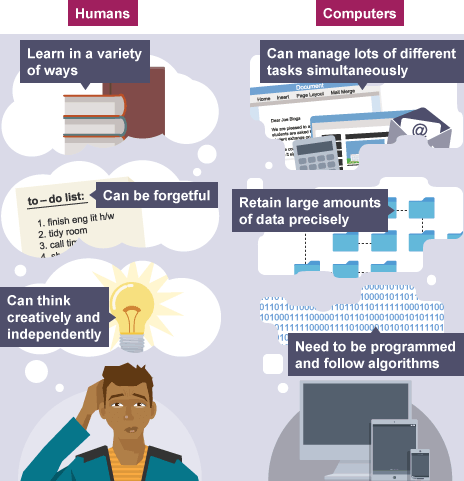
Computers only work by following specific instructions they are given. This is useful when tasks need to be performed accurately since computers won't stray from its given instructions.
computation means following a set of instructions in a logical order to process input data and produce output data. The set of instructions is known as ALGORITHM.
Computers can have a variety of uses, including:
automation
robotics
bionics
data crunching
modelling
AUTOMATION- comps can be programmed to perform repetitive tasks. Major benifits of savin time.
Automation enables companies to use computers to manufacture products like cars and to organize warehouses quickly and efficiently
ROBOTICS
Computers control robots, which can be used in environments that are too dangerous or impractical for humans to work in. For example, robots are able to explore the planet Mars, without the risks involved in sending an astronaut into space.
Page 5
MODELLING
Computer-generated models allow users to create simulations of complex structures or theories. These can be used to make useful predictions about the behaviour of a system under different circumstances, eg testing the load-bearing capacity of bridges, analysing how dinosaurs would have walked or forecasting weather.
Data crunching
Computer systems can collect and store vast amounts of data. Computers make it much easier to study information and look for patterns, eg Google Analytics stores data on search habits and has been used to predict flu outbreaks around the world.
Bionics
Advances in robotics also have great medical benefits. Advanced prosthetics, such as replacement arms and legs, are becoming much more intuitive thanks to computer technology.
Page 6
THINKING LIKE A COMPUTER
Key difference between humans and computers is that a computer has a CPU that needs to be programmed to follow a set of logical instructions.
key concepts behind working with computers include computational thinking, decomposition, and abstraction.
Page 7
Computational thinking means understanding how to represent a problem in a way that a computer will be able to solve. This involves breaking down problems into a series of logical steps such as an algorithm.
You can use computational thinking to think about how to translate real-world processes for a computer to understand. An example might be making a sandwich. This is something a human could do without a list of instructions, but if a robot was asked to do it, it would need a series of clear, basic steps to follow. The sandwich-making process would need to be broken down into a series of detailed, simple, logical steps using computational thinking.
Decomposition
Decomposition means breaking down a large problem into smaller chunks that can be solved using computing.
Some computer games take years to create, with hundreds of people who create the software working on individual sections. A big project like this will be decomposed into smaller problems and different teams of developers will work on each one.
Abstraction
Abstraction means reducing something to a very simple set of characteristics, chosen to be most relevant to the problem.
In computing, abstraction is used to hide the data or reduce the amount of data to what is needed for the problem to be solved. For example, a person might be abstractly described by just their name and date of birth in a simple database. A programmer looks at ways to simplify pieces of code and sequences in an algorithm to make them as efficient as possible - this will save time and speed up the program.
Information
- Description
- GCSE Computing Note on INTRODUCING COMPUTERS, created by nisan rai on 18/08/2017.
- Created by
- nisan rai
- Views
- 4
- Rating