
Flashcards
Week 4
Cards in this deck (61)
- 1How computers developed• Adding machines
• Machines that could add, subtract, multiply, divide
• Machines that could do fixed sequences of arithmetic (they could change)
• Machines that could look at the results of arithmetic and then decide what to
do next - 2Three key ideasMake a machine that performs a fixed sequence of arithmetic operations
Provide a way to change that sequence
Make it possible to compare two numbers, and then decide what to do next - 3Computer ArchitectureCA defines the structure and the machine language of a computer
Understanding the principles of CA is central to computer science - 4Computer Architecture 3 layers out 7ISA (HW-SW interface)
Microarchitecture
Digital Circuits - 5High-level languageA high-level language (HLL) is a programming language such as C, FORTRAN, or Pascal that enables a programmer to write programs that are more or less independent of a particular type of computer.
- 6How many languages do a machine have?one fixed machine language
- 7How there can be many programming languages for a given machine?Each PL is translated to machine language by software called a compiler
- 8What is a computer?A digital circuit (a piece of hardware, a machine) that executes programs
- 9Looking upthe machine language must be powerful enough to provide
support for operating systems and programming languages - 10Looking downthe machine language must be simple enough so that a
digital circuit can execute it (example: RTM circuit) - 11The machine language is?a series of bit patterns directly executed by a computer
– Even with hexadecimal representation would be very tedious to use - 12assembly language is?a symbolic representation of machine language
- 13What is a symbolic representation mean– A low-level language converted to machine language by the assembler
– There is a one-to-one correspondence between assembly instructions and
machine instructions - 14Sigma16In this course we will study a computer architecture called Sigma16
• Designed to support several research projects at the University of Glasgow
• It's a research architecture, not a commercial product
• There are no real hardware machines implementing Sigma16
An emulator and simulator - 15Why use Sigma16?Our focus is on ideas and principles
Sigma16 has just one word size (16 bits) Most commercial computers have backward compatibility with previous
versions, leading to great complexity - 16complex instruction set (CISC)Intel x86 is the only commercial example
- 17reduced instruction set (RISC)– Sigma16 uses this
- 18InstructionsAn assembly language provides instructions
Analogous to statements in a high-level language, with some differences
– Instructions (RISC) are simple: R2:=R1+R3
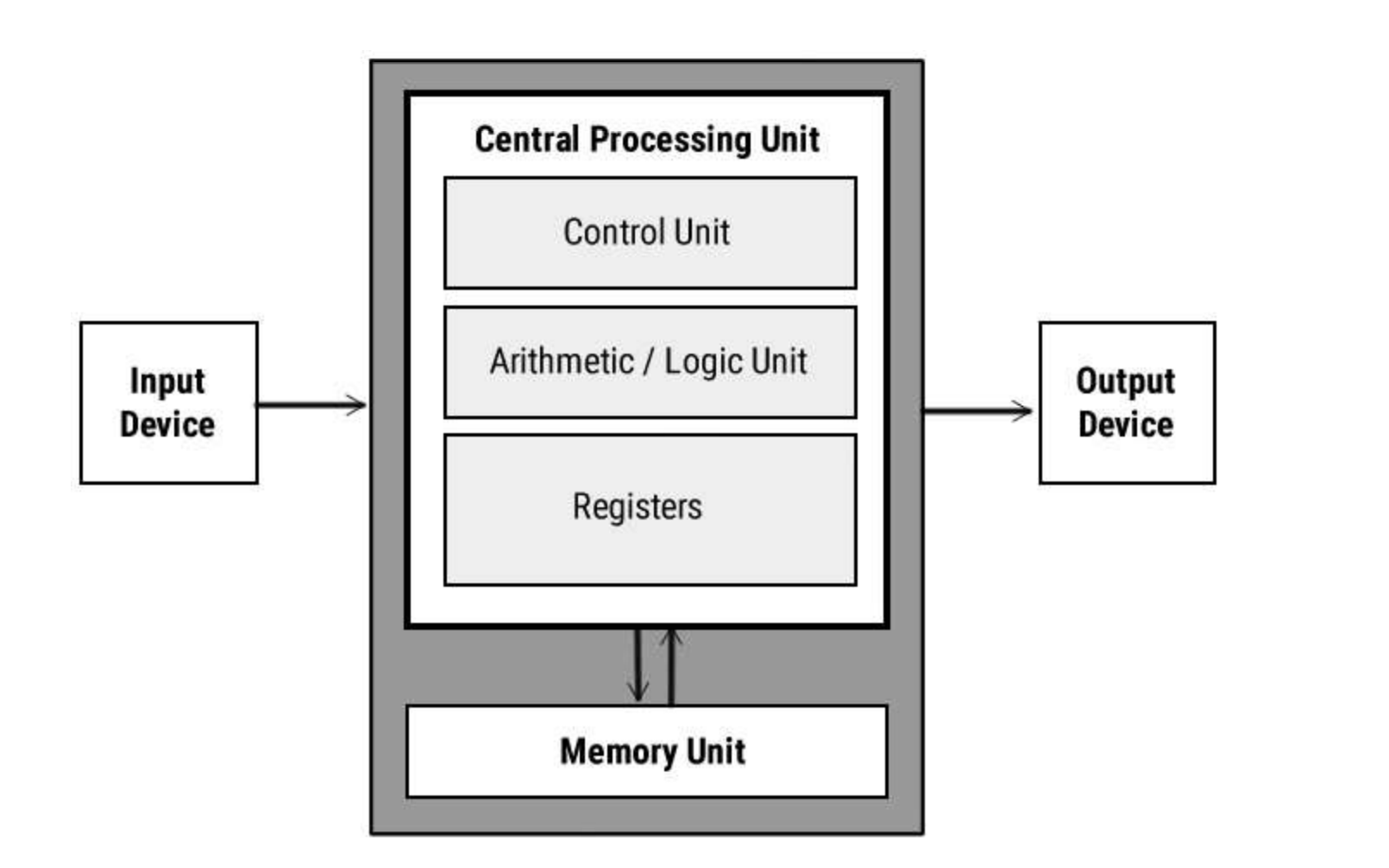
– Each instruction performs just one operation - 19Structure of a computer
- 20ALUThe ALU (arithmetic and logic unit) is a circuit that can do arithmetic,
such as addition, subtraction, comparison, and some other operations - 21memoryThe memory can hold a large number of words, similar to the register file
but significantly slower and much larger - 22Input/OutputThe Input/Output can transfer data from the outside world to/from the
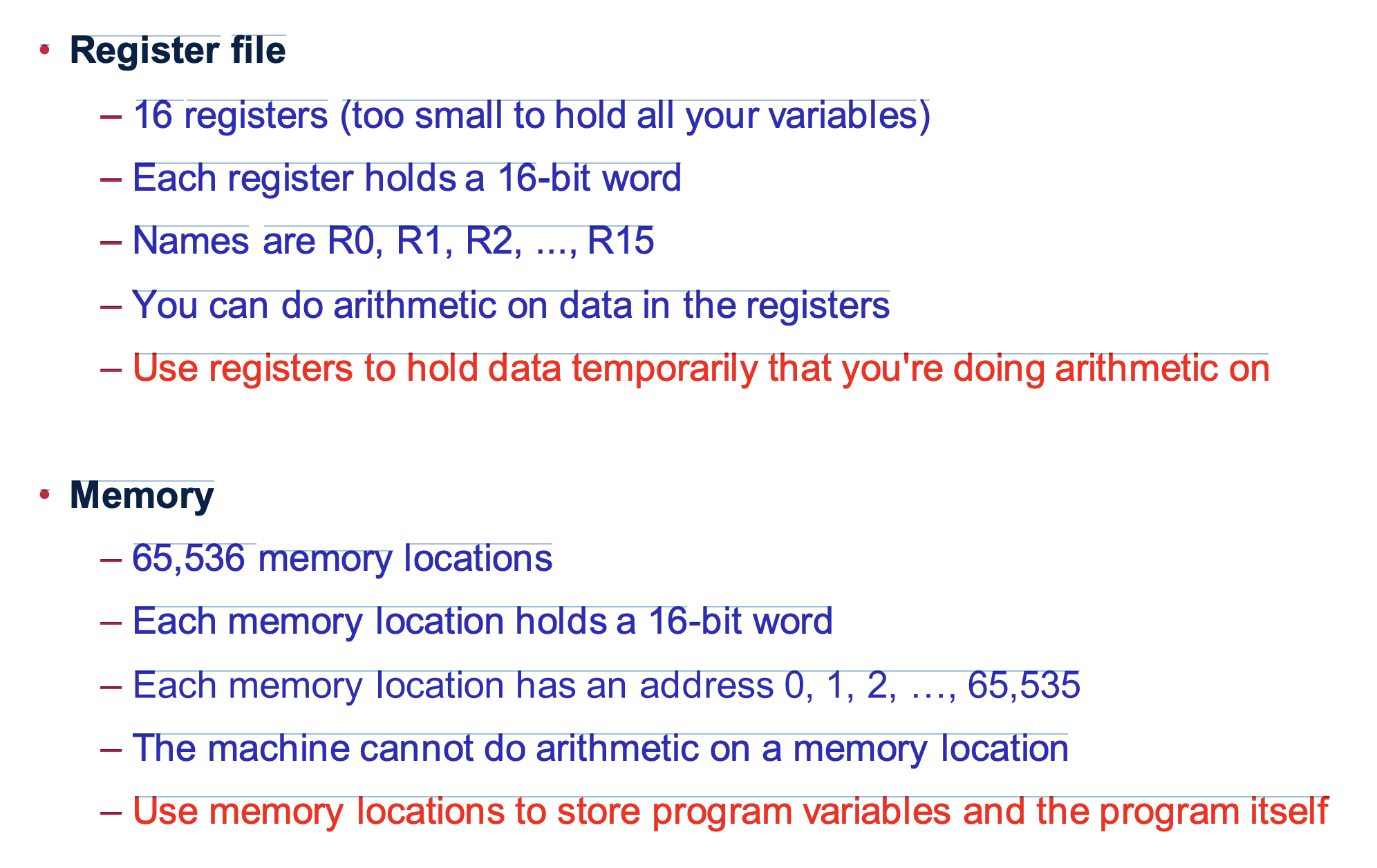
memory - 23Register fileThe register file is a set or array of “registers”
The RTM circuit has 4 (R0, …, R3), each holding 4 bits
There are 16 registers in Sigma16, each holding 16 bits (a 16-bit word)
We'll write the words using hexadecimal
In assembly language we are programming directly with the hardware in the computer, but registers can hold variables - 24The add instruction– add dest,op1,op2 where dest, op1, op2 are registers
– The two operands are added, the result is placed in the destination
– Meaning: dest := op1 + op2
Ex: add R5,R2,R3 ; means R5 := R2 + R3 - 25Notation and terminology– It's actually more consistent because every instruction will be written in
this form: a keyword for the operation, followed by the operands
– The notation is related closely to the way instructions are represented in
memory, which we'll see later - 26More arithmetic instructionsadd dest,op1,op2
sub dest,op1,op2
div dest,op1,op2
mul dest,op1,op2 - 27General form of arithmetic instructionGeneral form: op d,a,b
op: operation (+, −, ×, ÷)
d: destination register (where the result goes)
a: first operand register
b: second operand register - 28R0• R0 always contains 0
– Any time you need the number 0, it's available in R0
– You cannot change the value of R0
– It is legal to use R0 as the destination, but it will still be 0 after you do it! - 29R15• R15 holds status information
– Some instructions place additional information in R15 (is the result
negative? was there an overflow?)
– Therefore, R15 is for temporary information (not a safe place to keep
long-term data) - 30MemoryThe memory is similar to the register file
• A variable name (e.g. x, sum, count) refers to a word in memory
• Some differences between memory and register file
– The memory is much larger: 216 = 65,536 locations (register file only 16)
– The memory cannot do arithmetic - 31strategy in programming with memory– Keep data permanently in memory
– When you need to do arithmetic, copy a variable from memory to a register
– When finished, copy the result from a register back to memory - 32Registers and memory
- 33There are two instructions for accessing the memory– load copies a variable from memory to a register load R2,x[R0]
– store copies a variable from a register to memory store R3,y[R0] - 34Wouldn't it be easier just to get rid of the distinction between registers and memory and do all the arithmetic on memory?yes, it's possible to design a computer that way (e.g. Intel machines)
– But it makes the computer much slower!
– A computer without load and store instructions (where you do arithmetic
on memory locations) would run between 100 and 1,000 times slower - 35ConstantsThe RTM has an instruction that loads a constant into a register
We use the lea instruction
– lea R2,57[R0] - 36Stopping the programThe last instruction of every program should be
trap R0,R0,R0 ; halt
• This tells the computer to halt, it stops execution of the program - 37Defining variablesTo define variables x, y, z and give them initial values we use ‘data’
x data 34
data statements should come after all the instructions in the program - 38why should data statements should come after all the instructions in the program– Reason: the booter loads the object code into memory, starting from
location 0, and then jumps to location 0
– If you put the data first, there will not be instructions to execute - 39CompilingComputers cannot execute programs in a high-level programming language
Translating from high-level language to assembly language is called compiling - 40Benefits of using compilers– A computer can run programs in many languages (using many compilers)
– Compilers can make programming easier: good error messages, etc
– Languages can be designed to fit well for different purposes - 41Statements in high level languages– Statements that determine the order of the calculations (control structures)
• Conditionals: if-then-else
• Loops: while, repeat, for
• Structuring computation: functions, procedures, coroutines, etc - 42High level control structuresNotation: S, S1, S2, etc means “any statement” (e.g. an assignment statement), bexp means “any boolean expression”, either True or False (e.g. x>3)
• Block: We treat several statements as a single statement {S1; S2; S3;}
• if-then: if bexp then S;
• if-then-else: if bexp then S1 else S2;
• while-loop: while bexp do S
And more - 43Low level constructsJust three
Assignment statements
Goto
Conditional - 44Translation procedure1. First translate high-level statements into these low-level constructs
2. Then translate the low-level constructs into assembly language - 45The Goto statement• Many (not all) programming languages have a goto statement
• Any statement may have a label (for example “loop”)
• Normally execution proceeds from one statement to the next, on and on
• A goto L transfers control to the statement with label L - 46Types of Goto– Inconditional: goto L
– Conditional: if b then goto L - 47The conditional goto statementif bexp then goto label
• bexp is a Boolean expression: x < y, j = k, abc > def
• If the bexp is True the statement goes to the label
• Otherwise we just move on the next statement
• The only thing you can put after then is a goto statement - 48Jumping• The foundation of control structures is jump instructions
• Jumping is the machine language equivalent of got
• The unconditional instruction jump loop[R0] means goto loop - 49label• An instruction may have a label
• The label is a name, starting with a letter, and must appear in the first character of a line - 50Comparison instruction: Boolean formcmp Ra,Rb: compares the values in registers Ra and Rb, and then sets bits (or flags) in R15 to indicate the result
The notation R15.i means bit i in R15 thus R15.0 is the leftmost bit of R15 - 51The resulting bits (or flags) are– binary less than (L) in R15.0
– two's complement less than (<) in R15.1
– equal in R15.2
– binary greater than (G) in R15.3
– two's complement greater than (>) in R15.4 - 52Conditional jumps: Boolean decisionThe result of a cmp instruction can be used to control a conditional jump
jumplt < less than
jumple <= less than or equal
jumpne != not equal
jumpeq = equal
jumpge >= greater than or equal
jumpgt > greater than - 53Jump instructions: jump if a register contains 0 or ≠ 0• jumpz Rd,label[R0] ; jump if Rd contains
• jumpnz Rd,label[R0] ; jump if Rd contains any value other than 0 - 54Compilation patterns• Each programming construct is translated according to a compilation pattern
• As mentioned before, it's useful to translate in two steps
– First, translate complex high-level statements to simple low-level ones
– Then complete the translation to assembly language - 55First, translate complex high-level statements to simple low-level ones• goto label, if b then goto label
• The “goto” form corresponds closely to machine instructions - 56Then complete the translation to assembly language• Assignment statements: loads, then arithmetic, then store
• goto label: jump label[R0]
• if b then goto label: jumpxx label[R0] where xx is: lt, le, ne, eq, ge, gt
• if b then goto label: jumpnz R5,label[R0] where R5 contains b
• if not b then goto label: jumpz R5,label[R0] where R5 contains b - 57blockA block is a sequence of instructions
– To execute it, always start with the first statement
– When it finishes, it always reaches the last statement - 58How to compile nested statements• Every high-level statement should be compiled into a block of code
• This block may contain internal structure (several smaller blocks)
– To execute it you should always begin at the beginning and it should
always finish at the end
• The previous patterns work for nested statements
• But you need to use new labels (can't have the same label in several places) - 59Programming techniques– The statement-by-statement style (use it if you feel confused)
– The register-variable style (use it if you like the shorter code it produces) - 60The register-variable style– The instructions corresponding to the statements are mixed together
– Some statements are executed entirely in the registers
– A variable is kept in the same register across many statements
– The use of loads and stores is minimised
– Object code is concise but harder to see how it corresponds to source code - 61The statement-by-statement style– Each statement is compiled into a separate block of code
– Each statement requires loads, computation, then stores
– A variable may appear in several different registers
– There may be a lot of redundant loading and storing
– Object code corresponds to source code, but it may be unnecessarily long
Information
- Description
- Computer Science Flashcards on Week 4, created by Isaac Gilbert on 01/02/2022.
- Created by
- Isaac Gilbert
- Views
- 2
- Rating