
Mind map
Network Protocols
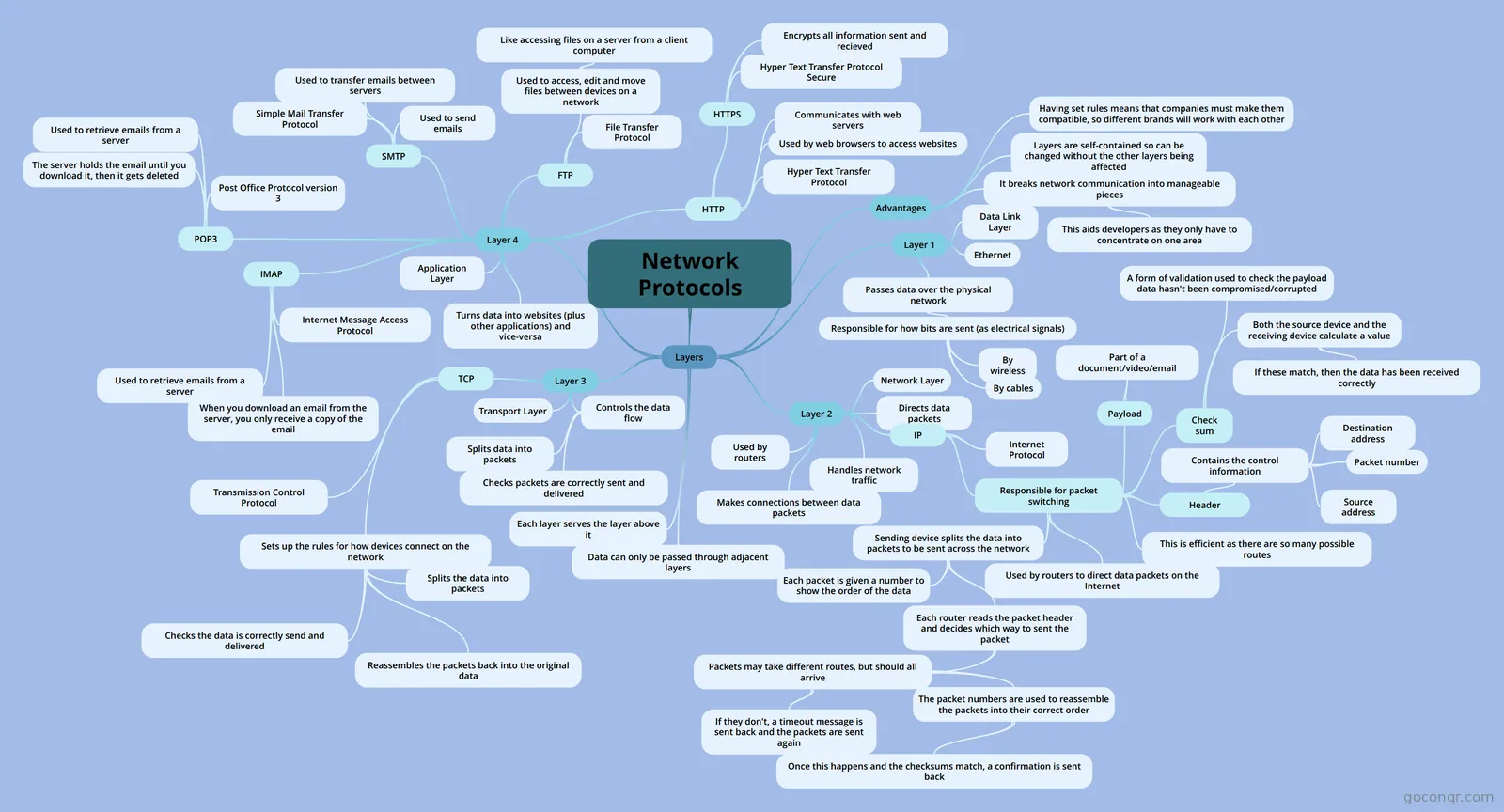
Mind map: network protocols
Map content
Network Protocols
Layers
- Layer 1
- Data Link Layer
- Passes data over the physical network
- Responsible for how bits are sent (as electrical signals)
- By cables
- By wireless
- Responsible for how bits are sent (as electrical signals)
- Ethernet
- Layer 2
- Network Layer
- Makes connections between data packets
- Directs data packets
- Handles network traffic
- Used by routers
- IP
- Internet Protocol
- Responsible for packet switching
- Used by routers to direct data packets on the Internet
- Sending device splits the data into packets to be sent across the network
- Each packet is given a number to show the order of the data
- Each router reads the packet header and decides which way to sent the packet
- Packets may take different routes, but should all arrive
- The packet numbers are used to reassemble the packets into their correct order
- Once this happens and the checksums match, a confirmation is sent back
- If they don't, a timeout message is sent back and the packets are sent again
- The packet numbers are used to reassemble the packets into their correct order
- Packets may take different routes, but should all arrive
- Header
- Contains the control information
- Destination address
- Source address
- Packet number
- Contains the control information
- Payload
- Part of a document/video/email
- Check sum
- A form of validation used to check the payload data hasn't been compromised/corrupted
- Both the source device and the receiving device calculate a value
- If these match, then the data has been received correctly
- This is efficient as there are so many possible routes
- Layer 3
- Transport Layer
- Controls the data flow
- Splits data into packets
- Checks packets are correctly sent and delivered
- TCP
- Transmission Control Protocol
- Sets up the rules for how devices connect on the network
- Splits the data into packets
- Reassembles the packets back into the original data
- Checks the data is correctly send and delivered
- Layer 4
- Application Layer
- Turns data into websites (plus other applications) and vice-versa
- HTTP
- HTTPS
- Hyper Text Transfer Protocol Secure
- Encrypts all information sent and recieved
- Hyper Text Transfer Protocol
- Used by web browsers to access websites
- Communicates with web servers
- HTTPS
- FTP
- File Transfer Protocol
- Used to access, edit and move files between devices on a network
- Like accessing files on a server from a client computer
- SMTP
- Simple Mail Transfer Protocol
- Used to send emails
- Used to transfer emails between servers
- POP3
- Post Office Protocol version 3
- Used to retrieve emails from a server
- The server holds the email until you download it, then it gets deleted
- IMAP
- Internet Message Access Protocol
- Used to retrieve emails from a server
- When you download an email from the server, you only receive a copy of the email
- Advantages
- It breaks network communication into manageable pieces
- This aids developers as they only have to concentrate on one area
- Layers are self-contained so can be changed without the other layers being affected
- Having set rules means that companies must make them compatible, so different brands will work with each other
- It breaks network communication into manageable pieces
- Data can only be passed through adjacent layers
- Each layer serves the layer above it
- Layer 1
Information
- Description
- GCSE Computing Network Protocols
- Created by
- Comhnall-James McLeod
- Views
- 6
- Rating