
Mind map
1.1
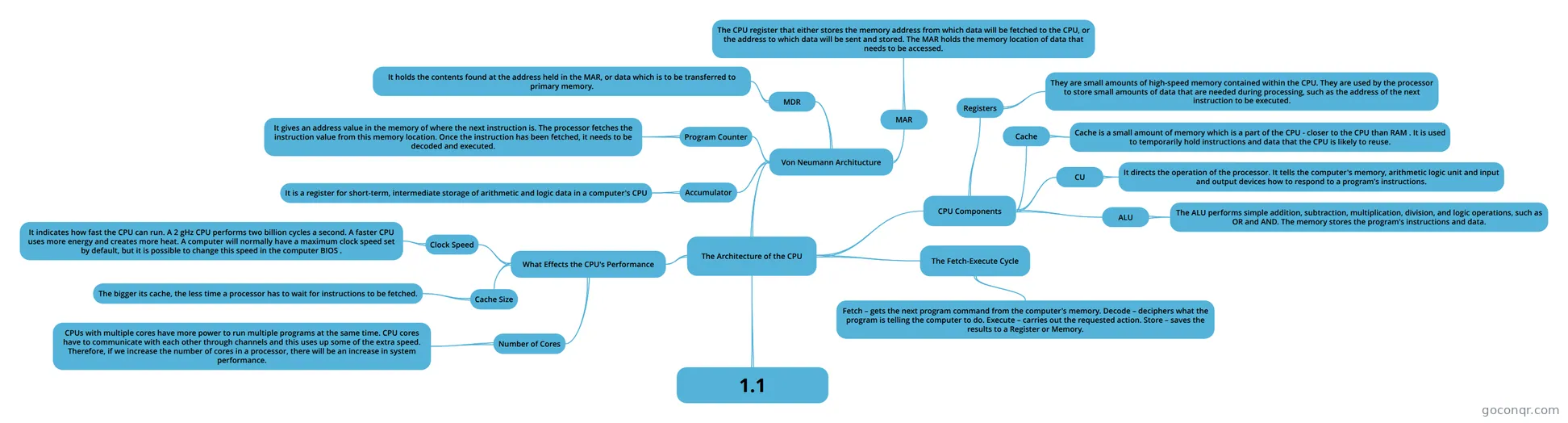
Mind map: The architecture of the CPU
Map content
1.1
The Architecture of the CPU
- The Fetch-Execute Cycle
- Fetch – gets the next program command from the computer's memory. Decode – deciphers what the program is telling the computer to do. Execute – carries out the requested action. Store – saves the results to a Register or Memory.
- CPU Components
- ALU
- The ALU performs simple addition, subtraction, multiplication, division, and logic operations, such as OR and AND. The memory stores the program's instructions and data.
- CU
- It directs the operation of the processor. It tells the computer's memory, arithmetic logic unit and input and output devices how to respond to a program's instructions.
- Cache
- Cache is a small amount of memory which is a part of the CPU - closer to the CPU than RAM . It is used to temporarily hold instructions and data that the CPU is likely to reuse.
- Registers
- They are small amounts of high-speed memory contained within the CPU. They are used by the processor to store small amounts of data that are needed during processing, such as the address of the next instruction to be executed.
- ALU
- Von Neumann Architucture
- MAR
- The CPU register that either stores the memory address from which data will be fetched to the CPU, or the address to which data will be sent and stored. The MAR holds the memory location of data that needs to be accessed.
- MDR
- It holds the contents found at the address held in the MAR, or data which is to be transferred to primary memory.
- Program Counter
- It gives an address value in the memory of where the next instruction is. The processor fetches the instruction value from this memory location. Once the instruction has been fetched, it needs to be decoded and executed.
- Accumulator
- It is a register for short-term, intermediate storage of arithmetic and logic data in a computer's CPU
- MAR
- What Effects the CPU's Performance
- Clock Speed
- It indicates how fast the CPU can run. A 2 gHz CPU performs two billion cycles a second. A faster CPU uses more energy and creates more heat. A computer will normally have a maximum clock speed set by default, but it is possible to change this speed in the computer BIOS .
- Cache Size
- The bigger its cache, the less time a processor has to wait for instructions to be fetched.
- Number of Cores
- CPUs with multiple cores have more power to run multiple programs at the same time. CPU cores have to communicate with each other through channels and this uses up some of the extra speed. Therefore, if we increase the number of cores in a processor, there will be an increase in system performance.
- Clock Speed
- The Fetch-Execute Cycle
Information
- Description
- Mind Map on 1.1, created by Zac Odell on 01/10/2021.
- Created by
- Zac Odell
- Views
- 2
- Rating