
Mind map
Input Devices
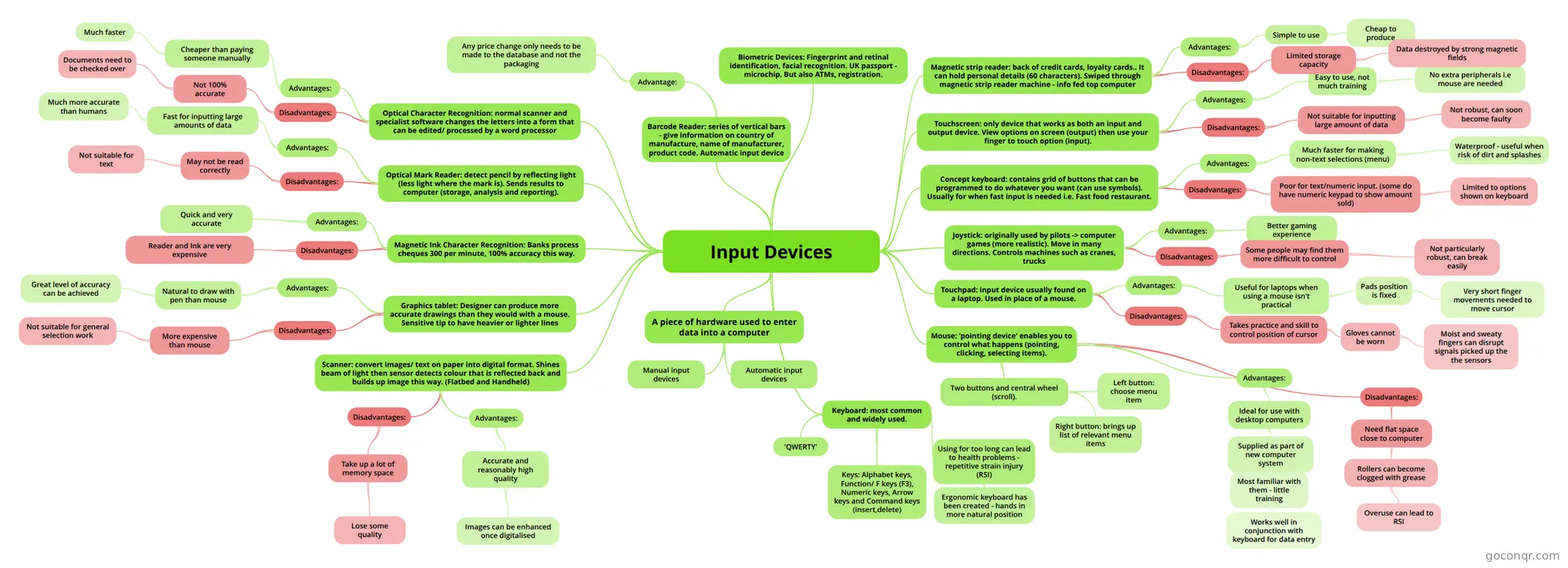
Mind map: Input devices
Map content
Input Devices
Keyboard: most common and widely used.
- Keys: Alphabet keys, Function/ F keys (F3), Numeric keys, Arrow keys and Command keys (insert,delete)
- 'QWERTY'
- Using for too long can lead to health problems - repetitive strain injury (RSI)
- Ergonomic keyboard has been created - hands in more natural position
A piece of hardware used to enter data into a computer
- Manual input devices
- Automatic input devices
Mouse: 'pointing device' enables you to control what happens (pointing, clicking, selecting items).
- Two buttons and central wheel (scroll).
- Left button: choose menu item
- Right button: brings up list of relevant menu items
- Advantages:
- Ideal for use with desktop computers
- Supplied as part of new computer system
- Most familiar with them - little training
- Works well in conjunction with keyboard for data entry
- Most familiar with them - little training
- Supplied as part of new computer system
- Ideal for use with desktop computers
- Disadvantages:
- Need flat space close to computer
- Rollers can become clogged with grease
- Overuse can lead to RSI
- Rollers can become clogged with grease
- Need flat space close to computer
- Two buttons and central wheel (scroll).
Touchpad: input device usually found on a laptop. Used in place of a mouse.
- Advantages:
- Useful for laptops when using a mouse isn't practical
- Pads position is fixed
- Very short finger movements needed to move cursor
- Pads position is fixed
- Useful for laptops when using a mouse isn't practical
- Disadvantages:
- Takes practice and skill to control position of cursor
- Gloves cannot be worn
- Moist and sweaty fingers can disrupt signals picked up the the sensors
- Gloves cannot be worn
- Takes practice and skill to control position of cursor
- Advantages:
Joystick: originally used by pilots -> computer games (more realistic). Move in many directions. Controls machines such as cranes, trucks
- Advantages:
- Better gaming experience
- Disadvantages:
- Some people may find them more difficult to control
- Not particularly robust, can break easily
- Some people may find them more difficult to control
- Advantages:
Concept keyboard: contains grid of buttons that can be programmed to do whatever you want (can use symbols). Usually for when fast input is needed i.e. Fast food restaurant.
- Advantages:
- Much faster for making non-text selections (menu)
- Waterproof - useful when risk of dirt and splashes
- Much faster for making non-text selections (menu)
- Disadvantages:
- Poor for text/numeric input. (some do have numeric keypad to show amount sold)
- Limited to options shown on keyboard
- Poor for text/numeric input. (some do have numeric keypad to show amount sold)
- Advantages:
Touchscreen: only device that works as both an input and output device. View options on screen (output) then use your finger to touch option (input).
- Advantages:
- Easy to use, not much training
- No extra peripherals i.e mouse are needed
- Easy to use, not much training
- Disadvantages:
- Not suitable for inputting large amount of data
- Not robust, can soon become faulty
- Not suitable for inputting large amount of data
- Advantages:
Scanner: convert images/ text on paper into digital format. Shines beam of light then sensor detects colour that is reflected back and builds up image this way. (Flatbed and Handheld)
- Advantages:
- Accurate and reasonably high quality
- Images can be enhanced once digitalised
- Accurate and reasonably high quality
- Disadvantages:
- Take up a lot of memory space
- Lose some quality
- Take up a lot of memory space
- Advantages:
Graphics tablet: Designer can produce more accurate drawings than they would with a mouse. Sensitive tip to have heavier or lighter lines
- Disadvantages:
- More expensive than mouse
- Not suitable for general selection work
- More expensive than mouse
- Advantages:
- Natural to draw with pen than mouse
- Great level of accuracy can be achieved
- Natural to draw with pen than mouse
- Disadvantages:
Magnetic Ink Character Recognition: Banks process cheques 300 per minute, 100% accuracy this way.
- Advantages:
- Quick and very accurate
- Disadvantages:
- Reader and Ink are very expensive
- Advantages:
Optical Mark Reader: detect pencil by reflecting light (less light where the mark is). Sends results to computer (storage, analysis and reporting).
- Advantages:
- Fast for inputting large amounts of data
- Much more accurate than humans
- Fast for inputting large amounts of data
- Disadvantages:
- May not be read correctly
- Not suitable for text
- May not be read correctly
- Advantages:
Optical Character Recognition: normal scanner and specialist software changes the letters into a form that can be edited/ processed by a word processor
- Advantages:
- Cheaper than paying someone manually
- Much faster
- Cheaper than paying someone manually
- Disadvantages:
- Not 100% accurate
- Documents need to be checked over
- Not 100% accurate
- Advantages:
Magnetic strip reader: back of credit cards, loyalty cards.. It can hold personal details (60 characters). Swiped through magnetic strip reader machine - info fed top computer
- Advantages:
- Simple to use
- Cheap to produce
- Simple to use
- Disadvantages:
- Limited storage capacity
- Data destroyed by strong magnetic fields
- Limited storage capacity
- Advantages:
Barcode Reader: series of vertical bars - give information on country of manufacture, name of manufacturer, product code. Automatic input device
- Advantage:
- Any price change only needs to be made to the database and not the packaging
- Advantage:
Biometric Devices: Fingerprint and retinal identification, facial recognition. UK passport - microchip. But also ATMs, registration.
Information
- Description
- A level ICT (3.1.2 Software + Hardware components of information systems) Mind Map on Input Devices, created by charcrawford on 18/11/2013.
- Created by
- charcrawford
- Views
- 49
- Tags
- Rating