
Mind map
Operating systems
Map content
Operating systems
- 8
Managing resources and providing user interface
- Manages peripherals such as input and output devices • Communicates with and sends data output to a printer/monitor/other valid output device • Communicates with and receives data input to a keyboard/mouse/other valid input device
- Manages printing using spooling. Data is stored on hard disc/in memory/stored in a queue .Document is printed when printer is free/in correct order . Benefit of spooling – user can carry on working/log off when waiting for job to print
- Manages backing store Ensures that data is stored and can be retrieved correctly from any disk drive . Creates and maintains Filing system such as FAT or NTFS (accepted but not expected) .Organize files in a hierarchical directory structure.
- File compression. The amount of data is reduced and the file is made smaller .Compression is used to save disk space
- Disk de-fragmentation . Fragmented files are split up and stored on different parts of the disk • Disk fragmentation will slow down disk access speed . Disk de-fragmentation is when file parts are physically re-arranged (re-organised, moved, re-ordered on disk into the order required for access)
- Manages memory (RAM) • Ensures that programs/data do not corrupt each other • Ensures that all programs and data including itself is stored in correct memory locations
- Manages processes • Ensures that different processes can utilise the CPU and do not interfere with each other or crash • On a multi-tasking O/S ensure that all tasks appear to run simultaneously
- Manages security • Allows creation and deletion of user accounts • Allows users to logon and change passwords
- Another function of the operating system is to provide a user interface. Here are some examples of how the operating system provides a user interface: • allows copying/deleting/moving/sorting/searching of file or folders • allows access to system settings such as hardware • provides a command line interface • allows users to have more than one window open • provides a graphical user interface (Windows, Icons, Menus, Pointers) • provides user with errors/help messages • allows customisation of interface, e.g. change desktop background/layout • allows user to switch between tasks (programs/windows)
Functions of commonly used programs
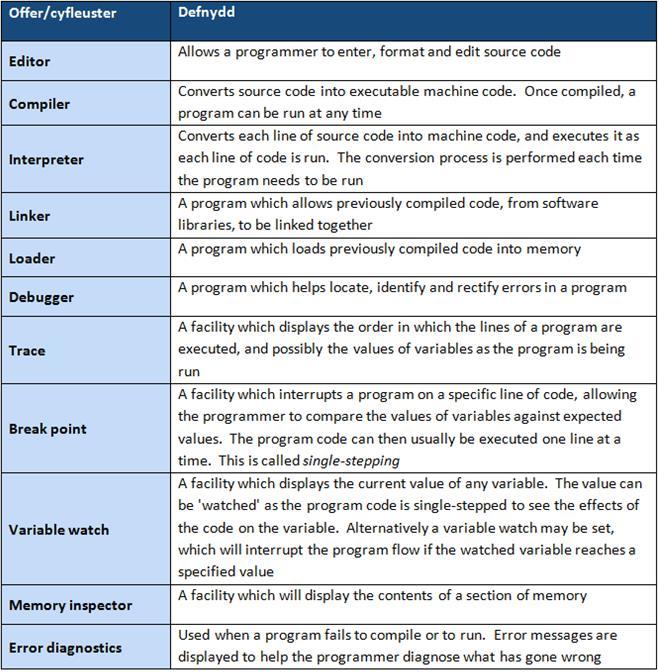
- Libraries A library is a collection of commonly used private functions and subprograms. Examples of private functions include standard mathematical operations such as square root, random number generators. Examples of subprograms include standard input/output routines, such as saving data to disk. These functions and subprograms can be called from within your program anytime, but only when the appropriate library has been linked. For urthe discussion see page 68. The advantages of using standard libraries are that: • related private functions and subprograms are stored in the same location • time is saved as the programmer can simply use the private functions and programs stored in a library • subroutines contained in a library have already been tested, so they should work reliably and not need further testing • programs will contain less code and will therefore be easier to maintain Most computer languages use standard libraries, although it is also possible to create your own
- Software development environment Software development environments, also known as Integrated Development Environments (IDE), provide programmers with various tools that are needed to create computer programs.
Disk organisation such as: file transfer, formatting, compression
- File transfer File transfer is the ability to transfer data from one location to another. This can be done by simply copying a file from one folder (directory) to another, or from one storage medium to another. You may wish to carry out either of these tasks in order to organise your files better, using subfolders or to back-up your work onto a secondary storage device, such as a flash memory stick
- Formatting Formatting is the process of preparing a disk for use. During this process, a new file system is set out on disk and all data may be erased in readiness for new data to be stored.
- Compressing Compression is the process of making a file size smaller. This may be advantageous as it allows more data to be stored on the disk and files may also be transferred more quickly. There are two methods of achieving disk compression; one is software based and the other hardware based. Software based disk compression is often included as a facility of an operating system and so it is readily available on most computer systems. The disadvantage of this is that it slows down the process of reading and writing to disk. Hardware disk compression requires specialist hardware, which can be expensive. However, it does not affect the speed of access as much as software based disk compression.
- System restore (roll back) System restore is the process of replacing lost or corrupt data by replacing it with an earlier backup.
- Disk defragmentation Files are stored on computer systems that can, over time, become fragmented. This means that they are split and stored on different parts of the disk. If a file is fragmented, it takes longer for the disk heads to move between parts of the file, which slows the process of loading it. Defragmentation is the process where files are physically re-arranged on disk so that they are no longer fragmented and the parts of each file are stored together. This improves the speed of accessing data from disk.
- Control panel Many operating systems use a control panel to give the user control of software and hardware features. It enables the user to change settings, such as sound, device and display settings all from one convenient location.
- Virus protection A virus is a computer program that is able to copy itself onto other programs often with the intention of maliciously damaging data. The consequences of a virus spreading can have catastrophic effects on computer systems, and therefore need to be prevented. Virus protection software, also called anti-virus software, is a program that can be loaded into memory when the computer is running. It monitors activity on a computer system for the signs of virus infection. Each virus has its own unique ‘signature’ which is known to virus protection software and stored in a database. Data stored on a computer system is scanned to see if any of the virus signatures within the database exist on the system. There are many thousands of known viruses, and new viruses are created daily. Virus protection software therefore needs to be updated regularly to combat these.
- Firewall A firewall can be a software or hardware security system that controls the incoming and outgoing network traffic. Packets of data are analysed to determine whether they should be allowed through or not. The basic function of a firewall is to monitor where data has come from and where it is going to, and to determine if this communication is allowed. It does this by checking a list of pre-defined rules. For example, if computer system number 1 above was attempting to connect to software port 80 on computer system 10, this would be allowed, as this would be listed in the pre-defined rules as a common port for browsing web pages. However, if computer system 6 attempted to access computer system number 2 on software port 139, this would be blocked as this would not be listed in the pre-defined rules and so this could be a sign of attempted hacking. A more advanced firewall would analyse the contents of each packet of data to ensure that it matches what is expected to be sent t
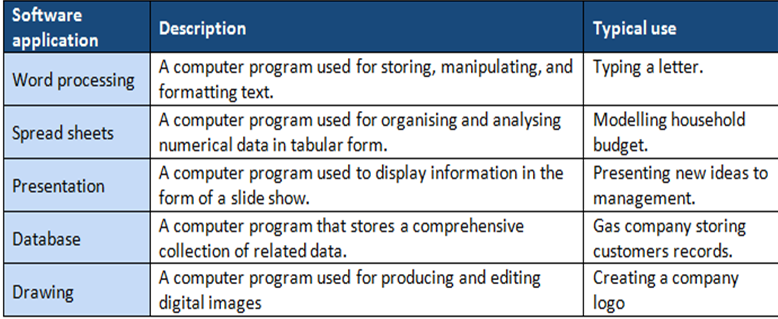
Applications such as: word processing, spread sheets, presentation, database, drawing
- A wide variety of software applications are used in the day-to-day use of computer systems. You will be familiar with many of these having studied ICT at Key Stage 3. Here are some of the most common software applications and their typical uses:
Images and files in the map
Information
- Description
- GCSE Computing Mind Map on Operating systems, created by ahmad Al-fatly on 20/09/2016.
- Created by
- ahmad Al-fatly · Sep 2016
- Updated
- Oct 5, 2016
- Views
- 1
- Rating