
Mind map
Section 2 - Networks
Map content
Section 2 - Networks
LANs and WANs
- Local Area Networks
- Lan networks cover a sall geographical are in which is located on a single site
- All of the hardware in which is used for the LAN network is owned by the organisation
- Wired (Ethernet) or wireless (WiFi)
- WiFi works in 2 frequency bands of either 5GHz or 2.4GHz
- A band is a range of frequencies
- A band is then further separated into channels
- Using separate channels reduces the amount of interference by nearby devices
- 2.4GHz can carry several non overlapping channels
- 5GHz carries many non overlapping channels so it has a higher capacity
- More expensive equipment with shorter range
- Number of channels is regulated by law
- More expensive equipment with shorter range
- WiFi works in 2 frequency bands of either 5GHz or 2.4GHz
- Often found in businesses, schools, universities and homes
- LAN's are used to make file sharing easier between people on the network
- Allows them to work collaboratively or to copy files between devices
- Can share the same hardware
- Internet connection can also be shared between all devices on the LAN
- Software can be updated and installed on bulk between all devices at once to save time
- User accounts can be stored at a central point e.g. on a server
- Can then log into your account on any computer/device in which is on the LAN
- User accounts can be stored at a central point e.g. on a server
- LAN's are used to make file sharing easier between people on the network
- Lan networks cover a sall geographical are in which is located on a single site
- Wide Area Networks
- Connects LANs that are in different geographical areas
- E.g. a company spread over several countries would have a WAN to connect all their devices
- Organisations will hire an infrastructure from telecomunication companies who will manage and own the WAN for them
- Connected by copper telephone lines, satellite links or radio links
- Connects LANs that are in different geographical areas
- What can affect Network Performance?
- Bandwidth
- Means the amount of data in which can be transferred at a given time
- Greater the bandwidth, the better the performance of the network
- The available bandwidth is shared between users of the network
- Too many users or too much heavy use can cause congestion in the network slowing it down
- Means the amount of data in which can be transferred at a given time
- Wired connections tend to be a faster and more reliable than wireless ones
- Fibre optics give much better performance than copper cables
- Wireless performance soley is based on the range of the device from the source of the connection
- Bandwidth
- Local Area Networks
Network Threats
- Malware
- Short for Malicious software
- Types of Malware
- Computer Virus
- Trojan
- Spyware
- Adware
- Pharming
- Click Fraud
- Ransomware
- Rootkits
- Scareware
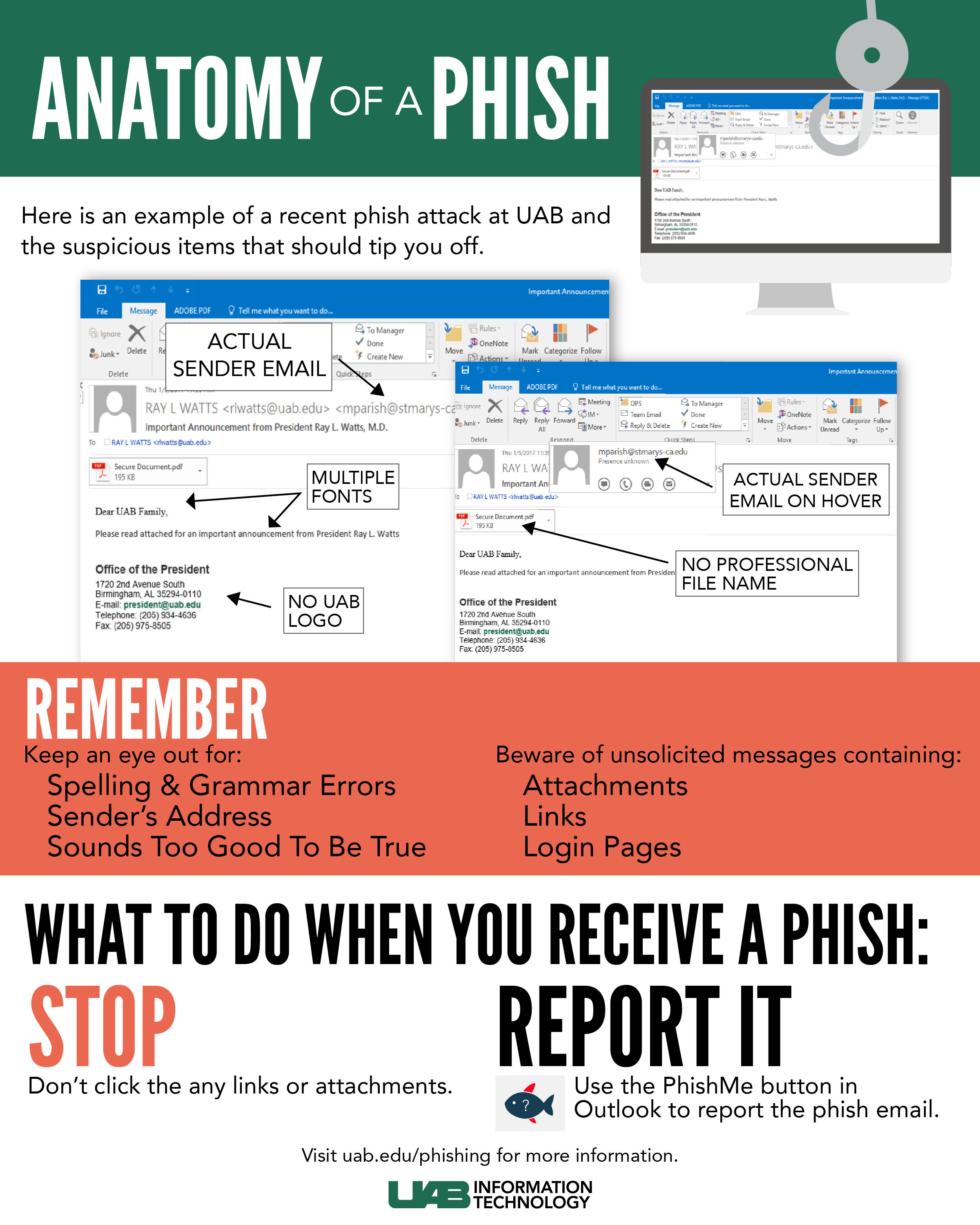
- Phishing
- Phishing involves he sending out of emails IMs or phone calls
- The people making these calls pretend to be someone of authority
- An example of what someone could claim to be could be a bank manager or windows technician
- The attacker uses the fake identity to then convince any users to give up sensitive information or to download harmful software
- Vulnerable users are told that they have some sort of urgent issue
- The attacker then asks the user for information or to download a program in which is labelled to be something else
- Vulnerable users are told that they have some sort of urgent issue
- Phishing involves he sending out of emails IMs or phone calls
- Brute Force
- This is one of the most basic ways in which to guess a password
- A computer program will be set up to run through every possibility of characters until the right combination is found
- Another method would be hard for a computer to solve would be something like a CAPTCHA before logging in
- A computer program will be set up to run through every possibility of characters until the right combination is found
- The reason companies ask for long passwords is because it takes longer for this kind of attack to guess the password if there are more characters
- These can be quite easily stopped by only allowing a certain number of attempts
- This is one of the most basic ways in which to guess a password
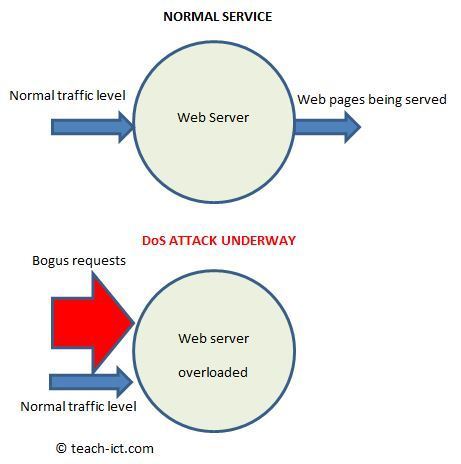
- Denial of Service
- This stops legitimate users from connecting to the necessary servers
- This floods the server with millions of bogus requests and because there are so many, the memory and CPU can't keep up so they then crash so the server goes down
- This is shortened to be called a DoS attack
- Data interception and Theft
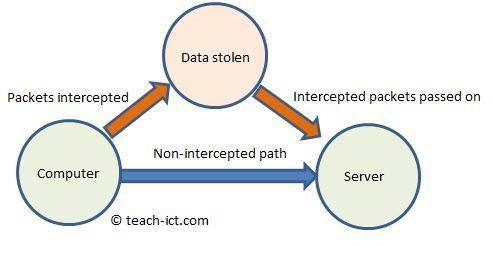
- Sometimes known as the "man in the middle" or "passive" attack because it doesn't damage data
- Almost like eavesdropping
- Users are unaware that their own data is being extracted
- Almost like eavesdropping
- All data in which moves across the internet or IP network is in the form of data packets
- These data packets are what would be intercepted
- The man in the middle attack would add an extra server or router in the network
- So.. the data packets would be redirected to the new device
- The data in each packet e.g. passwords and confidential information
- This is then extracted from the packets
- Can prevent this through encryption
- Sometimes known as the "man in the middle" or "passive" attack because it doesn't damage data
- SQL Injections
- This is a form of database attack that aims to get access to confidential information
- This could include someones login details
- SQL requests are sent to the database to check whether the username and password inputted are correct
- The attacker attempts to insert extra SQL commands to the input boxes and hopes the server will carry them out
- To protect from this the data should be validated originally before the SQL request
- This is a form of database attack that aims to get access to confidential information
- People as a weak point
- Social engineering
- When people are manipulated
- Often used by criminals to force people into making mistakes
- These mistakes would compromise a network's security
- People can be duped into downloading viruses or malware or be tricked into giving away passwords
- Social engineering
- Malware
Hardware
- NICs, Switches and Routers
- Network Interface Controllers
- Piece of internal hardware that allows a device to connect to a network
- Used to be separate cards
- Nowadays they tend to be built into the device's motherboard and they exist for both wired and wireless connections
- Piece of internal hardware that allows a device to connect to a network
- Switches
- They connect devices on a LAN
- They receive data and then send it to the device with the correct MAC address
- They connect devices on a LAN
- Routers
- Responsible for transmitting data between networks
- They're always connected to at least 2 networks
- Crucial role on the internet, they direct data in packets to their destination
- Used at home and in offices to connect the LAN to the internet
- Responsible for transmitting data between networks
- Network Interface Controllers
- Cables
- Cat 5e/6
- Ethernet cables connect devices to LANs and CAT 5e and 6 are the most common type
- They are 4 twisted copper wires surrounded by a plastic insulation layer and metallic mesh for shielding for interference
- Ethernet cables connect devices to LANs and CAT 5e and 6 are the most common type
- Coaxial
- These are the same as Cat 5e and 6, however it's just one copper wire
- Fibre-Optic
- These cables transmit data as light
- High performance, expensive cables that don't suffer from interference
- Can travel very long distance without signal quality loss
- High performance, expensive cables that don't suffer from interference
- These cables transmit data as light
- Cat 5e/6
- NICs, Switches and Routers
Client-Server and Peer-to-Peer Networks
- Client-Server
- Managed by a server
- Any devices in which are connected to said server are the clients
- Files and software are stored centrally
- The clients will send requests to the server for things like data etc
- Server processes the request and then responds
- Server will store user profiles, passwords and the access information
- Managed by a server
- Peer-to-Peer Networks
- Don't use servers as all devices are equal and connecting to each other
- Data is stored on each independent device seperately (NOT CENTRALISED)
- Client-Server
Network Protocols
- A protocol is a set of rules for how the devices on a network communicate and how data will be transmitted along the network
- The cover how communication between two devices should start and end
- Also covers what a device should do if data goes missing and how the data should be organised
- Communication on the same network uses MAC addresses
- Every device in which is network-enabled will have its own individual and unique MAC address
- These MAC addresses are assigned by the manufacturer of the device and cannot be changed
- MAC addresses are 48 or 64 bit binary numbers
- It's then converted into HEX so they're easier to be used
- These MAC addresses are mainly used by the Ethernet protocol on LANs
- It's then converted into HEX so they're easier to be used
- Every device in which is network-enabled will have its own individual and unique MAC address
- The cover how communication between two devices should start and end
- Communication between different networks uses IP addresses
- IP addresses are used when sending data between TCP/IP networks
- Not linked to hardware, they're either assigned manually (static) or automatically (dynamic)
- Static IP addresses are permanent addresses
- Used to link printers on a LAN and for hosting internet websites
- Companies don't want their IP addresses changing for their website
- Static IP addresses are therefore expensive so businesses pay a lot for them
- IP addresses are either 32 or 128 bit binary numbers and depending on the version, 32 are translated into 4 hex digits and 128 into 8 hex digits
- Static IP addresses are therefore expensive so businesses pay a lot for them
- Companies don't want their IP addresses changing for their website
- Used to link printers on a LAN and for hosting internet websites
- Dynamic IP addresses are assigned by a network server meaning that every time you log into the network the address changes.
- ISPs use Dynamic addresses as they're more cost effective and can be reused
- Static IP addresses are permanent addresses
- TCP/IP is the most important protocol
- Dictates how data is sent between networks
- Transmission Control Protocol (TCP) sets the rule for how devices connect
- In charge of splitting data into packets and then reassembling them back into the original data once it's reached the receiving device
- The IP is in charge of packet switching
- Packet Switching
- Background to Packet switching
- Making a connection
- Original way was to connect a physical cable between two devices
- This was okay for a small LAN but not for a WAN where millions of computers need to communicate randomly
- Telephone systems solved this connection problem with circuit switching
- Original way was to connect a physical cable between two devices
- Circuit Switching
- This enables digital messages to be sent across a physical path between sender and receiver
- This used wires or fiber optic cables and is set up prior to the message being sent
- Stays open through transmission and is released for use by others once the message is complete
- Very inefficient - once a connection is made, no one else can use the line
- Difficult to scale up the network for millions of devices
- Every connection can only support up to 100Mbps
- Difficult to scale up the network for millions of devices
- This used wires or fiber optic cables and is set up prior to the message being sent
- This enables digital messages to be sent across a physical path between sender and receiver
- Making a connection
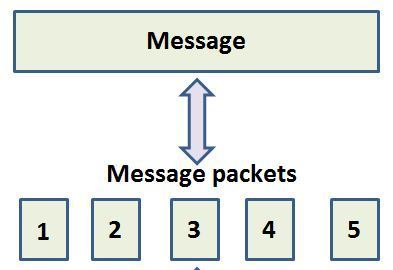
- The whole message is sent in one go wit packet switchng as the message is broken into smaller parts (data packets)
- Packets are given a 'packet number' to identify their order
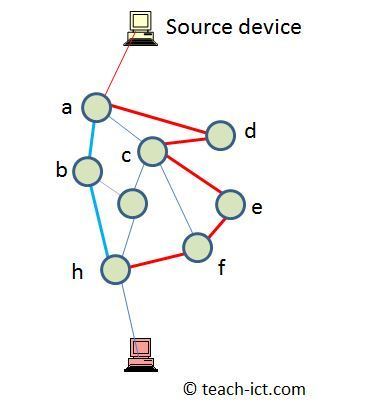
- These packets will travel across the network, usually in different directions so they take the shortest route they can
- When packets reach their final destination they are reassembled into correct order
- Once they have safely arrived a message will be sent to the sender for confirmation
- If a packet is corrupted o missing a message requesting that packet will be resent
- Packet Information
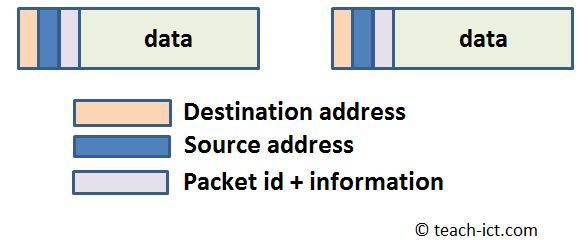
- Each packet contains 3 important pieces of information
- A source or return address
- Destination address for where the packet needs to be sent
- A sequence order for the order of the packets
- Preamble is data that's attached to the front of a data packet to prime receiving hardware that a data packet is about to arrive
- When the packet is received an error check is performed
- The error check makes use of a calculation called a 'check sum number'.
- If any errors are found then the destination computer knows the packet has been corrupted
- It will then send a request for that packet to be resent
- If any errors are found then the destination computer knows the packet has been corrupted
- The error check makes use of a calculation called a 'check sum number'.
- When the packet is received an error check is performed
- Each packet contains 3 important pieces of information
- Packet Information
- If a packet is corrupted o missing a message requesting that packet will be resent
- Once they have safely arrived a message will be sent to the sender for confirmation
- When packets reach their final destination they are reassembled into correct order
- These packets will travel across the network, usually in different directions so they take the shortest route they can
- Packets are given a 'packet number' to identify their order
- Background to Packet switching
- Packet Switching
- The IP is in charge of packet switching
- In charge of splitting data into packets and then reassembling them back into the original data once it's reached the receiving device
- Transmission Control Protocol (TCP) sets the rule for how devices connect
- Dictates how data is sent between networks
- Not linked to hardware, they're either assigned manually (static) or automatically (dynamic)
- IP addresses are used when sending data between TCP/IP networks
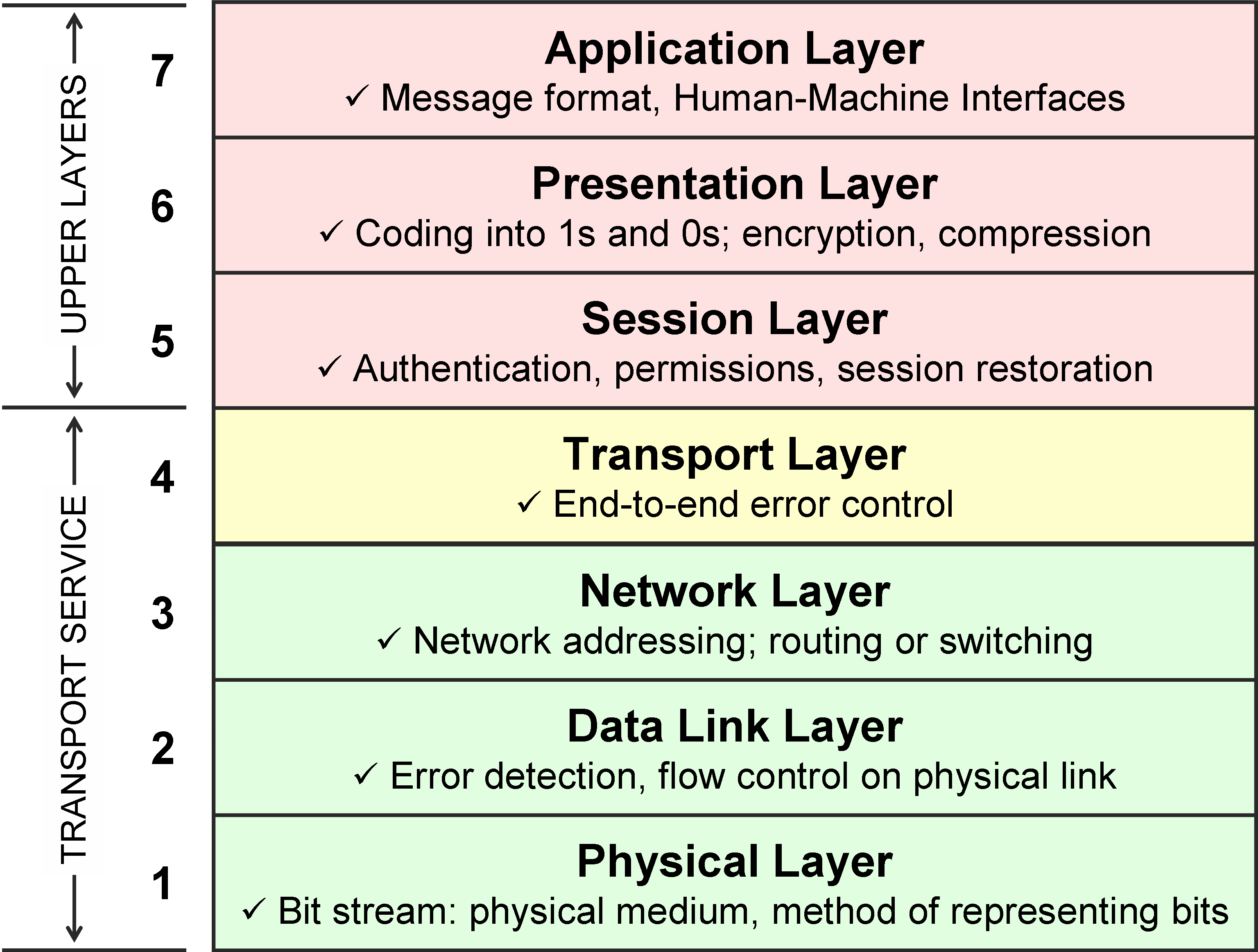
- They are divided into layers
- A layer is a group of protocols with similar functions
- A protocol is a set of rules for how the devices on a network communicate and how data will be transmitted along the network
The Internet
- The internet is a worldwide collection of networks
- A WAN connecting networks and devices around the world
- Based around the TCP/IP protocol
- Virtual Networks are software based networks
- Partitions a physical network's bandwidth to create another software based network
- Several Virtual networks exist on the same physical network
- VPN (Virtual Private Networks) can send data securely over a large network like a WAN
- Virtual LAN is when you split a LAN network into several separate networks with the same hardware
- Schools can use a VPN to set up an Intranet that students can access from home
- Virtual LAN is when you split a LAN network into several separate networks with the same hardware
- VPN (Virtual Private Networks) can send data securely over a large network like a WAN
- Several Virtual networks exist on the same physical network
- Partitions a physical network's bandwidth to create another software based network
- Virtual Networks are software based networks
- Based around the TCP/IP protocol
- The world wide web is a collection of websites that're hosted on web servers and accessed through the HTTP protocol
- The cloud uses the Internet to store files and applications
- A WAN connecting networks and devices around the world
- The internet is a worldwide collection of networks
Images and files in the map
Information
- Description
- Year 11 Computing Mind Map on Section 2 - Networks, created by Jake Bailey on 30/11/2017.
- Created by
- Jake Bailey
- Views
- 0
- Rating