
Mind map
Hardware
Map content
Hardware
Computer System
- Consists of hardware components
- it has to have an input and output
General purpose computer
- large range of functions
Embedded systems
- automatically perform functions
CPU
- Processes data and instructions decisions are made here
ALU
- It's where calculations are done
CU
- A component of the CPU that directs it's operations
Buses
- Data bus
- Carries data between the CPU and memory
- Address bus
- Carries memory addresses for locations to be read from or written to
- Control bus
- Carries control signals around the CPU and memry
- Data bus
Cache
- small
- High-speed type of memory
- stores used instructions or data
- located next to the CPU
Number of cores
- It affects the speed of the CPU
- Quad core is better, 4 times faster than single core
RISC
- microprocessor that is designed to perform a smaller number of instructions so that it can be faster
- reduced instruction set computing
CISC
- Contains a larger set of computer instructions that range from simple to complex and specialised
- complex instruction set computing
RAM
- Data applications currently in use
- needs power to work
- It's volatile so it doesn't save anything once it's shut down
- random access memory
ROM
- can be read from but not written
- Non-volatile- doesn't need power to store data so it can Boot Up
Flash memory
- Non-volatile memory, solid-state storage, quick to read and write on but only a certain amount of times, smaller in size than HDD, Expensive to make
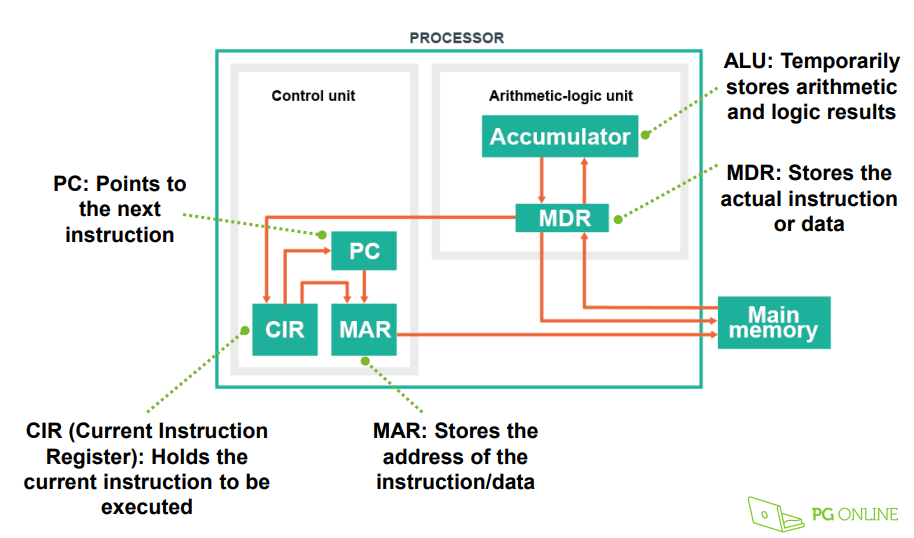
MAR
- Stores memory address from which data will be fetched from the CPU
- Memory address register
MDR
- stores the data being transferred from and to the immediate access storage
- Memory data register
CIR
- current instruction register
- Holds the instruction currently being executed or decoded
von neumann architecture
motherboard
- It provides power to all the components inside of it.
FDE Cycle
- 1. the processor checks the program counter to see which instruction to run next
- 2. the program counter gives an address value in memory of where the next instruction is
- 3. the processor fetches the instruction value from this memory location
- 4. once the instruction has been fetched, it needs to be decoded and executed
- 5. once this is done, the processor goes back to the program counter to find the next instruction
GPU
- specialized to display functions. it renders images, animations and videos
clock speed
- determines how many instructions it can execute per cycle, the higher the clock speed, the faster it is
secondary storage
- magnetic
- hard disc drive, uses magnets on rotating metal plates. large storage capacity but slow and has moving parts
- optical
- CD ROM
- magnetic
Images and files in the map
Information
- Description
- Year 10 Computing Mind Map on Hardware, created by Ana Rodrigues on 21/05/2018.
- Created by
- Ana Rodrigues · May 2018
- Updated
- Jun 11, 2018
- Views
- 0
- Rating