
Mind map
1_Networks
Map content
1_Networks
Network Topologies
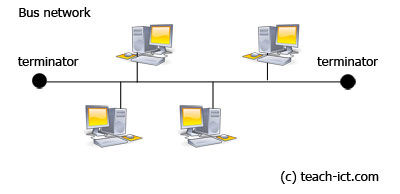
- Bus
- Advantages - • Easy to install • Easy to add extra workstations • Uses less cable than a Star network • Best choice for temporary networks
- Disadvantages - • If there is a problem with the central cable, the entire network stops working • If there are a lot of workstations on the network, data can travel slowly. • Data collisions can happen as the network becomes busy • Low security - every workstation can see all of the data in the network • Limited cable length and a maximum number of workstations
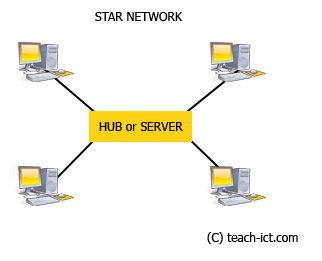
- Star
- Advantages - • Star networks are very reliable. If one connection fails, it does not affect other users • Very few data collisions as each workstation has its own cable to the server • Good security - no workstation can interact with another without going through the server first
- Disadvantages -• The most expensive network layout to install because of the amount of cables needed • Installing the network usually needs experts to set it up • Extra hardware such as hubs and switches may be needed • If the server crashes or stops working then nobody will be able to access their files or use the network.
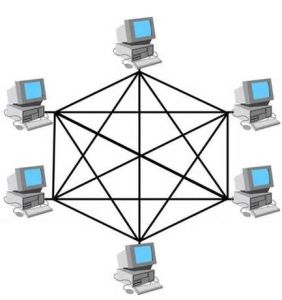
- Mesh
- Advantages - • Data can be transmitted from different devices simultaneously. This topology can withstand high traffic. • Even if one of the components fails there is always an alternative present. So data transfer doesn’t get affected. • Expansion and modification in topology can be done without disrupting other nodes.
- Disadvantages - • There are high chances of redundancy in many of the network connections. • Overall cost of this network is way too high as compared to other network topologies. • Set-up and maintenance of this topology is very difficult. Even administration of the network is tough.
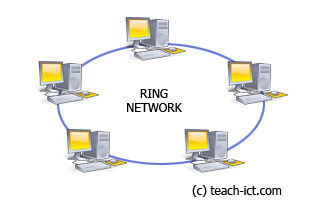
- Ring
- Advantages - • Transmission of data is fairly simple as it only travels in one direction • No data collisions • Extra computers can be added easily with little effect on performance - although you have to shut down the network to be able to do this.
- Disadvantages - • If a single machine is switched off, the network doesn't work • If a cable breaks, the network doesn't work • Data must pass through every computer until it reaches its destination. This can make it slower than other network layouts. • If there are any problems with the network, they can be difficult to identify the cause.
- Bus
Types of data speed
- Bps - Bites per second
- Mbps - Mega-bites per second
Images and files in the map
Information
- Description
- 6 ICT Mind Map on 1_Networks, created by harry johnston on 06/10/2016.
- Created by
- harry johnston
- Views
- 0
- History
-
- Created by jake wilson · Jul 1, 2016
- Copied by harry johnston · Oct 6, 2016
- Rating