
Mind map
Policy
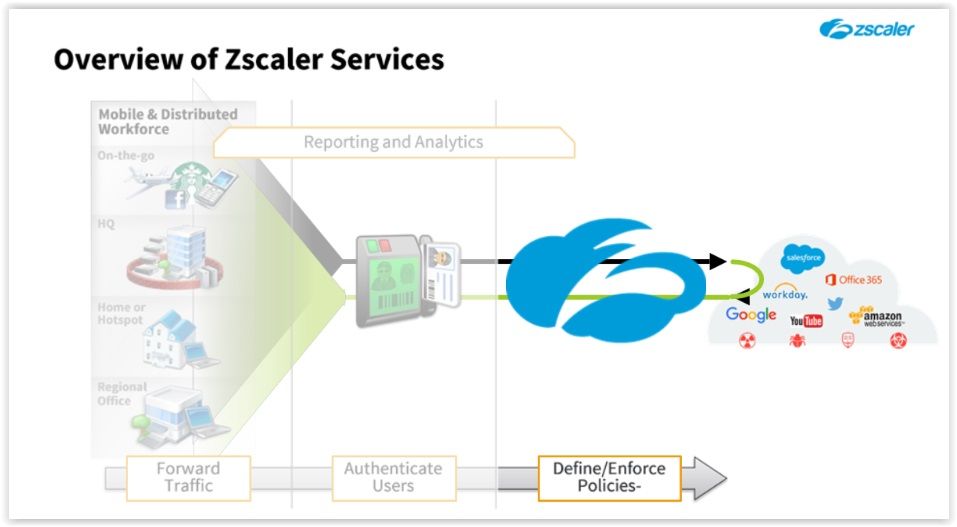
Map content
Policy
Policy Fundamentals
- Overview
- Defined via Web Portal Can be found by clicking on the police menu on the Admin Portal;
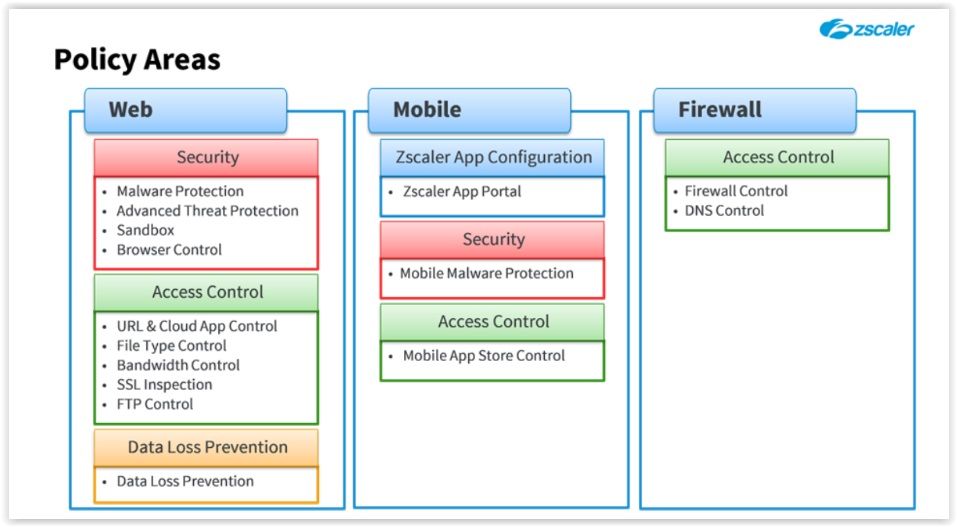
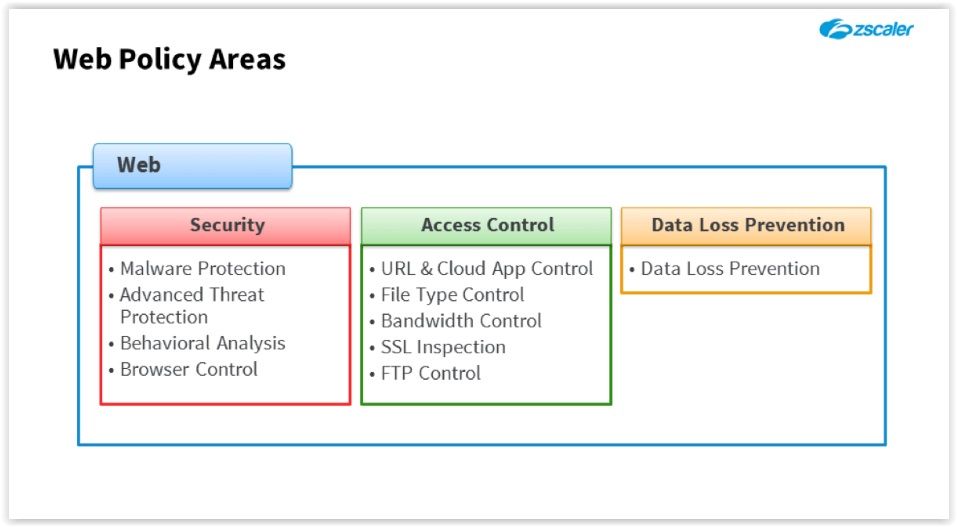
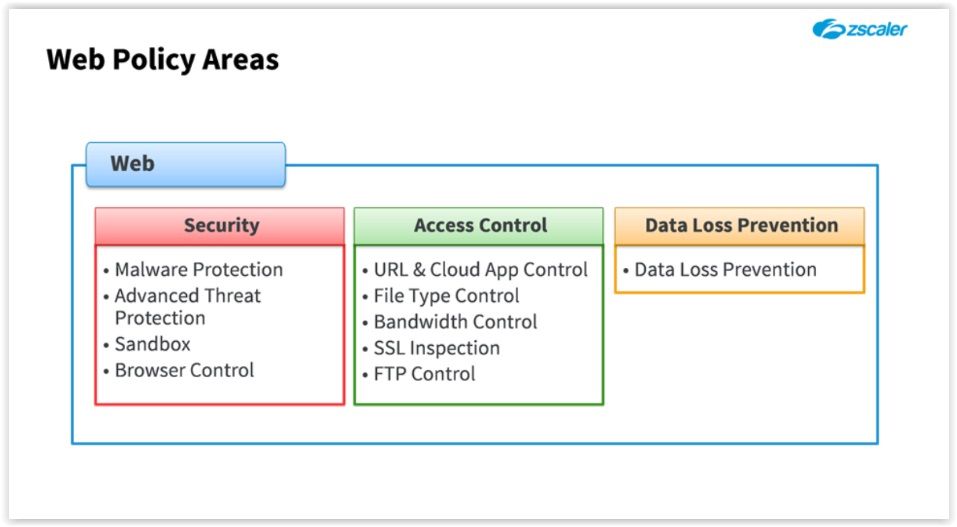
- Web
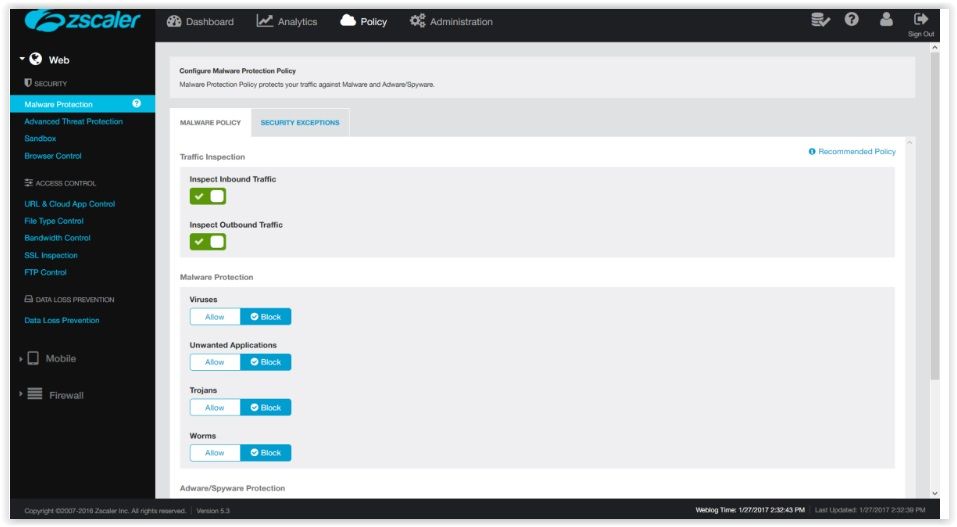
- Security Malware protection protection against Virus, Trojans, Worms, Adware, Spyware and another aplications Advanced Threat Protection To detect and block malicious activites, spywares or command and control traffic (C&C). For C&C meaning go to https://en.wikipedia.org/wiki/Command_and_control_(malware) Sandbox Cloud sandbox to quaratine suspect files for scanning on a prorected environment Browser Control To control the browser version, check if it`s the recommended one
- Access Control URL & Cloud App Control Control access to destination websites or applications File Type Control To specify the file types that may be uploaded or downloaded Bandwidth Control For assigning maximum and minimun bandwdth percentage for classes of traffic SSL Inspection Setting and resources for intercepeting and inspecting SSL traffic FTP Control For restricting access when using FTP protocol
- Data Loss Prevention Allows the creation of policies to monitor, and if necessary block, the unauthorized exfiltration of data using the Zscaler internal, or, the external DLP engines. It also allows the streaming of data to an on-site ICAP server for analysis
- Mobile
- Zscaler App Configuration Contains a link to the Zscaler app portal where the configurations can be set Security Set policies to Mobile Malware protection Access control Police rules for mobile app store control
- Firewall
- Access control FW control DNS control For basic and next gen fw configuration, depending on the subscription
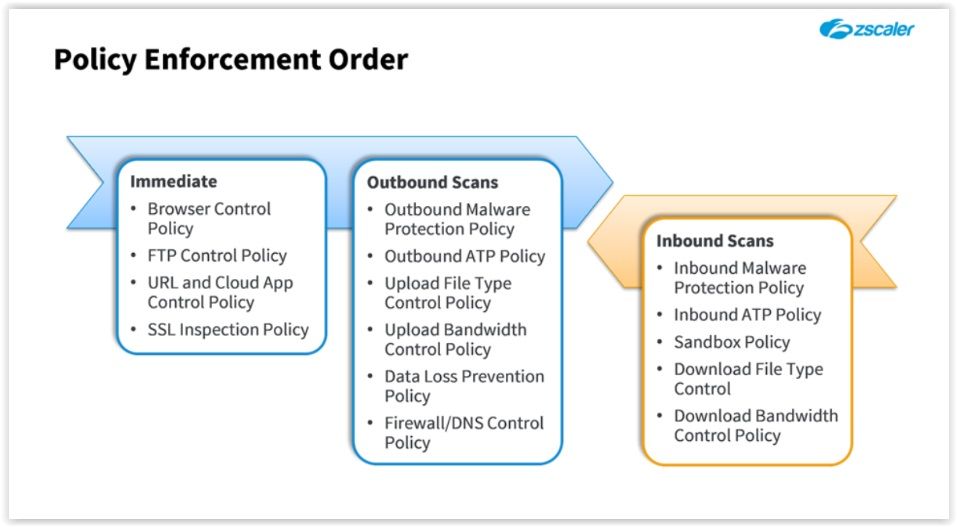
- Policy Enforcement Order
- Key Concepts
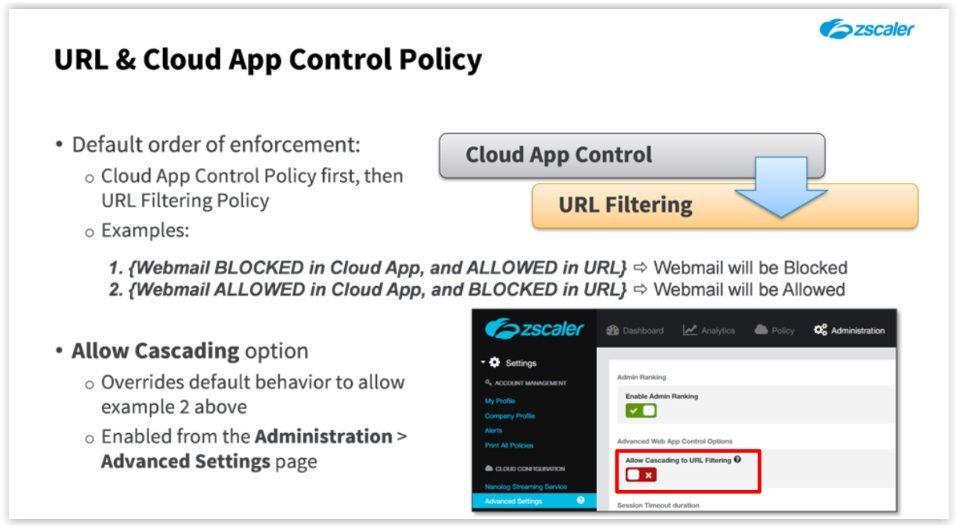
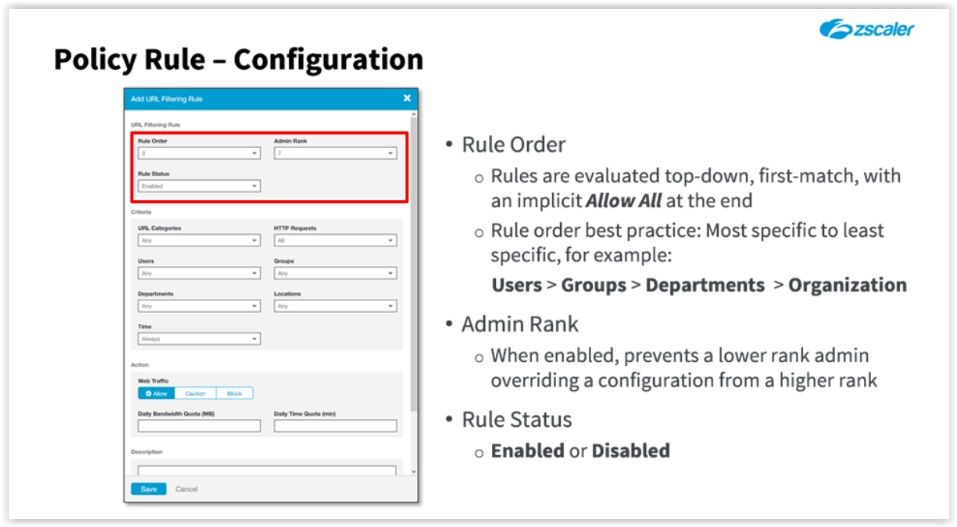
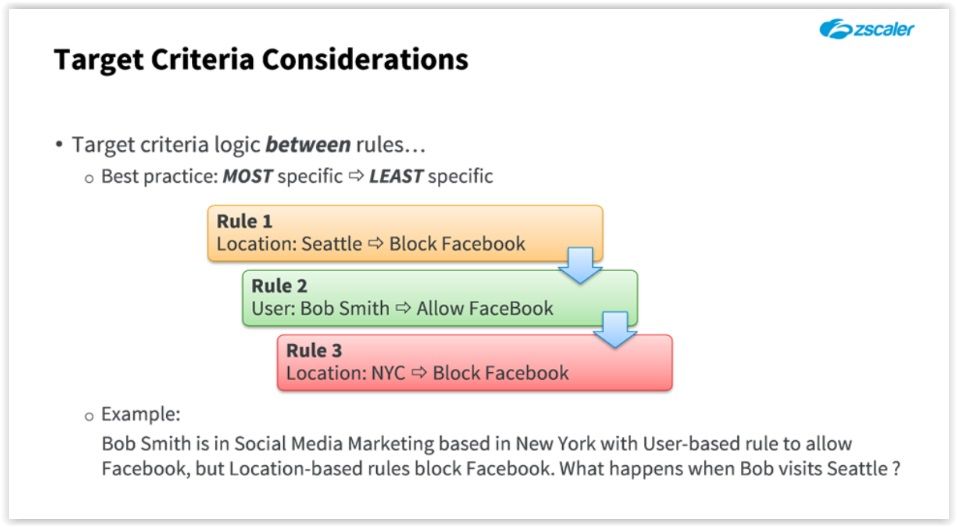
- URL & Cloud APP Control Policies ---> Where magic happens Policies are checked like a firewall, top --> down First match implicit allow all at the end
- Cloud APP is checked first If you want to add a logic "OR" you can use the "allow cascading" option
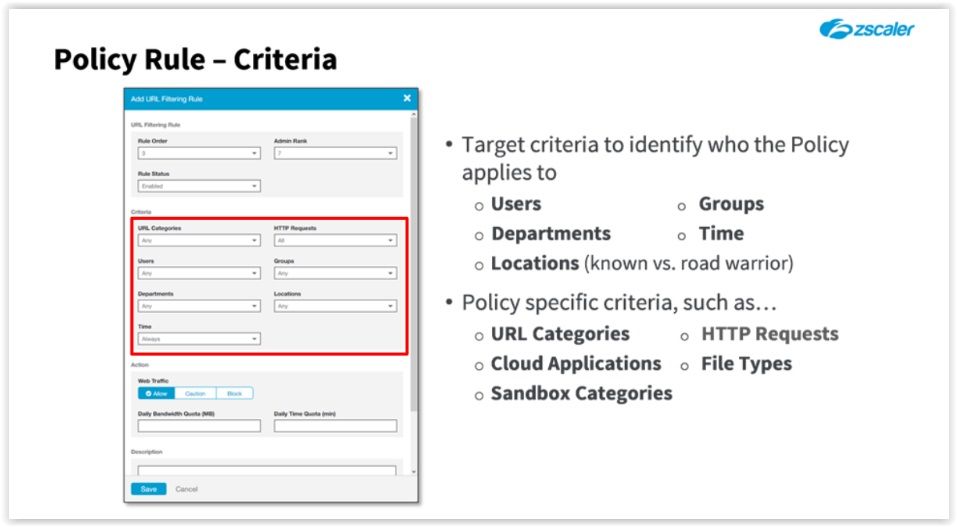
- Location = Road Warriors Users that are not connected to Zscaler from a known location (Roaming users)
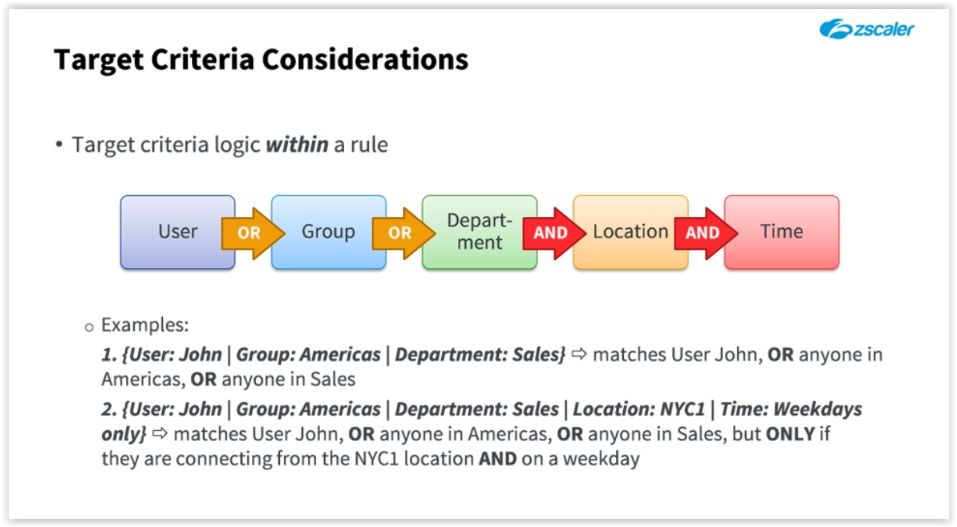
- Traffic criteria especifications BEST PRACTICE CREATE RULES FROM MOST SPECIFC TO LEAST SPECIFIC
- Policy Configuration
- Top to bottom
- SSL Inspection Overview
- SSL - Secure Sockets Layer https://www.digicert.com/ssl.htm
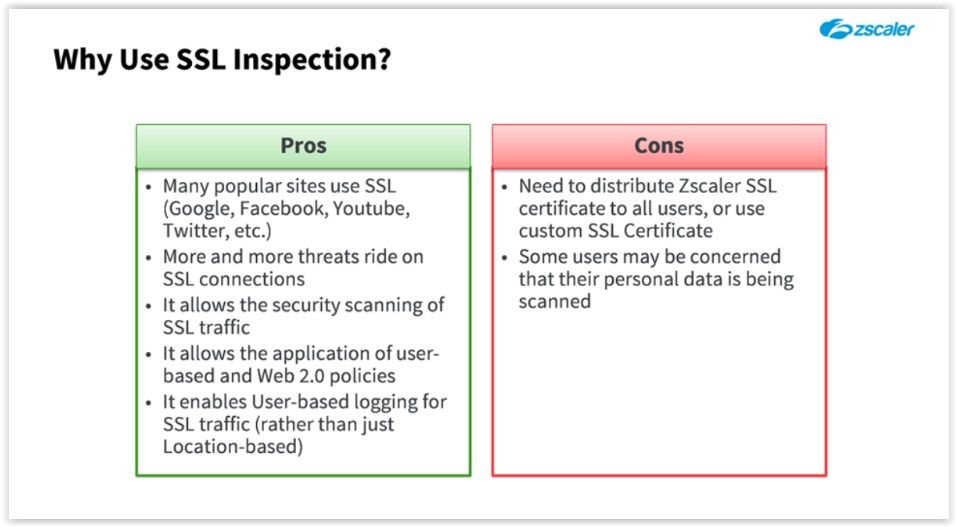
- About Cons Zscaler not store any data, it only exists in RAM long enough to the checks and the security rules can be applied. Plus data is stored in metadata format Zscaler recommends that you not inspect traffic directed to bankings or health care sites
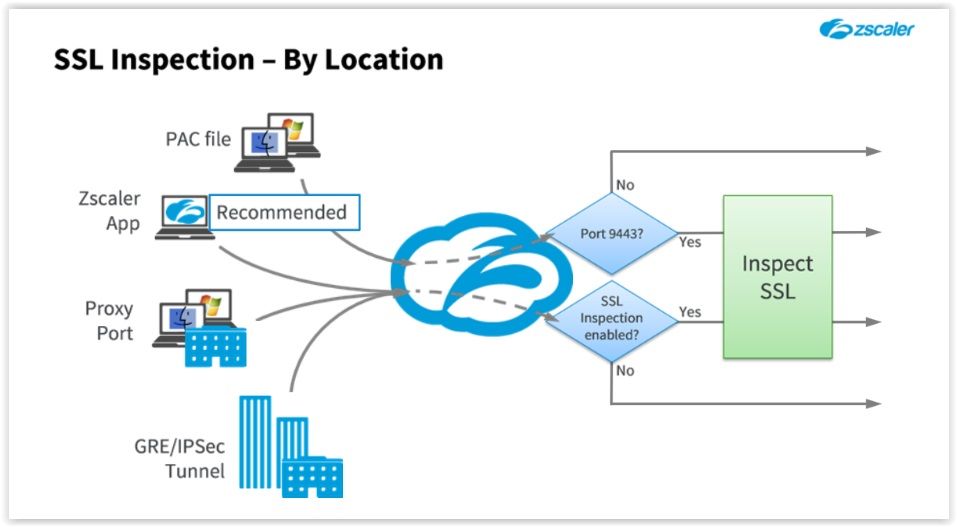
- SSL Inspection by location
- When dealing with road warriors you have three options: 1st Option PAC file Use Zscaler using TCP port 9443, you can't create any bypass rules for banking sites or health care.
- 2nd option Purchase a dedicated TCP proxy port from Zscaler and set your browser to use that port when connecting to Zscaler. That port will be tied to your location and your company so Zscaler can apply the rules previously specified
- 3rd option Zscaler App Install the Zscaller APP and enable the SSL scanning on mobile traffic option
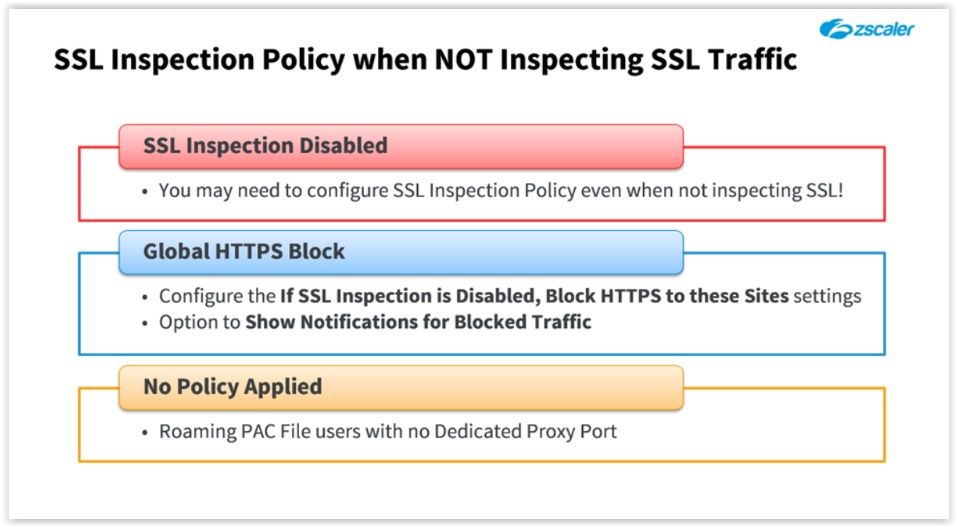
- SSL Inspection Policy when not inspecting SSL traffic
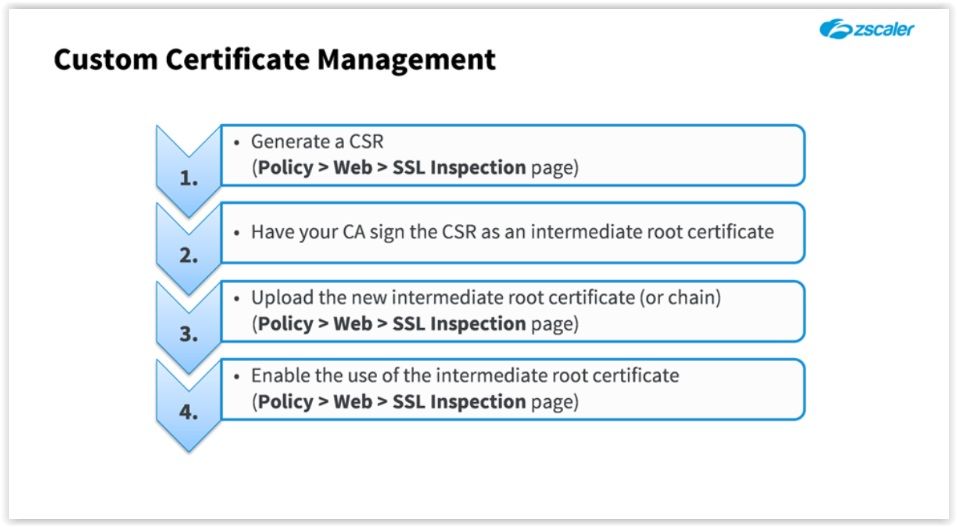
- To use your own CA
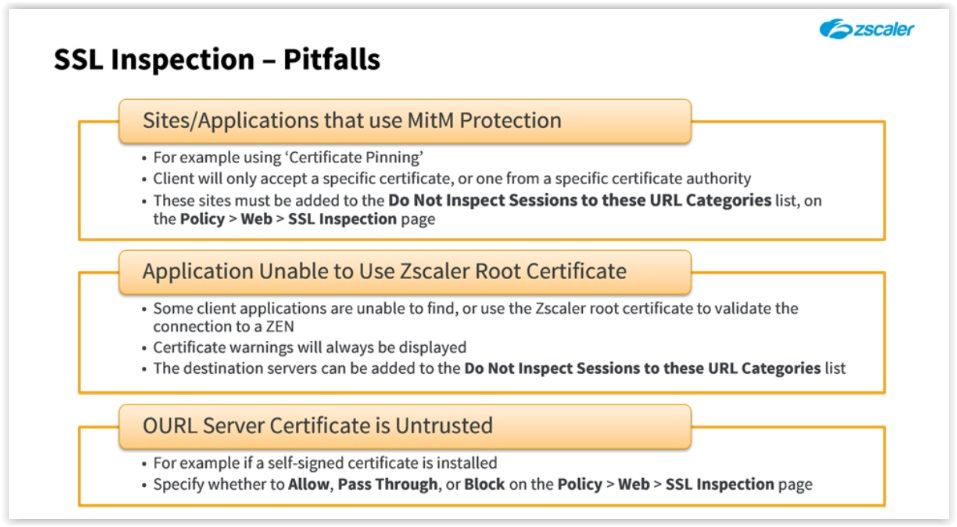
- Pitfalls
- MiTM Protection - Man in the Middle Protection
- Overview
Web - Access Control
- Rules are evaluated from top to bottom and rule evaluation stops at the first match, there's an implicit allow all in the end of the rule (not visible)
- This lesson was to teach you how to use the Zscaler admin portal UI.
- URL & Cloud App Control
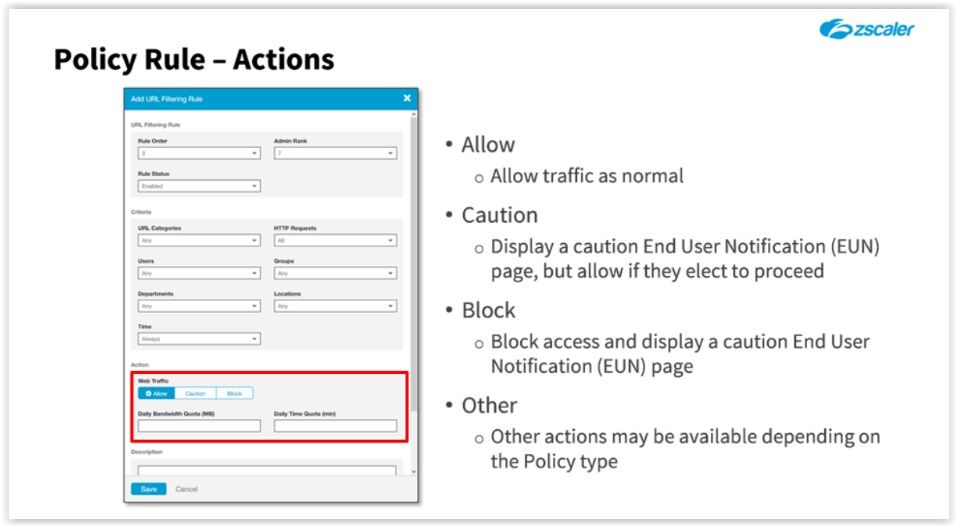
- Allows you to create filtering rules to block, allow, or allow with a caution, access for identified cloud apps or to specified URLs or URL categories.
- Cloud App control policy takes priority over the URL policy. There's a default *** ALLOW ALL *** rule in the end
- Most Specifc rules must come first
- By default Zscaler listens to ports 80 for HTTP traffic, port 53 for DNS traffic and port 21 for FTP traffic
- File Type Control
- The file type control policy allow you to create filtering rules to block, allow, or allow with a caution, the ability to download or upload specified type of files
- Bandwidth Control
- Allows you to create a filtering rules to restrict concurrent sessions, or to throttle traffic of selected classes when a link is over-subscribed
- SSL Inspection
- Important decision to be made, mor eand more site are moving to SSL, google, facebook, twitter and most recently whatsapp all require SSL conection
- This means if you not enable SSL inspection you're causing Zscaler to be blind to a massive ammount of traffic entering and exiting your network . Zscaler highly recommends to enable SSL inspection
- Enabled on a per location basis
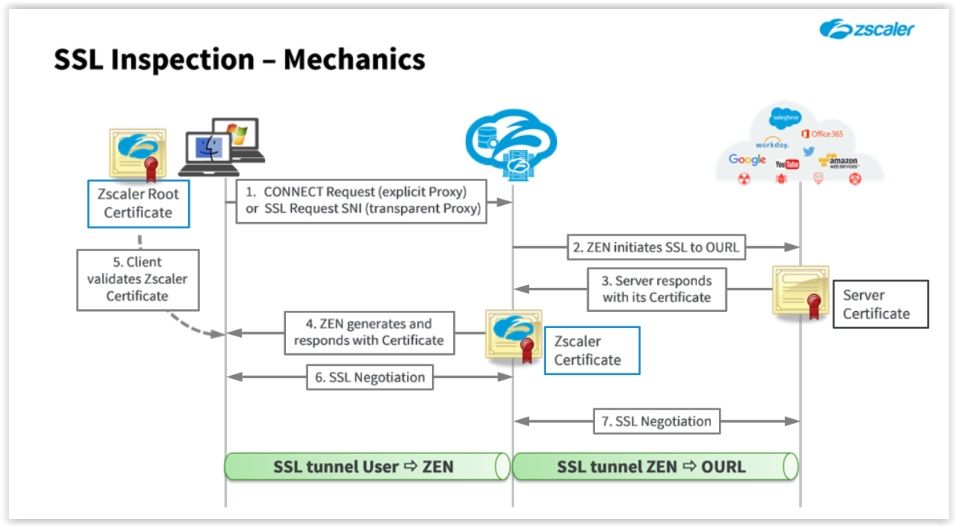
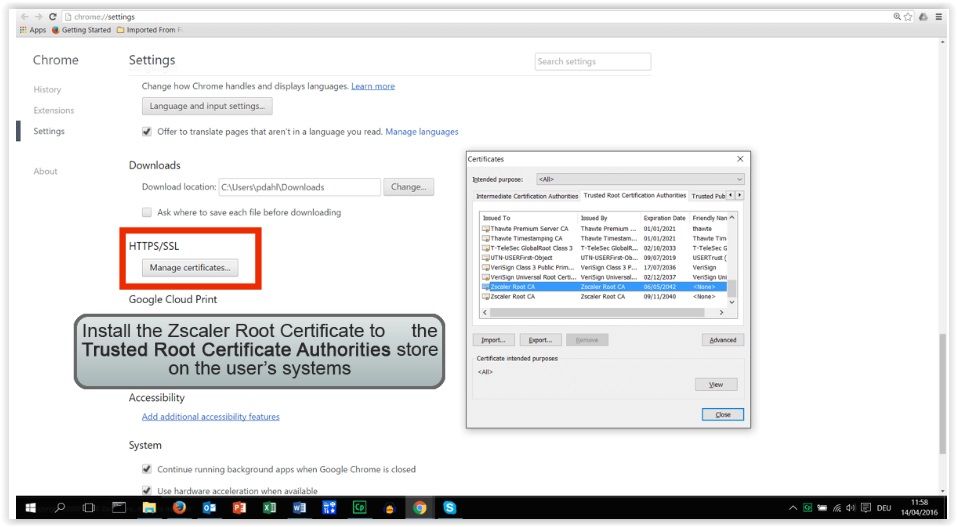
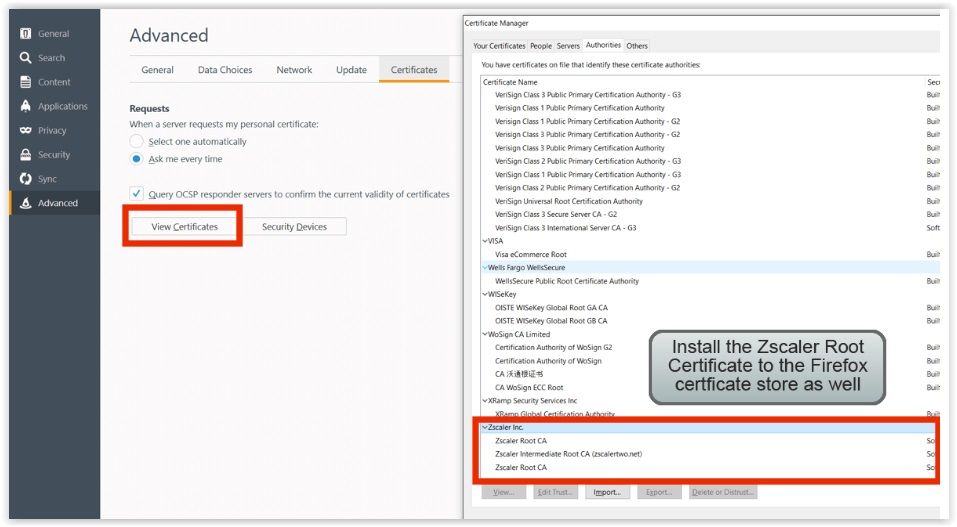
- The Zscaler root certificate needs to be installed in the trusted root certificate Authority store on the end user's system which then makes it available for most browsers
- FTP Control
- The FTP control policy allows yuo to configure policy to allow FTP access to specific sites
- Be default the Zscaler service does not allow users from a location to upload or download files from FTP sites. You can configure the FTP control policy to allow access to specific sites.
Web - Security
- Web Policy - Security
- Focus is security here
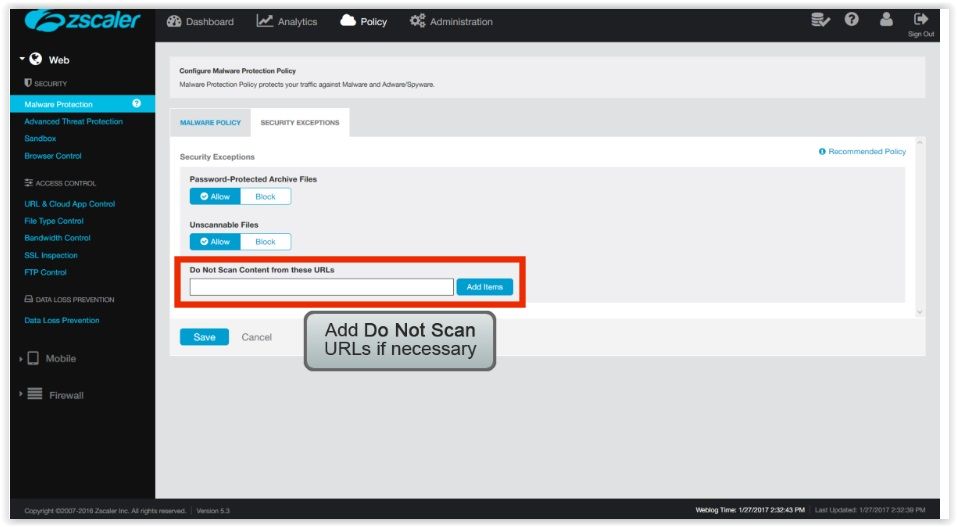
- Malware Protection
- 1st slide Malware policies
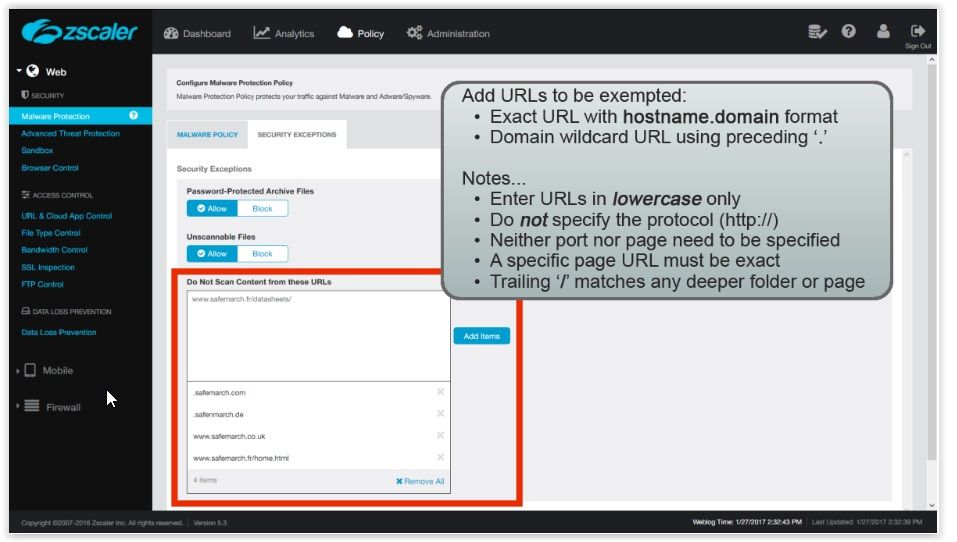
- 2nd slide Exceptions
- Third Slide: You may use a preceding "." delimeter as a wildcard to match any host on any sub-domain (up to 5 levels) Example: .safemarch.com
- Advanced Threat Protection
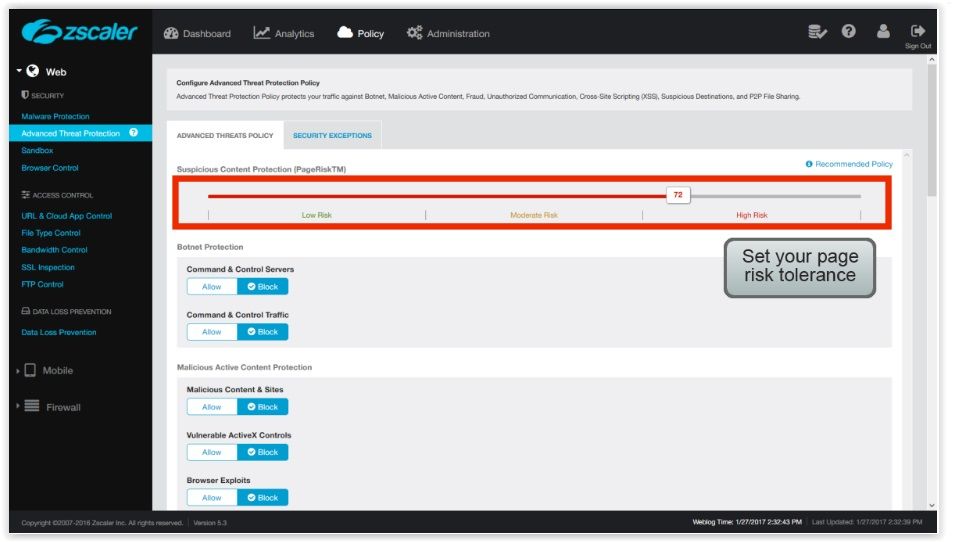
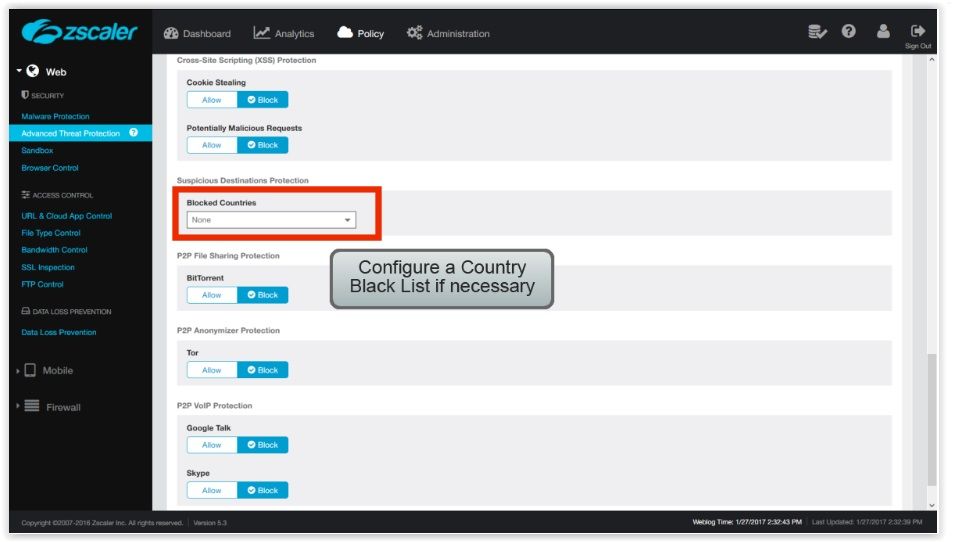
- Protects you against botnets, Malicious active content, Fraud, unauthorized communication, cross-site scripting (XSS), suspicious destinations, peer-to-peer file sharing
- 1st Slide The further you move this slider to the right, the more risk you are willing to accept. By default the page risk tolerance is set to 33. - Risk classification is pre-defined by Zscaler on a web page basis
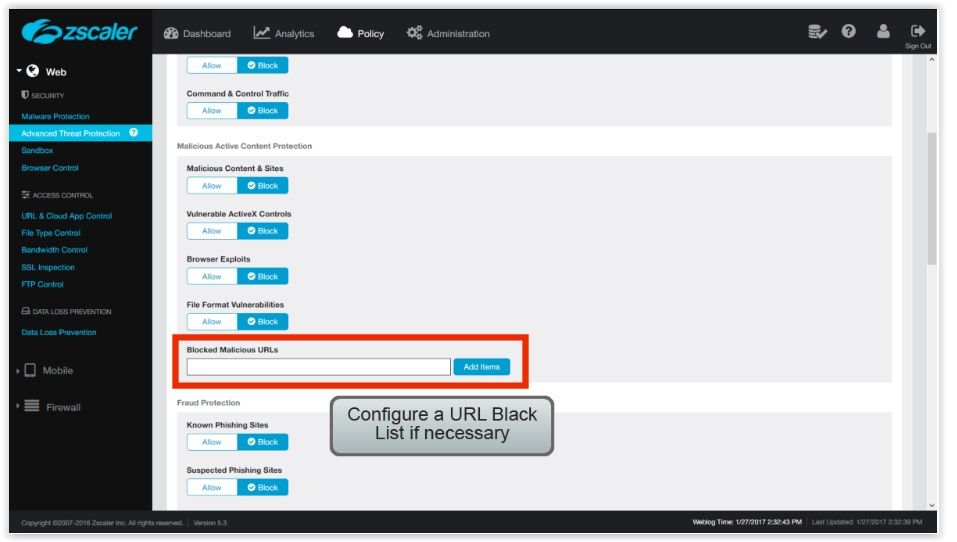
- 2nd Slide Configure a URL Black List - Customize
- 3rd Slide You can block an entire Country (this is based on the IP Range), common Country to block is North Korea due to the malicious traffic comming from it. --- White list takes precendence over black list. If a white list server is hosted on a black list country, the site will be allowed.
- What's XSS?
- https://en.wikipedia.org/wiki/Cross-site_scripting
- What's Botnet?
- https://en.wikipedia.org/wiki/Botnet
- Browser Control
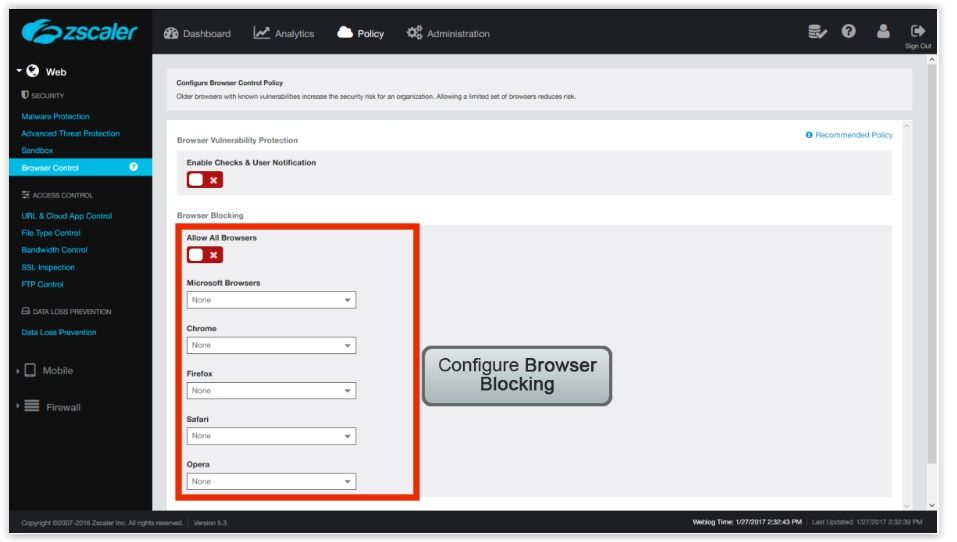
- The Browser control policy can be used to block older browsers with known vulnerabilities that increase the security risk for your organization
- Slide 1 The default is to Allow old browsers
- Sand Box
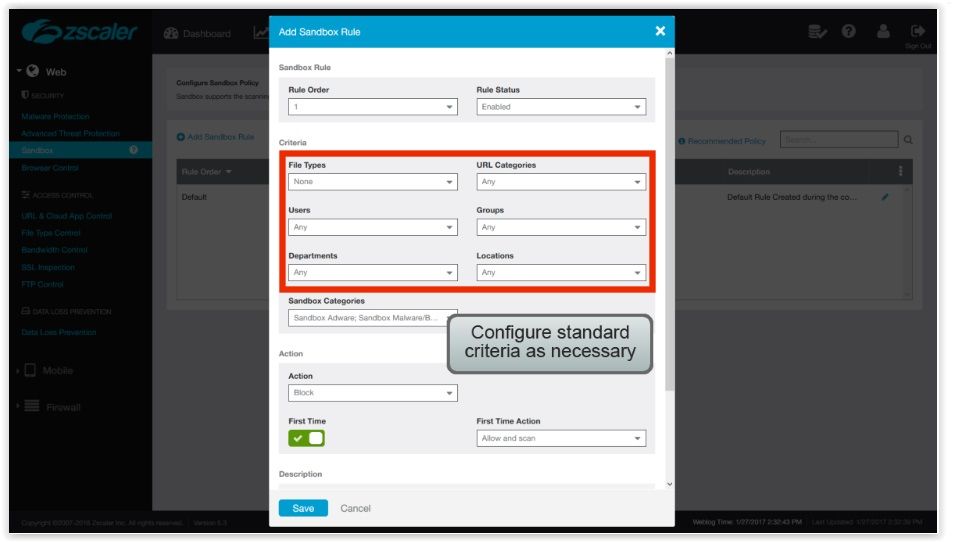
- The Sandbox policy allows the creation of rules for the scanning and execution of files in a Zscaler sandbox environment to be sure that any malicious content is "detonated" safely. This provides any additional layer of security against 0-day and advanced persistent threats (APTs)
- The rules are evaluated in the order listed and rule evaluation stops at the first match, there's a default "Allow rule" for all sandbox categories, altough this can be changed to blocked if required
- Actions available are: Allow or Block. "Sub-Actions" are: Allow and do not scan Allow and Scan Quarantine or What 3 First Time Actions are available for a Sandbox policy rule if it sees a file for the first time? Choose three.
- Web Policy - Security
Images and files in the map
Information
- Description
- Zscaler (Zscaler) Mind Map on Policy, created by Rafael Santos on 27/01/2017.
- Created by
- Rafael Santos · Jan 2017
- Updated
- Feb 13, 2017
- Views
- 0
- Rating