
Mind map
Networks
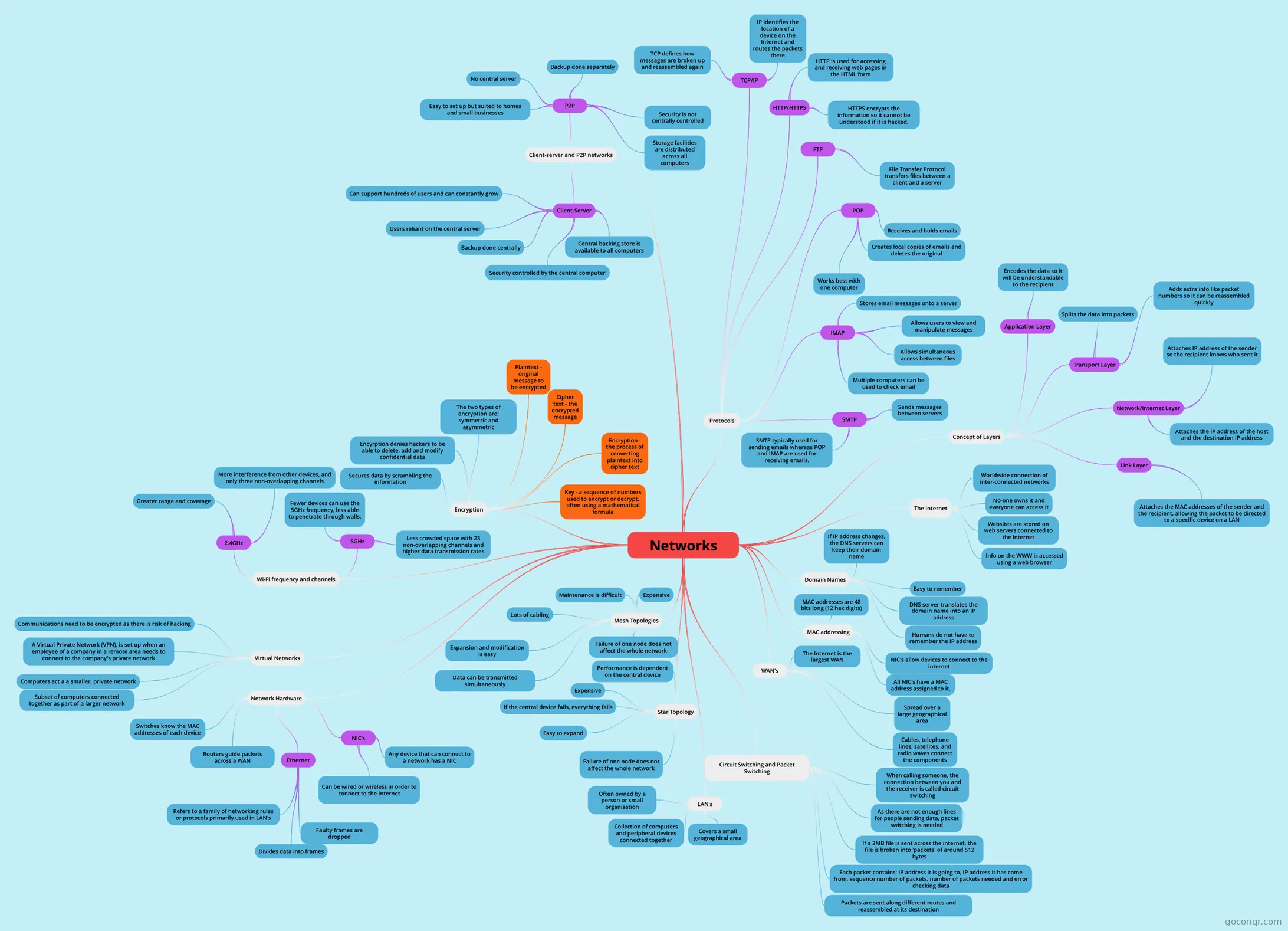
Mind map: networks
Map content
Networks
The Internet
- Worldwide connection of inter-connected networks
- No-one owns it and everyone can access it
- Websites are stored on web servers connected to the internet
- Info on the WWW is accessed using a web browser
Domain Names
- Easy to remember
- DNS server translates the domain name into an IP address
- Humans do not have to remember the IP address
- If IP address changes, the DNS servers can keep their domain name
MAC addressing
- NIC's allow devices to connect to the internet
- All NIC's have a MAC address assigned to it.
- MAC addresses are 48 bits long (12 hex digits)
WAN's
- The Internet is the largest WAN
- Spread over a large geographical area
- Cables, telephone lines, satellites, and radio waves connect the components
Circuit Switching and Packet Switching
- When calling someone, the connection between you and the receiver is called circuit switching
- As there are not enough lines for people sending data, packet switching is needed
- If a 3MB file is sent across the internet, the file is broken into 'packets' of around 512 bytes
- Each packet contains: IP address it is going to, IP address it has come from, sequence number of packets, number of packets needed and error checking data
- Packets are sent along different routes and reassembled at its destination
LAN's
- Covers a small geographical area
- Collection of computers and peripheral devices connected together
- Often owned by a person or small organisation
Star Topology
- Failure of one node does not affect the whole network
- Easy to expand
- Performance is dependent on the central device
- Expensive
- If the central device fails, everything fails
Mesh Topologies
- Failure of one node does not affect the whole network
- Data can be transmitted simultaneously
- Expansion and modification is easy
- Expensive
- Lots of cabling
- Maintenance is difficult
Network Hardware
- NIC's
- Any device that can connect to a network has a NIC
- Can be wired or wireless in order to connect to the Internet
- Ethernet
- Refers to a family of networking rules or protocols primarily used in LAN's
- Divides data into frames
- Faulty frames are dropped
- Routers guide packets across a WAN
- Switches know the MAC addresses of each device
- NIC's
Virtual Networks
- Subset of computers connected together as part of a larger network
- Computers act a a smaller, private network
- A Virtual Private Network (VPN), is set up when an employee of a company in a remote area needs to connect to the company's private network
- Communications need to be encrypted as there is risk of hacking
Wi-Fi frequency and channels
- 2.4GHz
- Greater range and coverage
- More interference from other devices, and only three non-overlapping channels
- 5GHz
- Less crowded space with 23 non-overlapping channels and higher data transmission rates
- Fewer devices can use the 5GHz frequency, less able to penetrate through walls.
- 2.4GHz
Encryption
- Secures data by scrambling the information
- Encyrption denies hackers to be able to delete, add and modify confidential data
- Plaintext - original message to be encrypted
- Cipher text - the encrypted message
- Encryption - the process of converting plaintext into cipher text
- Key - a sequence of numbers used to encrypt or decrypt, often using a mathematical formula
- The two types of encryption are: symmetric and asymmetric
Client-server and P2P networks
- Client-Server
- Central backing store is available to all computers
- Security controlled by the central computer
- Backup done centrally
- Users reliant on the central server
- Can support hundreds of users and can constantly grow
- P2P
- Storage facilities are distributed across all computers
- Security is not centrally controlled
- Backup done separately
- No central server
- Easy to set up but suited to homes and small businesses
- Client-Server
Protocols
- TCP/IP
- TCP defines how messages are broken up and reassembled again
- IP identifies the location of a device on the Internet and routes the packets there
- HTTP/HTTPS
- HTTP is used for accessing and receiving web pages in the HTML form
- HTTPS encrypts the information so it cannot be understood if it is hacked,
- FTP
- File Transfer Protocol transfers files between a client and a server
- POP
- Receives and holds emails
- Creates local copies of emails and deletes the original
- Works best with one computer
- IMAP
- Stores email messages onto a server
- Allows users to view and manipulate messages
- Allows simultaneous access between files
- Multiple computers can be used to check email
- SMTP
- Sends messages between servers
- SMTP typically used for sending emails whereas POP and IMAP are used for receiving emails.
- TCP/IP
Concept of Layers
- Application Layer
- Encodes the data so it will be understandable to the recipient
- Transport Layer
- Splits the data into packets
- Adds extra info like packet numbers so it can be reassembled quickly
- Network/Internet Layer
- Attaches IP address of the sender so the recipient knows who sent it
- Attaches the IP address of the host and the destination IP address
- Link Layer
- Attaches the MAC addresses of the sender and the recipient, allowing the packet to be directed to a specific device on a LAN
- Application Layer