
Notes
TOPIC 2- Computer Organisation
Content of the notes (7)
Page 1
2.1.1 The Central Processing Unit (CPU) and its elements
Exit skills:
Define the terms: CPU, ALU, CU, MAR, MDR, Address Bus and Data Bus
Develop a diagram of the CPU showing connections between the elements mentioned above.
Computer Systems (Computer System):
Consists of:
hardware + software components
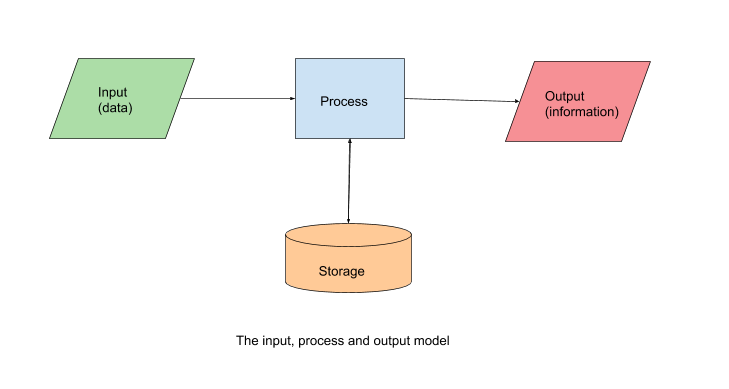
follow the concepts of: input, process, output and storage model
That means that:
a Computer System takes in some data as input
processes it in a manner that has been requested
outputs the result in some way
During the processing phase:
other data may be needed apart from the inputted
this data will exist in the storage of the computer system and will be used during the processing phase
any new information that may arise from the processing phase may also be saved in the storage
The input, process and output model is shown in the following Figure:
It's outlining the relationship between the components of a computer system.
More specifically, a computer system:
accepts data or instructions as input from an input device (from a keyboard, sensor, a digital camera button, etc.)
data or instructions are then processed by the computer system
(It may be the case that other data or instructions, apart from the input, are necessary during processing. These exist in the storage and may be loaded and used)
finally, the computer system outputs the processed data into information that we can see and use (using: a monitor, speakers, a printout, etc.)
this output is also saved in the storage (memory).
Data or instructions that are processed by a computer system in the process phase of the input, process, output and storage model are processed by the Central Processing Unit (CPU).
What is the CPU?
it's a hardware component of a computer system
it can perform basic arithmetic, logical or input/output operations --> in order to process data from input devices ino useful information
it's the "brain" of a computer system
it can process data very quickly
BUT it can only process data by following instruction, it can't think by itself
The CPU is also referred as the processor or chip
it works in the process phase of the input, process, output model
it retrieves + saves data and information from and to the storage (= which is the primary memory of the computer system)
For the CPU to be able to access any data or information (to be able to save it or retrieve it) which is located on some storage medium (such as hard disk, DVD, CD, floppy disk, USB disk) it first has to pass through the primary memory.
SO, the CPU can only retrieve data from the input or primary memory of the computer system
The CPU contains the:
Control Unit (CU)
Arithmetic Logic Unit (ALU)
Memory Address Register (MAR)
Memory Data Register (MDR)
The Control Unit :
is responsible for the operation of the CPU
it controls the retrieval of instructions from the primary memory as well as the sequence of their execution
The Arithmetic Logic Unit:
performs all the basic: arithmetic, logical or input/output operations
the CU is responsible for providing the ALU with the data that needs to be processed as well as the instructions of how the data should be processed
The primary memory used as storage contains two types of memory:
the Random Access Memory (RAM)
the Read Only Memory (ROM)
The RAM:
stores the executing program instructions as well as any data that is needed.
Instructions and data are stored in unique memory locations
Every such location has an address as well as content
The content is:
where the instructions and data reside
The memory location is:
used by the CU to: find, retrieve and access the data
which is then sent to the ALU for processing
The ROM:
holds instructions and data in unique memory location
every location has an address as well as content
is used to store permanent instructions and data that cannot be changed
which is used to boot and operate the computer (mentioned before)
nothing can be altered
Figure 2.2
The terms bit (b), Byte (B) and their multiples
Computer systems are binary systems.
It means that all the data and instructions that are stored in a computer system are stored in sequences of binary digits that can only take two possible values: 1 and 0.
Thus, a binary digit (bit) is the basic unit of information in computer systems and can only have two values: either 1 or 0.
1 Byte = 8 bits
A bit (b), a byte (B).
1B = 8b
One byte can store a single character. (ex.the letter A)
In a 64 bit computer each memory location holds 64 bits. A 64 bit Memory (Address) Bus transfers 64 bits at any one time (which are the contents of a memory location in a 64 bit computer system).
In computer systems we describe everything in bits and bytes.
They are used to denote file sizes stored on on memory or disks (ex. a 12MB file) or even connection speeds (ex. 50 Mbps).
Since files can become quite large and connection speeds quite fast, multiple of bits and bytes are used.
Kilo (K) is 1,024 in binary system and its size approximation is 1,000.
Mega (M) is 1,024^2 in binary system and its size approximation is 1,000,000.
Giga (G) is 1,024^3 in binary system and its size approximation is 1,000,000,000.
Tera (T) is 1,024^4 in binary system and its size approximation is 1,000,000,000,000.
In the decimal system, 1 km = 1,000 m.
Since computer systems are binary, a "Kilo" is 1,024. Since these two values are close we tend to use multiple of 1,000 instead of 1,024 in the binary system.
!!!!, 12 Mb is not the same as 12 MB (one is bit and the other is byte)
12 Mb = 12*1,024^2 bits whereas 12 MB= 12*1,024^2 bytes
Since 1 Byte is equal to 8 bits, 12 MB is an amount of 8 times greater than 12 Mb
The CU:
contains various registers
What is a register?
A register is a small storage location that can hold data, usually a multiple of 8 bits.
For example, a 64 bit computer has 64 bit registers.
The size of the register in bytes is known as a word.
For example: a 64 bit register holds 64 bits = 8*8 bits and since 1 byte is equal to 8 bits, 64 bits = 8 Bytes.
Thus, a 64 bit computer system has a word of size of 8 bytes.
This means that each memory will hold 64 bits (or 8 Bytes).
The basic registers in the CU are the:
Memory address register (MAR)
Memory data register (MDR)
The MAR:
holds the memory address of the data to be used by the ALU
and that then the ALU can fetch the corresponding content from the memory and process it accordingly
it can also hold the memory address of where the data that has to be processed will need to be stored
For the MAR to communicate with the primary memory, a connection is necessary
The connection is accomplished by the Memory (Address) Bus.
The MDR:
holds the data that is to be used by the ALU and then saved to the RAM
it is closely related to the MAR, because whichever memory address memory the MAR is holding, the corresponding data will be loaded onto the MDR for processing by the ALU
After the processing has taken place, the ALU places the result onto the MDR and the data is copied to the memory address location in RAM specified by the MAR
the connection between he RAM and the MDR is accomplished by the Data Bus.
Reference:
- The CS book for the IB
Page 2
2.1.2 RAM and ROM
Exit skills:
Explain the use of primary memory
Define the terms RAM and ROM
Explain the differences between RAM and ROM
The primary memory:
only storage that is directly available/accessible by the CPU
at any point in time, the primary memory may hold both data and instructions that are currently running on the computer system
these data and instructions are stored in the primary memory as binary machine code (i.e. a series of 0s and 1s)
The primary memory consists of two types of memory:
Random Access Memory (RAM)
Read Only Memory (ROM)
RAM:
general-purpose storage area: the data stored can be over-written
This allows data and instructions to be loaded for execution and used whenever they are necessary
it's volatile: whenever the power is lost the contents of its memory are wiped clean (ex. if an unsaved document is open with changes, once the power is lost so will the changes. (be lost))
ROM:
store instructions and data
it cannot be over-written: the instructions that are embedded in ROM cannot be changed
non-volatile: even if the power is cut the memory isn't wiped
store programs and instructions that do not need to be updated or changed (ex. the start-up instructions of the operating system
Reference:
- The CS book for the IB
Page 3
2.1.3 The cache memory
Exit skills:
Describe cache memory
Explain the function of cache memory
Describe various types of cache memory
RAM has two main types:
Dynamic RAM (DRAM)
Static RAM (SRAM)
SRAM:
Page 4
2.1.4 The machine instruction cycle
Page 5
2.1.5 Persistent storage and secondary memory
Page 6
2.1.6 Functions of an operating system
Page 7
2.1.7 Software Application
Information
- Description
- International Baccalaureate Computer Science Note on TOPIC 2- Computer Organisation, created by Athina Korontini Dervogne on 07/11/2020.
- Created by
- Athina Korontini Dervogne
- Views
- 2
- Rating