
Mind map
Databases
Map content
Databases
Keywords
- Persistent simply means that it is stored on secondary storage so that it can be accessed later.
- Related it has some kind of similarity with someother data
- Organised there some kind of struture system to the way something works
- Fields a characteristic of something in a database.
- External information end user will see
- Conceptual the links beween tables / dev pov
- Physical raw data
- Serial file items are stored as a series one after another.
- Sequential files the data is in some sequence
- Flat file only one table aka it only go by surnames
- Hierarchical a system of teirs and levels
Types of databases Databases can be computerised or paper based. An address book is an example of a paper based database. In an address book entries are stored in a logical order, normally by surname and each entry contains the same fields such as name, house number, street name etc.
• A Primary Key contains a unique identifier for each record. To make each record in a database unique we normally assign them a primary key. Even if a record is deleted from a database, the primary key will not be used again. The primary key can be automatically generated and will normally just be a unique number or mix of numbers and letters.
Validation checks that the correct type of data is entered Verification checks that the data is actually the data you want.
A relational database divides the data within the database into different tables with each table focusing on a particular entity. This ensures that most data is stored only once. For example, a newsagents stores information on its customers. It also needs to store information on the newspapers and magazines each customer receives. As this information is a different entity we need to have a separate table for this data.
- Primary Key Each table should have a primary key. This is a field chosen to be unique for each record. Usually this is some sort of reference number. Foreign key A foreign key is used to link tables together and create a relationship between them. It is a primary key in one table that is linked to a field in another table.
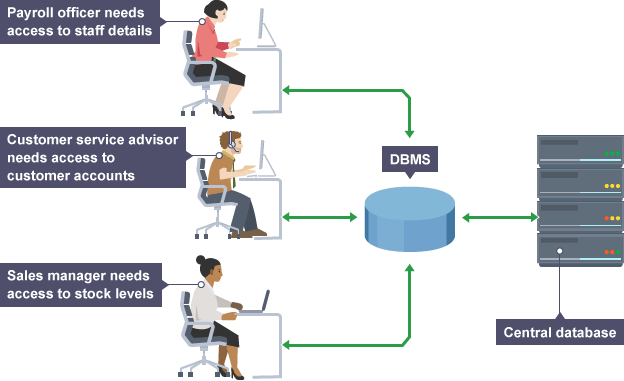
Most databases are manipulated with a Database Management System (DBMS). A DBMS provides the software tools to create, maintain and interrogate a database as well as providing an interface to applications.
- What tasks does a DBMS have to carry out? • allow different applications to access data at the same time; • Controls access to the data. Security features are provided to limit who can do what. • allow multiple user access at the same time; • Controls concurrency- meaning that data is locked while someone is working on it so that someone else cannot change the same data at the same time. • hold just one copy of data that everyone can access – this prevents inconsistent updates; • provides user interfaces to work with the data in the required view • makes it possible to change the data in a database without having to change the applications. • creates backups and the ability to restore from a backup in the event of a disaster • Support a query language to enable extracting, adding and amending its data. • Force referential integrity. This means that it prevents operations that could damage relationships. Such as deleting a subject from a school database when students are linked to t
- features
- Queries Queries are objects that extract data from a database. They are used to select the fields required and the conditions that need to be met. A query can be created by using an interactive graphic tool called “Query by example” QBE.
- Forms This is a user friendly ways of allowing the user to see and modify. Without these sql would take programming expertise.
- Reports These are often the printed out of data from the database, they can be tables or fully formed and well-presented reports. They are usual based on a queries.
SQL
- One of the strengths of a DBMS is the query language called SQL, that it supports. The screen shot below shows a table from a database. The table is called employees.
- SELECT * FROM Employees
- A query however normally wants to select only records in a table that meet a set condition. We can achieve this in SQL in much the same way as in QBE. SELECT * FROM Employees WHERE { some logical condition}
Images and files in the map
Information
- Description
- gcse Computing Mind Map on Databases, created by Oliver CARLINE on 09/10/2015.
- Created by
- Oliver CARLINE
- Views
- 2
- Rating