
Mind map
1. Types and components of Computer systems
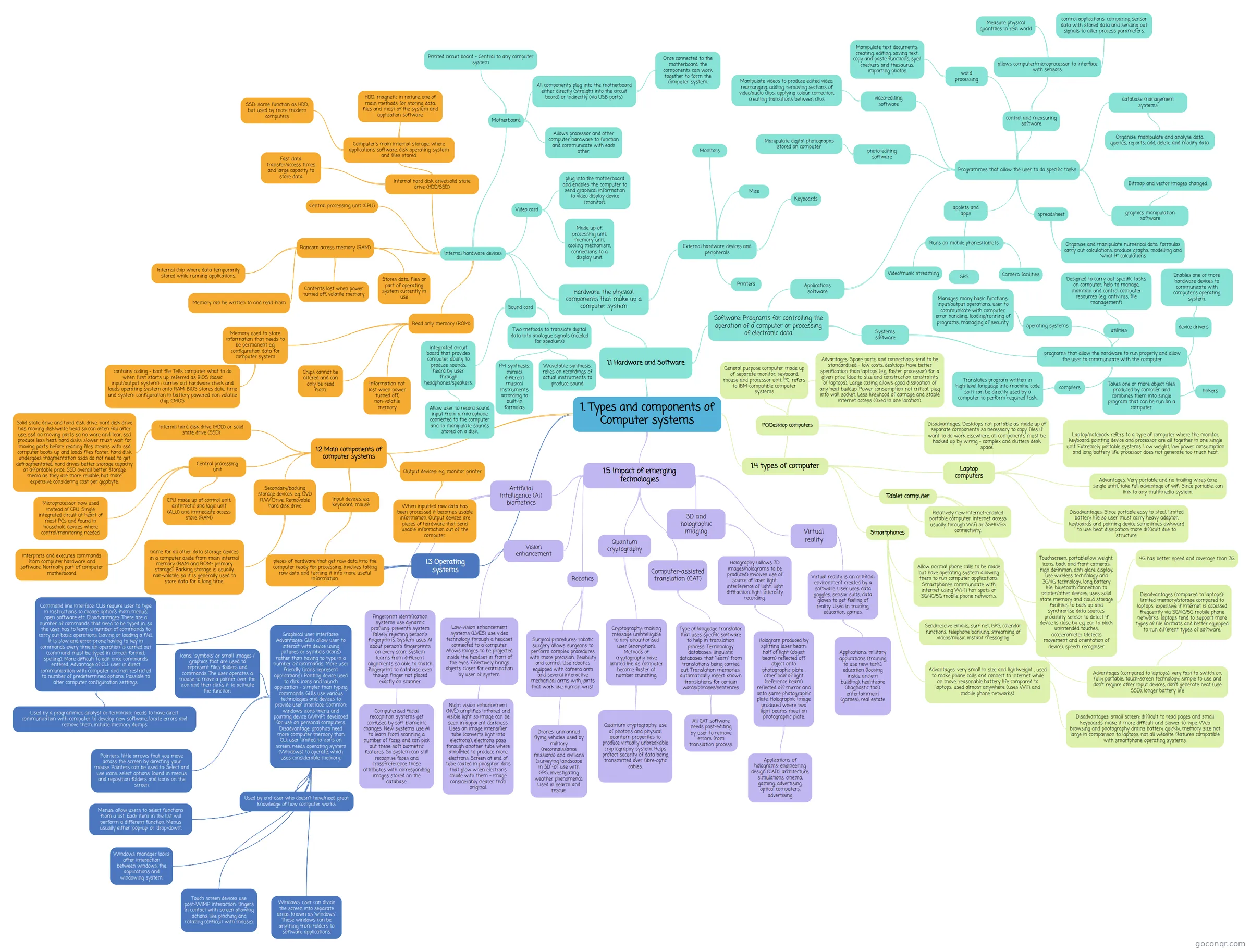
Mind map: Types and components of computer systems
Map content
1. Types and components of Computer systems
1.1 Hardware and Software
- Hardware: the physical components that make up a computer system
- Internal hardware devices
- Central processing unit (CPU)
- Internal hard disk drive/solid state drive (HDD/SSD)
- Computer's main internal storage: where applications software, disk operating system and files stored.
- SSD: same function as HDD, but used by more modern computers
- HDD: magnetic in nature, one of main methods for storing data, files and most of the system and application software.
- Fast data transfer/access times and large capacity to store data
- Computer's main internal storage: where applications software, disk operating system and files stored.
- Random access memory (RAM)
- Internal chip where data temporarily stored while running applications.
- Memory can be written to and read from
- Contents lost when power turned off, volatile memory
- Stores data, files or part of operating system currently in use
- Read only memory (ROM)
- Memory used to store information that needs to be permanent e.g. configuration data for computer system
- contains coding - boot file. Tells computer what to do when first starts up, referred as BIOS (basic input/output system) : carries out hardware check and loads operating system onto RAM. BIOS stores date, time and system configuration in battery powered non volatile chip, CMOS.
- Chips cannot be altered and can only be read from.
- Information not lost when power turned off, non-volatile memory
- Memory used to store information that needs to be permanent e.g. configuration data for computer system
- Motherboard
- Printed circuit board - Central to any computer system
- All components plug into the motherboard either directly (straight into the circuit board) or indirectly (via USB ports).
- Once connected to the motherboard, the components can work together to form the computer system.
- Allows processor and other computer hardware to function and communicate with each other.
- Video card
- plug into the motherboard and enables the computer to send graphical information to video display device (monitor).
- Made up of: processing unit, memory unit, cooling mechanism, connections to a display unit.
- Sound card
- Integrated circuit board that provides computer ability to produce sounds, heard by user through headphones/speakers.
- Allow user to record sound input from a microphone connected to the computer and to manipulate sounds stored on a disk.
- Two methods to translate digital data into analogue signals (needed for speakers)
- FM synthesis: mimics different musical instruments according to built-in formulas
- Wavetable synthesis: relies on recordings of actual instruments to produce sound
- Integrated circuit board that provides computer ability to produce sounds, heard by user through headphones/speakers.
- External hardware devices and peripherals
- Monitors
- Keyboards
- Mice
- Printers
- Internal hardware devices
- Software: Programs for controlling the operation of a computer or processing of electronic data
- Applications software
- Programmes that allow the user to do specific tasks
- word processing
- Manipulate text documents: creating, editing, saving text; copy and paste functions, spell checkers and thesaurus, importing photos
- spreadsheet
- Organise and manipulate numerical data: formulas carry out calculations, produce graphs, modelling and "what if" calculations
- database management systems
- Organise, manipulate and analyse data: queries, reports; add, delete and modify data.
- control and measuring software
- allows computer/microprocessor to interface with sensors.
- Measure physical quantities in real world
- control applications: comparing sensor data with stored data and sending out signals to alter process parameters.
- allows computer/microprocessor to interface with sensors.
- applets and apps
- Runs on mobile phones/tablets.
- Video/music streaming
- GPS
- Camera facilities
- Runs on mobile phones/tablets.
- photo-editing software
- Manipulate digital photographs stored on computer.
- video-editing software
- Manipulate videos to produce edited video: rearranging, adding, removing sections of video/audio clips; applying colour correction, creating transitions between clips
- graphics manipulation software
- Bitmap and vector images changed.
- word processing
- Programmes that allow the user to do specific tasks
- Systems software
- programs that allow the hardware to run properly and allow the user to communicate with the computer
- operating systems
- Manages many basic functions: input/output operations, user to communicate with computer, error handling, loading/running of programs, managing of security.
- utilities
- Designed to carry out specific tasks on computer; help to manage, maintain and control computer resources (e.g. antivirus, file management)
- device drivers
- Enables one or more hardware devices to communicate with computer's operating system.
- linkers
- Takes one or more object files produced by compiler and combines them into single program that can be run on a computer.
- compilers
- Translates program written in high-level language into machine code so it can be directly used by a computer to perform required task,
- operating systems
- programs that allow the hardware to run properly and allow the user to communicate with the computer
- Applications software
- Hardware: the physical components that make up a computer system
1.2 Main components of computer systems
- Internal hard disk drive (HDD) or solid state drive (SSD)
- Solid state drive and hard disk drive: hard disk drive has moving disk/write head so can often fail after use, ssd no moving parts so no ware and tear, ssd produce less heat, hard disks slower must wait for moving parts before reading files means with ssd computer boots up and loads files faster. hard disk undergoes fragmentation ssds do not need to get defragmentated, hard drives better storage capacity at affordable price. SSD overall better storage media as they are more reliable, but more expensive considering cost per gigabyte.
- Central processing unit
- interprets and executes commands from computer hardware and software. Normally part of computer motherboard.
- Microprocessor now used instead of CPU. Single integrated circuit at heart of most PCs and found in household devices where control/monitoring needed.
- CPU made up of control unit, arithmetic and logic unit (ALU) and immediate access store (RAM)
- Input devices: e.g. keyboard, mouse
- pieces of hardware that get raw data into the computer ready for processing. involves taking raw data and turning it into more useful information.
- Output devices: e.g. monitor printer
- When inputted raw data has been processed it becomes usable information. Output devices are pieces of hardware that send usable information out of the computer.
- Secondary/backing storage devices: e.g. DVD R/W Drive, Removable hard disk drive
- name for all other data storage devices in a computer aside from main internal memory (RAM and ROM- primary storage). Backing storage is usually non-volatile, so it is generally used to store data for a long time.
- Internal hard disk drive (HDD) or solid state drive (SSD)
I.3 Operating systems
- Command line interface: CLIs require user to type in instructions to choose options from menus, open software etc. Disadvantages: There are a number of commands that need to be typed in, so the user has to learn a number of commands to carry out basic operations (saving or loading a file). It is slow and error-prone having to key in commands every time an operation is carried out (command must be typed in correct format, spelling). More difficult to edit once commands entered. Advantage of CLI: user in direct communication with computer and not restricted to number of predetermined options. Possible to alter computer configuration settings.
- Used by a programmer, analyst or technician: needs to have direct communication with computer to develop new software, locate errors and remove them, initiate memory dumps
- Graphical user interfaces: Advantages: GUIs allow user to interact with device using pictures or symbols (icons) rather than having to type in a number of commands. More user friendly (icons represent applications). Ponting device used to click icons and launch application - simpler than typing commands. GUIs use various technologies and devices to provide user interface. Common: windows icons menu and pointing device (WIMP) developed for use on personal computers. Disadvantage: graphics need more computer memory than CLI, user limited to icons on screen, needs operating system (Windows) to operate, which uses considerable memory.
- Windows: user can divide the screen into separate areas known as 'windows'. These windows can be anything from folders to software applications.
- Icons: 'symbols' or small images / graphics that are used to represent files, folders and commands. The user operates a mouse to move a pointer over the icon and then clicks it to activate the function.
- Menus: allow users to select functions from a list. Each item in the list will perform a different function. Menus usually either 'pop-up' or 'drop-down'.
- Pointers: little arrows that you move across the screen by directing your mouse. Pointers can be used to: Select and use icons, select options found in menus and reposition folders and icons on the screen.
- Windows manager looks after interaction between windows, the applications and windowing system.
- Touch screen devices use post-WIMP interaction: fingers in contact with screen allowing actions like pinching and rotating (difficult with mouse),
- Used by end-user who doesn't have/need great knowledge of how computer works.
- Command line interface: CLIs require user to type in instructions to choose options from menus, open software etc. Disadvantages: There are a number of commands that need to be typed in, so the user has to learn a number of commands to carry out basic operations (saving or loading a file). It is slow and error-prone having to key in commands every time an operation is carried out (command must be typed in correct format, spelling). More difficult to edit once commands entered. Advantage of CLI: user in direct communication with computer and not restricted to number of predetermined options. Possible to alter computer configuration settings.
1.4 types of computer
- PC/Desktop computers
- General purpose computer made up of separate monitor, keyboard, mouse and processor unit. PC: refers to IBM-compatible computer systems
- Advantages: Spare parts and connections tend to be standardised - low costs, desktops have better specification than laptops (e.g. faster processor) for a given price (due to size and construction constraints of laptops). Large casing allows good dissipation of any heat buildup. Power consumption not critical: plug into wall socket. Less likelihood of damage and stable internet access (fixed in one location).
- Disadvantages: Desktops not portable as made up of separate components so necessary to copy files if want to do work elsewhere, all components must be hooked up by wiring - complex and clutters desk space.
- Laptop computers
- Laptop/notebook refers to a type of computer where the monitor, keyboard, pointing device and processor are all together in one single unit. Extremely portable systems. Low weight, low power consumption and long battery life, processor does not generate too much heat.
- Advantages: Very portable and no trailing wires (one single unit), take full advantage of wifi. Since portable, can link to any multimedia system.
- Disadvantages: Since portable easy to steal, limited battery life so user must carry heavy adaptor, keyboards and pointing device sometimes awkward to use, heat dissipation more difficult due to structure.
- Tablet computer
- Touchscreen, portable/low weight, icons, back and front cameras, high definition, anti glare display, use wireless technology and 3G/4G technology, long battery life, bluetooth connection to printer/other devices, uses solid state memory and cloud storage facilities to back up and synchronise data sources, proximity sensor to detect if device is close by e.g. ear to block unintended touches, accelerometer (detects movement and orientation of device), speech recogniser
- 4G has better speed and coverage than 3G
- Relatively new internet-enabled portable computer. Internet access usually through WiFi or 3G/4G/5G connectivity.
- Advantages (compared to laptops): very fast to switch on, fully portable, touch-screen technology: simple to use and don't require other input devices, don't generate heat (use SSD), longer battery life
- Disadvantages (compared to laptops): limited memory/storage compared to laptops. expensive if internet is accessed frequently via 3G/4G/5G mobile phone networks. laptops tend to support more types of file formats and better equipped to run different types of software.
- Touchscreen, portable/low weight, icons, back and front cameras, high definition, anti glare display, use wireless technology and 3G/4G technology, long battery life, bluetooth connection to printer/other devices, uses solid state memory and cloud storage facilities to back up and synchronise data sources, proximity sensor to detect if device is close by e.g. ear to block unintended touches, accelerometer (detects movement and orientation of device), speech recogniser
- Smartphones
- Allow normal phone calls to be made but have operating system allowing them to run computer applications. Smartphones communicate with internet using Wi-Fi hot spots or 3G/4G/5G mobile phone networks.
- Send/receive emails, surf net, GPS, calendar functions, telephone banking, streaming of videos/music, instant messaging
- Advantages: very small in size and lightweight , used to make phone calls and connect to internet while on move, reasonable battery life compared to laptops, used almost anywhere (uses WiFi and mobile phone networks).
- Disadvantages: small screen: difficult to read pages and small keyboards make it more difficult and slower to type. Web browsing and photography drains battery quickly, memory size not large in comparison to laptops, not all website features compatible with smartphone operating systems.
- PC/Desktop computers
1.5 Impact of emerging technologies
- Artificial intelligence (AI) biometrics
- Fingerprint identification systems use dynamic profiling: prevents system falsely rejecting person's fingerprints. System uses AI about person's fingerprints on every scan: system learns from different alignments so able to match fingerprint to database even though finger not placed exactly on scanner.
- Computerised facial recognition systems get confused by soft biometric changes. New systems use AI to learn from scanning a number of faces and can pick out these soft biometric features. So system can still recognise faces and cross-reference these attributes with corresponding images stored on the database.
- Vision enhancement
- Low-vision enhancement systems (LVES) use video technology through a headset connected to a computer. Allows images to be projected inside the headset in front of the eyes. Effectively brings objects closer for examination by user of system.
- Night vision enhancement (NVE) amplifies infrared and visible light so image can be seen in apparent darkness. Uses an image intensifier tube (converts light into electrons), electrons pass through another tube where amplified to produce more electrons. Screen at end of tube coated in phosphor dots that glow when electrons collide with them - image considerably clearer than original.
- Low-vision enhancement systems (LVES) use video technology through a headset connected to a computer. Allows images to be projected inside the headset in front of the eyes. Effectively brings objects closer for examination by user of system.
- Robotics
- Drones: unmanned flying vehicles used by military (reconnaissance missions) and civilians (surveying landscape in 3D for use with GPS, investigating weather phenomena). Used in search and rescue.
- Surgical procedures: robotic surgery allows surgeons to perform complex procedures with more precision, flexibility and control. Use robotics equipped with camera arm and several interactive mechanical arms with joints that work like human wrist.
- Quantum cryptography
- Cryptography: making message unintelligible to any unauthorised user (encryption). Methods of cryptography have limited life as computer become faster at number crunching.
- Quantum cryptography: use of photons and physical quantum properties to produce virtually unbreakable cryptography system. Helps protect security of data being transmitted over fibre-optic cables.
- Cryptography: making message unintelligible to any unauthorised user (encryption). Methods of cryptography have limited life as computer become faster at number crunching.
- Computer-assisted translation (CAT)
- Type of language translator that uses specific software to help in translation process. Terminology databases: linguistic databases that "learn" from translations being carried out, Translation memories: automatically insert known translations for certain words/phrases/sentences
- All CAT software needs post-editing by user to remove errors from translation process.
- Type of language translator that uses specific software to help in translation process. Terminology databases: linguistic databases that "learn" from translations being carried out, Translation memories: automatically insert known translations for certain words/phrases/sentences
- 3D and holographic imaging
- Holography (allows 3D images/holograms to be produced) involves use of source of laser light, interference of light, light diffraction, light intensity recording.
- Hologram produced by splitting laser beam: half of light (object beam) reflected off object onto photographic plate , other half of light (reference beam) reflected off mirror and onto same photographic plate. Holographic image produced where two light beams meet on photographic plate.
- Applications of holograms: engineering design (CAD), architecture, simulations, cinema, gaming, advertising, optical computers, advertising
- Hologram produced by splitting laser beam: half of light (object beam) reflected off object onto photographic plate , other half of light (reference beam) reflected off mirror and onto same photographic plate. Holographic image produced where two light beams meet on photographic plate.
- Holography (allows 3D images/holograms to be produced) involves use of source of laser light, interference of light, light diffraction, light intensity recording.
- Virtual reality
- Virtual reality is an artificial environment created by a software. User uses data goggles, sensor suits, data gloves to get feeling of reality. Used in training, education, games.
- Applications: military applications (training to use new tank), education (looking inside ancient building), healthcare (diagnostic tool). entertainment (games), real estate
- Virtual reality is an artificial environment created by a software. User uses data goggles, sensor suits, data gloves to get feeling of reality. Used in training, education, games.
- Artificial intelligence (AI) biometrics
Information
- Description
- IGCSE ICT Mind Map on 1. Types and components of Computer systems, created by 122559 on 21/12/2015.
- Created by
- 122559
- Views
- 8
- Rating