
Mind map
Transfer of data in ICT systems
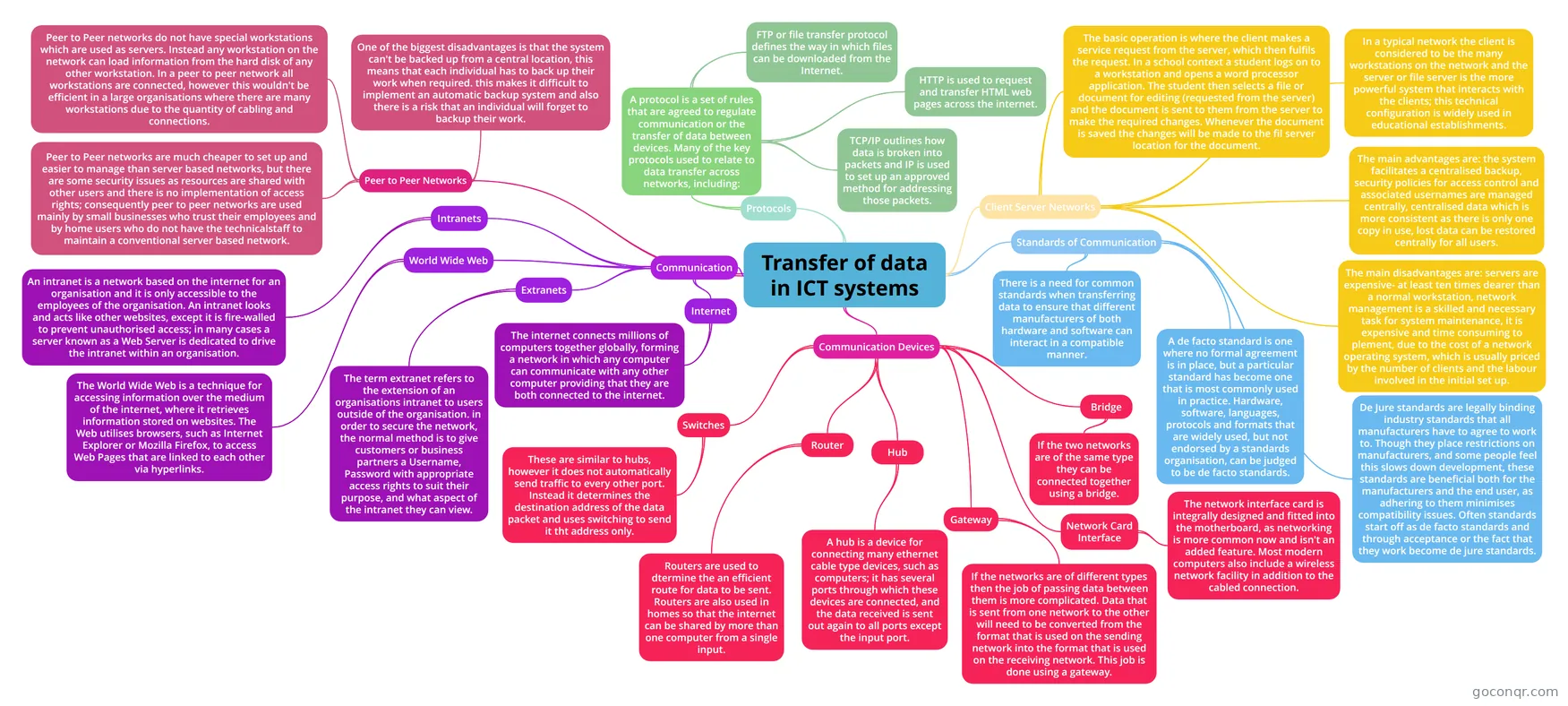
Mind map: Transfer of data in ICT systems
Map content
Transfer of data in ICT systems
Communication
- Intranets
- An intranet is a network based on the internet for an organisation and it is only accessible to the employees of the organisation. An intranet looks and acts like other websites, except it is fire-walled to prevent unauthorised access; in many cases a server known as a Web Server is dedicated to drive the intranet within an organisation.
- Extranets
- The term extranet refers to the extension of an organisations intranet to users outside of the organisation. in order to secure the network, the normal method is to give customers or business partners a Username, Password with appropriate access rights to suit their purpose, and what aspect of the intranet they can view.
- Internet
- The internet connects millions of computers together globally, forming a network in which any computer can communicate with any other computer providing that they are both connected to the internet.
- World Wide Web
- The World Wide Web is a technique for accessing information over the medium of the internet, where it retrieves information stored on websites. The Web utilises browsers, such as Internet Explorer or Mozilla Firefox, to access Web Pages that are linked to each other via hyperlinks.
- Intranets
Peer to Peer Networks
- Peer to Peer networks do not have special workstations which are used as servers. Instead any workstation on the network can load information from the hard disk of any other workstation. In a peer to peer network all workstations are connected, however this wouldn't be efficient in a large organisations where there are many workstations due to the quantity of cabling and connections.
- Peer to Peer networks are much cheaper to set up and easier to manage than server based networks, but there are some security issues as resources are shared with other users and there is no implementation of access rights; consequently peer to peer networks are used mainly by small businesses who trust their employees and by home users who do not have the technicalstaff to maintain a conventional server based network.
- One of the biggest disadvantages is that the system can't be backed up from a central location, this means that each individual has to back up their work when required. this makes it difficult to implement an automatic backup system and also there is a risk that an individual will forget to backup their work.
Client Server Networks
- In a typical network the client is considered to be the many workstations on the network and the server or file server is the more powerful system that interacts with the clients; this technical configuration is widely used in educational establishments.
- The basic operation is where the client makes a service request from the server, which then fulfils the request. In a school context a student logs on to a workstation and opens a word processor application. The student then selects a file or document for editing (requested from the server) and the document is sent to them from the server to make the required changes. Whenever the document is saved the changes will be made to the fil server location for the document.
- The main advantages are: the system facilitates a centralised backup, security policies for access control and associated usernames are managed centrally, centralised data which is more consistent as there is only one copy in use, lost data can be restored centrally for all users.
- The main disadvantages are: servers are expensive- at least ten times dearer than a normal workstation, network management is a skilled and necessary task for system maintenance, it is expensive and time consuming to plement, due to the cost of a network operating system, which is usually priced by the number of clients and the labour involved in the initial set up.
Standards of Communication
- There is a need for common standards when transferring data to ensure that different manufacturers of both hardware and software can interact in a compatible manner.
- De Jure standards are legally binding industry standards that all manufacturers have to agree to work to. Though they place restrictions on manufacturers, and some people feel this slows down development, these standards are beneficial both for the manufacturers and the end user, as adhering to them minimises compatibility issues. Often standards start off as de facto standards and through acceptance or the fact that they work become de jure standards.
- A de facto standard is one where no formal agreement is in place, but a particular standard has become one that is most commonly used in practice. Hardware, software, languages, protocols and formats that are widely used, but not endorsed by a standards organisation, can be judged to be de facto standards.
Protocols
- A protocol is a set of rules that are agreed to regulate communication or the transfer of data between devices. Many of the key protocols used to relate to data transfer across networks, including:
- TCP/IP outlines how data is broken into packets and IP is used to set up an approved method for addressing those packets.
- HTTP is used to request and transfer HTML web pages across the internet.
- FTP or file transfer protocol defines the way in which files can be downloaded from the Internet.
- A protocol is a set of rules that are agreed to regulate communication or the transfer of data between devices. Many of the key protocols used to relate to data transfer across networks, including:
Communication Devices
- Network Card Interface
- The network interface card is integrally designed and fitted into the motherboard, as networking is more common now and isn't an added feature. Most modern computers also include a wireless network facility in addition to the cabled connection.
- Bridge
- If the two networks are of the same type they can be connected together using a bridge.
- Hub
- A hub is a device for connecting many ethernet cable type devices, such as computers; it has several ports through which these devices are connected, and the data received is sent out again to all ports except the input port.
- Gateway
- If the networks are of different types then the job of passing data between them is more complicated. Data that is sent from one network to the other will need to be converted from the format that is used on the sending network into the format that is used on the receiving network. This job is done using a gateway.
- Router
- Routers are used to dtermine the an efficient route for data to be sent. Routers are also used in homes so that the internet can be shared by more than one computer from a single input.
- Switches
- These are similar to hubs, however it does not automatically send traffic to every other port. Instead it determines the destination address of the data packet and uses switching to send it tht address only.
- Network Card Interface
Information
- Description
- AS - Level ICT Mind Map on Transfer of data in ICT systems, created by Emily Twible on 18/02/2016.
- Created by
- Emily Twible
- Views
- 1
- Rating