
Mind map
Mother Board
Map content
Mother Board
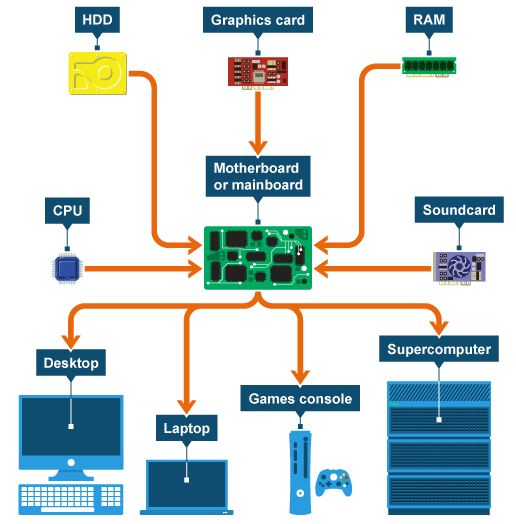
Motherboard or mainboard –the mainboard makes everything below work together.
Processor or central processing unit (CPU) – carries out instructions.
Hard disk drive (HDD) – stores files and applications.
RAM or memory – temporarily stores recently used files and applications for quick access later.
Graphics card – produces 2D and 3D images on the screen or monitor.
Soundcard – produces sound from the speakers or headphones and powers the microphone.
The motherboard is a circuit board that connects the CPU to the memory and all the other hardware. The CPU sits on the motherboard (also called the logic board).
Buses are circuits on the motherboard that connect the CPU to other components. There are many buses on the motherboard. A bus moves instructions and data around the system. The speed of a bus is measured in megahertz (MHz). The faster the bus, the faster data is communicated. The speed of the motherboard is defined by the bus speed.
- Buses are limited by their width in bits. They are usually 8, 16 or 32-bits wide. This tells us how many bits can be sent by the bus at any one time, eg a 32-bit bus can send 32 bits at once.
- The bus that connects the CPU to the memory is called the front-side bus (FSB) or system bus. CPU cores share Level 2 and Level 3 cache across the FSB. They will usually connect to Level 2 cache through the back-side bus (BSB). The BSB is much faster than the FSB.
CPU
- The CPU (Central Processing Unit) is the part of a computer system that is commonly referred to as the "brains" of a computer. The CPU is also known as the processor or microprocessor.
- The CPU is responsible for executing a sequence of stored instructions called a program. This program will take inputs from an input device, process the input in some way and output the results to an output device.
- CPUs aren’t only found in desktop or laptop computers, many electronic devices now rely on them for their operation. Mobile phones, DVD players and washing machines are examples of equipment that have a CPU.
- The central processing unit (CPU) of a computer is a piece of hardware that carries out the instructions of a computer program. It performs the basic arithmetical, logical, and input/output operations of a computer system. The CPU is like the brains of the computer - every instruction, no matter how simple, has to go through the CPU. So let's say you press the letter 'k' on your keyboard and it appears on the screen - the CPU of your computer is what makes this possible. The CPU is sometimes also referred to as the central processor unit, or processor for short. So when you are looking at the specifications of a computer at your local electronics store, it typically refers to the CPU as the processor.
- Components
- The first is the arithmetic logic unit (ALU), which performs simple arithmetic and logical operations.
- Second is the control unit (CU), which manages the various components of the computer. It reads and interprets instructions from memory and transforms them into a series of signals to activate other parts of the computer. The control unit calls upon the arithmetic logic unit to perform the necessary calculations.
- Third is the cache, which serves as high-speed memory where instructions can be copied to and retrieved.
- Early CPUs consisted of many separate components, but since the 1970s, they have been constructed as a single integrated unit called a microprocessor. As such, a CPU is a specific type of microprocessor. The individual components of a CPU have become so integrated that you can't even recognize them from the outside. This CPU is about two inches by two inches in size.
- CPUs are located on the motherboard. Motherboards have a socket for this, which is specific for a certain type of processor. A CPU gets very hot and therefore needs its own cooling system in the form of a heat sink and/or fan.
- Components
- The CPU (Central Processing Unit) is the part of a computer system that is commonly referred to as the "brains" of a computer. The CPU is also known as the processor or microprocessor.
SSD
- An SSD (solid-state drive or solid-state disk) is a nonvolatile storage device that stores persistent data on solid-state flash memory.
- Price SSDs are about 10 times more expensive than HDDs per MB
- Capacity SSDs are generally no larger than 512 GB but HDDs go up to 4 TB
- Noise SSDs are silent whereas HDDs make spinning disc sounds
- An SSD (solid-state drive or solid-state disk) is a nonvolatile storage device that stores persistent data on solid-state flash memory.
HDD
- In a personal computer, a hard disk drive (HDD) is the mechanism that controls the positioning, reading, and writing of the hard disk, which furnishes the largest amount of data storage for the PC.
- Power HDDs uses about 3 times more battery power than SSDs
- Speed SSDs are almost twice as fast at loading up and copying files
- Both are highly reliable forms of storage but the magnetic disc is more vulnerable to knocks as it has moving parts
- In a personal computer, a hard disk drive (HDD) is the mechanism that controls the positioning, reading, and writing of the hard disk, which furnishes the largest amount of data storage for the PC.
FLASH MEMORY AND SSD
- Flash memory and solid state drives SSDs Flash memory is a type of non-volatile ROM memory called EEPROM (electronically erasable programmable read only memory). This is a form of static RAM. USB memory sticks and memory cards are compact forms of flash memory used with cameras, smartphones and tablet computers. The internal storage of a computer can use a solid state drive (SSD), which is a much larger piece of flash memory. Flash memory is solid. There are no moving parts, unlike the spinning disc inside a magnetic drive. A SSD uses microscopic electronic switches to store data. Millions of transistors are either on or off and remain so as long as electricity is applied to the system. SSDs use switches called floating gate transistors. These create a special cage (the gate) that traps the electron flow within it. This gate effect continues whether there is electricity in the system or not, and so storage remains when the power is removed.
External HDDs and SSDs can also be used to store data.
Optical Drives
- In computing, an optical disc drive (ODD) is a disk drive that uses laser light or electromagnetic waves within or near the visible light spectrum as part of the process of reading or writing data to or from optical discs.
- CD (Compact Disc) Optical discs that use the same technology as music CDs. They store up to 700MB of data. CDs can be used for multimedia applications such as encyclopaedias and can store pictures, sounds and video clips or anything else that will fit.
- There are several formats on the market, such as: CD-ROM - read only, the data is written to them before they are sold. CD-R - meaning CD-Recordable, the user can write data to the CD once or fill it over time using multi-session (writing to the same disc on separate occasions). CD-RW - meaning CD-ReWritable, the CD can be written and re-written to. Unlike multi-session discs, existing data can be overwritten.
- DVD (Digital Versatile Disc) DVDs are the same physical size as CDs but hold much more data - a single sided disc can hold up to 4.7GB. DVDs are commonly used for storing video so you will often see them measured in minutes, eg 4.7GB = 120 minutes.
- here are several formats on the market, such as: DVD-ROMs - read only, the data is written to them before they are sold. DVD-R - meaning DVD-Recordable, the user can write data to the DVD once or fill it over time using multi-session. DVD-RW - meaning DVD-ReWritable, the DVD can be written and re-written to. Unlike multi-session discs, existing data can be overwritten.
- CD (Compact Disc) Optical discs that use the same technology as music CDs. They store up to 700MB of data. CDs can be used for multimedia applications such as encyclopaedias and can store pictures, sounds and video clips or anything else that will fit.
- In computing, an optical disc drive (ODD) is a disk drive that uses laser light or electromagnetic waves within or near the visible light spectrum as part of the process of reading or writing data to or from optical discs.
Images and files in the map
Information
- Description
- GCSE ICT Mind Map on Mother Board, created by Molly Heywood-Muir on 03/03/2016.
- Created by
- Molly Heywood-Muir
- Views
- 0
- Rating