
Mind map
PDC b063
Map content
PDC b063
hardware and software (including wireless communications)
- 1.1 network infrastucture
- All communication relies on devices being able to communicate via a network
- some wired others wireless
- The way devices are physically connected is known as network topology
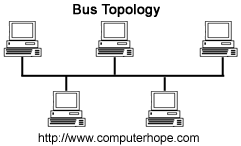
- Bus
- All the devices "daisy-chained" together
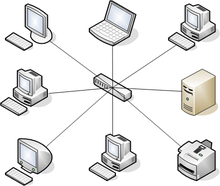
- Star
- made of wires all radiating from a single point
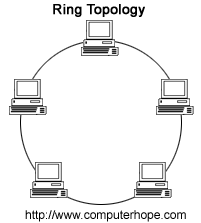
- Ring
- All the devices connected in a ring
- Most companies choose a star formation
- Using erthnet
- cheapest
- easiest
- most widely supported
- offers high data transfer rates
- better fault tolerance
- All devices are connected to a central switch
- shared resources e.g. internet and printers
- all data saved on a server
- server/client configuration
- all data saved in a single location
- can be accessed from anywhere on the network
- easily backed up
- Bus
- Should install a firewall
- network security system
- can be software based but more likely to be a designated hardware device
- positioned between the network and internet connection
- can be software based but more likely to be a designated hardware device
- keeps the network secure from unauthorised access and hacking
- the server would also be kept in a physically secure loaction
- network security system
- All communication relies on devices being able to communicate via a network
- 1.2 networking hardware
- modem
- short for monulator/demodulator
- converts the digital signals used by computers into analogue signals so the data can be transmitted using a telephone line
- it then coverts the other way when data is sent back to the computer.
- this is needed to enable internet connectivity on LAN
- modems still exist but most are found inside servers
- router
- connects the internal infrastructure of a network to the wider internet
- able to interpret the destination of data packets and send them on their way
- read the ip adresses of the sender and the recipient contained within a data packet and "route" the packet to its intended target
- essential to allow multiple networked computers to send and receive data over a single internet connection
- switch
- sits inside the LAN in star topology
- connects all devices together using ethnert cable connections
- They are ble to keep a record of the identity of every device that is connected to them
- without a data record, data packets would flood all over the network and slow it down.
- switches can read MAC addresses of the sender and the recipient contained within the data packet and use this to know what to do with it
- every network-capable device has a unique identity code known as a MAC address.
- when any packet of data is transmitted, the IP address and MAC addresses are stored in the data packet
- sits inside the LAN in star topology
- hub
- may be visually identical to a switch
- sits at the centre of a star topology
- offers wired connections to all devices on the network
- differences between switches and huibs
- cannot read IP or MAC addresses contained within data packets
- merely amplifies the signals with it receives to the devices connected to it
- network interface controller
- Every device which conects to a network must have one
- provide wireless and ethernet connectivity to both fixed and mobile devices.
- although they do still exists as hardware (cards) which are inserted into the motherboard, its more common now for it to be built into the motherboard or device during manufacturing
- every NIC has a MAC address (cant be changed) and an IP address which can be changed.
- modem
- 1.3 Wi-Fi
- Wireless fidelity
- wireless communication tech which allows devices to connect to a Local Area Network
- provides WAP's (wireless access points)
- sends and recieves signals from wireless devices such as handheld scanners used by PDC
- the range is usually around 25m
- multiple WAP's needed in the depot
- combats range and interference problems
- multiple WAP's needed in the depot
- walls or other structures can interfere with connection
- only provides wireless connectivity to an existing LAN
- does not route traffic between networks
- different to a wireless router
- wireless router does direct traffic between networks
- usually between internet on the WAN side and your Local area Network on the LAN side
- wireless router does direct traffic between networks
- each wireless access point would be wired back to a switch and in turn to the companies servers and other hardware devices on the network.
- there must be a wired LAN in place which provides the backbone for the WAP deployment
- usually deployed using power over ethernet (PoE)
- uses pairs of copper wire inside the data cable which are not used to carry data, but power to the WAP
- therefore the WAP's do not need to have separate power cables run to them
- saves cost of deployment
- allows units to be deployed more flexibly within the building
- therefore the WAP's do not need to have separate power cables run to them
- special PoE wires are also used that provide power as well as data connectivity to the ethernet cables running to each WAP
- uses pairs of copper wire inside the data cable which are not used to carry data, but power to the WAP
- example of a wireless network protocol
- bluetooth
- defined worldwide by IEEE 802.11 standard
- Institute of Electrical and Electronics Engineers.
- all networking standards are set by the 802 committee
- means that every manufacturer can make equipments which works with everyone elses.
- since the introduction of WiFi in 1997 there have been many updates and revisions
- the main standards of WiFi are:
- 802.11b
- 802.11a
- 802.11n
- greatest range
- 802.11ac
- greatest data transmission
- each of these offer an improvement on the last and different features.
- the main standards of WiFi are:
- many items of WiFi equipment are capable of connecting to more than one standard and it is important for PDC to get equipment which conforms to the latest standards in order to achieve the most efficient data throughout its system and also conform to legacy data
- legacy system
- older system that might exist in some part of a companies infrastructure
- likely to use older communication technology
- legacy system
- 1.4 handheld scanner (barcode scanner)
- can read printed barcodes and can output the data held on the barcode to a computer
- very commonly used in stock control as the barcodes an data can be read very quickly and easily
- inside the scanner is a light source, a lens and a light sensor which translated opical impulses into electrical ones youtube
- most contain decoder security which analyses the barcode data and translates data into an electronic output that can be undertood by the computer system
- need to be flexible
- portable and able to connect to and communicate a woreless netwrok
- useful to PDC as gives workers a wider range as wouldn't be tethered down
- portable and able to connect to and communicate a woreless netwrok
- how do they work?
- each barcode carries a unique number which identifies that specific parcel in a transaction between the sender and reciever
- the barcode does not carry the address of either end but this is usually printed anyway
- once the unique code is scanned, all the details can be viewed
- a method of encoding data that can be read by an optical scanner
- check digits
- encoded within the data is a check digit which is calculated using a mathematical formula and bases on the other values in the code.
- if the scanner finds that the check digit in the barcode does not correspond to the check digit it has calculated itself from the other data in the barcode then it assumes that it has wrongly scanned the barcode and gives an error message to re scan
- several different standards of barcodes- most common EAN-13
- there is also an EAN-8 for smaller parcels which 13 digits would be too long
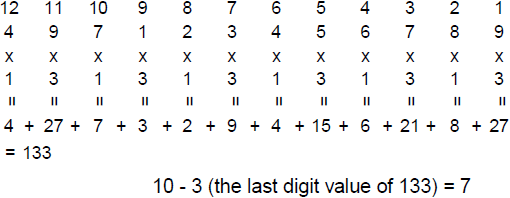
- each number is given a "weighting" number of 3 or 1
- the original number is then multiplied by their weighting number.
- all the new numbers are added up
- the check digit is the value needed to add to make it to the next multiple of ten. e.g if the sum of the numbers was 123 then the check digit would be 7
- the same process is used in an 8 digit barcode
- the check digit is the value needed to add to make it to the next multiple of ten. e.g if the sum of the numbers was 123 then the check digit would be 7
- all the new numbers are added up
- the original number is then multiplied by their weighting number.
- encoded within the data is a check digit which is calculated using a mathematical formula and bases on the other values in the code.
- each barcode carries a unique number which identifies that specific parcel in a transaction between the sender and reciever
- 1.1 network infrastucture
3G,4G,Near Field Communication and Electronic Data Interchange
- 2.1 3G wireless movile telecomunications technology
- third generation
- introduced 2003
- 5-6 Mbps as of 2016
- megabits per second
- enabled mobile internet access, video calls and video streaming
- although it is an older standard there are many areas where it is still available.
- if PDC wanted a smartphone app it would have to consider the data transfer rates which are now avaliable
- 3G would have to be considered as anything with too larger bandwidth would not download quick enough and the customer might loose interest in placing an order
- if a live map was used to display the whereabouts of the parcel then the image would have to be compresed to a small enough size that it would still load on a 3G connection in a small enough amount time
- 3G would have to be considered as anything with too larger bandwidth would not download quick enough and the customer might loose interest in placing an order
- 2.2 4G Wireless mobile telecommunications technology
- fourth generation
- 2010
- 17 mbps-2016
- increased speeds are inevitable
- must have a 4G tariff to use which is more expensive
- coverage is not yet nationwide
- 2.3 Near Field Communication (NFC's)
- work using electromagnetic induction
- used to read simple NFC tags
- to work effectively the tag and reader must be no more than 5cm apart
- Once the data has been exchanged, it can be shared with computer systems, such as entering details of a package into a database
- company could develop an app to allow an in sotre worker to scan the parcel on thweir personal phones rather than supplying specialist hardware
- advantages
- versatile and could be programmed for many purposes
- could develop a mobile phone app for use in collection depots such as post offices and the owkrers could use their own mobile phones to scan parcels
- wouldnt have to buy specialist hardware if they had the app
- dissadvantages
- costs more for NFC tags rather than barcodes
- may be compatibility issues with other systems
- relies on availability of NFC-enabled devices at every one of it delivery expotrts
- NFC has a very short range compared to a barcode scanner so may be difficult to scan large packages
- may be additional costs of implementing including system updates and staff training aswell as keeping the system up and running
- 2.4 Electronic Data Interchange
- automated method for allowing two comanies to exchange buisness information
- PDC uses an EDI to allow large companies to send bulk parcels without having to enter each parcels details into the website
- tracking info can also be sent back to companies using the EDI
- Could use this method for automatically transferring invoices, shipping notices and purchase orders to and from its commercial customers
- how it works
- customer requests a price for delivery of a parcel from PDC
- Customer and PDC agree to a conract for the delivery of the parcel
- the cuctomer places an order with PDC for the delivery
- PDC acknowledges the order with the customer
- PDC sends the advanced shipping notice
- PDC organises the parcel delivery and includes the advice note
- The parcel is deliverwed and the customer electronically signs for the delivery
- PDC and the customer can both check the delivery using the electronic tracking system
- PDC sends an invoice to the customer for the delivery
- customer pays and sends a remittance advice note back to PDC
- PDC sends an invoice to the customer for the delivery
- PDC and the customer can both check the delivery using the electronic tracking system
- The parcel is deliverwed and the customer electronically signs for the delivery
- PDC organises the parcel delivery and includes the advice note
- PDC sends the advanced shipping notice
- PDC acknowledges the order with the customer
- the cuctomer places an order with PDC for the delivery
- Customer and PDC agree to a conract for the delivery of the parcel
- customer requests a price for delivery of a parcel from PDC
- different standards of EDI by PDC
- de facto standards
- when too companies who regularly do buisness organise the format and types of data which can be shared
- de jure standards
- standards developed by professionals which anyone can use
- de facto standards
- EDIFACT
- Electronic Data Interchange for Administration, Commerce and Transport
- professional body which develops EDI rules for the United Nations
- Usually publishes a new set of EDI messages each year in a list of standards called a dictionary
- professional body which develops EDI rules for the United Nations
- Electronic Data Interchange for Administration, Commerce and Transport
- EAN
- European Article Numbering
- international standards body
- Some countries adapt their own EAN EDI standards for use within their own country
- e.g. tradacoms for use by retail trade in the UK
- Some countries adapt their own EAN EDI standards for use within their own country
- international standards body
- European Article Numbering
- ODETTE
- Organisation for Data Exchange by Tele transmission in Europe
- formed and used by the automotive industry
- originally developed its own unique standards of EDI but has now adopted subsets of EDIFACT standards
- formed and used by the automotive industry
- Organisation for Data Exchange by Tele transmission in Europe
- VDA
- Verband der Automobilindustrie
- German automotive industry-developed own standards of EDI messages
- Only used in the Uk by the automotive supply industry
- German automotive industry-developed own standards of EDI messages
- Verband der Automobilindustrie
- ANSI
- American National Standards Institute
- ANSI standards and EDI messages are known as "transaction sets"
- Rarely used in the UK
- ANSI standards and EDI messages are known as "transaction sets"
- American National Standards Institute
- Company standards
- some companies still continue to use their own variations of EDI that meet the requirements of a specific industry
- This means PDC might still have to send similar messages in different formats depending on the preferred standards of different customers
- some companies still continue to use their own variations of EDI that meet the requirements of a specific industry
- Advantages of EDI
- replacement or reduction of mail, fax or email
- reduced staffing costs
- less chance of transcription errors when data in an order or invoice typed into a computer system
- reduced postal costs and time saved waitiing for postal deliveries
- increased processing of speed orders
- less chance of errors arising from transferring data from one form to another
- disadvantages of EDI
- not all companies use the same EDI standard, especially in different parts of the world
- PDC might have to use additional software to encode of decode its EDI transmissions in order to match the EdI version to some of its suppliers or customers
- 2.1 3G wireless movile telecomunications technology
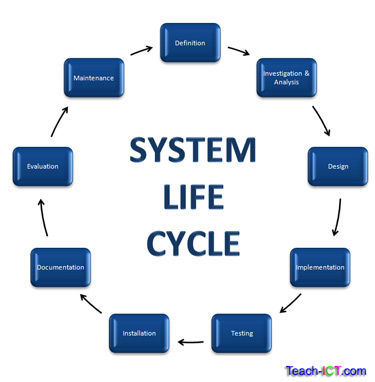
System life cycle stages, advantages and disadvantages
- 3.1 definition of the problem
- 1st stage- statement of intent
- often followed by a feasibility study to decide whether there is a financial case for taking the project further
- if savings cannot be made then the system will be pointless
- process for planning,vcreating, testing and deploying an information system
- Failure to complete the whole process can lead to the new system not delivering what the end user wants
- 3.2 investigation
- e.g. looking at the system to be replaces and considering the views and needs of the management of the company and the end users
- the system must enhance the efficiency of the business or it will be of no use
- questionnaires, interviews or observations of how people work within the company
- diagrams may be used to map out the flow of data and goods through the company to make it easier to understand how the current system works and where problems may exist
- decision whether to modify an existing system, buy in a new system or develop a whole new bespoke system "in house"
- modifying an existing sytem
- advantages
- easiest and least diruptive
- likely to have the l9owest cost
- disadvantages
- any problems with the existing system may be replicated into the new system
- advantages
- buying a new system
- advantages
- development costs will have been spread across several companies, resulting in lowers costs for PDC
- Likely to be tried and tested by other companies
- ongoing support will be avaliable
- disadvantages
- the system is unlikely to fully match what PDC needs-requiring additional systems to still be needed
- advantages
- developing a whole new system,
- advantages
- new system will be designs to fully meet what PDC needs
- the documentation/ supports is specific to PDC's operations
- disadvantages
- if developed by a specialist company, they may not understand as fully what is needed as an in house developer might
- if developed in house, there may not be as much skill as if a specialist company was used
- any problems with existing system may be replicated into new one
- advantages
- modifying an existing sytem
- 3.3 analysis
- list of success criteria will be drawn up
- based on meeting a system specification
- represents everything the system MUST be, have or do
- represents the evaluation criteria for the project or what the system must do in order to be considered finsihed
- developer gets paid
- list of success criteria will be drawn up
- 3.4 design
- final detail of the solution will be decided
- the user interface design
- navigation around the system, online help, error messages and the overall look and feel of the system
- most likely employ a graphic design team
- the system development team will have to decide on the way that the new system will deal with input, processing and storage of data
- input and storage (including validation and format of data) is usually specified in a data dictionary
- the ways in which the new system will output data
- both on screen and in printed format
- managers should be involved to ensure its what they require
- minimum software and hardware requirmnts needed to run the new system
- a new system might be much more expensive to impliment as it requires the company to purchase new computers and other hardware or new licenses of later operating systems
- 3.5 development and testing
- coding of the project begins
- although the testing si often shown as a separate process to development they are both part of the iterative process
- the same process of testing an development may be repeated many times, each time getting closer to the desired system
- each section of the new system must be tested to ensure the system works just as the managers want
- each fault which is found must be fixed
- also ensure the system will run seamlessly along side any other systems and thatit will run on the hardware and software being used
- also consideration is given to how legacy data can be brought across to the new system
- testing could be done my the developers themselves or staff selected to trail the system
- 3.6 implementation
- rolling out the system into the company
- direct changeover
- old system turned off, new system turned on
- advantages
- data in the new system is consistent and there are no iissues with compatilitlity with old systems once all the data has been converted from the old system to the new
- disadvantages
- relies on the newsystem being fully operational with no flaws
- difficult to implement as the whole set of staff must be trained and ready to use the system
- most likely to fail
- pilot implementation
- a department within the company trials the hwole of the new system while all the rest of the comapny carries on with the old system
- advantages
- easier to train small groups of people at a time
- trained workers can then help others to use the system
- any bugs in the new system can be identified before the whole system is rolled out
- disadvantages
- the department piloting the new system might have difficulty in sharing data with other departmenst still using the older system
- phased implementation
- some elements of the new system are implemented across the company first and the old system is gradually replaces step by step
- advantages
- smnall changes are often the easiest and most effective implementation system
- easier to offer training on one part of the new system at a time
- disadvantages
- the new system may have dificulty in sharing data with the old system
- it may be tempting to roll out sections of the system which are unfinished without testing that every system workls with every other
- parallel running
- old system is left in place and new system implemented. Old system turned off after a while
- advantages
- old system provides a fall back position if the new system turns out to be unworkable
- diadvantages
- creates twice as much work for the workforce and is the most inefficient method
- direct changeover
- rolling out the system into the company
- 3.7 documentation
- most important
- every system must be provided with manuals covering the design of the system and how to use it
- overview of the system
- installation instructions and technical details e.g. hardware and software requirements
- user guide
- troubleshooting advice which will be a list of all actions needed to solve simple problems
- glossery of technical terrms
- 3.8 evaluation
- system specification must be refered to in order to establish if the project has met its goals
- does the system perform as expected?
- does the new system solve the problem identified in the investigation stage?
- was the original system specification sound or did it change along the way?
- system specification must be refered to in order to establish if the project has met its goals
- 3.9 maintenance
- corrective
- ongoing maintenance must be in place to fix bugs that come to light onve the system is up and running
- adaptive
- ongoing maintenance must be in place to develop new functions and features such as new ways of inputting data or producing reports in new formats and adapting to new requiremnt of the company as they come along
- perfective
- ongoing maintenance must be in place in order to improve system performance and efficiency
- corrective
- 1.10 advantages and disadvantage sof the systems life cycle
- advantages
- well-established, tried and testing methodology that is effevctive and well understood
- very structured approach with clear definition sbetween on ephase and the next
- would allow PDC to thouroughly plan for risks, finances and resources
- would allow PDC to make a structuired plan with deadlines for each stage
- possible for PDC to formally review the system and process allowing them to make a desitions as to its success
- could reflect PDC's buisness needs
- disadvantages
- formally sticking to each step can rsult in it being along, drawn out process-expenses
- the ned users may not be able to fully express their needs to the developers
- users are less of a part of the process- end results may be what the developers think the users want not what they acctually need
- end users may not see the solution until complete
- advantages
- 3.1 definition of the problem
Images and files in the map
Information
- Description
- gcse ict Mind Map on PDC b063, created by elise connor on 21/04/2017.
- Created by
- elise connor
- Views
- 4
- Rating