
Educational Technology mind maps
1,265 mind maps by 1,139 users · Page 1 of 32
This page gathers over 1,200 community-made Educational Technology mind maps, covering ICT, multimedia learning and classroom tools. University students can use them to review learning theories, while teachers can explore technology in teaching practice. Pick a map that fits your current topic.
Select topic
- Digital Pedagogy and Critical Thinking53
- Digital Literacy and 21st Century Skills32
- Technology Integration Models and Standards31
- Technology Integration in the Classroom58
- E-Learning, Blended Learning and Flipped Classrooms85
- Personal and Virtual Learning Environments46
- Digital Tools and Learning Resources22
- Multimedia Learning and Digital Storytelling15
- Gamification and Game-Based Learning22
- Technology in Language Teaching161
- Technology for Writing Skills105
- Copyright and Online Safety5
Mind maps
-
Educational Technology What is Educational Technology? It is more than just simply implementing technology into the classroom. It ...
-
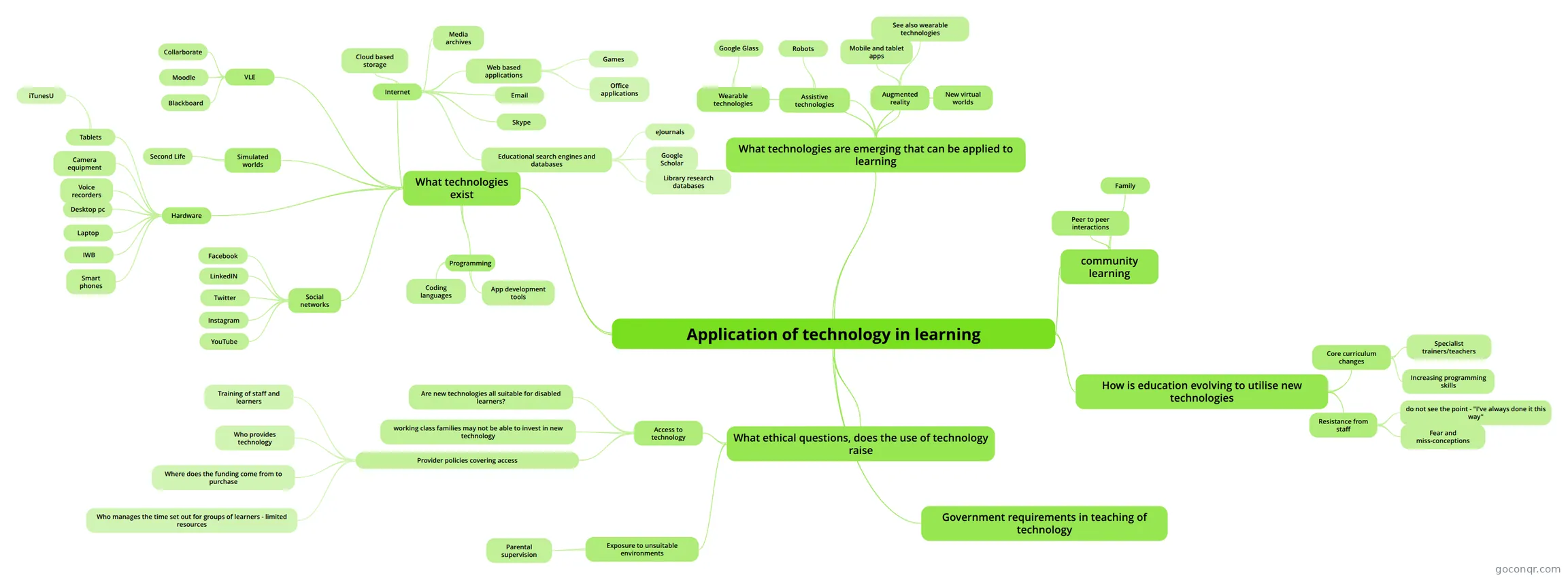 Application of technology in learning Exploration of Technology in learning, in preparation for presentation and report
-
INNOVATIVE EDUCATIONAL TECHNOLOGIES
-
Interactive Multimodal Learning Environments A concept map of an article on interactive multimodal learning environments.
-
Educational Technologies for teaching and learning
-
TECHNOLOGY
-
Tools for learning: Technology and teaching strategies
-
Teacher professional identity and the nature of technology integration
-
TECHNOLOGY INTEGRATION IN ENGLISH LANGUAGE TEACHING AND LEARNING - Selim Gunuç, Nuri Babacan JOSE RODOLFO SALGADO CASTRO Creating a Mind Mapping Journal TECHNOLOGY INTEGRATION IN ENGLISH LANGUAGE TEAC...
-
Teaching and Learning with Technology
-
Teaching and Learning with Technology
-
Blended learning
-
The Use of Ict in English Teaching-Learning Processes
-
Gavin Dudeney
-
Gavin Dudeney
-
The Use of Ict in English Teaching-Learning Processes
-
The use of Media in the English class
-
Educational Technology What is Educational Technology? It is more than just simply implementing technology into the classroom. It ...
-
Technology Standards in Education
-
THE ROLE OF TECHNOLOGY IN EFL SETTINGS
-
Educational technology in context
-
Elena Nedaivoda, PR-61 Innovative Educational Technologies
-
New Literacies Teacher Librarian Part 1
-
EDUCATION (Teaching and Learning)
-
Interactive Multimodal Learning Environments A concept map of an article on interactive multimodal learning environments.
-
"Digital Natives, Digital Immigrants"
-
Inquiry Through Digital Literacies Inquiry through digital literacies
-
Innovative educational technologies in foreign languages teaching
-
How to improve writing skills through the use of ICT
-
Constructing Personal Learning Environments
-
CONCEPTUAL FRAMEWORK
-
21st Century Skills & Digital Literacy
-
Digital age language teacher
-
A Theory of Effective Computer-Based Instruction It is about the technology which teachers uses in their class. The technology is important and essential be...
-
ICT-Mediated Instruction
-
UNIT 2.Improving the Writing Skills in Foreign Language Teaching with ICTs.
-
USING TECHNOLOGY: A short list of some key technology in education must include
-
The Use of Ict in English Teaching-Learning Processes
-
Improving Writing Literacies through Digital Gaming Literacies: Facebook Gaming in the Composition Classroom
-
How to improve writing skills through the use of ICT
More Educational Technology resources
About educational technology mind maps
GoConqr OriginalExplore educational technology mind maps
These maps offer different routes through the unit. Interactive Multimodal Learning Environments brings together ideas including feedback, pacing and pretraining. Creating with ICT maps aspects of creativity, while 3D Printing in Education raises questions about classroom uses and available printers.
For a practical starting point, choose Stages in Making a Video. Its branches begin with planning a lesson and deciding whether video suits its objectives. If you are exploring implementation instead, the map on factors preventing teachers from integrating technology offers another focus.
Revise with a map
Follow the branches of a map, then try recalling the connections without looking. Return to any branch you find hard to explain. When you want to check your understanding in a different way, switch to a quiz on the unit page; flashcards can help you revisit terms. Choose a map and follow one branch at a time.
Frequently asked questions
Which mind map could I start with?
For a practical starting point, Stages in Making a Video lays out steps beginning with lesson planning. For a broader view, Educational Technology connects questions about learning with pedagogy, real-world application and social media. Your choice can depend on whether you want a process or a wider set of connections.
Are these mind maps free to use?
Yes. Every mind map listed here is free to open and study without an account. The resources were made by GoConqr users rather than by GoConqr. A free account also lets you make your own mind maps, quizzes, flashcards and notes, and save your quiz scores.
What classroom applications do the maps cover?
The collection includes 3D Printing in Education, which asks about classroom uses and types of printers. Stages in Making a Video looks at planning and recording a lesson. Other maps address blended learning, cellphones in the classroom and using ICT for assessment for learning.