
Flashcards
A+ Flash Cards_2
Cards in this deck (186)
- 1What is C:\NTLDR?(Windows XP)
Started by the code in the MBR, NTLDR is the first OS file to be loaded. This is the equivalent to C:\Bootmgr.exe in Windows Vista/7/8 - 2What is C:\BOOT.INI?(Windows XP)
This is the 1st file started by NTLDR if there are no SCSI drivers being used. Builds the operating system selection menu, and tells the computer where each OS is located. This is the equivalent to C:\BCD.DAT in Windows Vista/7/8 - 3What is C:\NTDETECT.COM?(Windows XP)
Started by NTLDR.EXE after BOOT.INI is loaded. Detects and initializes hardware on boot. - 4What is C:\WINDOWS\SYSTEM32\NTOSKRNL.EXE?(Windows XP)
Started by NTLDR.exe after NTDETECT.COM is loaded. Core kernel code responsible for tasks such as thread management. - 5What is C:\BOOTMGR.EXE?(Windows Vista/7/8)
Started by the code in the VBR, BOOTMGR.EXE is the first OS file to be loaded. This is the equivalent to C:\NTLDR in Windows XP. - 6What is C:\BCD.DAT?(Windows Vista/7/8)
Started by BOOTMGR.EXE, BCD builds the operating system selection menu, and tells the computer where each OS is located. This is the equivalent to C:\BOOT.INI in Windows XP. - 7What is C:\WINDOWS\SYSTEM32\WINLOAD.EXE?(Windows Vista/7/8)
Loads the Operating System - 8What is C:\WINDOWS\SYSTEM32\WINRESUME.EXE?(Windows Vista/7/8)
Resumes the Operating System if the system is started from a hibernate state. - 9(Command) Display basic TCP/IP configuration, such as IP address, subnet mask, and default gateway.ipconfig
- 10(Command) Display TCP/IP settings, including your Media Access Control (MAC) address, domain name system (DNS) server, and lease information.ipconfig /all
- 11(Command) Release your IP address.ipconfig /release
- 12ipconfig /renewRenew your IP address.
- 13What does this command do? pingSend four test messages to the IP address or host name you specify; verify whether the other system is up and running.
- 14(Command) Display TCP/IP protocol statistics and connection information. Can be used to see who is connected to your system; what ports are open; and if you use an -o switch, what the process ID is of the program that opened the port.netstat
- 15(Command) Troubleshoot DNS problems. For example, you can get a listing of all the records in DNS using this.nslookup
- 16(Command) arpTroubleshoot ARP. For example, you can use arp -a to view your Address Resolution Protocol (ARP) cache.
- 17(Command) View a list of running processes.Tasklist
- 18(Command) Terminates a process when you supply the process id.Taskkill /PID /F
- 19Mirrored disk striping. RAID level x is also known as RAID 1+0 because it is disk striping while mirroring the data written in the stripe.RAID 10
- 20Disk striping with parity (RAID x volume). With RAID x volumes, the data is written to multiple drives along with parity information that is used to help recover data if a single drive fails. RAID x volumes need a minimum of three disks.RAID 5
- 21Disk mirroring/duplexing (mirrored volume). With disk mirroring, the data is written to both drives involved in the mirror to provide data redundancy. Windows 7 supports disk mirroring.RAID 1
- 22Disk striping (striped volume). With RAID level x, the data is split across drives with no data redundancy. RAID level x improves read and write performance by writing to multiple drives at the same time. You need a minimum of two drives.RAID 0
- 23(Win32 Command) Check your hard drive for problems with the file system and for bad sectors.chkdisk.exe Check Disk
- 24(Win32 Command) Make changes to Registry values; can be used to make selective backups. Prior toregedit.exe Registry Editor
- 25(Win32 Command) Used from the command line to defragment a hard drive.defrag.exe Disk Defragmenter
- 26(Win32 Command) Back up files to tape or any writable file system.ntbackup.exe Windows NT backup
- 27This command verifies that system files have not been modified; or, if they have, replaces them with the original. It works with the hiddenC:\windows\system32\dllcache directory and the original operating system CD.sfc.exe System File Checker
- 28(Win32 Command) See running programs and services, terminate problems, and view rudimentary performance information about the system.taskman.exe Task Manager
- 29(Win32 Command) View detailed performance informationperfmon.exe Performance Console
- 30(Win32 Command) Reconfigure the boot process for troubleshooting and diagnosing the boot process.msconfig.exe System Configuration Tool
- 31(Win32 Command) View hardware and configuration information for your computer.System Information msinfo32.exe
- 32Logging component of the operating system; the central location for all logging activity.Event Viewer
- 33What is C:\WINDOWS\SYSTEM32\WINLOGON.EXE?(Windows Vista/7/8)
Starts the logon prompt. After logon starts EXPLORER.EXE. - 34(Types of Malicious Software) Code that runs on a computer without the user’s knowledge; it infects the computer when the code is accessed and executed.Virus
- 35(Types of Malicious Software) Much like viruses except that they self-replicate whereas a virus does not.Worms
- 36(Types of Malicious Software) Appear to perform desired functions but are actually performing malicious functions behind the scenes.Trojan horses
- 37(Types of Malicious Software) Type of malicious software that is either downloaded unwittingly from a website or is installed along with some other third-party software.Spyware
- 38(Types of Malicious Software) Software designed to gain administrator-level access to the core of a system without being detected.Rootkit
- 39The act of manipulating users into revealing confidential information or performing other actions detrimental to the user.Social engineering
Examples:
phishing, shoulder surfing, and tailgating - 40The verification of a person’s identity, it helps protect against unauthorized access.Authentication
- 41The four types of Authentication.1. Something the user knows (password or PIN); 2. Something the user
has (a smart card or other security token); 3. Something the user is (biometric reading:
fingerprint or retina scan); or 4. Something a user does (signature or voice print). - 42A security feature in Windows 7/Vista which requires administrative login to perform higher tasks.UAC (User Account Control) in Windows 7/Vista requires administrative login to perform
higher tasks. - 43The act of changing information using an algorithm known as a cipher to make it unreadable to anyone except users who possess the proper “key” to the data.Encryption
- 44A feature of Windows which encrypts one or more files or folders directly within the Properties page. Makes files appear green.Encrypting File System (EFS)
- 45A feature of Windows which encrypts an entire disk, available only on Windows 7 Ultimate/Enterprise and Vista Ultimate/Enterprise. Requires TPM.BitLocker
- 46The 3 methods of Hard Drive Disposal.• Clearing (drive to be reused in house),
• Purging (sanitizing, Ex. DoD 5220.22-M seven pass standard, degaussing)
• Destruction (pulverizing, drilling holes in platters). - 47In regard to permissions- If you create a folder, the default action it takes is:To inherit
permissions from the parent folder. - 48In regard to permissions- If you move a folder within the same partition, it:Retains the
permissions. - 49In regard to permissions- If you move or copy a folder to another partition, the (new) folder:Inherits from the
new parent. - 50This command is used to repair BootmgrBootrec/fixboot
(Vista/7/8) - 51This command rewrites the master boot record in Vista/7/8.Bootrec/fixmbr
(Vista/7/8) - 52This command rebuilds the boot configuration data store.Bootrec/ rebuildbcd
(Vista/7/8) - 53This command repairs the Master Boot Record in Windows XP.FixMBR
(XP) - 54This command writes new boot sector information in Windows XP.FixBoot
(XP) - 556 steps of the laser printing process.Clean-Charge-Write-Develop-Transfer-Fuse
(Can-Chase-Write-Down-The-Facts) - 56This type of printer uses force to transfer ink to paper, for example, a print head striking a ribbon with paper directly behind it, similar to a typewriter.Impact Printer
- 57Also known as an electrophotographic printerLaser Printer
- 58This type of printer produces text and images by heating specially coated paper.Thermal printers
- 59This type of printer works by propelling ink onto various sizes of paper.Inkjet Printer
- 60The four most common motherboard form factors.ATX (most common),
microATX, ITX, and BTX - 61This file contains setup errors during an installation of Windows.Setuperr.log contains setup errors during an installation of Windows.
- 62Maximum number of partitions on a BASIC disk.A BASIC disk can have four partitions: up to four primary partitions, but only one extended
partition. Logical drives are sections of an extended partition.
(Practically unlimited on Dynamic Disk) - 63What is different about an active partition?The Active partition is the one
that is booted from; it usually contains the OS. - 64Any section of a hard drive with a letter is called a ____________.volume.
- 65Malware is short for:Malicious Software
- 66Port 80HTTP
(Hardly Trying To Party at 80) - 67Port 443HTTPS
- 68Port 25SMTP
(Still Managing To Party at 25) - 69Port 23Telnet
(Nothing special at 23)
eg No acronym for Telnet - 70Port 110POP3
(Pooped Out Partying at 110) - 71Port 445SMTPS
- 72Port 995POP3/S
- 73In this type of attack, a vast number of compromised computers are to flood a specific server at the same time for the purpose of making that server and its services unavailable.Distributed Denial-of-Service (DDoS)
- 74In this type of attack, one computer and one internet connection is used to flood a server with packets, with the aim of overloading the targeted server’s bandwidth and resources.Denial of Service (DoS)
- 75Provide an example of a T-Carrier service.A T-1 or a T-3 is a service provided by a T-Carrier.
- 76True/False: An Ethernet cable can be considered a display cable.True. CompTIA considers an Ethernet cable to be a type of display cable because of it's use with KVM and rack devices.
- 77What is ADSL?Asymmetrical Digital Subscriber Line:
Asymmetric because the Upload/Download speeds are different. - 78What is SDSL?Symmetrical Digital Subscriber Line:
Symmetrical because the Upload/Download speeds are the same. - 79DVI-ADigital Visual Interface-Analog
(Think old TV set) - 80DVI-DDigital Visual Interface-Digital
(Think 1's and 0's) - 81DVI-IDigital Visual Interface-Integrated
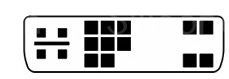
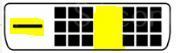
(Works with either Analog or Digital) - 82What type of DVI connector is shown?DVI-A
(Notice that Analog requires these 4 pins)
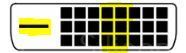
- 83What type of DVI connector is shown?DVI-D (Digital)/Dual Link
(Notice the 4 analog pins are missing. Notice the 6 pins in the center- these are required for dual link.)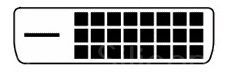
- 84What type of DVI connector is shown?DVI-D (Digital)/Single-link
(Notice the 4 Analog pins on the left are missing, as well as the center 6 Dual Link pins.)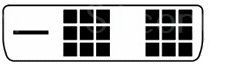
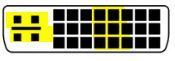
- 85What type of DVI connector is shown?DVI-I (Integrated)/Dual Link
Integrated=Analog+Digital
(Note: Has Analog and Dual Link Pins)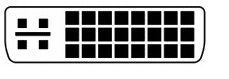
- 86What type of DVI connector is shown?DVI-I (Integrated)/Single Link
(Notice Analog pins but no Dual Link pins)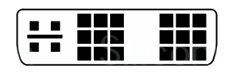
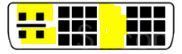
- 87Port 21FTP
(Free To Party at 21) - 88Port 53DNS
(Don't Need Sillyness at 53) - 89Port 143IMAP
(I Manage A Poo at 143) - 90Port 3389RDP
(Really Dead Person at 3389) - 91What is the color of a wire that reads +5 volts?Red
- 92What is the color of a wire that reads -5 volts?White
- 93What is the color of a wire that reads +12 volts?Yellow
- 94What is the color of a wire that reads -12 volts?Blue
- 95What is the color of a wire that reads +3.3 volts?Orange
- 96Intel or AMD? Socket LGAIntel
- 97Intel or AMD? Socket 775Intel
- 98Intel or AMD? Socket 1155Intel
- 99Intel or AMD? Socket 1156Intel
- 100Intel or AMD? Socket 1366Intel
- 101Intel or AMD? Socket 940AMD
(This is the only numbered socket AMD uses) - 102Intel or AMD? Socket AM2+AMD
- 103Intel or AMD? Socket AM3AMD
- 104Intel or AMD? Socket AM3+AMD
- 105Intel or AMD? Socket FM1AMD
- 106Intel or AMD? Socket FAMD
- 107The device with SCSI ID _______ is always given the highest priority, as this ID is normally set aside for the host adapter.The device with SCSI ID 7 is always given the highest priority, as this ID is
normally set aside for the host adapter. - 108(Types of Social Engineering) The act of trying to get people to give their user names, passwords, etc. by masquerading as someone else electronically.Phishing
- 109(Types of Social Engineering) Observing someone’s screen or keyboard to get information, often passwords.Shoulder Surfing
- 110(Types of Social Engineering) When an unauthorized person tags along with an authorized person to gain entry to a restricted area.If the authorized person allows the unauthorized person through-
Intentionally: Piggybacking
Unintentionally: Tailgating - 111What is a TPM?Trusted Platform Module (TPM)
A chip residing on the motherboard that actually stores the
encrypted keys. (Bitlocker needs this) - 112What does the "nb" in "nbtstat" stand for?NetBIOS
- 113Which command line tool may be able to assist you in securing the open ports on a local workstation?netstat
- 114What does robocopy stand for?Robust Copy
- 115The address below is an example of what? 169.254.31.29APIPA - Automatic Private IP Addressing - allows DHCP clients to obtain addresses even in cases when the DHCP server cannot provide one.
- 116What are the minimum system requirements for Windows XP?CPU = 233 MHz, RAM = 64 MB, Free disk space =1.5 GB.
Media Center CPU = 1.6 GHz, RAM = 256 MB. - 117What are the minimum system requirements for Windows Vista?CPU = 800 MHz, RAM = 512 MB, and Free disk space=15
GB. - 118What are the minimum system requirements for Windows 7?CPU = 1 GHz, RAM = 1 GB (2 GB for 64-bit), Free disk space
= 16 GB (20 GB for 64-bit) - 119How many pins does a PC100 memory module have?PC100 is SDRAM which has 168 pins.
- 120How many pins does a DDR-200 PC-1600 memory module have?DDR-200 PC-1600 is 1st generation DDR which has 184 pins.
- 121How many pins does a DD2-800 PC2-6400 memory module have?DD2-800 PC2-6400 is 2nd generation DDR memory which has 240 pins.
- 122How many pins does a PC3-12800 memory module have?DDR3-1600 PC3-12800 is third generation DDR and has 240 pins. Although DDR2 and DDR3 both have 240 pins, they are notched differently and are not compatible with each other.
- 123How many pins does a PC4-25600 memory module have?DDR4-3200 PC4-25600 is the fourth generation of DDR memory and has 288 pins.
- 124How many pins does a PC800 RIMM have?PC800 RDRAM, or RAMBUS has 184 pins and comes in RIMMS instead of DIMMS. This memory is now obsolete.
- 125True or False? SO-DIMMs of DDR and DDR2 both have 200 pins.True:
The 200-pin SO-DIMM can be of the types DDR and DDR2. In both cases the notch is located at one fifth of the board length (20 pins + notch + 80 pins), but in DDR2 the notch is located slightly closer to the center of the board. - 126How many pins does a DDR3 SO-DIMM have?A DDR3 SO-DIMM has 204 pins.
- 127How many pins does a UNIDIMM memory module have?A UNIDIMM memory module has 260 pins and can found in either DDR3 or DDR4 configurations.
- 128(Win32 Command) Diagnostic tool for getting information about and testing a computer’s DirectX version.dxdiag (DirectX Diagnostics Tool)
- 129(Win32 Command) MSTSCMicroSoft Terminal Services Client
(Remote Desktop) - 130Identify the laptop adapter card shown:ExpressCard /54
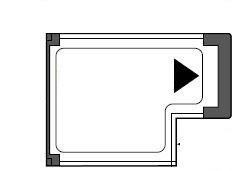
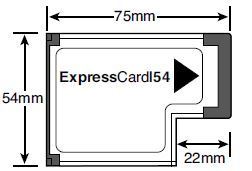
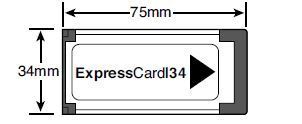
- 131Identify the laptop adapter card shown:ExpressCard /34
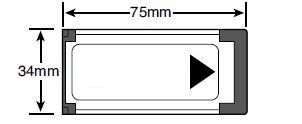
- 132Identify the laptop adapter card shown:CardBus (PCMCIA)
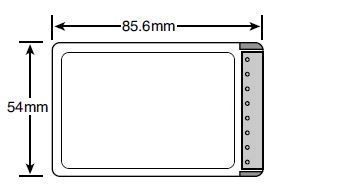
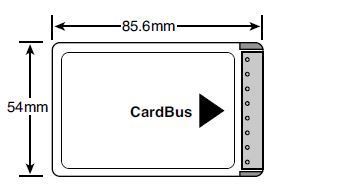
- 133What is the maximum range of a Class 1 Bluetooth device?100 meters
- 134What is the maximum range of a Class 2 Bluetooth device?10 Meters
- 135What is the maximum range of a Class 3 Bluetooth device?1 meter
- 136VDSLVery-high-bit-rate Digital Subscriber Line
(This is just ADSL on steroids, 50-100Mbps speeds) - 137Identify the connector shown:BNC ((Bayonet Neill–Concelman)
Usually just called "Bayonet Connector".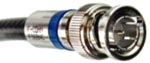
- 138Identify the connector shown:F-Connector
(Used for RG 5/6 cable)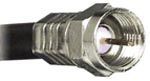
- 139Identify the connector shown:Fiber-Optic: LC
(Remember "Little Connector". This is smaller than SC.)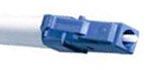
- 140Identify the connector shown:Fiber-Optic: SC
(Think "SC" for "Scuare/Square". This is bigger than LC)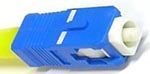
- 141Identify the connector shown:Fiber-Optic: ST (Stands for Straight-Tip.)
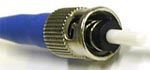
- 142What type of Cat5 cable is shown?STP (Shielded Twisted-Pair)
This is regular network cable that is shielded (notice blue film). The shield protects the signal from radio-interference.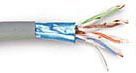
- 143What type of Cat5 cable is shown?UTP (Unshielded Twisted-Pair)
This is regular network cable, and is more susceptible to radio interference than STP.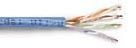
- 144What are the 3 private IP address ranges?Anything that is: 10.x.x.x
172.16.x.x to 172.31.x.x
Anything that is: 192.168.x.x - 145What is a RAM "channel", and how does it affect speed?Each "channel" represents the number of RAM modules that can be accessed at once, and therefore the maximum speed.
Single Channel: 64-bit (One stick at at time.)
Dual Channel: 128-bit (Two sticks at a time. 2x as fast as Single)
Triple Channel: 192-bit (Three sticks at once. 3x as fast as Single, 1.5x as fast as Dual.) - 146What is a BD-R disc?Blu-ray Disc Recordable (Cannot be reused)
- 147What is a BD-RE disc?Blu-ray Disc Recordable Erasable (Can be reused)
- 148Identify the type of memory card shown:CF (Compact Flash)
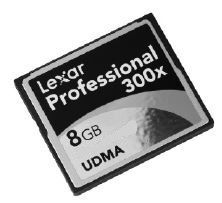
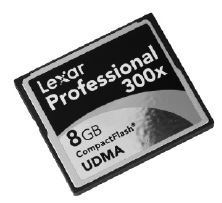
- 149Identify the type of memory card shown:SD (Secure Digital)
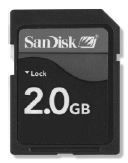
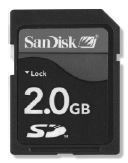
- 150Identify the type of memory card shown:MiniSD (Mini Secure Digital)


- 151Identify the type of memory card shown:MicroSD (Micro Secure Digital)


- 152Identify the type of memory card shown:(Sony) Memory Stick
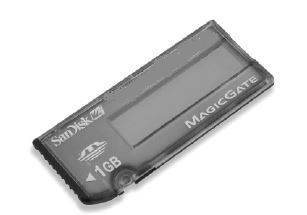
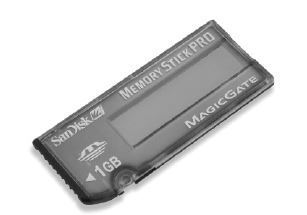
- 153Identify the type of memory card shown:xD (eXtreme Digital)
(Olympus/Fujifilm)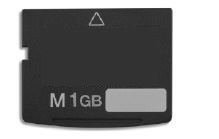
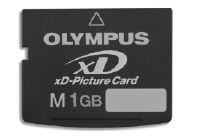
- 154Name the connector shown:
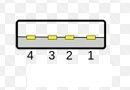
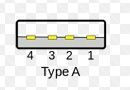
- 155Name the connector shown:


- 156Name the connector shown:


- 157Name the connector shown:


- 158Name the connector shown:


- 159Name the connector shown:


- 160USB 1.1Low Speed: 1.5 Mbpts/3 Meters
High Speed: 12 Mbps/5 Meters - 161USB 2.0480 Mbps/5 Meters
- 162USB 3.05 Gbps/3 Meters
- 163Firewire AKA Firewire 400400 Mbps/15ft (4.5 Meters) per device (up to 63 devices)
Half-Duplex - 164Firewire 800800 Mbps/15ft (4.5 Meters) per device (up to 63 devices)
Full-Duplex - 165SATA Rev. 11.5 Gbps/1 Meter
- 166SATA Rev. 23 Gbps/1 Meter
- 167SATA Rev. 36 Gbps/1 Meters
- 168eSATA(External SATA)
Same speed as Motherboard (1/2/3) but distance is 2 Meters. - 169802.11a5GHz
54Mbps/120 Meters - 170802.11b2.4GHz
11Mbps/140 Meters - 171802.11g2.4GHz
54Mbps/140 Meters - 172802.11n5GHz and/or 2.4GHz
600Mbps/250 Meters
(4x 150Mbps Streams) - 173Who wins? Explicit or Inherited permissions?Permissions that have been explicitly granted override permissions that have been inherited from it's parent.
- 174What is the difference between a RAM chip that is Single-Sided vs Double-Sided?The number of RAM "Sides" refers to it's "Ranks". If a RAM module has 1 rank, it means that all memory on the stick is accessed at once, whereas modules with 2 or more "sides" have multiple ranks that each have to take turns being accessed. This has nothing to do with whether or not there are chips on both sides of the module.
- 175______ humidity and _______ temperature can contribute to ESD.Low Humidity and Low Temperature
- 176What is the Resolution of VGA?(Video Graphics Array)
640x480 - 177What is the Resolution of SVGA?(Super Video Graphics Array)
800x600 - 178What is the Resolution of XGA?(eXtended Graphics Array)
1024x768 - 179Who wins? Allow or Deny permissions?Deny permissions always override allow permissions.
- 180What is the Resolution of WXGA?(Wide eXtended Graphics Array)
1366x768 - 181What is the Resolution of SXGA?(Super eXtended Graphics Array)
1280x1024 - 182Refresh Rate vs Response Time:Refresh Rate is the amount of time each frame of video is displayed whereas Response Time is the amount of time it takes one pixel to change colors.
- 183This command rewrites the boot.ini file in XP.bootcfg /rebuild
(XP version of BCDEDIT) - 184This command allows you to modify/repair the BCD in Vista/7/8BCDEDIT
(7 version of bootcfg) - 185Basic Disk vs Dynamic DiskBasic:
*Works with pre-Win2K OS (DOS, 98,etc)
*Only 4 partitions
*Cannot be resized or RAID
Dynamic:
Only Win2K+
*2000+ Partitions
*RAID, resizing, etc. - 186—
Information
- Description
- A+ Flash Cards
- Created by
- Russell Fourie
- Views
- 4
- Tags
- History
-
- Created by Koda M · Sep 17, 2015
- Copied by Russell Fourie · Sep 17, 2015
- Rating