
Mind map
DATABASES
Map content
DATABASES
OBJECTS / FEATURES
- Tables
- Used to STORE data
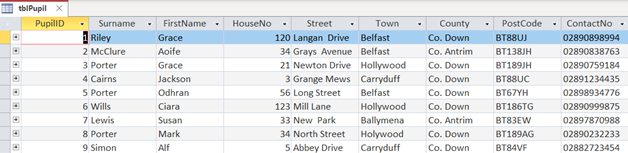
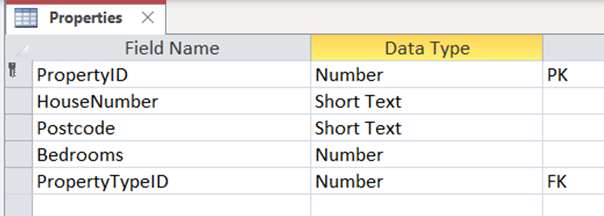
- Primary Key: Uniquely identifies each record in a table, usually a field name that ends in ID, Ref, Code or Number
- Record: a collection of fields that make up a row in a table.
- Field: part of a record that stores data about a single item or person.
- Foreign Key: a field that is a primary key in its own table and also appears in another table to link them together.
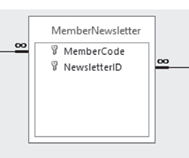
- Composite Key: a table with two Primary Key fields that combine together as a unique reference to each record in the table.
- Used to STORE data
- Queries
- used to SEARCH for data
- SQL
- SELECT: specifies the data to be returned
- WHERE: identifies the exact data to be returned - criteria
- FROM: where the data to be returned can be found
- Access Queries
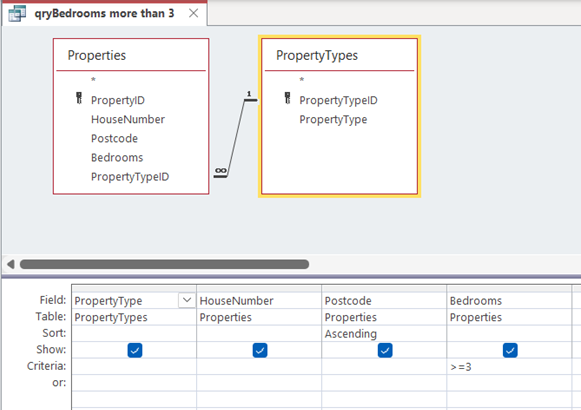
- The fields and the tables the fields are within are added to the design window. Constraints such as specific criteria under fields and sorting ascending or descending are selected/entered.
- SQL
- used to SEARCH for data
- Reports
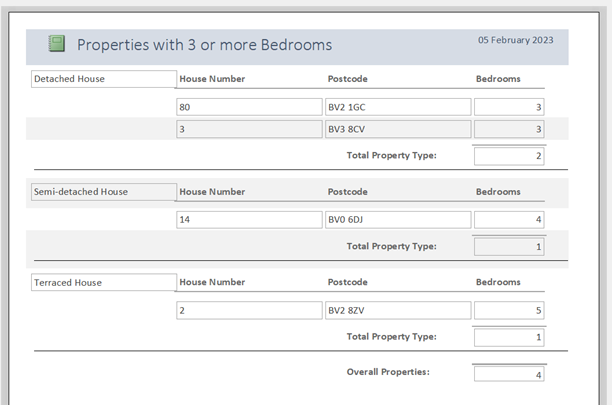
- used to PRESENT results of a query in a easy to read and understand way for the user.
- Forms
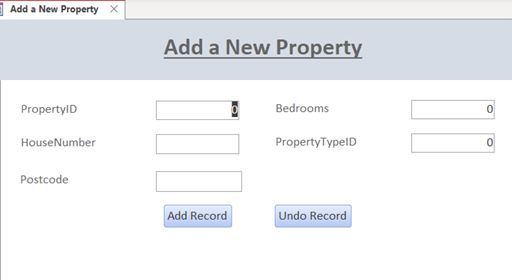
- used to INPUT data into a table or tables in an easy to understand way
- Tables
DATA TYPES
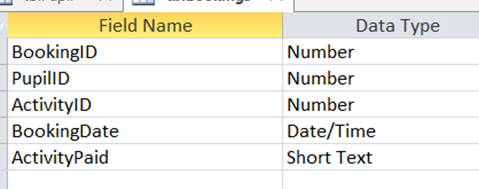
- TEXT / STRING: can contain text only or a mixture of text , numbers and characters.
- Tuesday; BT70 2LY, Jane
- NUMBER: numeric data that can be whole numbers or decimals
- 7; 3.5
- DATE/TIME: Stores dates and times
- 21/05/2021
- YES / NO: (Boolean value) Data that has only two possible values
- True; No
- CURRENCY: values of money
- £3.50
- TEXT / STRING: can contain text only or a mixture of text , numbers and characters.
IMPORTING DATA
- Data can be imported into databases from a range of files. These include CSV (comma separated values), TXT (text files), XLS (spreadsheet files)
VALIDATION
- Length Check
- Checks the data entered matches a specific length without going over it.
- Presence Check
- Checks if there is data entered for a specific field. It will not be allowed to be left blank.
- Type Check
- Checks if data entered matches the data type set. You would not be able to enter letters on a Number data type.
- Format Check
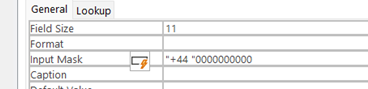
- Checks if the values are in a certain layout. Used on fields like postcode or telephone number. L is used to represent letters between A to Z and 0 is used to represent values between 0 and 9.
- LL00 0LL
- +44 00000000000
- Checks if the values are in a certain layout. Used on fields like postcode or telephone number. L is used to represent letters between A to Z and 0 is used to represent values between 0 and 9.
- Range Check
- Checks if the values are between an upper or lower limit. It can also compare if values are above a certain value or below a certain value.
- >=1 and <=5
- >03/05/2021
- <=20
- Checks if the values are between an upper or lower limit. It can also compare if values are above a certain value or below a certain value.
- Length Check
LOGICAL & COMPARISON OPERATORS
- Logical operators use words such as AND, OR and BETWEEN
- Comparison operators uses symbols such as >, <, >=, <= and =
BIG DATA
- The term Big Data has been used to refer to a range of problems and technologies that relate to the management of very large data sets. The amount of data that we currently generate is enormous, and is increasing each year.
- Volume
- The amount of data that is processed. Big data problems involve data sets that are so large and complex that traditional tools, such as relational database management systems, are not able to deal with them effectively.
- Variety
- The different types of data thar is processed. This is not data that can easily be put into relational database tables. It is video, audio, and image, as well as text and numeric data.
- Velocity
- The speed at which data is processed. Big data problems frequently have to deal with real time flows of data. Events happen in the real world and the data generated is real time, and is often time sensitive.
- Volume
- The term Big Data has been used to refer to a range of problems and technologies that relate to the management of very large data sets. The amount of data that we currently generate is enormous, and is increasing each year.
DATA ANALYTICS
- There is no value in managing data unless we can interpret it and extract useful information. This is the role of data analytics. Data analytics applies algorithms to raw data in order to spot patterns, relationships and trends. The algorithms may include statistical analysis as well as artificial intelligence techniques.
RELATIONAL DATABASE
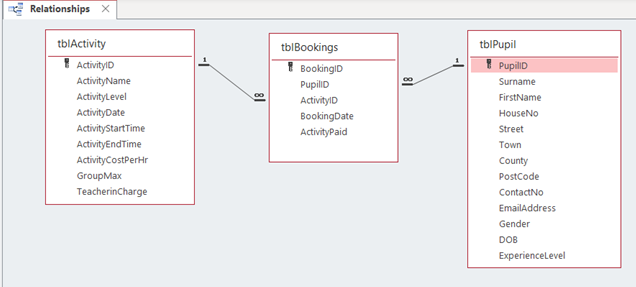
- Relationships:: The link between two tables in a database.
- 1 to 1 e.g. 1 person has 1 passport
- 1 to Many e.g. 1 Student studies Many Subjects
- Many to Many e.g Many Activities can be booked by Many People
- Defined as having two or more tables connected together.
- Relationships:: The link between two tables in a database.
Images and files in the map


Information
- Description
- GCSE GCSE IT - Unit 1 Mind Map on DATABASES, created by a St George on 17/01/2023.
- Created by
- a St George · Jan 2023
- Updated
- Feb 5, 2023
- Views
- 0
- Rating