
Mind map
Unit 1
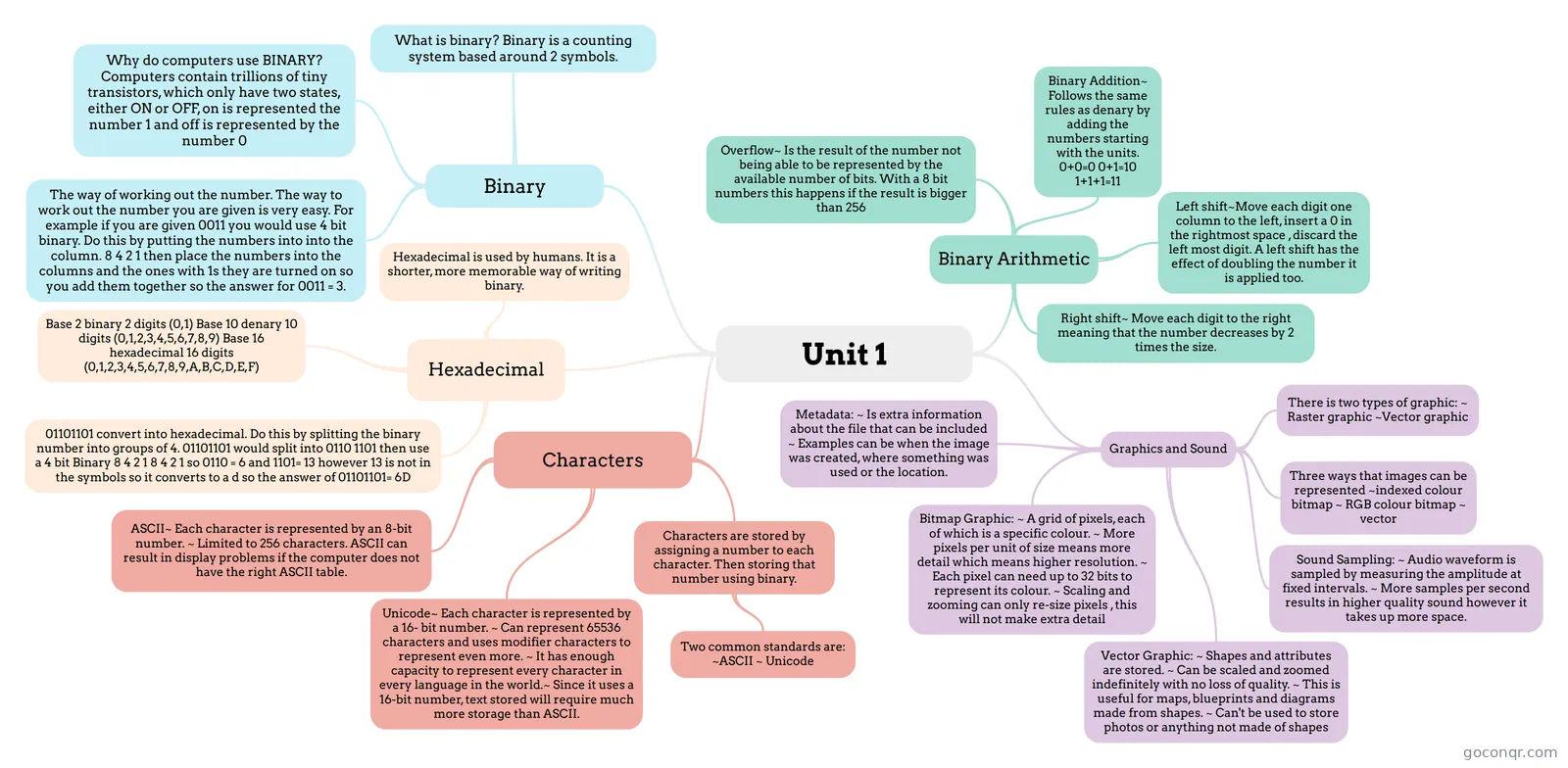
Mind map: Binary and hexadecimal
Map content
Unit 1
Binary
- What is binary? Binary is a counting system based around 2 symbols.
- Why do computers use BINARY? Computers contain trillions of tiny transistors, which only have two states, either ON or OFF, on is represented the number 1 and off is represented by the number 0
- The way of working out the number. The way to work out the number you are given is very easy. For example if you are given 0011 you would use 4 bit binary. Do this by putting the numbers into into the column. 8 4 2 1 then place the numbers into the columns and the ones with 1s they are turned on so you add them together so the answer for 0011 = 3.
Hexadecimal
- Base 2 binary 2 digits (0,1) Base 10 denary 10 digits (0,1,2,3,4,5,6,7,8,9) Base 16 hexadecimal 16 digits (0,1,2,3,4,5,6,7,8,9,A,B,C,D,E,F)
- Hexadecimal is used by humans. It is a shorter, more memorable way of writing binary.
- 01101101 convert into hexadecimal. Do this by splitting the binary number into groups of 4. 01101101 would split into 0110 1101 then use a 4 bit Binary 8 4 2 1 8 4 2 1 so 0110 = 6 and 1101= 13 however 13 is not in the symbols so it converts to a d so the answer of 01101101= 6D
Binary Arithmetic
- Binary Addition~ Follows the same rules as denary by adding the numbers starting with the units. 0+0=0 0+1=10 1+1+1=11
- Left shift~Move each digit one column to the left, insert a 0 in the rightmost space , discard the left most digit. A left shift has the effect of doubling the number it is applied too.
- Right shift~ Move each digit to the right meaning that the number decreases by 2 times the size.
- Overflow~ Is the result of the number not being able to be represented by the available number of bits. With a 8 bit numbers this happens if the result is bigger than 256
Characters
- Characters are stored by assigning a number to each character. Then storing that number using binary.
- Two common standards are: ~ASCII ~ Unicode
- ASCII~ Each character is represented by an 8-bit number. ~ Limited to 256 characters. ASCII can result in display problems if the computer does not have the right ASCII table.
- Unicode~ Each character is represented by a 16- bit number. ~ Can represent 65536 characters and uses modifier characters to represent even more. ~ It has enough capacity to represent every character in every language in the world.~ Since it uses a 16-bit number, text stored will require much more storage than ASCII.
- Characters are stored by assigning a number to each character. Then storing that number using binary.
Graphics and Sound
- There is two types of graphic: ~ Raster graphic ~Vector graphic
- Three ways that images can be represented ~indexed colour bitmap ~ RGB colour bitmap ~ vector
- Bitmap Graphic: ~ A grid of pixels, each of which is a specific colour. ~ More pixels per unit of size means more detail which means higher resolution. ~ Each pixel can need up to 32 bits to represent its colour. ~ Scaling and zooming can only re-size pixels , this will not make extra detail
- Vector Graphic: ~ Shapes and attributes are stored. ~ Can be scaled and zoomed indefinitely with no loss of quality. ~ This is useful for maps, blueprints and diagrams made from shapes. ~ Can't be used to store photos or anything not made of shapes
- Sound Sampling: ~ Audio waveform is sampled by measuring the amplitude at fixed intervals. ~ More samples per second results in higher quality sound however it takes up more space.
- Metadata: ~ Is extra information about the file that can be included ~ Examples can be when the image was created, where something was used or the location.
Information
- Description
- Mind Map on Unit 1, created by maisy-jane wood on 25/10/2019.
- Created by
- maisy-jane wood
- Views
- 2
- Rating
More on Binary, Decimal and Hexadecimal