
Network Hardware and Devices
128 resources created by 122 users
This Network Hardware and Devices page on GoConqr gathers community-made mind maps, flashcards, quizzes and notes on hubs, switches, routers, network cards, cabling and ports. It's built for school students, university students and professional candidates revising a topic or filling gaps, and for teachers after ready-made material. There are over 100 resources here, including more than 30 mind maps and over 60 flashcards, with GCSE Computer Science, CCNA and Network+ in the mix. Pick a mind map to get your bearings, then try a quiz.
Top Network Hardware and Devices resources
-
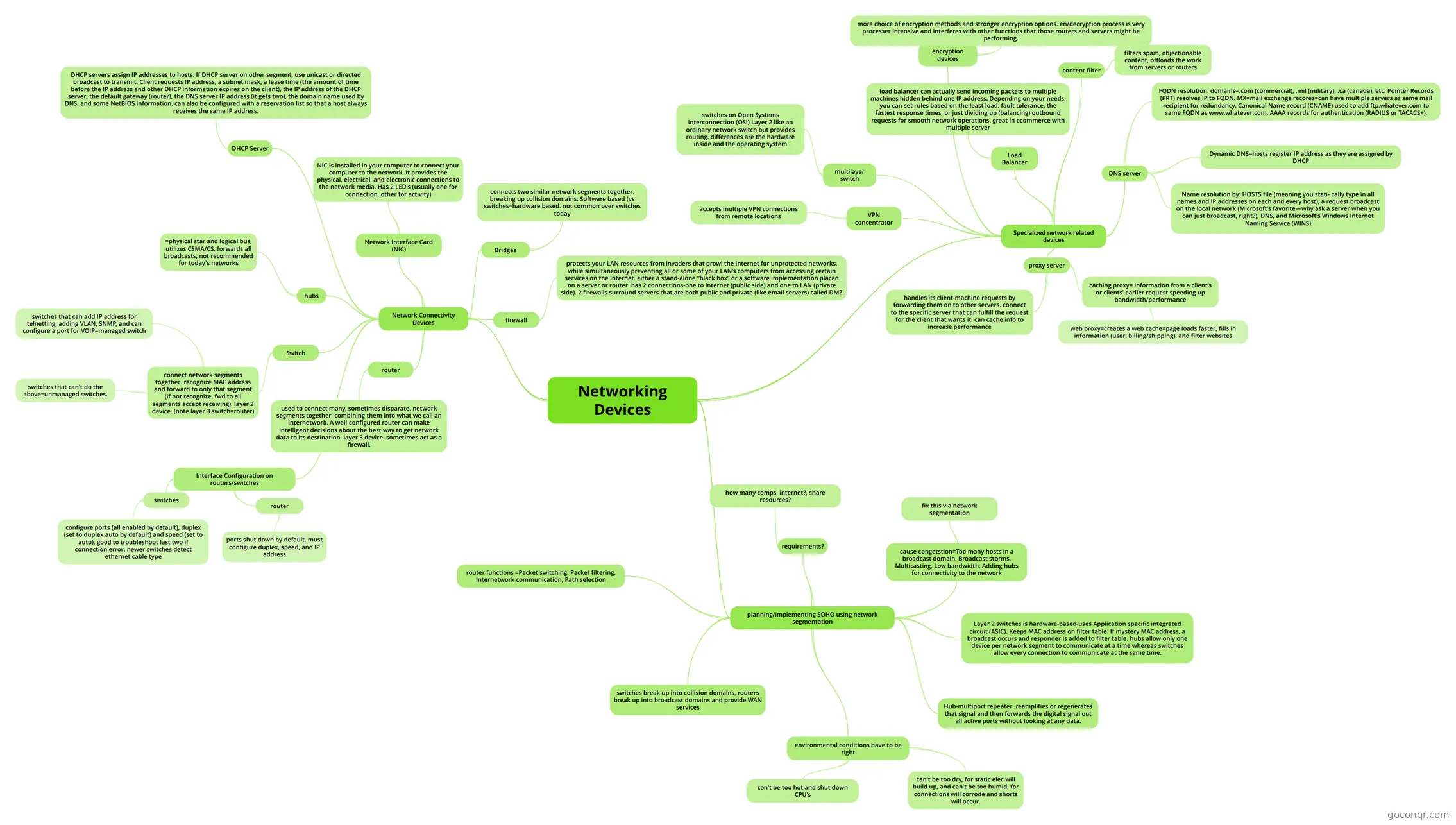 Mind map Networking Devices
-
35 cardsNetwork Devices What is a repeater?
-
17 questionsNetwork+ Ch.3 Identify the type of network cabling shown in the graphic.
-
14 cardsS+ Objective 1.1 Network Devices Flashcards Flashcards covering Network Devices defined in Objective 1.1
-
23 cardsCompTIA Network+ Common Ports Common ports to know for CompTIA Network+ Exam
-
3 cardsNetwork Hardware and Physical Media Network Hardware & Physical Media
-
18 cardsNetwork Schematic Icons Match the icon to the network device it stands for
-
8 cardsLAN Hardware What does WAP mean?
Quizzes
See all 10 quizzesMind maps
See all 44 mind mapsFlashcards
See all 70 flashcards-
35 cardsNetwork Devices What is a repeater?
-
14 cardsS+ Objective 1.1 Network Devices Flashcards Flashcards covering Network Devices defined in Objective 1.1
-
23 cardsCompTIA Network+ Common Ports Common ports to know for CompTIA Network+ Exam
-
3 cardsNetwork Hardware and Physical Media Network Hardware & Physical Media
-
18 cardsNetwork Schematic Icons Match the icon to the network device it stands for
-
8 cardsLAN Hardware What does WAP mean?
-
3 cardsnetwork hardware What is a WAP
More Networks and telecommunications topics
About Network Hardware and Devices
GoConqr OriginalWhat this unit covers
This unit sits in the Networking Foundations strand of Networks and telecommunications. Its resources look at the physical kit that makes a network work: hubs, bridges, switches, routers, network interface cards, servers, firewalls, printers and the cabling that links them.
Where to start
Begin with the mind map Networking Devices. It sets out hubs, network connectivity devices and the network interface card in one view. Then open Hubs, Bridges, Switches, which explains that a hub is a physical repeater with no intelligence, working at the physical layer of the OSI model.
Next, try Chapter 5 - Networking Devices, which moves from common connectivity devices to specialised ones and to planning a small office or home network with segmentation. When you are ready for more, open Advance Networking Devices, which covers VLANs, multilayer switches, VPNs and tunnelling protocols.
Flashcards for recall
Several flashcard decks share the title Network Hardware & Physical Media. They cover routers, switches, fibre optic, coaxial and twisted pair cable, and bus, star and ring topologies with their advantages and drawbacks. The deck Networking Hardware & Communication Devices lists servers, backup storage, firewalls and Wi-Fi routers. For ports, the Ports & Storage deck uses memorable phrases to fix port numbers in your head.
Using quizzes with maps
- Read a mind map first and note the terms you cannot explain.
- Take a quiz such as Network Devices and Connectivity or Network Ports to test them.
- Return to the map for anything you missed, then repeat with flashcards.
The quiz Network+ Ch.3 adds cabling questions, including plenum cable, if you are working towards a certification.
Make it your own
Teachers can pick a map or deck to use in class. Everyone can borrow the ideas here and build their own revision set from them.
Frequently asked questions
Which resource should I open first?
Start with the mind map Networking Devices. It gives a broad view of hubs, network cards and connectivity devices. After that, Hubs, Bridges, Switches goes deeper on how each device behaves, and Chapter 5 - Networking Devices adds specialised devices and small office network planning.
Are the resources free to use?
Yes. Every resource listed here is free to open, study and take, with no account needed. They were made by GoConqr users, not by GoConqr itself. A free account also saves your quiz scores and lets you make your own quizzes, mind maps, flashcards and notes.
Which exams do these resources suit?
The listed resources mention GCSE Computer Science, CCNA and Network+. The mix includes secondary-level material, plus resources for university students and professional candidates. Check each resource against your own course, since the community wrote them for different specifications.
What do the mind maps cover?
They cover network devices such as hubs, bridges, switches and routers, plus LAN hardware, network components, ports and switch configuration. Advance Networking Devices goes further into VLANs, multilayer switches and VPN protocols. There are more than 30 mind maps to choose from.
Is there anything on ports and cabling?
Yes. The Ports & Storage and Port Numbers & Assignments decks help with port recall, and the Network Ports quiz tests it. For cabling, the Network+ Ch.3 quiz asks you to identify cable types, and several flashcard decks cover fibre optic, coaxial and twisted pair.
What if I cannot find the topic I need?
Try a related title, as many resources overlap, for example LAN hardware, network components or network devices. If a topic is still missing, you can make your own mind map or flashcards with a free account and build exactly the set you need.