
The Technological Process and Problem Solving
123 resources created by 111 users
This page on GoConqr gathers community-made mind maps, flowcharts, notes, a quiz and a flashcard deck on The Technological Process and Problem Solving, from spotting a need to testing and marketing a solution. It's built for school students working through the stages of a project, and for teachers after ready-made material. There are over 120 resources here, including more than 110 mind maps, mostly at secondary level. Open a mind map, try the quiz, then make your own flashcards.
Top The Technological Process and Problem Solving resources
-
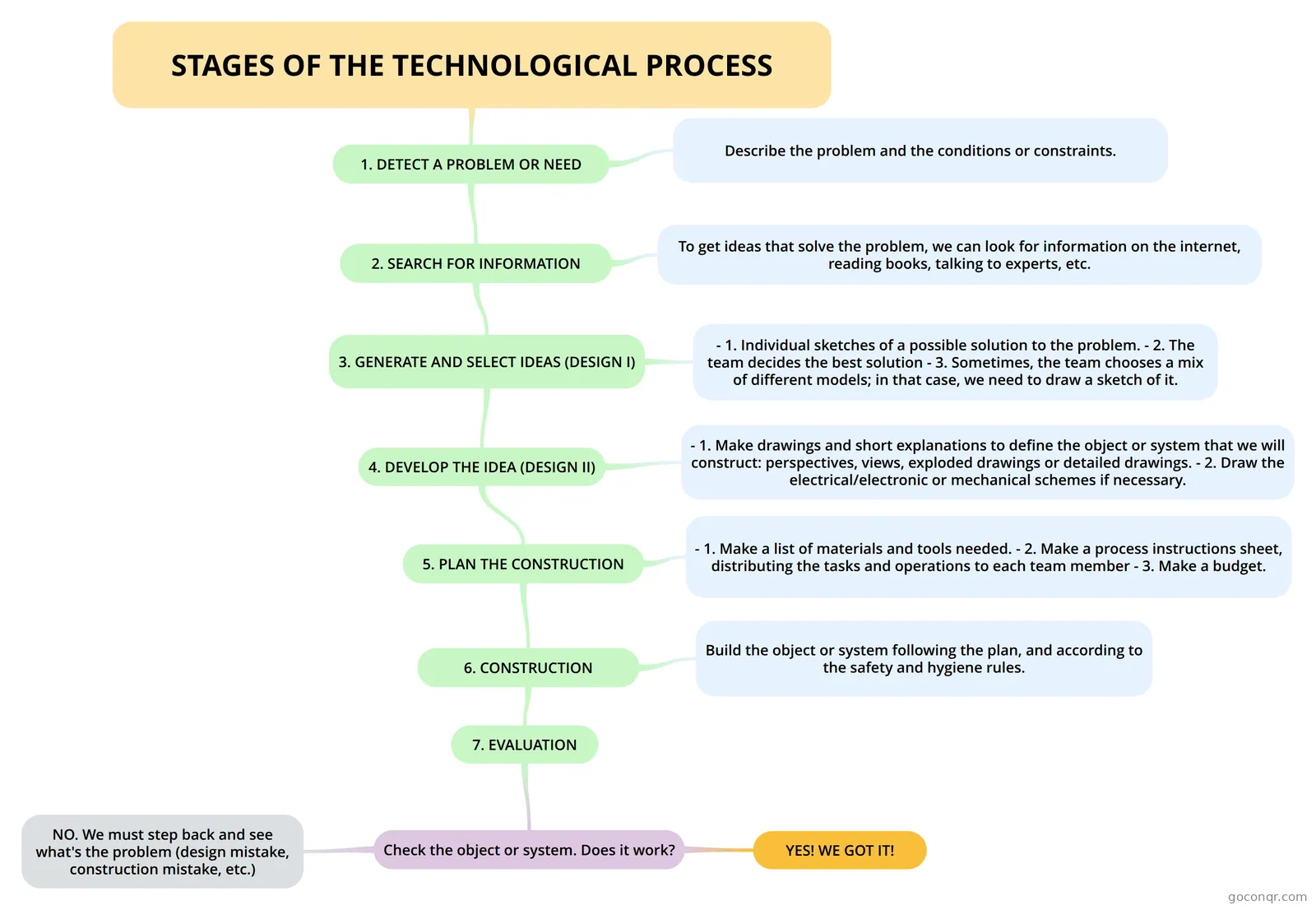 Mind map STAGES OF THE TECHNOLOGICAL PROCESS
-
Mind map Technological process It's a project of class, that is a mind map of the unit
-
Mind map STAGES OF THE TECHNOLOGICAL PROCESS
-
Mind map PHASES OF THE TECHNOLOGICAL PROCESS
-
Mind map Unit 1.- Technology problem solving
-
Mind map Project Planning
-
Mind map PROJECT PLANNING
-
Mind map STAGES OF THE TECHNOLOGICAL PROCESS
Quizzes
Mind maps
See all 112 mind mapsFlashcards
Flowcharts
Notes
-
THE TECHNOLOGICAL PROCESS - creado desde un Mapa Mental WHAT IS TECHNOLOGY? FACTORS IN THE TECHNOLOGICAL PROCESS CLASSROOM WORKSHOP
-
TECHNOLOGY - creado desde un Mapa Mental MAN'S PROGRESS THROUGH TECHNOLOGY THE PROCESSOF SOLVING TECHNOLOGICAL PROBLEMS The set of procedures or rules that must be followed in order achieve a specifcgoal is called "technique
-
Technology - creado desde un Mapa Mental In the workshop Project approach Roles
Topics in The Technological Process and Problem Solving
More Engineering and technology (general or other) topics
About The Technological Process and Problem Solving
GoConqr OriginalWhat this unit covers
The listed resources follow the technological process, the series of steps used to solve a problem or meet a need. Most maps set out the same sequence: need or problem, idea, development, construction, verification and marketing. Several add detail under each step, such as analysing needs and conditions, looking for similar cases and studying their solutions, and sharing individual proposals before a group selects one.
Where to start
Begin with the mind map STAGES OF THE TECHNOLOGICAL PROCESS. It opens with describing the problem and its constraints, then moves through detecting a need, searching for information, generating and selecting ideas, and developing the design. Next, compare it with Technological process and Phases of the technological process, which lay out the six phases and mention tender documents that say how a task must be completed.
Widening out
Some maps look at the bigger picture. PROJECT PLANNING links technology to solving problems and to the elements needed to build technological products. Unit 1.- Technology problem solving treats technology as a way of meeting human needs, a continuous improvement process built on knowledge, skills, techniques and procedures. There is also a map called Tools used in technology.
Using maps, flowcharts and the quiz together
- Read one mind map and note the order of the stages.
- Check it against a flowchart, such as STAGES OF THE TECHNOLOGICAL PROCESS, to see the steps as a sequence.
- Take Technology 1 to see which stages you can recall.
- Go back to the maps for the gaps.
The notes created from mind maps give the same content in text form, and the flashcard deck is a short set for quick recall.
Where it fits
This unit sits in the Design and Problem Solving strand of Engineering and technology (general or other). Teachers can use the maps to introduce a project, and students can compare several versions of the same process to see which layout helps them most. Pick a map that suits you and start there.
Frequently asked questions
Which resource should I open first?
Start with the mind map STAGES OF THE TECHNOLOGICAL PROCESS. It walks from describing the problem and its constraints through detecting a need, searching for information, generating ideas and developing the design. Once that is clear, other maps on the page show the same process in slightly different layouts.
What do the mind maps cover?
Most set out the stages of the technological process: need or problem, idea, development, construction, verification and marketing. Others cover project planning, technology as a way of meeting human needs, and tools used in technology. Several include sub-points such as analysing conditions and comparing similar solutions.
Is there a quiz or flashcards?
Yes. The page lists one quiz, Technology 1, and a flashcard deck on the same theme. Use the quiz after reading a map to see what you remember, then go back over the stages you missed. The deck suits short bursts of revision.
Are the resources free, and who made them?
Every resource listed here is free to open, study and take, with no account needed. They were made by GoConqr users, not by GoConqr itself. A free account also saves your quiz scores and lets you create your own quizzes, mind maps, flashcards and notes.
Who is this page for?
It is mainly for school students, since nearly all the resources are at secondary level. Teachers can also use the maps and flowcharts as ready-made material for introducing the steps of a technology project, or as a model for students to compare and adapt.
What if I can't find what I need?
Try another map on the same topic, because several cover the same stages with different wording and detail. The flowcharts and notes give the process in other forms. If something is still missing, you can build your own map or flashcards from what you have read.