
Impact of ICT and Technology on Society
88 resources created by 80 users
This Impact of ICT and Technology on Society page on GoConqr gathers community-made mind maps, quizzes, flashcards and notes, from the digital divide and working practices to data protection, health and safety, and environmental impact. It's built for school students revising a topic and teachers after ready-made material. There are over 800 resources here, including more than 30 quizzes and over 700 mind maps, mostly at secondary level. Pick a topic, try a quiz to find your gaps, then make revision of your own.
Top Impact of ICT and Technology on Society resources
-
25 questionsDigital Divide What do you call a particular section of a population?
-
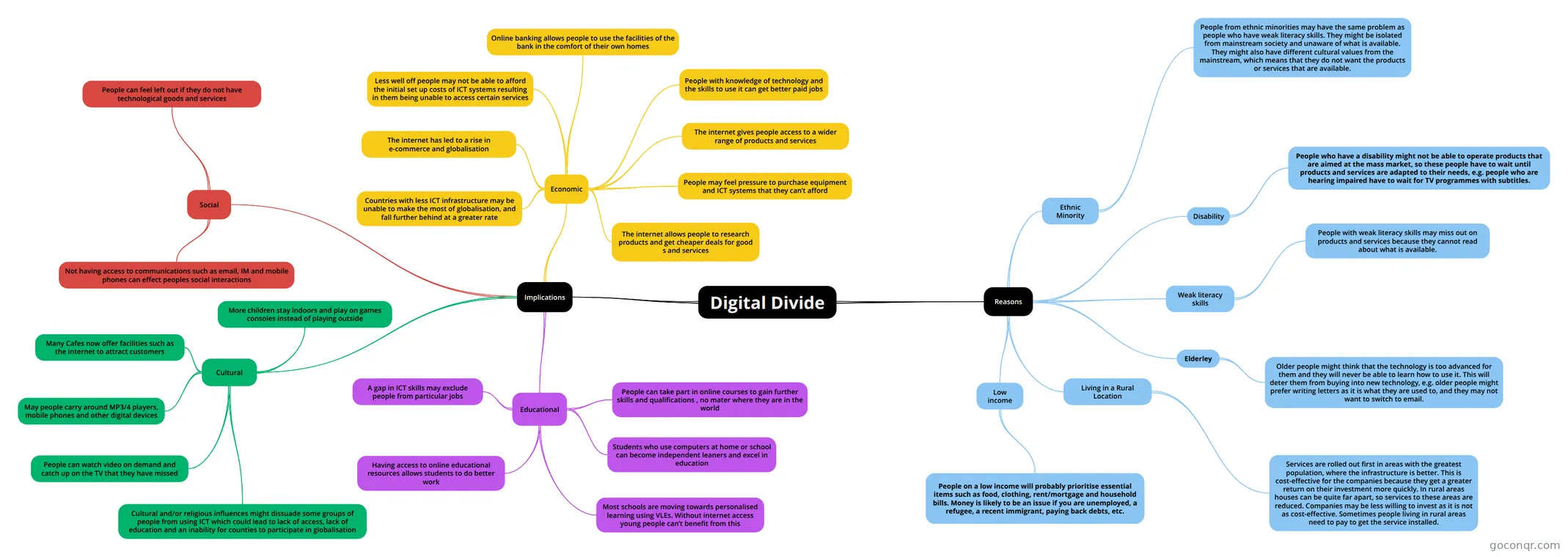 Mind map Digital Divide
-
Mind map 1.6 Mindmap help
-
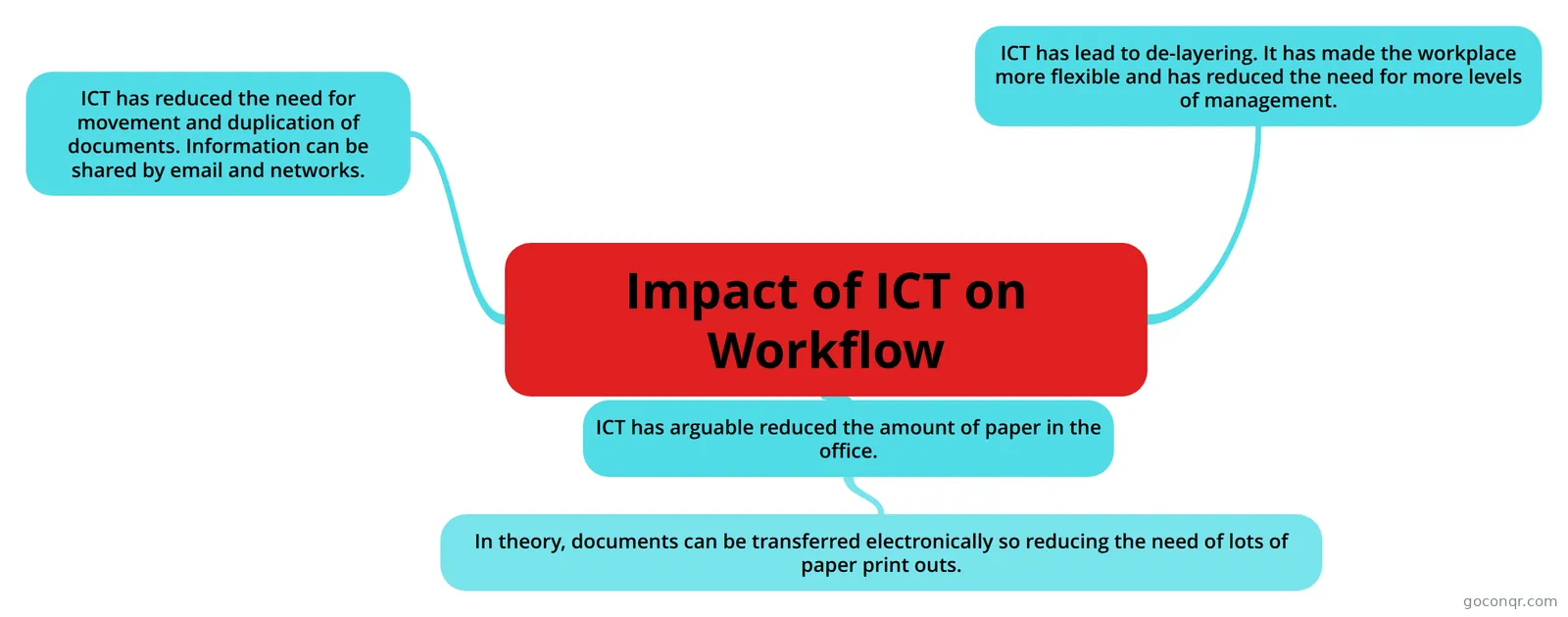 Mind map Impact of ICT on Workflow
-
 Mind map Effects of Technology on Everyday Life
-
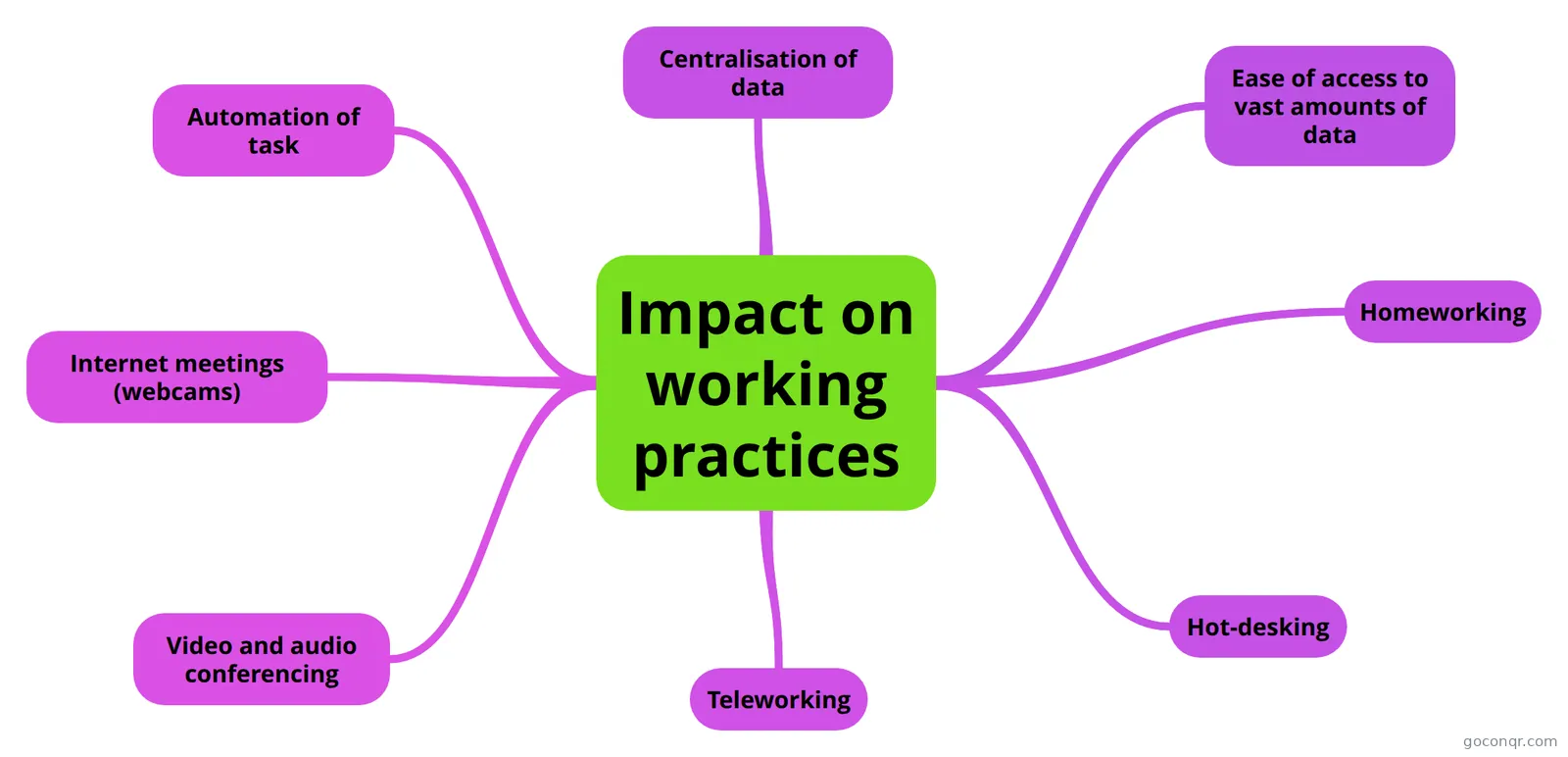 Mind map Impact on working practices
-
64 cardsLiving in a digital world.
-
100 cardsICT Glossary
Quizzes
See all 10 quizzes-
25 questionsDigital Divide What do you call a particular section of a population?
-
15 questionsColor Pretest Is black on white accessible?
-
12 questionsICT In Todays World Quiz What is an analogue computer?
-
18 questionsThe chapter 1 quiz of awesomeness Embedded computers can do anything!
-
10 questionsQuiz Social and ethical problem of IT A program capable to damage the computer
-
6 questionsChapter 13 - Health, Safety and Other Issues What is software piracy?
-
8 questionsICT Quiz What are the advantages of online shopping? Tick all correct answers.
-
9 questionsThe chapter 2 quiz of awesomeness Email is electronic mail
Mind maps
See all 56 mind maps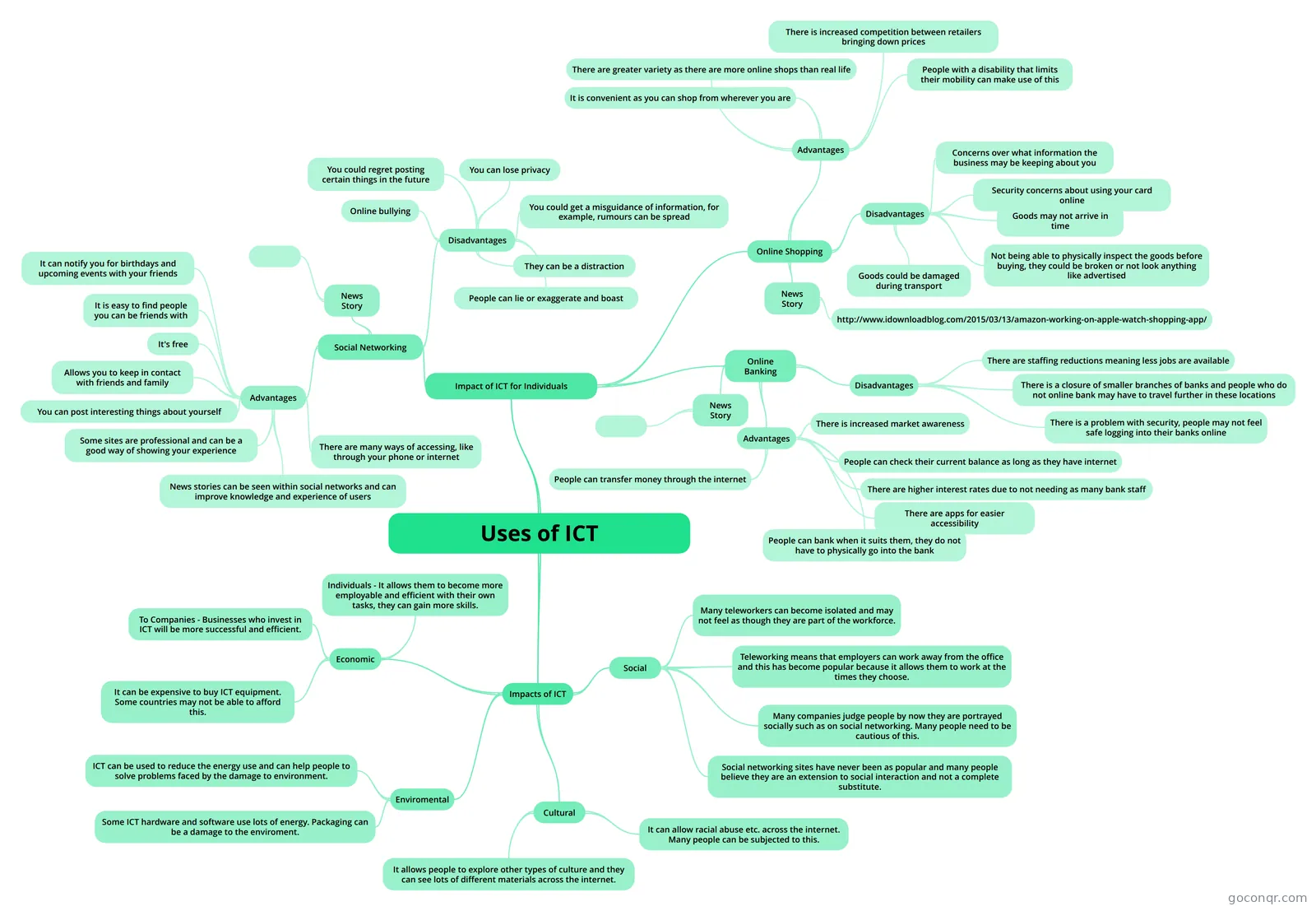
Flashcards
See all 19 flashcards-
64 cardsLiving in a digital world.
-
100 cardsICT Glossary
-
43 cardsL3 CamTech IT Unit 2: Global Information (Exam Jan 2021) What are the 6 types of information holder?
-
10 cardsmeme Problems with healthcare monitoring?
-
19 cardsEthical, Legal and Environmental Impacts of Digital Technology on Wider Society UNIT 7 Computer Science: Ethical, Legal and Environmental Impacts of Digital Technology on Wider Society
-
13 cardsICT topic 6: issues edexcel
-
18 cardsUnit 1 Living in a Digital World Entertain me what to buy Flash cards
-
18 cardsUnit 1 Living in a Digital World Smart Working Revision Flash Cards
Notes
-
ICT and Modern Living: Revision ICT and Modern Living: Revision Topic: Working from HomeChanges in the way people work. Advances in communication mean people no longer have to commute to an office every day. They can co-operate with others on projec...
-
Notes #1 Teleworking: Employees do not have to travel distances to be at work. They can work from home. Most workers use computers and use mobile communications to do work at home. Advantages: Office running costs and overhead...
-
List of Technologies Type of Technology : What it Supersedes 1 GPS e.g. SatNav : Paper maps 2 3G : GPRS / No connection 3 Barcode / Magnetic Strip : Manual data entry 4 Chip & Pin : Signature 5 Mobile phones : Land line 6 Games console : ...
More Computing and ICT (programming, computer science, digital skills, educational technology) topics
About Impact of ICT and Technology on Society
GoConqr OriginalWhat this page covers
This page sits in the Security, Safety, Ethics and Society strand of Computing and ICT. Most of what it lists is mind maps, with quizzes, flashcard decks, notes and slide sets alongside them. The resources were made by GoConqr users, and they mention exams such as GCSE ICT, GCSE Computer Science, IGCSE ICT, A-level ICT, IB, BTEC and BTEC IT.
Where to start
Begin with the Digital Divide mind map. It sets out reasons and implications under educational, cultural, social and economic headings. It also notes that people with technology skills can get better paid jobs. Then try the Digital Divide quiz, which opens with questions on demographics and economic terms.
Work and everyday life
- Read Impact on working practices, which covers homeworking, teleworking, hot-desking, video and audio conferencing, and automation of tasks.
- Move to Impact of ICT on Workflow, which looks at less movement and duplication of documents.
- Finish with Effects of Technology on Everyday Life, covering education, careers, entertainment and communication.
Law, safety and ethics
The 1.6 Mindmap covers ethical, legal, cultural and environmental impacts, plus privacy and the Data Protection Act 2018. The two Chapter 7 maps cover legislation such as the Computer Misuse Act and the Freedom of Information Act, as well as physical security methods against ICT crime. Health and Safety looks at problems such as RSI and how to reduce them.
Using quizzes and maps together
Read a map first, then close it and take the matching quiz. Note the questions you missed and go back to that branch of the map. The glossary flashcard decks help with key terms, and the environment maps suit a last check.
When you're ready, choose one map, test yourself, and add your own notes or cards to fill any gaps.
Frequently asked questions
Which resource should I open first?
Start with the Digital Divide mind map. It breaks the topic into reasons and implications under educational, cultural, social and economic headings. Once you've read it, try the Digital Divide quiz to see which ideas you remember and which need another look.
What do the mind maps cover?
They cover working practices such as homeworking and teleworking, workflow, everyday life, banking, home entertainment, health and safety, ICT crime, legislation, and environmental impact. Some, like the 1.6 Mindmap, group ethical, legal, cultural and environmental effects together.
Are the resources free to use?
Yes. Every resource listed here is free to open, study and take, with no account needed. They were made by GoConqr users, not by GoConqr itself, so it's worth comparing a few on the same topic. A free account saves your quiz scores and lets you make your own resources.
Which exams do these resources suit?
The listed resources mention GCSE ICT, GCSE Computer Science, IGCSE ICT, A-level ICT, IB, BTEC and BTEC IT. Most of the material is at secondary level, so it suits school students, and teachers can use it as ready-made material.
Are there flashcards as well as maps?
Yes. There are decks on the digital divide, ICT in the home, health and safety, ethical and legal issues, and many ICT glossaries. They work well for definitions, while the maps help you see how topics connect.
What if I can't find my exact topic?
Look at the related maps and notes with similar names, such as ICT and Modern Living or Technology and Society, since community authors word topics differently. You can also make your own map, quiz or flashcards to fill the gap.