
Computer Architecture and Organization
129 resources created by 114 users
This Computer Architecture and Organization page on GoConqr gathers community-made mind maps, quizzes, flashcards and notes, from the CPU, buses and memory to input/output, pipelining, GPUs and parallel architectures. It's built for university students filling gaps, school students meeting the topic early, and teachers after ready-made material. There are over 120 resources here, including more than 90 mind maps, 9 quizzes and 20 flashcard decks, made by over 110 contributors. Pick a topic, try a quiz to find your gaps, then make your own revision sets.
Top Computer Architecture and Organization resources
-
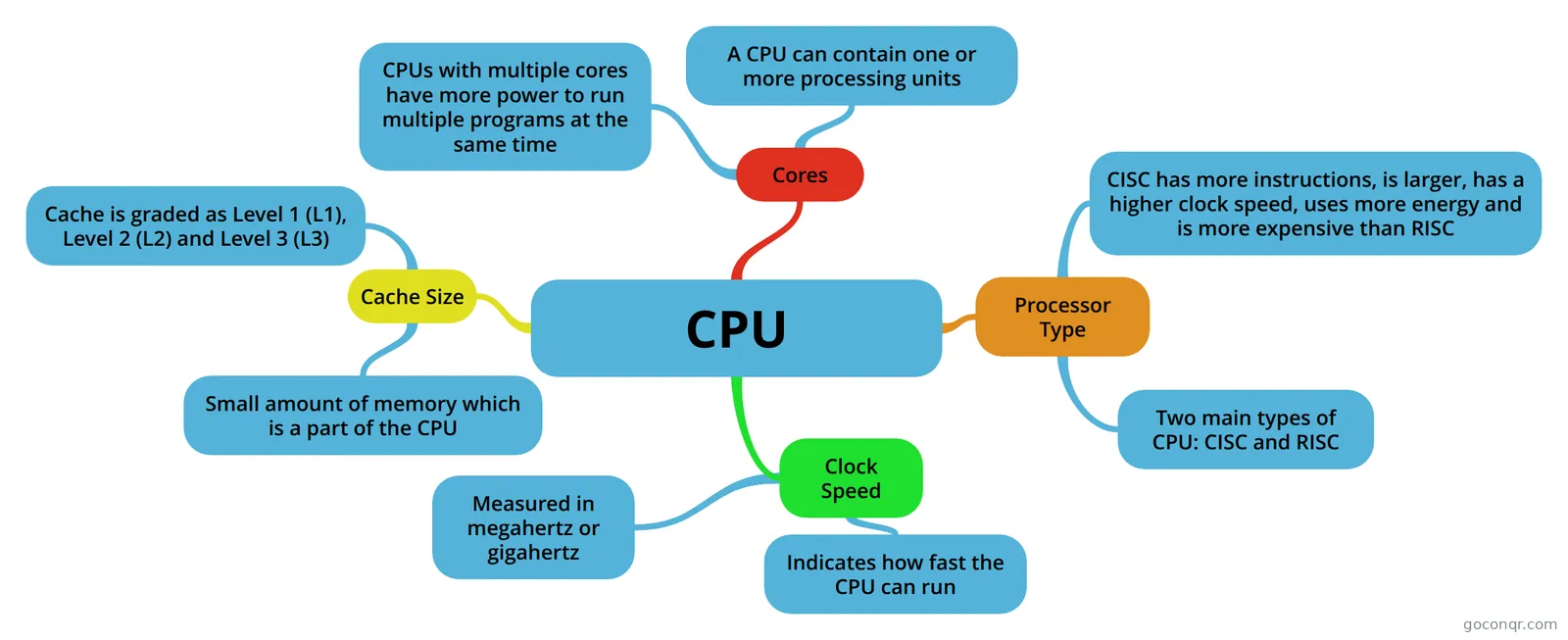 Mind map CPU
-
189 questionsPC_architecture_Final_Preparation What is a Latency:
-
Mind map Microprocessors
-
191 questionsPC At VLIW Speculative Execution, which of this solution is true about problem: Branches restrict compiler cod...
-
190 questionsPC Architecture In 32-bit addressing mode, address field is either 1 byte or?
-
42 questions[CPSC313 Final] Midterm 1 Quiz
-
100 questionsHardware Final Which RAID implementation produces a non-fault tolerant striped set that allows multiple physical disks to ...
-
83 cardsCS150 conception about bigger space before?
Quizzes
-
189 questionsPC_architecture_Final_Preparation What is a Latency:
-
191 questionsPC At VLIW Speculative Execution, which of this solution is true about problem: Branches restrict compiler cod...
-
190 questionsPC Architecture In 32-bit addressing mode, address field is either 1 byte or?
-
42 questions[CPSC313 Final] Midterm 1 Quiz
-
100 questionsHardware Final Which RAID implementation produces a non-fault tolerant striped set that allows multiple physical disks to ...
-
42 questionsБАЗА С лекций (PC-41) What does mean SISD?
-
8 questionsAssembly Diagrams Label the Following
-
20 questionsUntitled A callee-saved register should be saved before it is written to in a procedure
Mind maps
See all 95 mind mapsFlashcards
See all 20 flashcards-
83 cardsCS150 conception about bigger space before?
-
62 cardsModule 1 Flash Cards The ARM processor uses a load-store architecture? T/F?
-
24 cards1) What is computer hardware? In a PC there are 2 chip sets, the northbridge and southbridge. What's the difference?
-
15 cards01Handout1
-
51 cardsUntitled
-
20 cardsMicro-Architecture What is a microarchitecture and what is it made up of?
-
15 cardsPipeline Purpose of pipeline
-
9 cardsUntitled What are components of Neumann-Machine?
Flowcharts
Notes
-
Control of the processor - creado desde un Mapa Mental Functional requirements Control SignalsWe have defined the elements that make up the processor(ALU, registers,data paths) and the micro-operations that are performed. Internal processor organization
-
Instructions - created from Mind Map MOVLW ADDLW MOVWF
-
Features of parallel processors 1. Better quality of solutions: rounding-off errors are lower.2. Better algorithms3. Better storage distribution4. Greater reliability: a parallel computer continues working even if one processor fails.
-
ENCM 369 Study Notes Non- Leaf Procedure Explanation/Good Example:Norm Lecture Notes: Jan 28
Topics in Computer Architecture and Organization
More Electrical and electronic engineering topics
About Computer Architecture and Organization
GoConqr OriginalWhat the page covers
The resources follow the main parts of a computer. The CPU mind map sets out cores, clock speed, cache size and processor type. The Microprocessors mind map goes further, covering how numbers and characters are stored, byte ordering (big endian and little endian), SRAM and DRAM, latencies, DDR, ECC memory and Hamming code.
Buses have a large share of the page. There are maps on bus types, the bus system and the different kinds of information carried, plus a deck on CPU buses. Memory is covered by the Read Only Memories map, with its non-volatile types, and by an overview of non-uniform memory access.
Where to start
- Begin with the CPU mind map for the vocabulary of processors.
- Move to the Microprocessors mind map for data representation and memory.
- Read the BUS mind map to see how components exchange data.
- Continue with input/output, using the flashcard deck on Input/Output Systems, which lists the four I/O subsystems, memory mapped I/O, and programmed and interrupt-driven transfer.
Going further
Later topics include the maps on pipelining and RISC, the control of the processor, instruction fetch and execute, GPUs and parallel architectures. The Computer Performance map gives context by tracing the generations from valves to transistors to integrated circuits. The flashcard deck CS150 touches on parallel programming, multiprocessors, mainframes and supercomputers.
Using quizzes and maps together
Read a map first, then test yourself. The quiz PC Architecture and the quiz Hardware Final ask you to recall ideas such as latency and common memory reference patterns. Note which questions you miss, go back to the matching map, then retry. Flashcard decks suit short sessions on terms.
Where it sits
This unit belongs to the Digital Electronics and Computer Systems strand of Electrical and electronic engineering. Most resources are at university level, with some for school students.
Choose one map today, then try a quiz and see what you remember.
Frequently asked questions
Which resource should I open first?
Start with the CPU mind map. It covers cores, clock speed, cache size and processor type in a few branches. Then move on to the Microprocessors mind map, which adds memory, data formats and processor architecture, before you try one of the quizzes.
What do the mind maps cover?
They cover the CPU, microprocessors, buses, read only memories, non-uniform memory access, expansion ports, input/output, pipelining and RISC, processor control, GPUs and parallel architectures. Several topics appear in more than one map, so you can compare different students' approaches.
Are the resources free to use?
Yes. Every resource listed here is free to open, study and take, with no account needed. They were made by GoConqr users, not by GoConqr itself. If you sign up for a free account, you can also save quiz scores and create your own sets.
Which quizzes are there?
There are 9 quizzes. They include PC Architecture, Hardware Final and Assembly Diagrams, plus a quiz that asks about latency and memory reference patterns. Use them after reading a map to find which topics need another look.
Who are these resources for?
Mostly university students, who make up most of the page. Some resources suit school students meeting the topic, and teachers can use the maps and decks as ready-made material for a class or revision session.
What if my topic is missing?
Browse the related maps, notes and flashcard decks first, since a topic may sit inside a wider map. If it is still missing, make your own mind map, quiz or flashcards with a free account and build the page up for yourself.