
Virtualization and Containers
411 resources created by 284 users
This Virtualization and Containers page on GoConqr gathers community-made quizzes, mind maps, flashcards and notes, from vSphere and ESXi to Docker and Kubernetes. It's built for university students and professional candidates practising for VMware and Kubernetes certification questions, and for teachers after ready-made material. There are over 390 resources here, including more than 50 quizzes, over 290 mind maps and more than 30 flashcard decks, made by over 270 contributors. Try a quiz to find your gaps, then study the maps.
Top Virtualization and Containers resources
-
25 questionsNew Questions TEST Which two statements are true for a vCenterServer user account that is used for vSphere Data Protection (VD...
-
268 questionsPersonal Test An administrator is planning a vSphere infrastructure with the following specific networking requirements: ...
-
84 questionssegunda parte Which is the maximum number of block devices (LUNs) that are supported by ESXi hosts that are running versi...
-
54 questionsVmware VCP What three conditions could result in VMware Flash Read Cache being unable to claim a disk? (Choose three.)
-
77 questionsAUL: Exam CH 1-4, 29 One reason to virtualize is:
-
27 questionsvSphere 6 Foundations Quiz An administrator is performing an interactive installation of ESXi 6.x. Which three options are available f...
-
30 questionsPractice 91 - 120 A Telco customer is implementing NFV using vSphere as the virtualization platform. Which feature can help a...
-
23 questionsKubernetes Which feature in Kubernetes assigns pods to a node at runtime?
Quizzes
See all 54 quizzes-
25 questionsNew Questions TEST Which two statements are true for a vCenterServer user account that is used for vSphere Data Protection (VD...
-
268 questionsPersonal Test An administrator is planning a vSphere infrastructure with the following specific networking requirements: ...
-
84 questionssegunda parte Which is the maximum number of block devices (LUNs) that are supported by ESXi hosts that are running versi...
-
54 questionsVmware VCP What three conditions could result in VMware Flash Read Cache being unable to claim a disk? (Choose three.)
-
77 questionsAUL: Exam CH 1-4, 29 One reason to virtualize is:
-
27 questionsvSphere 6 Foundations Quiz An administrator is performing an interactive installation of ESXi 6.x. Which three options are available f...
-
30 questionsPractice 91 - 120 A Telco customer is implementing NFV using vSphere as the virtualization platform. Which feature can help a...
-
23 questionsKubernetes Which feature in Kubernetes assigns pods to a node at runtime?
Mind maps
See all 306 mind maps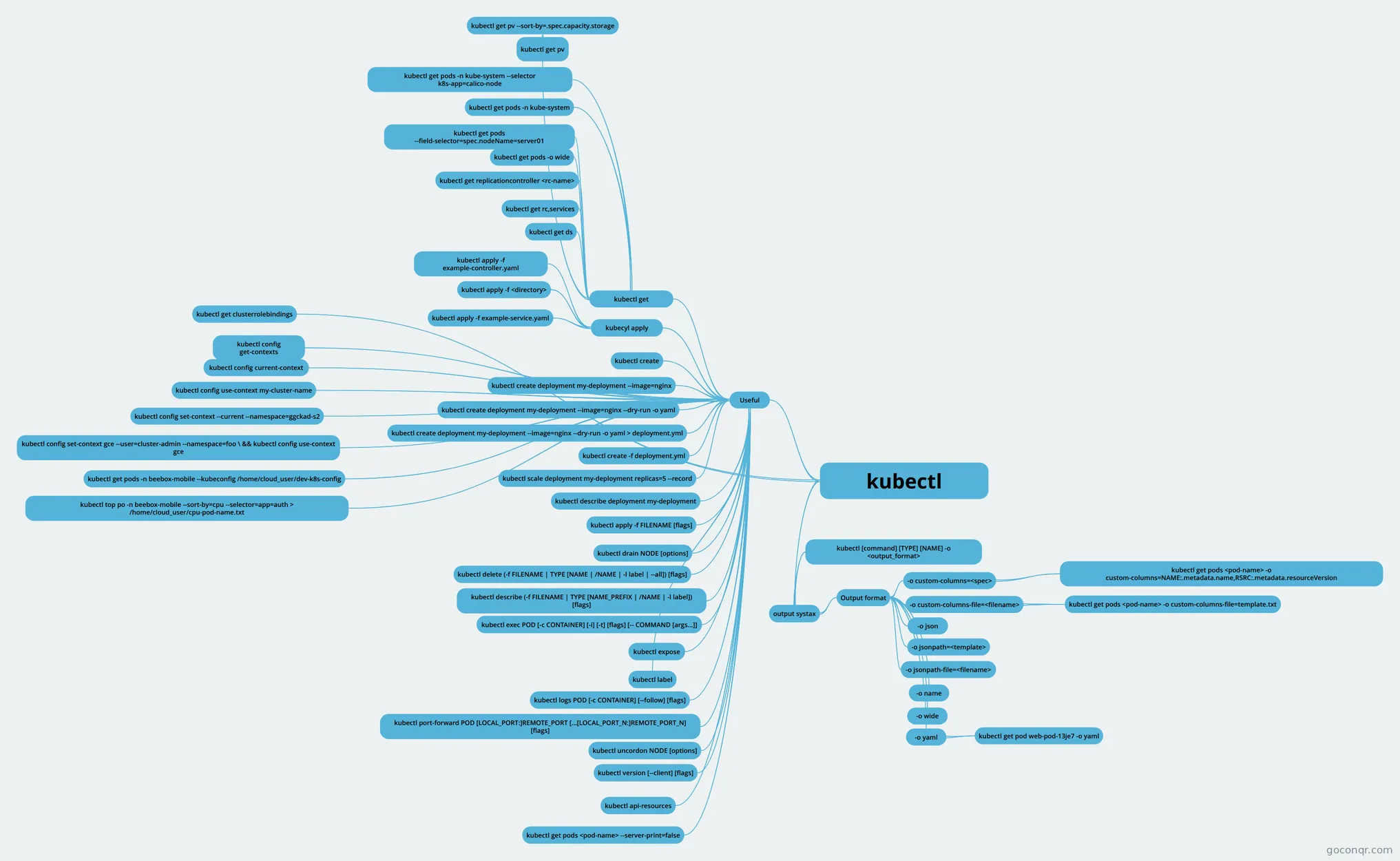
Flashcards
See all 35 flashcards-
123 cards2V0 vCenter High Availability (HA) protects vCenter Server against host and hardware failures. What is the mini...
-
91 cardsvirtualization What is hosted virtualization
-
101 cardsUntitled 1a) What is Hosted Visualization?
-
18 cardsAron Midgård - Architecture Main components of Kubernetes
-
21 cardsAron Midgård - 9 Volumes and data
-
11 cardsModule 25
-
18 cardsNetworking notes 1 Two Common build software products come in
-
21 cardsAron Midgård - APIS and Access
Flowcharts
Notes
See all 13 notes-
Build and run your image Introduction Now that you’ve set up your development environment, thanks to Docker Desktop, you can begin to develop containerized applications. In general, the development workflow looks like this: Create and test in...
-
Untitled HA configuration and Processes: HA States--Enabling HA cluster, will then elect a host to be master. All other hosts are slaves. master: Manges the protected list of VMs. Updates on power on and off. Caches the cluste...
-
Exercise 6-2: Define a NAT Virtual Network Using virsh
-
Exercise 6-4: Create a Storage Pool and Volume Using virsh
-
Virtualization - created from Mind Map Definition Hardware Types of Hypervisor
-
Untitled Q.1 What is Virtualization? What are its components? Ans : Virtualization is the "creation of a virtual (rather than actual) version of something, such as a server, a desktop, a storage device, an operating syste...
-
Useful commands lscpu | grep Virtualization grep vmx /proc/cpuinfo yum group install "virtualization hypervisor" yum group install "virtualization client" yum group install "virtualization platform" yum group install "virtualization ...
-
Untitled What is Docker? A way to package software so it can run on any hardware. Docker consists of: Dockerfile: blueprint for building a Docker image Image Templat...
Slides
Topics in Virtualization and Containers
More Computing and ICT (programming, computer science, digital skills, educational technology) topics
About Virtualization and Containers
GoConqr OriginalWhat this page covers
The resources fall into two broad groups: hypervisor-based virtualization and containers. On the VMware side, the quizzes follow the VCP route. Titles such as Vmware VCP, VCP-DCV and Professional VMware vSphere 7.x (2V0-21.20) sit alongside questions on ESXi installation, distributed switches, Flash Read Cache and Auto Deploy. Other quizzes ask what virtualization is for, and how a virtual machine differs from a container.
Containers and orchestration
The Kubernetes Mind Map explains containers through cgroups, namespaces and union filesystems. The kubectl Mind Map lists commands, including creating a deployment from an nginx image with a dry run. The docker Mind Map covers advantages such as portability, density and lower licensing cost. Flashcard decks go further, with sets on Docker commands, images, compose and registry, and on Kubernetes concepts, pods and deployments. The CKA exam is mentioned among the listed resources.
Where to start
- Open one of the many Virtualization mind maps for the basic ideas.
- Work through the Virtualization Midterm flashcards to learn the vocabulary.
- Take the vSphere 6 Foundations Quiz or the Kubernetes quiz.
- Move on to the VCP question sets and the 2V0-21.20 quiz.
Using quizzes and maps together
Take a quiz first and note the questions you miss. Then open the map that matches the topic, such as the docker or VMware maps, and read the branch that covers the gap. Try the quiz again afterwards. Hands-on notes, such as the virsh exercises on NAT networks and storage pools, give you commands to practise.
Where it sits
This unit belongs to the Networks, the Internet and Cloud strand of Computing and ICT. It links naturally to the networking and cloud material around it. Teachers can pick a quiz or map for a class, and everyone can choose a resource and begin.
Frequently asked questions
Which resource should I open first?
Start with one of the Virtualization mind maps to see the main ideas, then try the vSphere 6 Foundations Quiz if you are working towards VMware. If containers are your focus, open the Kubernetes mind map and quiz first. Both routes build up gradually.
What do the mind maps cover?
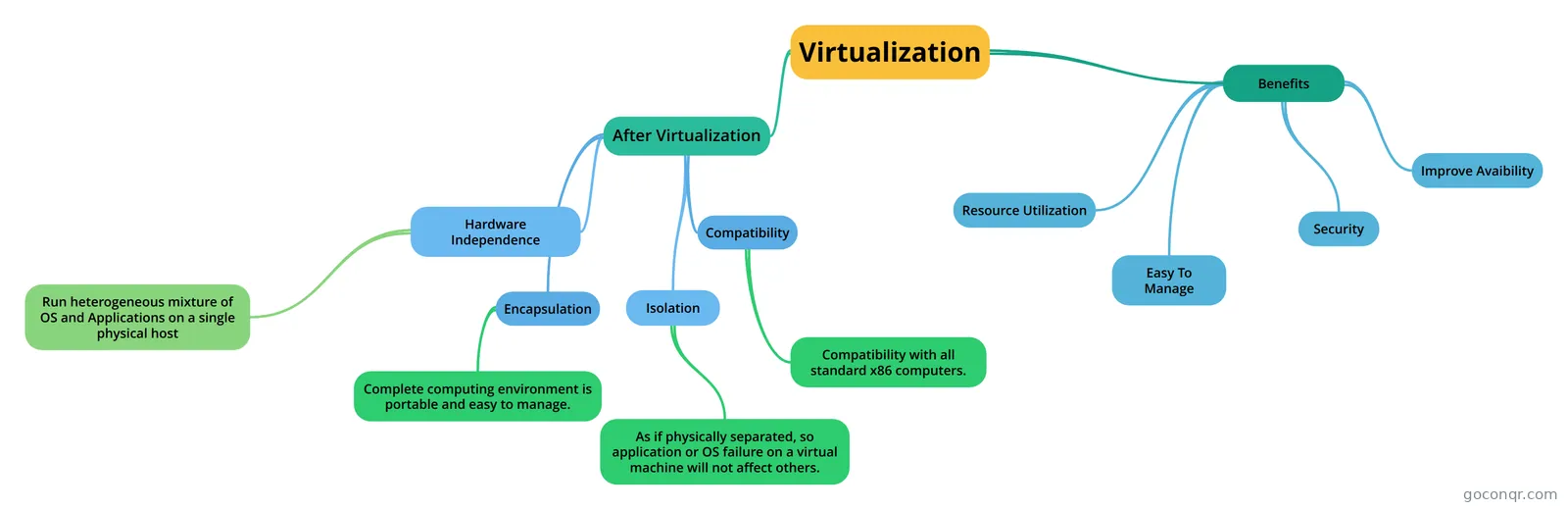
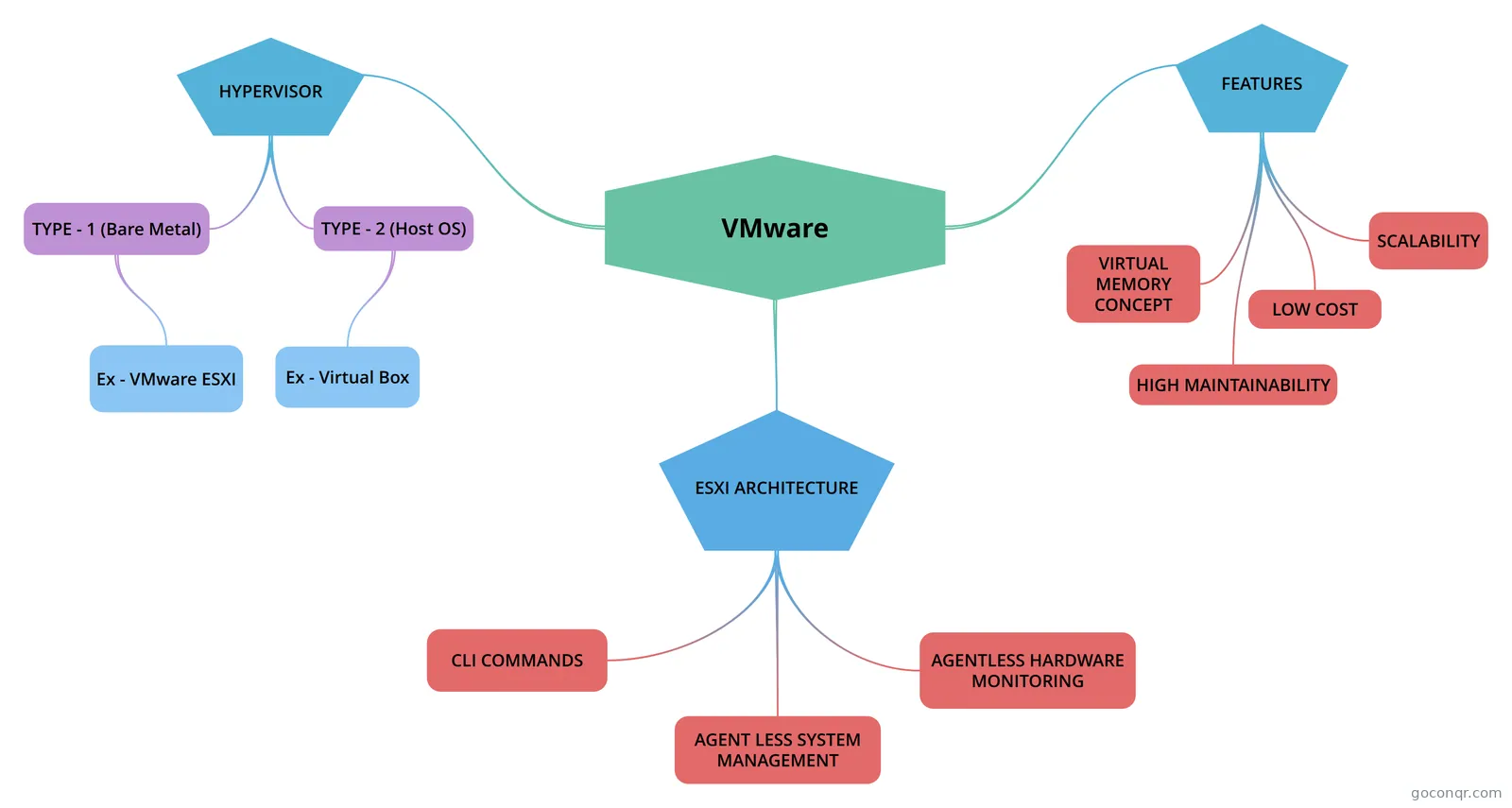
Many cover virtualization in general, including client side and application virtualisation. Others focus on VMware, Docker and Kubernetes. The docker map lists advantages and core components, the kubectl map lists commands, and the Kubernetes map explains cgroups, namespaces and union filesystems.
Which exams do the resources mention?
The listed resources mention VCP, VCP-DCV, VCP6-DCV, VCP 6.5, 2V0-21.20, VMware certification and CKA. Most material suits university students and professional candidates, so expect certification-style multiple-choice questions on vSphere and Kubernetes.
Are the resources free to use?
Yes. Every resource on this page is free to open, study and take, with no account needed. They were made by GoConqr users, not by GoConqr itself. A free account also saves your quiz scores and lets you make your own quizzes, maps, flashcards and notes.
Is there anything for Docker practice?
Yes. There is a Docker quiz, a Docker mind map and a series of flashcard decks on commands, images, compose, engine storage, run and registry. A note on building and running your image gives a practical example to follow.
What if I cannot find a topic I need?
Browse the neighbouring resources in this unit first, as many titles overlap. Several maps and decks cover the same ideas in different words. If a gap remains, you can build your own quiz, map or flashcards for it.