
Input and Output Devices
599 resources created by 490 users
This Input and Output Devices page on GoConqr gathers community-made quizzes, mind maps, flashcards, notes and slide sets, from keyboards, scanners and barcode readers to printers, monitors and interrupts. It's built for school students revising a topic and teachers after ready-made material. There are over 500 resources here, including more than 350 mind maps, over 100 flashcards and more than 10 quizzes, with GCSE ICT, IGCSE ICT, A-level ICT and GCSE Computing all mentioned. Pick a mind map, then test yourself with a quiz.
Top Input and Output Devices resources
-
23 cardsInput Devices What is a keyboard used for?
-
Mind map Output Devices
-
17 cards3.4 Vocabulary Just some vocab from 3.4 from testout
-
17 cardsconnor's flash cards Name two features of a KEYBOARD
-
12 cardsOUTPUT DEVICES features and description of each output device
-
8 cardsOutput,Out devices and Media Output, Output Devices Screens and Monitors
-
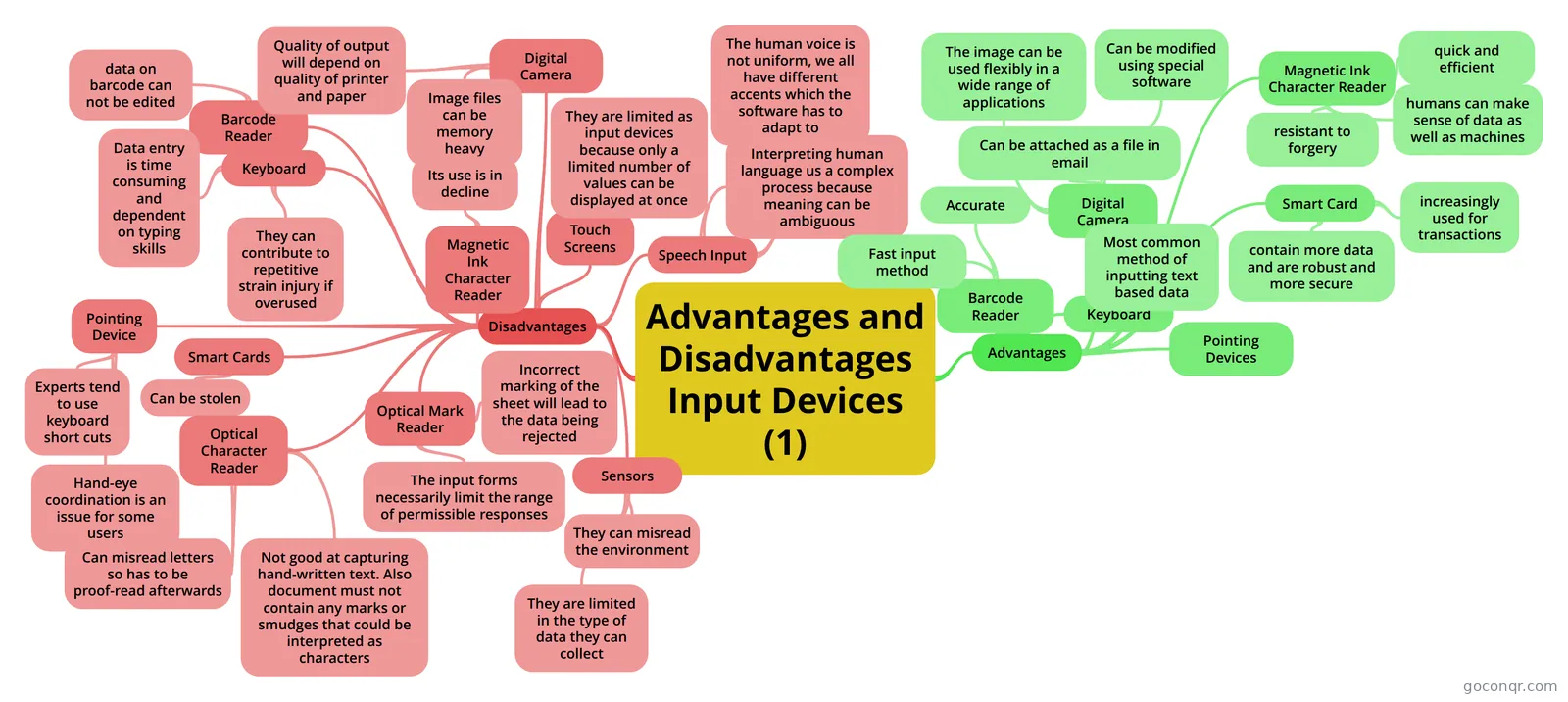 Mind map Advantages and Disadvantages Input Devices (1)
-
11 questionsInput Devices Which input device can be used to read data from packaging and book covers?
Quizzes
See all 29 quizzes-
11 questionsInput Devices Which input device can be used to read data from packaging and book covers?
-
3 questionsInput and Output Quiz Check the box that defines what type of device a microphone is.
-
10 questionsChapter 7
-
15 questionsUntitled What Does MICR stand For
-
12 questionsInput and Output Devices quiz The microphone is output device
-
10 questionscomputing input output quiz What key word do you have to include to get full marks in an input, output question?
-
5 questionsInput, Output and Storage Quiz An input device is a piece of software that allows input of data and commands into a computer.
-
7 questionsChapter 2 questions By ticking each box, which method is the most appropriate for inputting data for reading numbers found on a...
Mind maps
See all 416 mind maps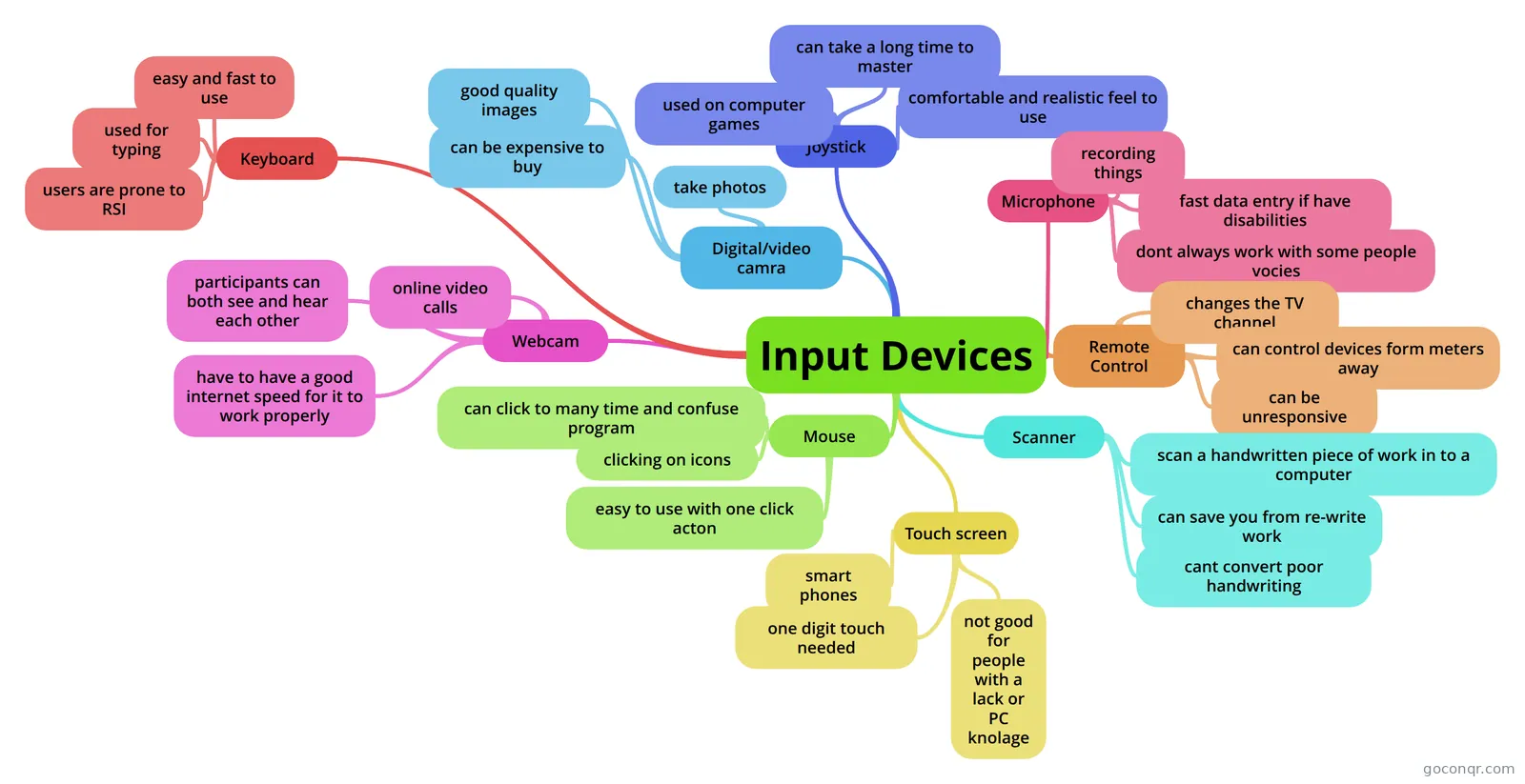
Flashcards
See all 139 flashcards-
23 cardsInput Devices What is a keyboard used for?
-
17 cards3.4 Vocabulary Just some vocab from 3.4 from testout
-
17 cardsconnor's flash cards Name two features of a KEYBOARD
-
12 cardsOUTPUT DEVICES features and description of each output device
-
8 cardsOutput,Out devices and Media Output, Output Devices Screens and Monitors
-
7 cardsInput and Output Chapter 6 What does GIGO stand for?
-
54 cardsChapter 2: Keyword Definitions
-
41 cardsICT unit 2 What data does a keyboard produce, how is it connected and what are the uses?
Notes
See all 13 notes-
Direct Memory Access (DMA) The CPU can request data from an I/O controller one byte at a time, but doing so wastes the CPU's time.We assume that the CPU accesses all devices and memory via a single system bus that connects the CPU, the memory, ...
-
DEVICES Explaination DEVICESIn IT for Computer Week, we had to learn about Input and Output devices.An Input Device is an object, that inputs electrical waves, into an Output or Storage Device.An Output Device is an object, that outputs t...
-
Transfer of control via Interrupts From the point of view of the user program, an interrupt is just that: an interruption of the normal sequence of execution. When the interrupt processing is completed, execution resumes. Thus, the user program does no...
-
CHAPTER 3 INPUT OUTPUT - created from Mind Map INPUT OUTPUT * Data or instructions entered into memory or computer
-
Time Sequence of Multiple interrupts Time Sequence of Multiple interrupts As an example of this second approach, consider a system with three I/O devices: a printer, a disk, and a communications line, with increasing priorities of 2, 4, and 5, respective...
-
INPUT - created from Mind Map PEN INPUT MOTION, VOICE, VIDEO INPUT touch a stylus or digital pen on a flat surface to write, draw, or make selections
-
Touchscreens Infra-red How it works: Infra-red rays sent across screen from the edges Sensors around the screen Rays from grid across screen Ray is broken Calculations by microprocessor to determine where the touch was Advantages:...
-
Thermal 1.200 to 2.400 dpi (dots per inch) special ink powder called toner the laser beam
Slides
Topics in Input and Output Devices
More Computing and ICT (programming, computer science, digital skills, educational technology) topics
About Input and Output Devices
GoConqr OriginalWhat this page covers
This unit sits in the Computer Systems strand of Computing and ICT. The listed resources split broadly into input devices, output devices and the way devices talk to the processor. Most are mind maps and flashcard decks made by other students, so you will see the same topics explained in different ways.
Input devices
The mind map Input Devices goes through the keyboard, mouse and joystick, with a pro and a con for each, such as the risk of RSI from typing. Advantages and Disadvantages Input Devices (1) looks at the barcode reader and digital camera. It notes, for example, that barcode data cannot be edited and that image files can be memory heavy. A separate mind map on barcodes covers what a code stores and why it can fail if damaged. The flashcard deck Input Devices asks what a keyboard, numeric keypad, mouse, touch pad, tracker ball and remote control are used for.
Output devices and connections
The deck OUTPUT DEVICES lists CRT and TFT monitors, interactive whiteboards, digital projectors, plasma screens, and inkjet and laser printers. The deck 3.4 Vocabulary adds peripherals, touch screens and connectors such as USB, FireWire, VGA and DVI. There are also mind maps on printers and scanners, plus resources on devices for disabled users.
Beyond the devices
For a deeper view, the notes on Direct Memory Access explain why the CPU does not want to fetch data from an I/O controller one byte at a time. Further notes cover interrupts.
A sensible order
- Skim a mind map for the overall picture.
- Work through a flashcard deck on the same topic.
- Take the quiz called Input Devices and note what you miss.
- Go back to the maps and notes for those gaps.
Teachers can pick a deck or quiz to set as a starter or revision task. When you are ready, choose one resource above and make a start.
Frequently asked questions
Which resource should I open first?
Start with the mind map called Input Devices. It gives a quick tour of the keyboard, mouse and joystick with advantages and disadvantages. Then move to the flashcard deck of the same name, and finish with the quiz Input Devices to see what stuck.
What do the mind maps on this page cover?
They cover input devices, output devices, printers, scanners, barcodes, RFID tags and automatic input methods. Some also look at hardware for physically disabled users. Many list the strengths and weaknesses of each device, which suits comparison questions.
Are the resources free to use?
Yes. Every resource listed here is free to open, study and take, with no account needed. They were made by GoConqr users, not by GoConqr itself, so styles and depth vary from one to the next.
Which exams do these resources suit?
Resources here mention GCSE ICT, IGCSE ICT, A-level ICT and GCSE Computing. Most of the material is aimed at secondary school students, so check a resource against your own course before relying on it.
Can I save my quiz scores or make my own?
A free account saves your quiz scores and lets you make your own quizzes, mind maps, flashcards and notes. It is handy if you want to fill a gap, such as printers or connectors, with material in your own words.
What if the topic I need is missing?
Try nearby titles first. Printers, scanners, touch screens and interrupts each have their own resources, and several general decks cover several devices at once. If you still cannot find it, build your own flashcards or map.