
Computer Maintenance and Troubleshooting
235 resources created by 182 users
This Computer Maintenance and Troubleshooting page on GoConqr gathers community-made quizzes, mind maps, flashcards and notes, from safety and ESD to the six-step troubleshooting method, CPUs, memory, hard drives and supporting users. It's built for school students, university students and professional candidates revising a topic, plus teachers after ready-made material. There are over 230 resources here, including more than 50 quizzes and over 140 mind maps, with a lot of IT Essentials and CompTIA A+ style practice. Pick a quiz to find your gaps, then make your own study set.
Select topic
- Computer Repair Safety and Tools12
- Preventive Computer Maintenance8
- Laptop Maintenance and Troubleshooting18
- Software Maintenance and Recovery13
- Troubleshooting Process21
- CPU and Memory Troubleshooting5
- Hardware Troubleshooting16
- Mobile Device Troubleshooting8
- Help Desk and Technical Support15
- Training and Supporting Users11
Top Computer Maintenance and Troubleshooting resources
-
105 questionsCisco Final Which statement is true about the use of an antistatic wrist strap?
-
53 questionsA+ Study 220-1002 Which command line utility would a technician use to analyze and repair damaged operating system files?
-
50 questionsQuiz - chapters 1 to 6 With what security procedure can you hide the WLAN ID from wireless clients?
-
45 questionsCompTIA A+ Core 2 (220-1002) Practice Exam Which of the following commands will display the MAC address of a computer?
-
22 questionsChapter 4 - Quiz Which task should be part of a software maintenance routine?
-
22 questionsCisco Chapter 4 Review Which task should be part of a software maintenance routine?
-
23 cardsMicrosoft Commands and Features 1102-M1 Common Microsoft commands/features and what they do
-
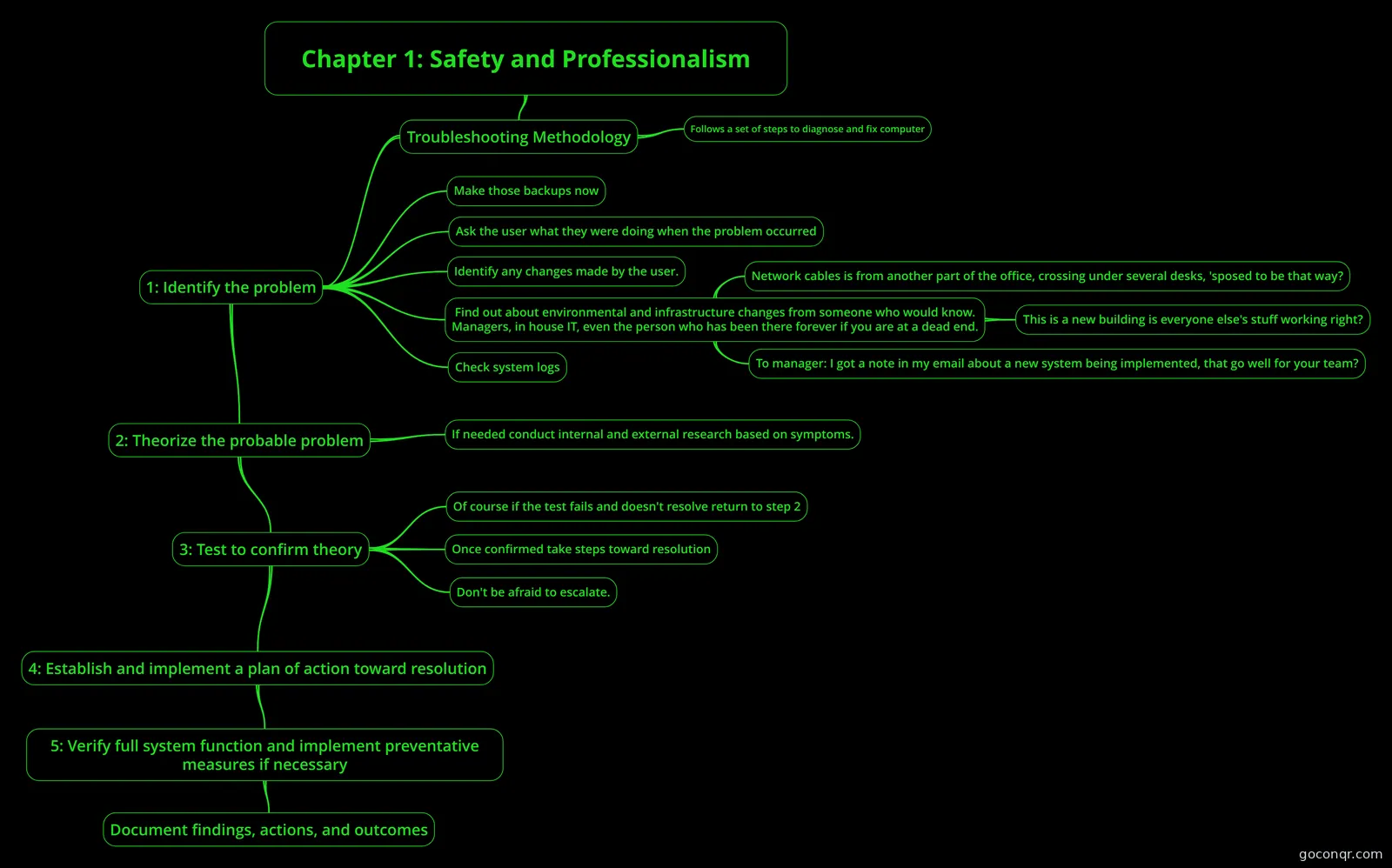 Mind map Chapter 1: Safety and Professionalism A mind map of the CompTIA A+ Core 1001 study material as found in the 10th edition of Mike Meyers' CompTIA ...
Quizzes
See all 57 quizzes-
105 questionsCisco Final Which statement is true about the use of an antistatic wrist strap?
-
53 questionsA+ Study 220-1002 Which command line utility would a technician use to analyze and repair damaged operating system files?
-
50 questionsQuiz - chapters 1 to 6 With what security procedure can you hide the WLAN ID from wireless clients?
-
45 questionsCompTIA A+ Core 2 (220-1002) Practice Exam Which of the following commands will display the MAC address of a computer?
-
22 questionsChapter 4 - Quiz Which task should be part of a software maintenance routine?
-
22 questionsCisco Chapter 4 Review Which task should be part of a software maintenance routine?
-
15 questionsComputer Maintenance Quiz Definition of Physical Maintenance is- "Physical Maintenance is actually cleaning your pc physically"
-
85 questionsMesser B A technician is delivering a new laptop to a user and moving the older laptop to a different user. Which of...
Mind maps
See all 144 mind maps-
Chapter 1: Safety and Professionalism A mind map of the CompTIA A+ Core 1001 study material as found in the 10th edition of Mike Meyers' CompTIA ...
-
Fire safety
-
Student Guide for Personal Computer Maintenance
-
Student Guide for Personal Computer Maintenance
-
3.8 Training and Supporting Users
-
Computer Maintenance
-
Student Guide for Personal Computer Maintenance
-
Maintaining Your Notebook Computer
Flashcards
See all 23 flashcards-
23 cardsMicrosoft Commands and Features 1102-M1 Common Microsoft commands/features and what they do
-
200 cardsComptia A+ 1002 Part1 A user has installed two new drives in one of the computers in the computer lab and has been unable to form...
-
200 cardsCompTIA A+ Exam 2 Which of the following wireless standards is only capable of 5GHz frequencies? A. 802.11a B. 802.11ac C. 80...
-
8 cardsModule 26 EXPLAIN APPROACHES TO RESOLVING PROBLEMS?
-
200 cardsCompTIA A+ - Acronyms
-
14 cards11.3 Support What are the 6 factors that influence the choice of support?
-
17 cardsUntitled Uninterruptible power supply
-
30 cardsChapter 10 PC Hardware study flash cards What are the three Windows settings critical to securing a computer that needs to be verified as part of re...
Flowcharts
Notes
-
A+ Study Guide - Chapter 1 A+ 220-801 ---- CHAPTER 1 .- OPERATIONAL PROCEDURES Wednesday, January 28, 2015 12:22 PM Exam Watch notes Workplace Safety and Safe Equipment Handling · Remember that both high voltage and low voltage can cause seriou...
-
A+ CompTIA A+ Chapter 1 Safety and Professionalism - Xx Chapter 2 Visible Computer - Xx Chapter 3 CPU Processors - Microarchitecture - Is the underlying digital...
-
Training and supporting users Internal and external users The majority of the training work carried out by the organisations will be delivered to internal users (the employees). There will be external users where the training is needed for them to...
-
Additional A+ exam questions What should you use to remove thermal compound from the heatsink and processor when replacing the heatsink? A: Water B: A soft cloth C: Mild detergent D: Isopropyl alcohol E: Window cleaner Correct Answer: DWith a wai...
-
Student Guide for Personal Computer Maintenance - creado desde un Mapa Mental Maintaining your Notebook Computer McAfee VirusScan Enterprise Updating Microsoft Windows
-
Types of Computer Maintenance - created from Mind Map The Types of Maintenance are very important for the lifetime of the computer PREVENTIVE CORRECTIVE
Topics in Computer Maintenance and Troubleshooting
More Computing and ICT (programming, computer science, digital skills, educational technology) topics
About Computer Maintenance and Troubleshooting
GoConqr OriginalWhat this unit covers
The resources follow the life of a repair job. The mind map Chapter 1: Safety and Professionalism sets out the troubleshooting method: identify the problem, theorize the probable cause, test to confirm, then plan and act. Other maps cover fire safety, ESD and EMI, power protection devices, and types of computer maintenance.
Hardware and software faults
Maps such as troubleshoot CPUs and Memory and Troubleshoot Hard Drives and RAID Arrays deal with hardware faults. On the software side, the flashcard deck Microsoft Commands and Features 1102-M1 lists tools such as chkdsk, sfc, regedit.exe and msinfo32.exe. The quiz A+ Study 220-1002 asks which utility repairs damaged operating system files.
Where to start
- Read Chapter 1: Safety and Professionalism to learn the order of the troubleshooting steps.
- Browse the maintenance maps, such as Types of Computer Maintenance, to see routine care.
- Take Cisco Chapter 4 Review, which asks about software maintenance routines and documenting customer information in a work order.
- Move to Cisco Final for antistatic straps, ESD risk and handling an upset customer.
- Try CompTIA A+ Core 2 (220-1002) Practice Exam for command-line and installation questions.
Using quizzes and maps together
Read a map first, then take a quiz on the same topic. Note what you got wrong, go back to the map, and use a flashcard deck to fix terms and commands. Repeat until the answers come easily. Teachers can set a quiz after a lesson or share a map as a recap.
Where it fits
This unit sits in the Computer Systems strand of Computing and ICT. It suits GCSE ICT, IT Essentials and Cisco IT Essentials work, as well as CCNA-linked study. Open any resource to start, or build your own maps and flashcards from what you find.
Frequently asked questions
Which resource should I open first?
Start with the mind map Chapter 1: Safety and Professionalism. It lays out the troubleshooting method step by step and covers safe, professional working. Once you know the order, try Cisco Chapter 4 Review to test how well you can apply it to real maintenance situations.
What do the mind maps cover?
They range across safety and professionalism, fire safety, ESD and EMI, power protection devices and types of maintenance. Others cover troubleshooting CPUs, memory, laptops and hard drives, plus training and supporting users. Several repeat similar topics, so you can pick the layout you like best.
Are the resources free to use?
Yes. Every resource listed here is free to open, study and take, with no account needed. They were made by GoConqr users, not by GoConqr itself, so it is worth checking a quiz against your own course materials.
Which exams and courses do these resources suit?
The listed resources mention CompTIA A+, GCSE ICT, IT Essentials, Cisco IT Essentials and CCNA. Most material is aimed at secondary-level and professional study, with a smaller share for university students. Check titles such as A+ Study 220-1002 or IT Essentials chapter reviews for fit.
Can I practise commands and terms?
Yes. The flashcard deck Microsoft Commands and Features 1102-M1 covers tools such as chkdsk, sfc, Task Manager, regedit.exe and services.msc. The quiz A+ Study 220-1002 then tests whether you know which utility to use for a given problem.
What if I can't find the topic I need?
Try a nearby map or quiz first, since topics often overlap. If a gap remains, you can make your own quiz, mind map, flashcards or notes with a free account, which also saves your quiz scores.